
Uvod
This manual provides comprehensive instructions for the Allimity AH59-02530A replacement remote control. This remote is designed to be compatible with various Samsung Blu-ray Home Entertainment System models, including HT-H4200R, HT-F4500, HT-FM45/ZA, HT-H4500R, HT-H4550R, HT-J4500, HT-J5500W, HT-JM41, and HT-J4100. No programming or setup is required; simply insert batteries to begin operation.
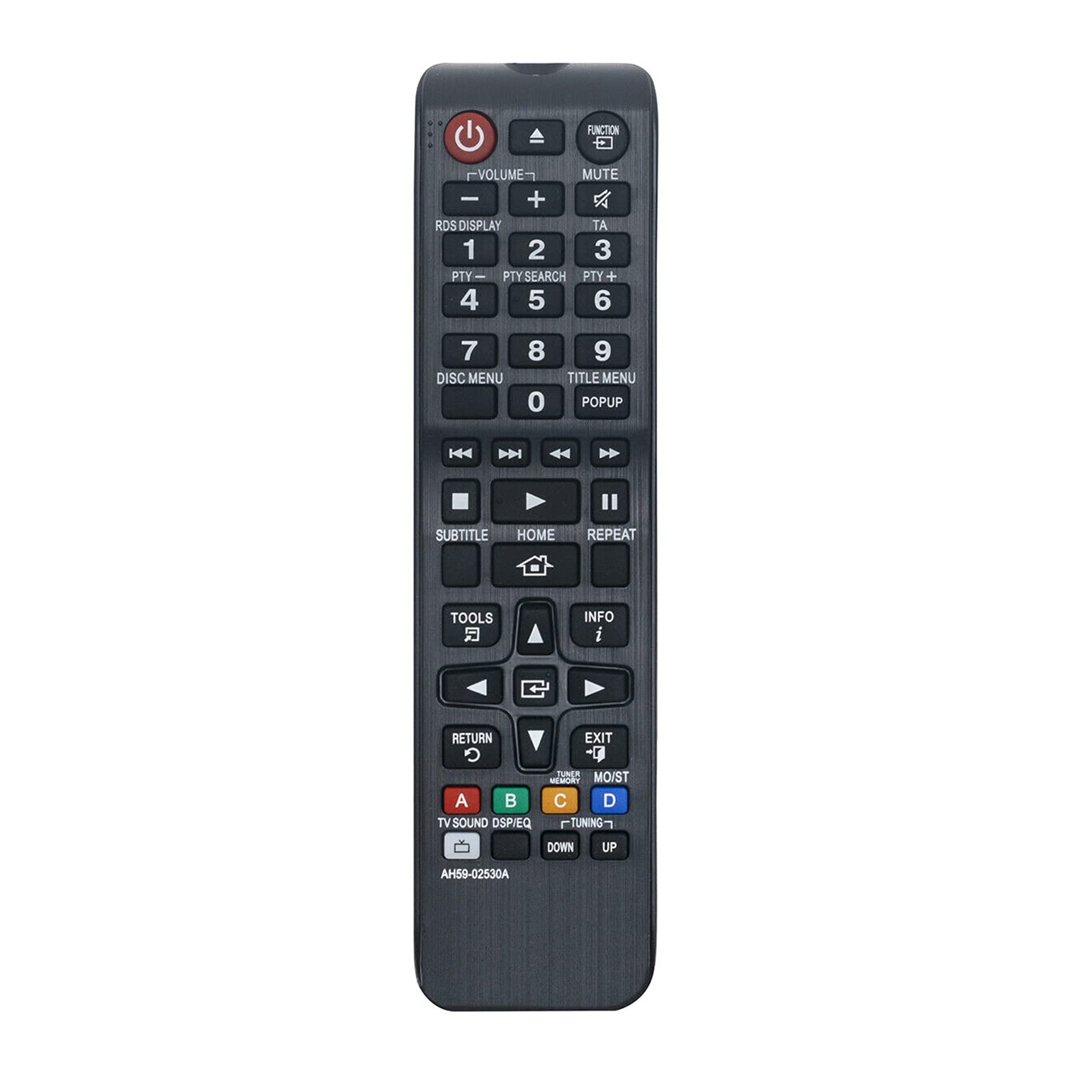
Slika 1: Kutno view of the Allimity AH59-02530A remote control, showcasing its layout and buttons.
Postavljanje
Ugradnja baterije
The Allimity AH59-02530A remote control requires two AAA alkaline batteries (not included) for operation. Follow these steps to install the batteries:
- Pronađite poklopac pretinca za baterije na stražnjoj strani daljinskog upravljača.
- Pritisnite jezičak i pomaknite poklopac prema dolje kako biste otvorili pretinac.
- Umetnite dvije nove AAA alkalne baterije, pazeći da pozitivni (+) i negativni (-) terminali odgovaraju dijagramima unutar odjeljka.
- Vratite poklopac odjeljka za baterije na mjesto dok ne klikne sigurno.

Slika 2: Stražnji dio view daljinskog upravljača s otvorenim odjeljkom za baterije, prikazujući utore za dvije AAA baterije.
Once batteries are installed, the remote is ready for use with your compatible Samsung Home Entertainment System.
Upute za rad
This remote control is designed to replicate the functions of your original Samsung remote. Point the remote directly at your Samsung Home Entertainment System for optimal performance. Below is a general guide to common button functions:

Slika 3: Prednja strana view daljinskog upravljača, ističući različite funkcijske tipke.
- Gumb za napajanje (⏻): Turns the home entertainment system on or off.
- Funkcijska tipka: Cycles through available input sources or functions.
- Volumen (+/-): Podešava razinu glasnoće zvuka.
- Gumb za isključivanje zvuka: Silences or restores the audio.
- Brojčane tipke (0-9): Used for direct input, such as track selection or menu navigation.
- Disc Menu / Title Menu / POPUP: Accesses disc-specific menus or pop-up menus.
- Kontrole reprodukcije (Reprodukcija, Pauza, Zaustavljanje, Brzo premotavanje naprijed, Premotavanje unatrag, Preskoči): Upravlja reprodukcijom medija.
- Gumb HOME: Returns to the main home screen or menu of the system.
- Navigacijska tipkovnica (gore, dolje, lijevo, desno, Enter): Used to navigate through menus and confirm selections.
- Gumb RETURN: Povratak na prethodni zaslon ili izbornik.
- Gumb EXIT: Izlazi iz trenutnog izbornika ili funkcije.
- ALATI Gumb: Pristupa brzim postavkama ili izborniku alata.
- Gumb INFO: Displays information about the current content or system status.
- Gumbi u boji (A, B, C, D): These buttons (Red, Green, Yellow, Blue) provide access to specific functions depending on the content or menu displayed on your screen.
For specific functions related to your Samsung Home Entertainment System model, refer to your system's original user manual.
Održavanje
Zamjena baterije
Replace batteries when the remote control's response becomes sluggish or inconsistent. Always replace both AAA batteries at the same time with new alkaline batteries. Do not mix old and new batteries, or different types of batteries.
Čišćenje
Za čišćenje daljinskog upravljača, nježno ga obrišite mekom, suhom krpom. Nemojte koristiti tekuća sredstva za čišćenje, sprejeve ili abrazivne materijale jer mogu oštetiti površinu daljinskog upravljača ili unutarnje komponente.
Skladištenje
When not in use for extended periods, it is recommended to remove the batteries to prevent leakage, which could damage the remote control.
Rješavanje problema
- Daljinski ne reagira:
- Provjerite jesu li baterije pravilno umetnute s ispravnim polaritetom (+/-).
- Zamijenite stare baterije novim AAA alkalnim baterijama.
- Ensure there are no obstructions between the remote control and the home entertainment system's infrared receiver.
- Provjerite je li daljinski upravljač usmjeren izravno prema sustavu.
- Ograničeni radni raspon:
- The maximum effective range is approximately 33 feet (10 meters). Ensure you are within this range.
- Bright light sources, such as direct sunlight or strong fluorescent lights, can interfere with the infrared signal. Try to minimize such interference.
- Određene funkcije ne rade:
- Verify that your Samsung Home Entertainment System model is listed as compatible.
- Some advanced functions might be specific to the original remote or require specific system settings.
Tehnički podaci
| Marka | SVEVEČINSTVO |
| Broj modela | AH59-02530A |
| Tehnologija povezivanja | Infracrveni |
| Kompatibilni uređaji | Samsung Blu-ray Home Entertainment Systems (HT-H4200R, HT-F4500, HT-FM45/ZA, HT-H4500R, HT-H4550R, HT-J4500, HT-J5500W, HT-JM41, HT-J4100) |
| Vrsta baterije | 2 x AAA alkalne baterije (nisu uključene) |
| Maksimalni domet | 33 stopa (10 metara) |
| Boja | Crna |
| Dimenzije predmeta (D x Š x V) | 6"L x 2"W x 0.5"H (approximately) |
| Težina artikla | 2 unce (otprilike) |
Informacije o jamstvu
Specific warranty details for the Allimity AH59-02530A remote control are typically provided by the seller or manufacturer at the time of purchase. Please refer to your product packaging, purchase receipt, or contact the seller directly for information regarding warranty coverage and terms.
podrška
For technical assistance, troubleshooting beyond this manual, or inquiries about your Allimity AH59-02530A remote control, please contact the seller or manufacturer directly. Contact information can usually be found on the product packaging or the platform where the item was purchased.