
1. Uvod
This manual provides essential information for the safe and efficient use of your HP Envy x360 13.3-inch 2-in-1 laptop. Please read this manual thoroughly before operating your device to ensure optimal performance and longevity. This device combines the functionality of a traditional laptop with the versatility of a tablet, featuring a responsive touchscreen and a 360-degree hinge.
2. Značajke proizvoda
- 13.3-inch Full HD IPS Touch-Screen Display: Experience vibrant visuals and intuitive interaction with the responsive touch display.
- 11th Generation Intel Core i5-1135G7 Processor: Delivers efficient performance for multitasking, productivity, and entertainment.
- 8GB DDR4 RAM: Provides substantial memory for smooth operation of multiple applications.
- 256GB PCIe NVMe SSD: Offers fast boot-up times and quick data access with solid-state storage.
- Tipkovnica s pozadinskim osvjetljenjem: Enables comfortable typing in various lighting conditions.
- Čitač otisaka prstiju: Enhances security and provides quick, convenient login.
- Operativni sustav Windows 10 Home: Pre-installed for a familiar and productive user experience.
- Šarka od 360 stupnjeva: Omogućuje uređaju transformaciju između načina rada prijenosnog računala, šatora, postolja i tableta.
- Intel Iris Xe Graphics: Integrated graphics for clear visuals and light creative tasks.
- Bang & Olufsen Audio with Three Speakers: Delivers rich and immersive sound.
- HP Wide Vision HD Camera with Camera Shutter: For video calls and privacy.
3. Fizički overview
Familiarize yourself with the various components and ports of your HP Envy x360 laptop.

Slika 3.1: Kutno view of the HP Envy x360 laptop in traditional laptop mode, displaying the keyboard and screen.
Priključci i priključci:
- USB 3.0 portovi tipa A (x2): For connecting external devices such as USB drives, mice, or keyboards.
- HDMI priključak (x1): Za spajanje na vanjske zaslone ili projektore.
- Micro SD Card Reader (x1): For reading and writing data to Micro SD cards.
- Kombinirani priključak za slušalice/mikrofon (x1): For connecting headphones or an external microphone.
- USB-C priključak (x1): For data transfer, charging, and display output (Thunderbolt compatible).
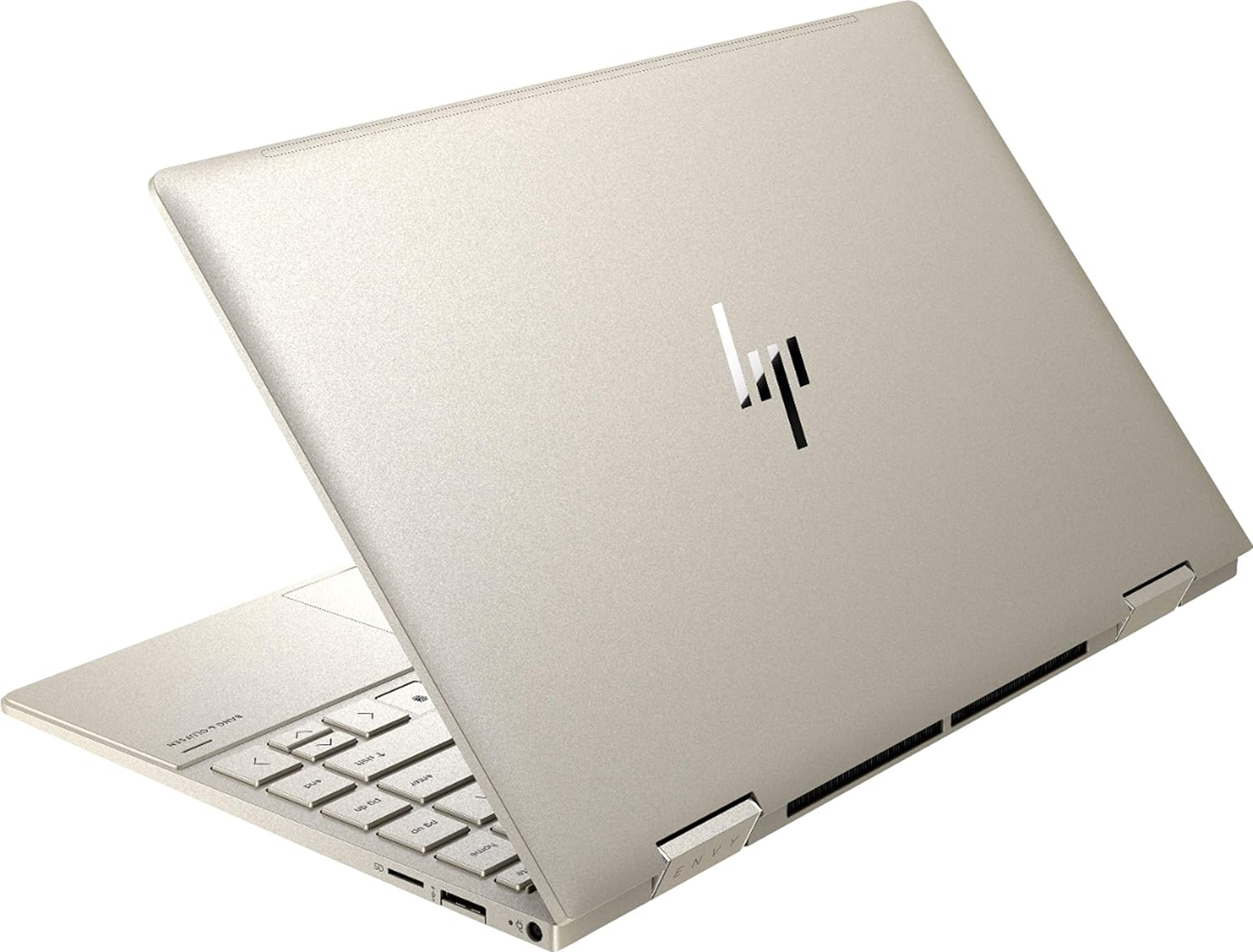
Slika 3.2: Stražnji dio view of the HP Envy x360 laptop, highlighting the sleek design and port placement on the sides.
4. Postavljanje
4.1 Početno uključivanje
- Unpack your HP Envy x360 laptop and included accessories.
- Spojite adapter za napajanje na priključak za punjenje prijenosnog računala, a zatim na utičnicu.
- Press the power button, typically located on the side or keyboard deck, to turn on the laptop.
- Slijedite upute na zaslonu da biste dovršili postavljanje sustava Windows 10 Home, uključujući odabir jezika, mrežnu vezu i stvaranje korisničkog računa.
4.2 Spajanje perifernih uređaja
Connect your mouse, external display, or other USB devices to the available ports as described in Section 3. For wireless devices, enable Bluetooth in Windows settings and pair your devices.
5. Upute za rad
5.1 Using the 2-in-1 Modes
Your HP Envy x360 features a versatile 360-degree hinge, allowing for multiple usage modes:
- Način rada prijenosnog računala: Traditional laptop orientation for typing and productivity.
- Način šatora: Fold the screen back to form an inverted 'V' shape, ideal for watching videos or presentations in confined spaces.
- Način rada stalka: Fold the screen back further, resting the keyboard face down, to use the display for media consumption or touch-based applications.
- Način rada tableta: Fold the screen completely back against the base, transforming the device into a tablet for touch interaction.

Figure 5.1: The HP Envy x360 laptop configured in tent mode, suitable for media viewing.

Figure 5.2: The HP Envy x360 laptop fully folded into tablet mode, ready for touch input.
5.2 Touchscreen and Keyboard Usage
- Zaslon osjetljiv na dodir: Use gestures similar to a smartphone or tablet for navigation, zooming, and interaction with applications.
- Tipkovnica s pozadinskim osvjetljenjem: Press the function key (Fn) and the appropriate F-key (usually F5 or F4, check keyboard icons) to toggle the keyboard backlight on/off or adjust brightness.
- Čitač otisaka prstiju: Enroll your fingerprint through Windows Hello settings for secure and fast login.
6. Održavanje
Regular maintenance helps prolong the life of your laptop.
- Čišćenje: Use a soft, lint-free cloth to clean the screen and chassis. For stubborn smudges, dampOperite krpu vodom ili sredstvom za čišćenje ekrana. Izbjegavajte jake kemikalije.
- Ažuriranja softvera: Regularly update Windows and HP drivers to ensure optimal performance and security.
- Njega baterije: Izbjegavajte često potpuno pražnjenje baterije. Za dugotrajno skladištenje napunite bateriju na oko 50-70%.
- Ventilacija: Ensure the laptop's vents are not obstructed to prevent overheating. Use on a hard, flat surface when possible.
7. Rješavanje problema
Ovaj odjeljak obrađuje uobičajene probleme s kojima se možete susresti.
7.1 Problemi s napajanjem
- Laptop se ne uključuje: Ensure the power adapter is securely connected and the outlet is functional. Try a different outlet or power adapter if available.
- Baterija se ne puni: Provjerite priključak adaptera za napajanje. Provjerite ima li oštećenja na kabelu ili priključku.
7.2 Problemi s prikazom
- Zaslon je prazan: Connect an external monitor to check if the issue is with the laptop's display. Try restarting the laptop.
- Zaslon osjetljiv na dodir ne reagira: Restart the laptop. Ensure all drivers are up to date via Windows Update or HP Support Assistant.
7.3 Problemi s performansama
- Spore performanse: Zatvorite nepotrebne aplikacije. Provjerite Upravitelj zadataka za procese koji intenzivno koriste resurse. Osigurajte dovoljno slobodnog prostora na SSD-u.
- Pregrijavanje: Clean vents. Ensure proper airflow. Reduce workload if consistently hot.
8. Specifikacije
| Značajka | Detalj |
|---|---|
| Marka | HP |
| Naziv modela | HP Envy x360 |
| Veličina zaslona | 13.3 inča |
| Razlučivost zaslona | 1920 x 1080 (puni HD) |
| Vrsta zaslona | LED IPS Touch Screen |
| Procesor | 11th Generation Intel Core i5-1135G7 (2.4 GHz, up to 4.2 GHz with Turbo Boost) |
| RAM memorija | 8 GB DDR4 |
| Skladištenje | SSD od 256 GB |
| Operativni sustav | Windows 10 Home |
| Grafika | Intel Iris Xe grafika (integrirana) |
| Posebne značajke | Pozadinsko osvjetljenje tipkovnice, čitač otiska prsta |
| Audio | Bang & Olufsen Audio with Three speakers |
| Povezivost | Wireless-AX, Bluetooth, USB, HDMI |
| luke | 2x USB 3.0 Type-A, 1x HDMI, 1x Micro SD Card Reader, 1x Headphone/Microphone Combo, 1x USB-C |
| Dimenzije (D x Š x V) | 12.07 cm x 7.66 cm x 0.65 cm |
| Težina | 2.92 lbs |
| Boja | Blijedo zlato |
9. Što je u kutiji
The following items are included with your HP Envy x360 laptop:
- HP Envy x360 13.3-inch 2-in-1 Laptop
- Adapter napajanja
- Podloga za miša

Figure 9.1: The HP Envy x360 laptop shown alongside the included mouse pad.
10. Jamstvo i podrška
Your HP Envy x360 laptop comes with a standard manufacturer's warranty. For detailed warranty information, please refer to the warranty card included in your product packaging or visit the official HP support website. For technical assistance, driver downloads, or service requests, please contact HP Customer Support.
HP podrška Webstranica: support.hp.com