
1. Uvod
Thank you for choosing the A4tech FG1112 Fstyler Wireless Keyboard and Mouse Set. This compact and efficient combo provides a reliable 2.4GHz wireless connection, offering convenience and comfort for your daily computing needs. The keyboard features a Q Turkish layout with FN multimedia keys, while the mouse offers precise 1200 DPI optical tracking. This manual will guide you through the setup, operation, and maintenance of your new device.
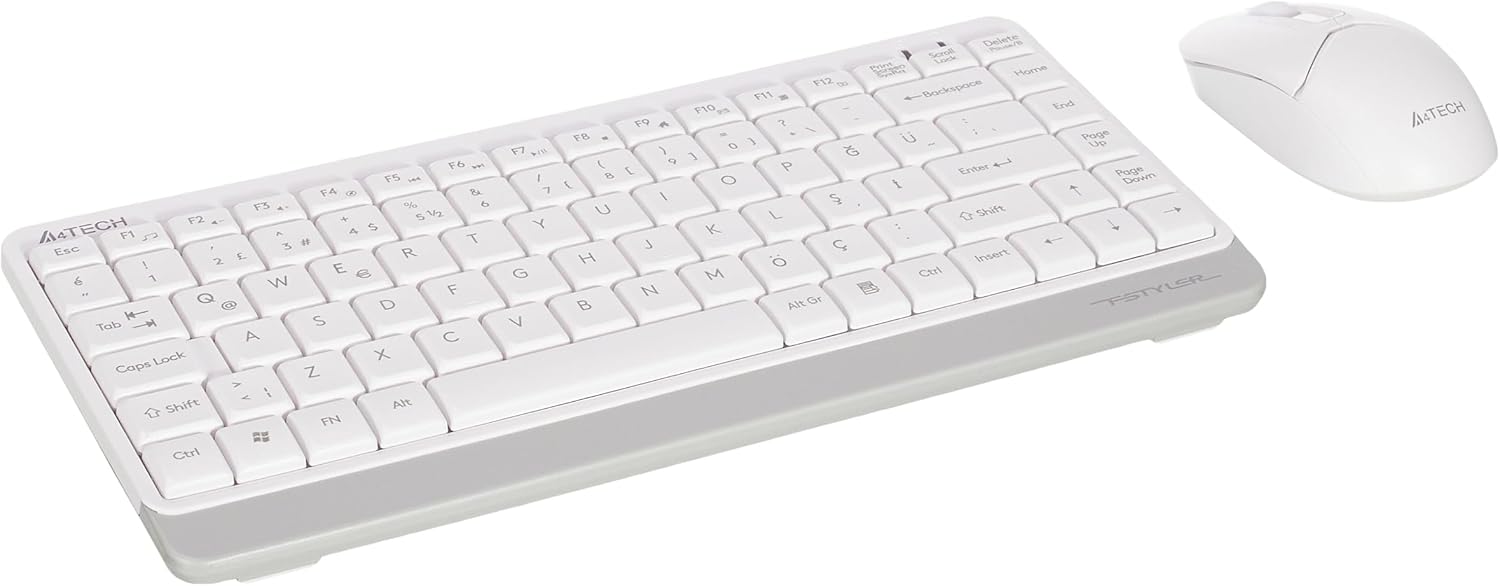
Image 1.1: A4tech FG1112 Fstyler Wireless Keyboard and Mouse Set (White)
2. Sadržaj paketa
Molimo provjerite sadržaj paketa kako biste bili sigurni da su svi artikli prisutni:
- 1 x A4tech FG1112 Wireless Keyboard
- 1 x A4tech Fstyler Wireless Mouse
- 1 x USB nano prijemnik
- 2 x AAA baterije (za tipkovnicu)
- 1 x AA Battery (for mouse, typically included)
- 1 x Korisnički priručnik (ovaj dokument)
3. Upute za postavljanje
- Umetnite baterije:
- For the keyboard: Open the battery compartment cover on the underside of the keyboard. Insert two AAA batteries, ensuring correct polarity (+/-). Close the cover.
- For the mouse: Open the battery compartment cover on the underside of the mouse. Insert one AA battery, ensuring correct polarity (+/-). Close the cover.

Image 3.1: Mouse bottom view showing battery compartment and power switch.
- Spojite USB Nano prijemnik: Locate the USB Nano Receiver, typically stored inside the mouse's battery compartment or packaged separately. Plug the receiver into an available USB port on your computer.
- Uključivanje:
- For the keyboard: Ensure the keyboard is powered on. There might be a power switch on the top right or underside.
- For the mouse: Slide the power switch on the underside of the mouse to the "ON" position.
- Automatsko povezivanje: Your computer should automatically detect and install the necessary drivers for the keyboard and mouse. This process may take a few moments. Once complete, your devices are ready for use.
Video 3.1: A short demonstration of the A4tech Fstyler Wireless Keyboard and Mouse Set, showing its compact design and wireless connectivity. This video illustrates the product's features and ease of use.
4. Upute za rad
4.1 Korištenje tipkovnice
The A4tech FG1112 keyboard features a compact design with a Q Turkish layout. It is designed for comfortable and quiet typing.

Slika 4.1: Vrh view of the A4tech FG1112 Wireless Keyboard, highlighting its Q Turkish layout.
Multimedia and Function Keys:
The keyboard includes 12 multimedia and internet function keys integrated into the F1-F12 keys. To activate these functions, press the FN tipku istovremeno sa željenom F-tipkom.
- FN + F1: Media Player
- FN + F2: Smanjivanje glasnoće
- FN + F3: Pojačati
- FN + F4: Isključi zvuk
- FN + F5: Prethodna pjesma
- FN + F6: Sljedeća pjesma
- FN + F7: Reprodukcija/Pauza
- FN + F8: Stani
- FN + F9: Home Page
- FN + F10: E-mail
- FN + F11: Moje računalo
- FN + F12: Kalkulator

Image 4.2: Illustration of FN key functionality for multimedia controls.
4.2 Korištenje miša
The A4tech Fstyler mouse provides precise 1200 DPI optical tracking for smooth and accurate cursor movement.

Slika 4.3: Vrh view of the A4tech Fstyler Wireless Mouse.
Osnovne funkcije:
- Lijevi klik: Primary function, used for selecting items, opening files, itd.
- Desni klik: Secondary function, typically opens context menus.
- Kotačić za pomicanje: Used for scrolling documents and web stranice okomito. Može funkcionirati i kao srednja tipka za klik.
5. Održavanje
- Čišćenje: Za čišćenje tipkovnice i miša koristite meku, suhu krpu. Za tvrdokornu prljavštinu, laganoamp cloth can be used, but ensure no liquid enters the devices.
- Zamjena baterije: When the keyboard or mouse becomes unresponsive or exhibits delayed input, it's time to replace the batteries. Follow the "Insert Batteries" steps in the Setup section.
- Skladištenje: When not in use for extended periods, turn off the mouse to conserve battery life. Store the devices in a cool, dry place.
6. Rješavanje problema
| Problem | Moguće rješenje |
|---|---|
| Tipkovnica/miš ne reagira |
|
| Delayed or intermittent response |
|
| Multimedijske tipke ne rade |
|
7. Specifikacije
| Značajka | Detalj |
|---|---|
| Marka | A4tech |
| Model | FG1112 |
| Tehnologija povezivanja | 2.4GHz bežični |
| Raspored tipkovnice | Q Turkish |
| Vrsta tipkovnice | Multimedia Membrane |
| DPI miša | 1200 DPI Optical |
| Izvor napajanja tipkovnice | 2 x AAA baterije |
| Izvor napajanja miša | 1 x AA Battery (typical) |
| Posebne značajke | Wireless, Mini, Multimedia Keys, Optical Mouse, Laser Printed Keys, Water-resistant design (with drainage channels) |
| Težina proizvoda | 0.62 Kilograms (Set) |
| Dimenzije (tipkovnica) | Approx. 315mm (Width) x 146mm (Depth) x 25mm (Height) |
| Dimenzije (miš) | Approx. 64mm (Width) x 108mm (Depth) x 35mm (Height) |

Image 7.1: Dimensions of the A4tech FG1112 Keyboard and Mouse.
8. Jamstvo i podrška
This A4tech FG1112 Fstyler Wireless Keyboard and Mouse Set comes with a Jamstvo 2 godine od datuma kupnje. Molimo sačuvajte dokaz o kupnji za potrebe jamstvenog zahtjeva.
For technical support, troubleshooting assistance, or warranty inquiries, please contact A4tech customer service through their official webmjestu ili lokalnom distributeru.
Više informacija i resursa za podršku možete pronaći na A4tech Store on Amazon.