
1. Uvod
This manual provides instructions for the Keychron K14 mechanical keyboard. The K14 is a 70% layout, 72-key keyboard designed for both Mac and Windows operating systems, offering both Bluetooth wireless and USB wired connectivity. It features an RGB backlight, an aluminum frame, and Gateron G Pro Brown mechanical switches.

Slika: Prekoview of the Keychron K14 mechanical keyboard highlighting its 70% layout, wireless/wired modes, multi-device connectivity, Gateron G Pro switches, RGB lighting, Mac/Windows compatibility, and USB-C plug.
2. Sadržaj paketa
Provjerite jesu li svi artikli prisutni u paketu vašeg Keychron K14:
- Keychron K14 Mechanical Keyboard
- USB kabel vrste C
- Izvlakač ključeva
- Switch Puller (if hot-swappable version)
- Extra Keycaps for Windows/Mac operating systems
- korisnički priručnik
3. Značajke proizvoda
3.1. 70% Layout and Key Cluster
The K14 features a compact 70% layout with 72 keys, providing a smaller footprint while retaining essential navigation keys such as Home, End, and Arrow keys, similar to a tenkeyless keyboard.

Slika: Krupni plan view of the Keychron K14 keyboard, illustrating its 70% layout which includes dedicated navigation keys such as Insert, Home, End, Delete, Page Up, Page Down, and arrow keys.
3.2. Gateron G Pro Brown Switches
The keyboard is equipped with Gateron G Pro Brown mechanical switches, known for their tactile feedback. These switches offer a durable lifespan of up to 50 million keystrokes.

Image: Specifications for the Gateron G Pro mechanical Brown Switch, detailing operating force (55±15gf), pre-travel (2±0.6mm), tactile behavior, gentle sound level, pre-lubed status (Yes), and a lifespan of up to 50 million keystrokes.
3.3. Ergonomski dizajn
The K14 features two-level adjustable feet, allowing for typing angles of 6º and 9º. This design, combined with an inclined bottom frame, provides ergonomic support for extended typing comfort.

Slika: Strana A view of the Keychron K14 keyboard, illustrating its two-level adjustable feet that allow for typing angles of 6 and 9 degrees, enhancing ergonomic support.
4. Postavljanje
4.1. Spajanje tipkovnice
The Keychron K14 supports both Bluetooth wireless and USB Type-C wired connections.
4.1.1. Bluetooth veza
- Ensure the keyboard's mode switch (located on the side) is set to "BT" (Bluetooth).
- Press and hold the "Fn" + "1" (or "2" or "3") keys for 4 seconds to enter pairing mode. The backlight will flash rapidly.
- Na svom uređaju (pametnom telefonu, prijenosnom računalu, iPadu) omogućite Bluetooth i potražite "Keychron K14".
- Select the keyboard to pair. The backlight will stop flashing upon successful connection.
- The keyboard can connect to up to 3 devices. Use "Fn" + "1", "Fn" + "2", or "Fn" + "3" to switch between paired devices.
4.1.2. Žičana veza
- Ensure the keyboard's mode switch is set to "Cable".
- Connect the provided USB Type-C cable from the keyboard to your computer's USB port.
- The keyboard will automatically be recognized and function as a wired keyboard.

Image: The Keychron K14 keyboard shown connecting wirelessly to a desktop computer, laptop, and smartphone, indicating compatibility with Mac and Windows operating systems.

Image: The Keychron K14 keyboard displayed with icons representing its dual connectivity options: wireless Bluetooth and wired USB-C.
4.2. Prekidač operativnog sustava
The K14 includes a switch to toggle between Mac and Windows layouts. Locate the OS switch on the side of the keyboard and set it to the appropriate operating system for optimal key functionality.
4.3. Podešavanje kuta tipkovnice
The keyboard features two-level adjustable feet. Flip out the feet to select between 6º and 9º typing angles to suit your ergonomic preference.
5. Operacija
5.1. Upravljanje pozadinskim osvjetljenjem
The Keychron K14 features RGB backlighting with 19 different types of lighting effects. Use the dedicated backlight key (often marked with a lightbulb icon) or function key combinations to cycle through effects, adjust brightness, and change colors.
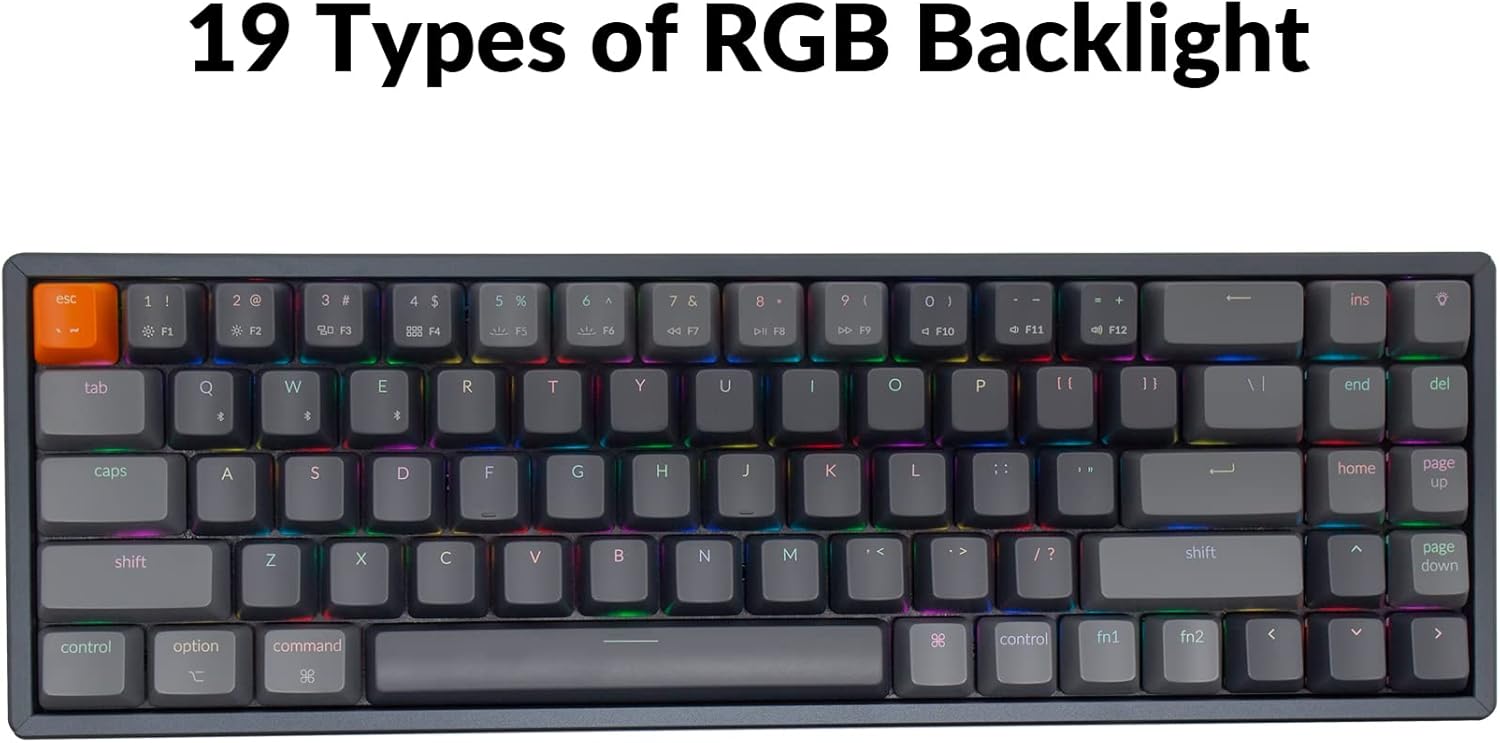
Image: The Keychron K14 keyboard illuminated with a multi-color RGB backlight, demonstrating its various lighting capabilities.
5.2. Multimedijske tipke
Access multimedia functions (e.g., volume control, play/pause) using the Fn key in combination with the designated function row keys. Refer to the keycap legends for specific functions.
5.3. N-tipka za preokretanje (NKRO)
The K14 supports N-key rollover (NKRO) in wired mode, allowing all keys to be registered simultaneously. In wireless mode, it supports 6-key rollover (6KRO).
6. Upravljanje baterijom
The Keychron K14 is equipped with a 4000 mAh battery, providing up to 240 hours of usage with the backlight off. Connect the keyboard via the USB Type-C cable to charge the battery. The charging indicator will show the charging status.

Image: A close-up of the Keychron K14 keyboard with a prominent overlay indicating its 4000 mAh battery capacity.
7. Održavanje
To ensure the longevity and optimal performance of your Keychron K14 keyboard, follow these maintenance guidelines:
- Čišćenje tipki: Za uklanjanje kapica tipki upotrijebite izvlakač. Očistite ih blagom otopinom sapuna i mekom krpom. Prije ponovnog pričvršćivanja provjerite jesu li potpuno suhe.
- Čišćenje kućišta tipkovnice: Use a soft, dry, lint-free cloth to wipe the aluminum frame and other surfaces. For stubborn dirt, a slightly damp Može se koristiti krpa, ali izbjegavajte prekomjernu vlagu.
- Uklanjanje prašine: Pomoću komprimiranog zraka uklonite prašinu i ostatke između tipki i prekidača.
- Skladištenje: Kada se tipkovnica ne koristi dulje vrijeme, čuvajte je na suhom i hladnom mjestu, dalje od izravne sunčeve svjetlosti i ekstremnih temperatura.
- Izbjegavajte tekućine: The keyboard is not water-resistant. Keep liquids away to prevent damage.
8. Rješavanje problema
Ako imate problema s tipkovnicom Keychron K14, pogledajte sljedeća uobičajena rješenja:
8.1. Tipkovnica ne reagira
- Provjerite vezu: Ensure the USB cable is securely connected or that Bluetooth is properly paired.
- Razina baterije: If using Bluetooth, check if the battery is charged. Connect the USB cable to charge.
- Prekidač načina rada: Verify the keyboard's mode switch is set correctly (BT for Bluetooth, Cable for wired).
- Ponovno pokretanje: Try restarting your computer or device and the keyboard.
8.2. Problemi s prekidom Bluetooth veze
- smetnje: Približite tipkovnicu svom uređaju i udaljite je od drugih bežičnih uređaja koji bi mogli uzrokovati smetnje.
- Popravak: Unpair the keyboard from your device's Bluetooth settings and then re-pair it.
- Firmware: Check the official Keychron website for any available firmware updates for your K14 model.
8.3. Tipke se ne registriraju ili se tipkaju dvaput
- Clean Switches: Dust or debris under the keycap or switch can cause issues. Use compressed air.
- Zamjena prekidača: If you have a hot-swappable version, try replacing the problematic switch with a spare one.
8.4. Pozadinsko osvjetljenje ne radi
- Svjetlina: Ensure the backlight brightness is not set to the lowest level.
- Funkcijske tipke: Try cycling through backlight modes and brightness levels using the designated function key combinations.
9. Specifikacije
| Značajka | Detalj |
|---|---|
| Marka | Keychron |
| Broj modela | K14C3 |
| Izgled | 70% (72 tipki) |
| Povezivost | Bluetooth 5.1 & USB Type-C Wired |
| Prekidači | Gateron G Pro Brown Mechanical |
| Pozadinsko osvjetljenje | RGB (19 vrsta) |
| Materijal okvira | Aluminij |
| Kapacitet baterije | 4000 mAh |
| Trajanje baterije | Do 240 sati (pozadinsko osvjetljenje isključeno) |
| Podesive noge | Yes (6º and 9º) |
| N-Key Rollover | NKRO (žično), 6KRO (bežično) |
| Kompatibilni uređaji | Prijenosno računalo, pametni telefon, tablet |
| Operacijski sustavi | Mac, Windows |
10. Jamstvo i podrška
Keychron products are covered by a limited warranty. For specific warranty terms, duration, and support inquiries, please refer to the official Keychron webweb-mjesto ili se izravno obratite njihovoj korisničkoj službi. Sačuvajte dokaz o kupnji za slučaj zahtjeva za jamstvo.
Službenik Webstranica: www.keychron.com