
Uvod
Thank you for choosing the VETEK AF6 4K Video Camera Camcorder. This manual provides comprehensive instructions for the proper setup, operation, and maintenance of your device. Please read this manual thoroughly before using the camcorder to ensure optimal performance and longevity.
Sadržaj paketa
Provjerite jesu li sve dolje navedene stavke uključene u vaš paket:
- 1x VETEK AF6 4K Camcorder
- 1x USB kabel
- 1x HDMI kabel
- 1x Lens Hood
- 1x Fill Light (External LED Light)
- 1x USB punjač
- 1x daljinski upravljač
- 1x SD kartica od 32 GB
- 1x Microphone Cable
- 1x Vanjski mikrofon
- 1x Reusable Camera Bag
- 2x Rechargeable Lithium Batteries
- 1x Dual External Battery Charger
- 1x Camera Instruction Manual
- 1x Microphone Instruction Manual
- 1x Handheld Stabilizer

Proizvod gotovview
Familiarize yourself with the main components of your VETEK AF6 camcorder.

Ključne karakteristike:
- 4K video rezolucija: Records videos at 3840*2160.
- 48.0 MP Image Resolution: Captures still images at 7920*5940.
- 3.0-inch 270° Rotatable Touch Screen: Omogućuje fleksibilnost viewing angles and intuitive control.
- 18X digitalni zum: Allows for closer shots of distant subjects.
- Wi-Fi povezivanje: Enables remote control and file transfer via a smartphone app.
- Funkcija PC kamere: Can be used as a webcam for live streaming and video calls.
- Podrška za vanjski mikrofon: Enhances audio quality.
- External Fill Light Support: Improves illumination in low-light conditions.
- Handheld Stabilizer Compatibility: Reduces camera shake for smoother footage.
- Posebni načini snimanja: Includes Slow Motion and Time-Lapse.
Postavljanje
1. Ugradnja i punjenje baterije
- Open the battery compartment cover on the camcorder.
- Insert a rechargeable lithium battery, ensuring correct polarity.
- Zatvorite poklopac odjeljka za baterije.
- To charge, insert the batteries into the dual external battery charger. Connect the charger to a power source using the provided USB cable and charger. The indicator lights will show charging status.
Bilješka: Ensure batteries are fully charged before first use for optimal performance. If indicator lights flicker or do not show a stable charging status, ensure the batteries are correctly seated in the charger and the power connection is stable.
2. Instalacija SD kartice
- Pronađite utor za SD karticu na kamkorderu.
- Insert the 32GB SD card (included) into the slot with the metal contacts facing the correct direction, until it clicks into place.
- To remove, gently press the SD card until it pops out.
Važno: Format the SD card in the camcorder's menu before initial use to ensure compatibility and prevent data corruption.
3. Pričvršćivanje pribora
- Vanjski mikrofon: Slide the external microphone onto the hot shoe mount on top of the camcorder. Connect the microphone cable to the MIC input port.
- sjenilo objektiva: Attach the lens hood to the front of the camcorder lens by twisting it clockwise until secure. The lens hood helps reduce glare and protects the lens.
- External LED Light: Slide the external fill light onto the hot shoe mount. Ensure it is securely fastened. This light provides additional illumination.
- Ručni stabilizator: Attach the camcorder to the handheld stabilizer using the screw mount at the bottom of the camcorder. The stabilizer helps maintain steady footage.



Upute za rad
1. Uključivanje/isključivanje
Open the LCD screen to power on the camcorder. Close the LCD screen to power off. Alternatively, use the power button located on the device.
2. Osnovno snimanje (video/fotografija)
- Promjena načina rada: Pomoću tipke Način rada možete se prebacivati između načina snimanja videa i načina snimanja fotografija.
- Početak/zaustavljanje snimanja: In video mode, press the Record button to start recording. Press it again to stop.
- Snimi fotografiju: U načinu rada za fotografiranje pritisnite gumb Foto za snimanje fotografije.

3. Funkcija zumiranja
Use the T (Telephoto) and W (Wide) buttons on the camcorder or the zoom controls on the remote control to adjust the 18X digital zoom.
4. Rad sa zaslonom osjetljivim na dodir
The 3.0-inch LCD screen is rotatable up to 270 degrees and supports touch input. Navigate menus, adjust settings, and review fujtage by tapping or swiping on the screen.
5. Wi-Fi Connection & App
Download the specified app (refer to the camera's manual for the app name) on your smartphone or tablet. Enable Wi-Fi on the camcorder and connect your mobile device to the camcorder's Wi-Fi network (SSID: 4K_WIFI1079, Password: 12345678). This allows for remote viewing, image capture, video shooting, and sharing to social media.

6. PC Camera Mode (Webcam Function)
Connect the camcorder to your PC using the USB cable. Select "PC CAM" mode on the camcorder. Your computer will recognize the camcorder as a webcam, enabling its use for video chatting and live streaming on platforms like YouTube or Facebook.

7. Posebne značajke
- Usporeni snimak: Access this mode through the camcorder's menu to record videos at a higher frame rate, allowing for slow-motion playback.
- Vremenski prekid fotografija: Select this option in the menu to capture a series of still images at set intervals, which can then be compiled into a time-lapse video.
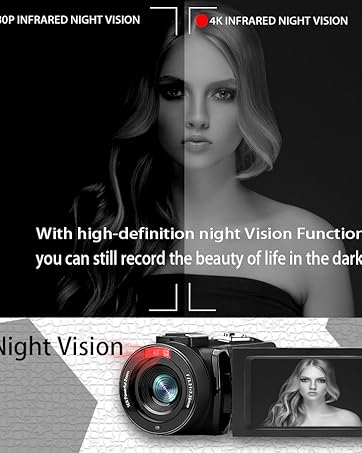
- Noćni vid: The camcorder features an infrared night vision function, enabling recording in low-light or dark environments. Activate this feature via the menu.


8. Daljinski upravljač
The included remote control allows you to operate the camcorder from a distance, controlling functions such as recording, photo capture, and zoom without touching the device.

Održavanje
- Čišćenje: Use a soft, dry cloth to clean the camcorder body. For the lens, use a specialized lens cleaning cloth and solution. Avoid abrasive materials or harsh chemicals.
- Skladištenje: Store the camcorder in a cool, dry place away from direct sunlight and extreme temperatures. Remove batteries if storing for extended periods.
- Vodootpornost: This camcorder is nije vodootporanIzbjegavajte izlaganje vodi ili visokoj vlažnosti.
Rješavanje problema
| Problem | Mogući uzrok | Otopina |
|---|---|---|
| Kamkorder se ne uključuje. | Baterija je prazna ili nepravilno instalirana. | Provjerite jesu li baterije potpuno napunjene i ispravno umetnute. |
| Battery charger indicator lights flicker. | Poor contact between battery and charger, or unstable power supply. | Re-seat batteries firmly in the charger. Check USB cable and power adapter connection. Try a different USB port or power source. |
| Ne može snimati videozapise ili fotografirati. | SD kartica je puna, nije umetnuta ili je oštećena. Odabran je pogrešan način rada. | Check SD card status, ensure it's inserted and has free space. Format the SD card if necessary (this will erase all data). Verify camcorder is in the correct mode. |
| Loša kvaliteta videa/fotografija. | Lens is dirty. Insufficient lighting. Incorrect settings. | Clean the lens. Use the external fill light or shoot in better-lit conditions. Adjust resolution and other settings in the menu. |
| Problemi s Wi-Fi vezom. | Incorrect Wi-Fi password or app not installed. | Ensure correct SSID (4K_WIFI1079) and password (12345678). Download and install the correct app. |
Tehnički podaci
- Marka: VETEK
- Broj modela: AF6
- Rezolucija video snimanja: 4K (3840*2160)
- Učinkovita razlučivost fotografije: 48.0 MP (7920*5940)
- Digitalno zumiranje: 18X
- Veličina zaslona: 3.0 inča
- Vrsta zaslona: 270° Rotatable Touch Screen
- Vrsta flash memorije: SD (supports up to 128GB, 32GB included)
- Format video snimanja: MP4
- Podržani audio format: MP4
- Tehnologija povezivanja: USB, HDMI, Wi-Fi
- Kompatibilnost operativnog sustava: Windows XP/7/8/10, MAC
- Stabilizacija slike: Digitalni
- Razina vodootpornosti: Nije vodootporan
- Broj baterija: 2 litij-polimerska baterija (uključena)
- Dimenzije predmeta (D x Š x V): 3.9"D x 6.2"Š x 7.8"V
Jamstvo i podrška
For warranty information and technical support, please refer to the contact details provided in the separate warranty card or visit the official VETEK webstranica. Ako naiđete na bilo kakve probleme koji nisu obuhvaćeni ovim priručnikom, obratite se korisničkoj službi za pomoć.