
1. Sigurnosne informacije
Molimo pažljivo pročitajte sve upute prije upotrebe ovog uređaja i sačuvajte ih za buduću upotrebu. Nepoštivanje ovih uputa može uzrokovati strujni udar, požar ili ozbiljne ozljede.
- Uvijek isključite ventilator iz utičnice prije čišćenja, servisiranja ili premještanja.
- Do not operate the fan with a damaged cord or plug. If the cord or plug is damaged, contact customer service for repair or replacement.
- Ovaj ventilator je namijenjen samo za unutarnju upotrebu. Ne koristite ga na otvorenom ili u vlažnim prostorima.
- Držite ventilator dalje od vode i drugih tekućina. Ne uranjajte ventilator u vodu.
- Pazite da ventilator bude postavljen na stabilnu, ravnu površinu kako biste spriječili njegovo prevrtanje.
- Držite djecu i kućne ljubimce podalje od ventilatora tijekom rada.
- Ne stavljajte prste ili bilo kakve predmete u rešetku dok ventilator radi.
- Do not block air openings or operate near curtains, drapes, or other objects that could block airflow.
- Ne koristite ventilator u prostorima gdje se skladište zapaljive tekućine ili plinovi.
2. Proizvod je gotovview
The Amazon Basics 40" 70-Degree Oscillating Digital Tower Fan is designed to provide efficient and customizable cooling for various indoor spaces. It features a sleek, compact design and user-friendly controls.
Komponente
- Toranj ventilatora
- Baza (potrebna montaža)
- Daljinski upravljač
Ključne značajke
- Učinkovito hlađenje: Delivers powerful airflow for effective cooling in enclosed spaces.
- Prilagodljive brzine: Four intuitive speed settings to adjust airflow.
- Više načina rada: Includes Standard, Breeze, and Nature modes for varied airflow patterns.
- Oscilacija: 70-degree oscillation for wide-range air flow coverage.
- Funkcija mjerača vremena: Programmable timer up to 15 hours for energy saving and convenience.
- Daljinski upravljač: Convenient remote for adjusting settings from a distance.
- Digitalne kontrole: Easy-to-use digital control panel located on the top of the fan.
- Kompaktan dizajn: Slim tower design (11.4"D x 11.4"W x 39.3"H) fits easily into any room.

Slika 2.1: The Amazon Basics 40-inch Digital Tower Fan shown with its remote control. The fan is black with a sleek, tall design, and the remote is compact with clearly labeled buttons for power, speed, mode, oscillation, and timer.

Slika 2.2: A diagram illustrating the key features of the tower fan, including its 40-inch height, 4 customizable airflow speed settings, timer with auto shutoff (1h, 2h, 4h, 8h options), and convenient remote control for adjusting speed, oscillation, and timer. The diagram highlights the digital display and control panel on top of the fan.
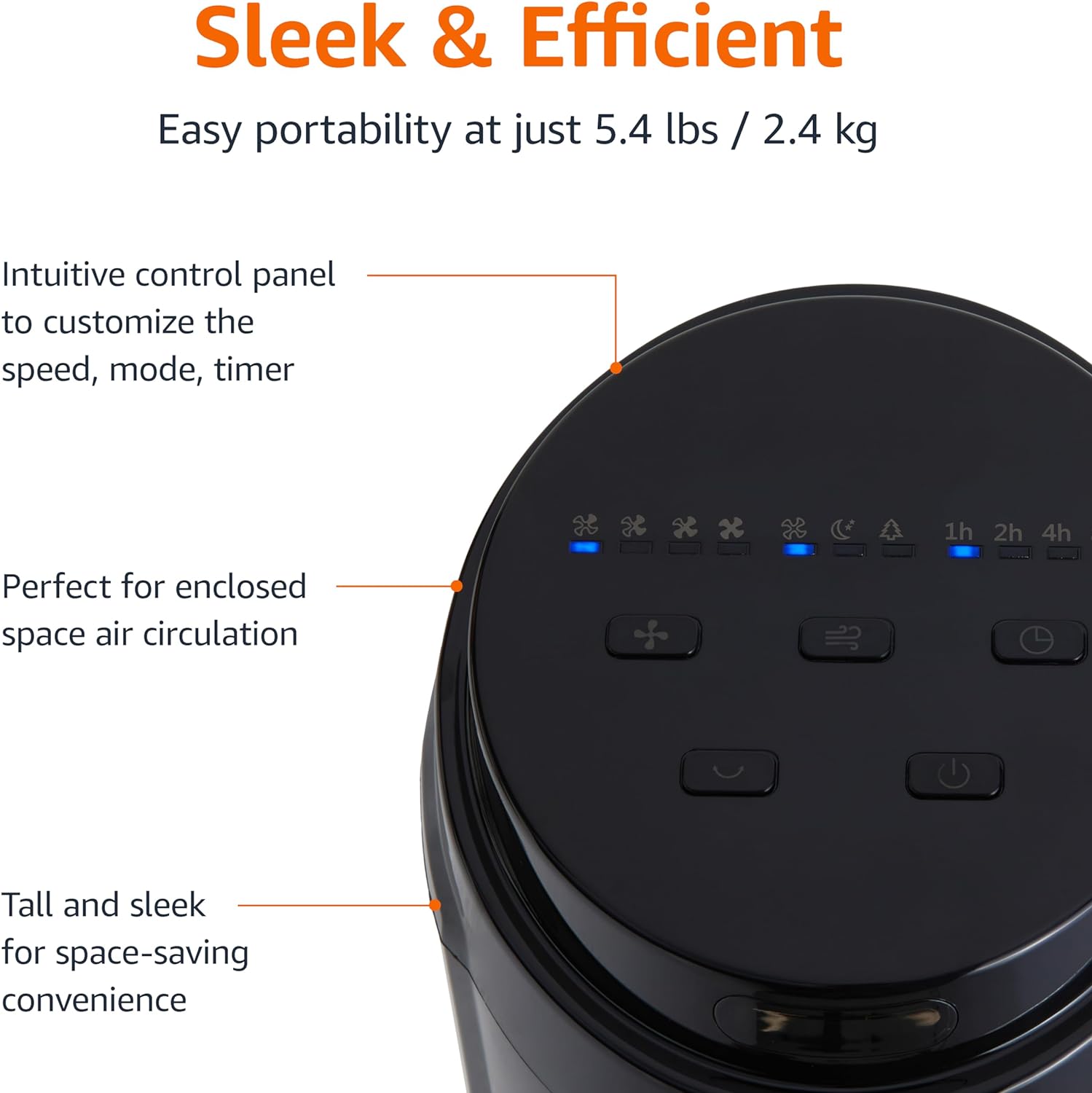
Slika 2.3: Krupni plan view of the intuitive control panel located on the top of the Amazon Basics Tower Fan. The panel features buttons for speed, mode, power, oscillation, and timer, along with LED indicators for selected settings. This design allows for easy customization of fan operation.
3. Postavljanje
3.1 Sastavljanje
- Pažljivo izvadite sve komponente iz pakiranja.
- Attach the fan base to the main tower unit. Align the slots on the base with the corresponding tabs on the bottom of the fan.
- Secure the base using the provided screws, if any, ensuring it is firmly attached.
3.2 Postavljanje
- Postavite ventilator na čvrstu, ravnu površinu.
- Ensure there is adequate space around the fan for proper air circulation, especially for the oscillation feature.
- Keep the fan at least 1 foot (30 cm) away from walls, furniture, and other objects.
- Plug the power cord into a standard NEMA 5-15 (US Standard Wall Outlet) electrical outlet.
4. Upute za rad
Ventilator se može upravljati pomoću upravljačke ploče na vrhu uređaja ili priloženog daljinskog upravljača.
4.1 Control Panel & Remote Control Functions
| Gumb/funkcija | Opis |
|---|---|
| Napajanje (uključeno/isključeno) | Uključuje ili isključuje ventilator. |
| Ubrzati | Cycles through 4 fan speed settings (Low, Medium, High, Max). |
| Način rada | Odabire između 3 načina rada:
|
| Oscilacija | Aktivira ili deaktivira značajku oscilacije od 70 stupnjeva, omogućujući ventilatoru da struji zrak po širem području. |
| Odbrojavanje vremena | Sets the fan to automatically turn off after a specified period (up to 15 hours in 1-hour increments). |
4.2 Korištenje daljinskog upravljača
The remote control allows for convenient operation of all fan functions from a distance. Ensure the remote is pointed towards the fan's control panel for optimal response.
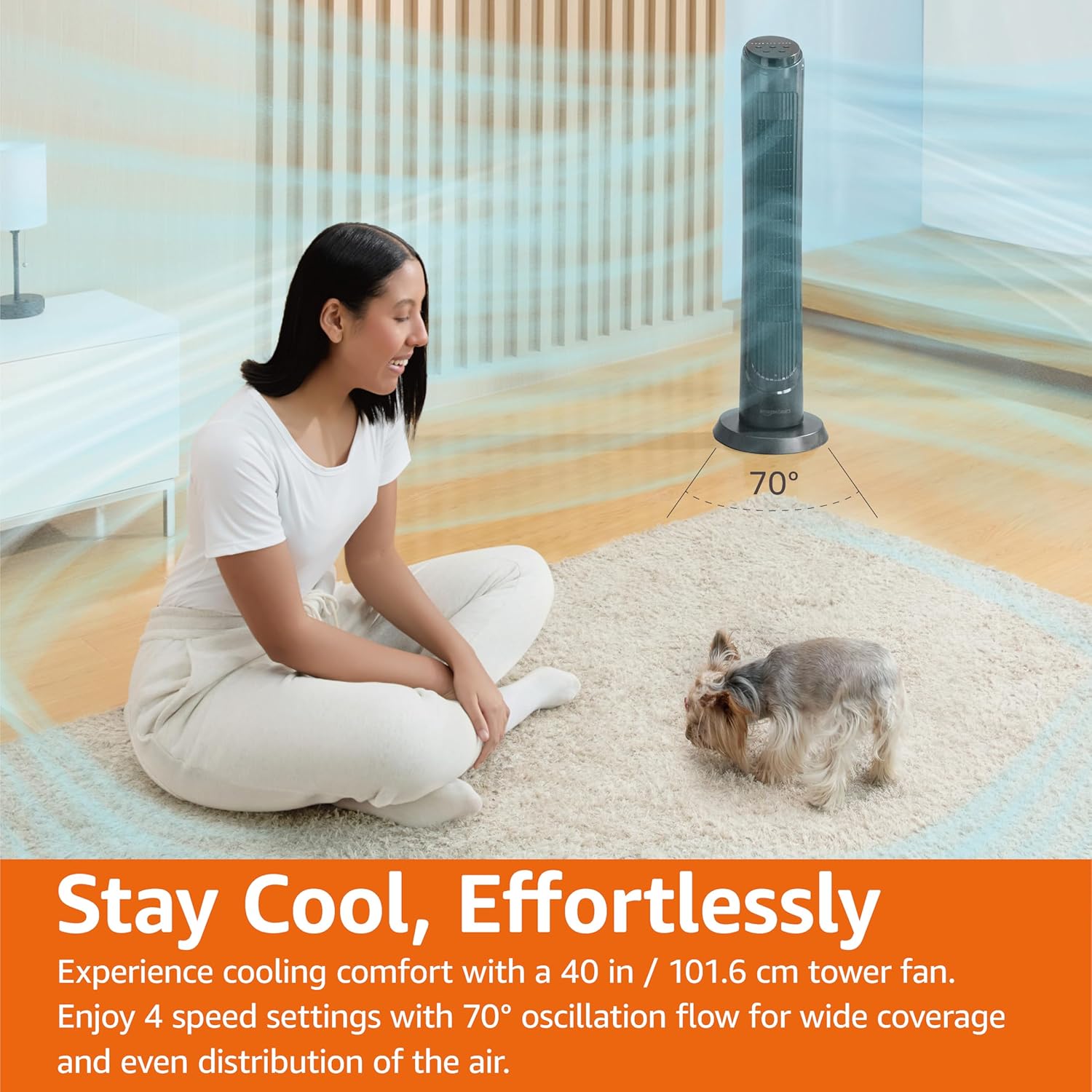
Slika 4.1: The Amazon Basics Tower Fan oscillating 70 degrees, providing wide coverage and even air distribution in a room. A person and a small dog are comfortably seated on a rug, benefiting from the airflow.

Slika 4.2: The Amazon Basics Tower Fan positioned in a modern living space, demonstrating its effective airflow. The image visually represents the air movement from the fan, highlighting its ability to circulate air throughout the room.
5. Održavanje
5.1 Čišćenje
- Uvijek isključite ventilator prije čišćenja.
- Koristite meku, damp krpu za brisanje vanjskih površina ventilatora.
- Do not use abrasive cleaners or harsh chemicals, as these may damage the fan's finish.
- For dust accumulation on the air intake or output grilles, use a vacuum cleaner with a brush attachment to gently remove dust.
- Prije ponovnog uključivanja ventilatora provjerite je li potpuno suh.
5.2 Skladištenje
- Ako ventilator skladištite dulje vrijeme, temeljito ga očistite kako je gore opisano.
- Ventilator spremite u originalnu ambalažu ili prikladnu kutiju kako biste ga zaštitili od prašine i oštećenja.
- Čuvati na hladnom i suhom mjestu.
6. Rješavanje problema
Ako imate problema s ventilatorom, pogledajte sljedeće uobičajene probleme i rješenja:
| Problem | Mogući uzrok | Otopina |
|---|---|---|
| Ventilator se ne uključuje. | Nema napajanja; Gumb za napajanje nije pritisnut. | Ensure the power cord is securely plugged into a working outlet. Press the Power button on the control panel or remote. |
| Slab ili nikakav protok zraka. | Air intake/output blocked; Fan speed too low. | Check for any obstructions around the fan grilles. Increase the fan speed setting. |
| Oscilacija ne radi. | Funkcija oscilacije nije aktivirana. | Press the Oscillation button on the control panel or remote. Ensure the fan is on a flat surface. |
| Daljinski upravljač ne radi. | Batteries are dead; Remote not pointed correctly. | Replace the remote control batteries. Ensure the remote is pointed directly at the fan's control panel. |
| Neobična buka. | Ventilator nije na ravnoj površini; Unutarnja blokada. | Place the fan on a stable, level surface. Unplug the fan and check for any foreign objects inside the grilles (do not attempt to disassemble). |
Ako problem i dalje postoji nakon isprobavanja ovih rješenja, obratite se korisničkoj podršci.
7. Specifikacije
| Atribut | Detalj |
|---|---|
| Marka | Osnove Amazona |
| Naziv modela | DC2021 |
| Boja | Crna |
| Dizajn električnog ventilatora | kat Fan |
| Izvor napajanja | AC napajanje |
| Stil | 40" - Digital |
| Dimenzije proizvoda | 11.4"D x 11.4"Š x 39.3"V |
| Tip sobe | Spavaća soba, Dnevni boravak, Ured |
| Posebna značajka | Oscillating, 4 Speeds, 3 Modes, Timer, Remote Control |
| Preporučena upotreba | Cooling and Air Circulation for Indoor Spaces |
| Razina buke | 60 dB |
| Wattage | 50 vata |
| Težina artikla | 7.5 funti (otprilike 3.4 kg) |
| Uključene komponente | Daljinski |
| Unutarnja/vanjska upotreba | Zatvoreni |
| Metoda kontrole | Daljinski |
| Materijal oštrice | Plastični |
| Broj razina snage | 4 |
| Tip glavnog priključka za napajanje | NEMA 5-15 (US Standard Wall Outlet) |
| Proizvođač | Amazon |
| UPC | 840095880428 |
| Zemlja podrijetla | Kina |
8. Jamstvo i podrška
For detailed warranty information, please refer to the official Warranty PDF document provided by Amazon Basics. This document outlines the terms and conditions of your product's warranty.
For further assistance, troubleshooting not covered in this manual, or to inquire about replacement parts, please contact Amazon Basics customer support.
- Službeni korisnički priručnik (PDF): Preuzmite PDF
- Official Warranty (PDF): Preuzmite PDF
- Osnovna trgovina Amazona: Posjeti trgovinu