
Dalton 2000VA/5-100A UPS
Korisnički priručnik za Dalton 2000VA neprekidno napajanje
Model: 2000VA/5-100A UPS
1. Uvod
Thank you for choosing the Dalton 2000VA Uninterruptible Power Supply (UPS). This device is designed to provide reliable power backup and protection for your electronic equipment against power outages, surges, and fluctuations. Please read this manual thoroughly before installation and operation to ensure optimal performance and safety.
2. Važne sigurnosne upute
Uvijek slijedite ove osnovne sigurnosne mjere kako biste smanjili rizik od požara, strujnog udara i ozljeda:
- Ne otvarajte UPS casing. There are no user-serviceable parts inside. Refer servicing to qualified service personnel.
- Do not use the UPS in environments with excessive dust, humidity, or extreme temperatures.
- Provjerite je li UPS spojen na uzemljenu utičnicu.
- Do not connect non-computer related items like medical equipment, life support equipment, or household appliances to the UPS.
- Postavite UPS u dobro prozračeno područje, dalje od izravne sunčeve svjetlosti ili izvora topline.
- In case of emergency, press the power button to turn off the UPS and disconnect it from the AC power source.
3. Sadržaj paketa
Provjerite jesu li svi artikli prisutni u vašem paketu:
- Dalton 2000VA UPS Unit
- Kabel za napajanje
- USB komunikacijski kabel (ako je primjenjivo)
- Korisnički priručnik (ovaj dokument)

Slika 3.1: Prednja strana view of the Dalton 2000VA UPS unit, showing the display screen and power button.
4. Postavljanje i instalacija
Follow these steps to set up your UPS:
- Raspakiranje: Pažljivo izvadite UPS iz ambalaže. Pregledajte ima li oštećenja tijekom transporta.
- Plasman: Place the UPS on a flat, stable surface in a cool, dry, and well-ventilated area. Ensure there is adequate space around the unit for airflow.
- Početna naplata: Before connecting any devices, plug the UPS power cord into a grounded wall outlet. Allow the unit to charge for at least 8 hours to ensure the battery is fully charged. The display will indicate charging status.
- Povezivanje uređaja:
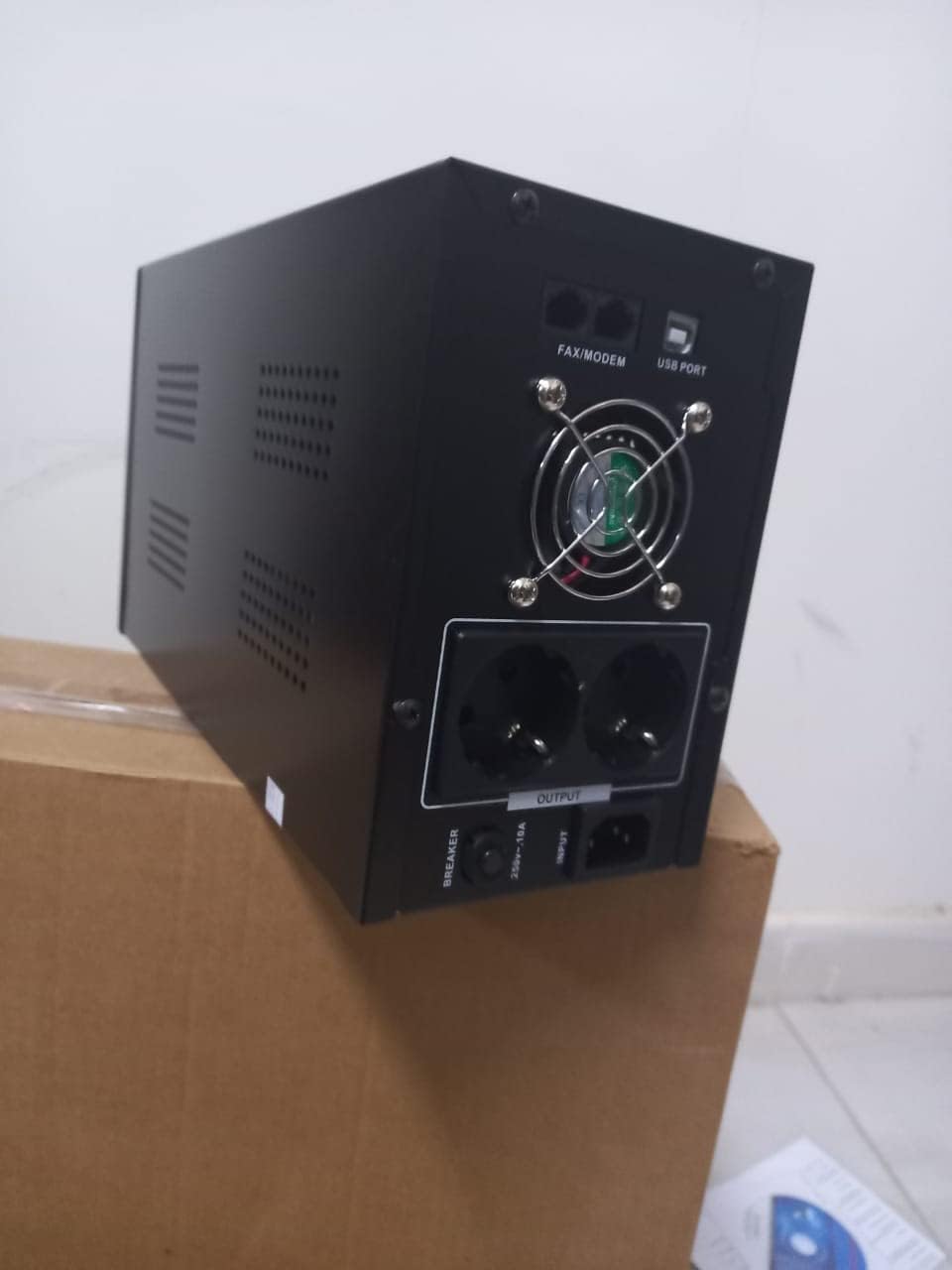
Slika 4.1: Stražnji dio view of the Dalton 2000VA UPS, highlighting the input power port, output sockets, and USB/Modem ports.
- Once the battery is charged, connect your computer, monitor, and other critical electronic devices to the UPS output sockets.
- Do not overload the UPS. Refer to the specifications section for maximum load capacity.
- If applicable, connect the USB communication cable from the UPS to your computer for monitoring software (software not included, check manufacturer's webmjestu).
5. Upravljanje UPS-om
5.1 Uključivanje/isključivanje
- Za uključivanje: After connecting to AC power and charging, press and hold the power button on the front panel for approximately 3 seconds until you hear a beep and the display illuminates.
- Za isključivanje: Press and hold the power button for approximately 3 seconds until you hear a beep and the display turns off. If the UPS is running on battery, it will shut down immediately. If connected to AC, it will switch to bypass mode before shutting down.
5.2 Razumijevanje zaslona
The front panel LCD display provides real-time status information:
- U: Prikazuje ulaznu voltage from the utility power.
- OUT: Prikazuje izlazni voltage provided by the UPS to connected devices.
- NORMALAN: Indicates the UPS is operating on utility power.
- Šišmiš: Prikazuje trenutnu razinu napunjenosti baterije.
- Opterećenje: Označava postotaktage of the UPS's capacity being used by connected devices.
- Battery Mode Icon: Appears when the UPS is running on battery power during an outage.

Slika 5.1: Bočna strana view of the UPS, showing the illuminated display with power status indicators.
5.3 Battery Backup Function
U slučaju napajanja outage, the UPS will automatically switch to battery power, providing continuous power to your connected devices. The duration of backup power depends on the load connected and the battery's charge level. The UPS will emit an audible alarm during battery operation.
When utility power returns, the UPS will automatically switch back to AC power and begin recharging its battery.
6. Održavanje
- Njega baterije: To maximize battery life, ensure the UPS is always connected to an AC outlet to keep the battery charged. If the UPS is stored for an extended period, recharge it every three months for at least 8 hours.
- Čišćenje: Disconnect the UPS from all power sources before cleaning. Use a soft, dry cloth to wipe the exterior. Do not use liquid or aerosol cleaners.
- Ventilacija: Regularly check that the ventilation openings are not blocked by dust or debris to prevent overheating.
7. Rješavanje problema
Uobičajene probleme i njihova rješenja potražite u donjoj tablici:
| Problem | Mogući uzrok | Otopina |
|---|---|---|
| UPS se ne uključuje. | Battery not charged or power cord disconnected. | Ensure power cord is securely plugged in and allow battery to charge for 8 hours. |
| UPS beeps continuously in normal mode. | Stanje preopterećenja. | Disconnect non-essential equipment until the alarm stops. Check total load. |
| Kratko vrijeme sigurnosne kopije. | Baterija nije potpuno napunjena ili se baterija bliži kraju vijeka trajanja. | Allow UPS to charge for 8 hours. If issue persists, battery may need replacement (contact service center). |
| UPS ne osigurava napajanje tijekom vanjsketage. | Battery discharged or internal fault. | Ensure UPS was fully charged. If problem persists, contact authorized service center. |
8. Tehničke specifikacije
| Značajka | Detalj |
|---|---|
| Dimenzije proizvoda | 12.5 x 22.5 x 38 cm |
| Proizvođač | Dalton |
| Naziv marke | Generički |
| Boja | Crna |
| Materijal | Metal |
| Trenutni | 5 Ampprije |
| Form Factor | Stalak |
| Frekvencijski raspon | 50-60 Hz |
| Izlazni voltage | 220 volti |
| Vrsta konektora | AC |
9. Jamstvo i podrška
Dalton provides an authorized maintenance center for all Uninterruptible Power Supply units. For warranty claims, technical support, or service inquiries, please contact your local Dalton authorized distributor or service center. Keep your purchase receipt as proof of purchase for warranty validation.
For further assistance, please visit the official Dalton webstranicu ili se obratite korisničkoj podršci.
Ask a question about this manual
Ask about setup, troubleshooting, compatibility, parts, safety, or missing instructions. Manuals+ will review the question and use this page’s manual context to help answer it.