
AOLION WGXB004005
AOLION adapter za stereo slušalice Korisnički priručnik
Model: WGXB004005
Uvod
The AOLION Stereo Headset Adapter is designed to enhance your gaming experience on Xbox One controllers. This adapter allows you to connect most wired stereo gaming headsets with a 3.5mm audio jack (CTIA plug standard) directly to your Xbox controller, providing convenient control over game sound and voice chat.
Sadržaj paketa
- 1 × AOLION Stereo Headset Adapter
- 1 × User's Manual
Proizvod gotovview
The adapter features intuitive controls for managing your audio experience during gameplay.

Slika 1: Prednja strana view of the headset adapter showing control buttons.
- Game Balance Button: Adjusts the balance towards game audio.
- Chat Balance Button: Adjusts the balance towards voice chat audio.
- Gumb za isključivanje mikrofona: Toggles microphone on/off.
- Gumb za pojačavanje zvuka: Increases overall volume.
- Gumb za smanjivanje glasnoće: Decreases overall volume.
- 3.5 mm audio utičnica: For connecting your stereo gaming headset.
- USB konektor: For connecting to the Xbox controller.
Kompatibilnost
This headset adapter is compatible with a wide range of Xbox One controllers and stereo gaming headsets:
- Xbox Controllers: Xbox One, Xbox One S, Xbox One X, Xbox Elite Wireless Controller Series 1, Xbox Elite Wireless Controller Series 2, Xbox Series S, and Xbox Series X Controllers.
- Slušalice: Most wired stereo gaming headsets featuring a 3.5mm audio jack (using the CTIA plug standard).

Figure 2: The adapter is compatible with multiple Xbox controller models.

Figure 3: The adapter supports standard 3.5mm CTIA headsets.
Postavljanje
Setting up your AOLION Stereo Headset Adapter is a simple plug-and-play process.
- Connect the Adapter to the Controller: Align the USB connector of the headset adapter with the expansion port at the bottom of your Xbox controller. Gently push until it clicks securely into place.
- Spojite slušalice: Plug your wired stereo gaming headset's 3.5mm audio jack into the corresponding port on the bottom of the headset adapter.
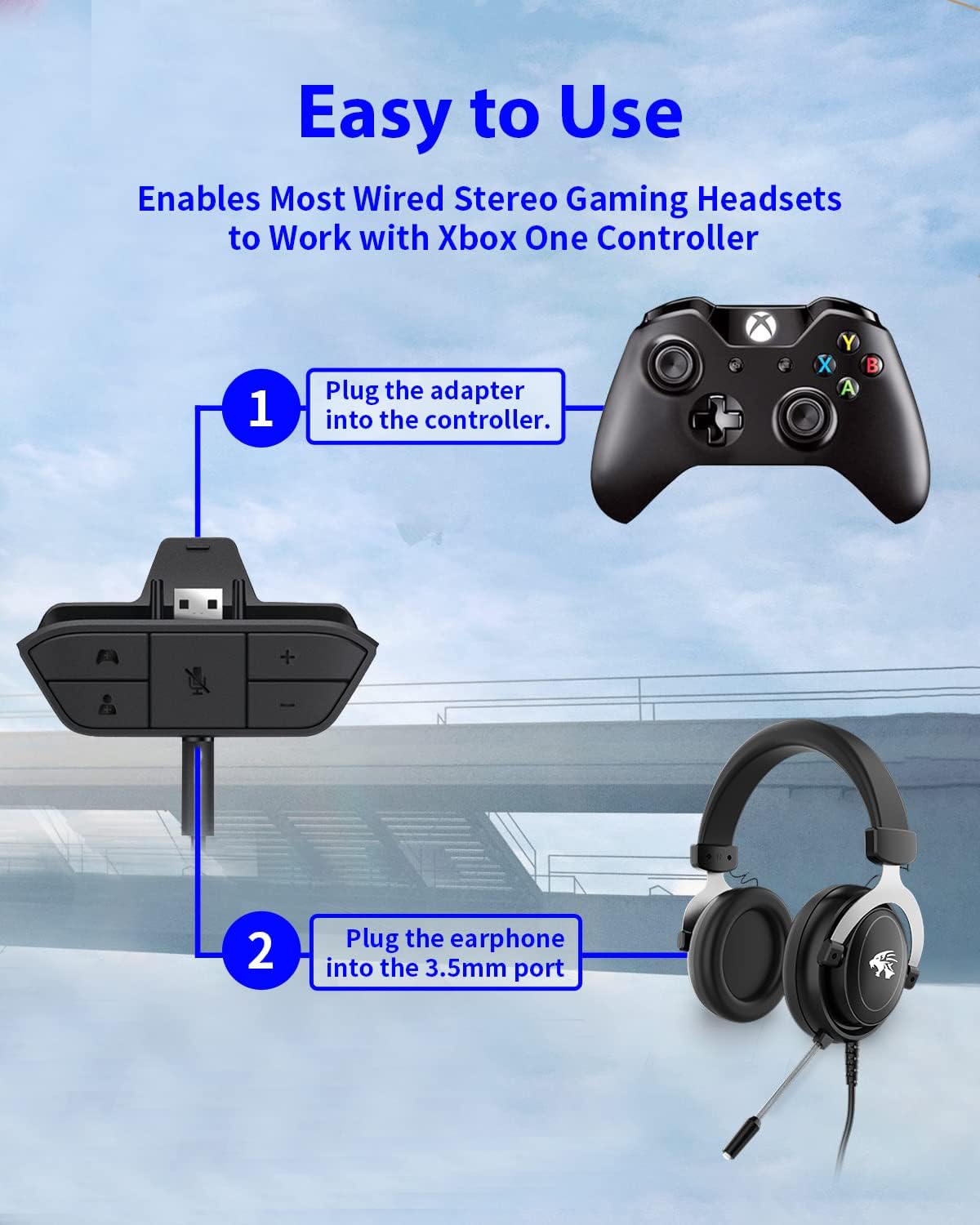
Figure 4: Step-by-step connection guide for the headset adapter.
Video 1: Demonstration of connecting the headset adapter to an Xbox controller.
Važna napomena: For optimal performance and to resolve potential audio issues, it is recommended to update your Xbox controller's firmware after connecting the adapter. This can typically be done through your Xbox console's settings (Settings > Devices & connections > Accessories > Select your controller > ... > Controller settings > Update firmware).
Upute za rad
Once connected, use the buttons on the adapter to control your audio:
- Pojačavanje/stišavanje glasnoće (+/-): Press the '+' button to increase the overall volume of both game and chat audio. Press the '-' button to decrease it.
- Microphone Mute (Microphone Icon): Press this button to mute or unmute your microphone. An indicator light (if present) or on-screen notification may confirm the mute status.
- Game/Chat Balance (Controller Icon / Person Icon):
- Pritisnite tipku Ikona kontrolera button to increase game audio volume and decrease chat audio volume.
- Pritisnite tipku Ikona osobe button to increase chat audio volume and decrease game audio volume.
Slika 5: Detaljno view of the adapter's control buttons.
Održavanje
To ensure the longevity and optimal performance of your headset adapter, follow these simple maintenance guidelines:
- Adapter održavajte čistim i bez prašine i ostataka. Za čišćenje koristite meku, suhu krpu.
- Izbjegavajte izlaganje adaptera ekstremnim temperaturama, vlazi ili izravnoj sunčevoj svjetlosti.
- Ne pokušavajte sami rastavljati ili popravljati adapter, jer će to poništiti jamstvo.
- Adapter spremite na sigurno mjesto kada ga ne koristite kako biste spriječili fizička oštećenja.
Rješavanje problema
If you encounter issues with your AOLION Stereo Headset Adapter, please refer to the following common solutions:
| Problem | Mogući uzrok/rješenje |
|---|---|
| No audio or poor audio quality (buzzing, peaking) |
|
| Mikrofon ne radi |
|
| Game/Chat balance not working |
|
Ako problem i dalje postoji nakon što ste isprobali ove korake, obratite se korisničkoj podršci.
Tehnički podaci
| Značajka | Detalj |
|---|---|
| Broj modela | WGXB004005 |
| Marka | AOLION |
| Dimenzije proizvoda (D x Š x V) | 3.15 x 1.57 x 0.79 inča (8 x 4 x 2 cm) |
| Boja | Crna |
| Vrsta konektora | Auxiliary (3.5mm CTIA standard) |
| Kompatibilni uređaji | Xbox One, One S, One X, Elite 1, Elite 2, Series S, Series X Controllers; 3.5mm CTIA Stereo Headsets |
Jamstvo i podrška
AOLION stands behind the quality of its products. This Stereo Headset Adapter comes with:
- 60-dnevno jamstvo povrata novca: If you are not entirely satisfied with your purchase within 60 days, you may be eligible for a full refund.
- 24-mjesečno jamstvo: We provide a 24-month warranty against manufacturing defects from the date of purchase.
For any questions, concerns, or warranty claims, please contact us through Amazon. We are committed to responding to your inquiries within 12 hours to ensure your complete satisfaction.
Ask a question about this manual
Ask about setup, troubleshooting, compatibility, parts, safety, or missing instructions. Manuals+ will review the question and use this page’s manual context to help answer it.