
Uvod
The CAD Audio MXU2 is a versatile 2-channel (2 mic/line) analog mixer featuring a built-in USB interface. Designed for compact and efficient audio processing, it includes +48V phantom power and 16-bit/48 kHz audio resolution, making it suitable for live performance, broadcasting, podcasting, and home recording applications. Its bus-powered design simplifies setup by eliminating the need for an external power supply when connected to a computer.
Proizvod gotovview
Ključne značajke
- 2 XLR combo inputs for microphone or instrument signals.
- Ideal compact option for live performance, broadcasting, podcasting, or home recording.
- USB output connects to a computer for easy recording or podcasting (16-bit/48kHz).
- Bus powered – no external power supply needed when using with a computer.
- +48V phantom power for use with condenser microphones.
Kontrole i priključci
The CAD Audio MXU2 features a straightforward layout for easy operation. Familiarize yourself with the following components:
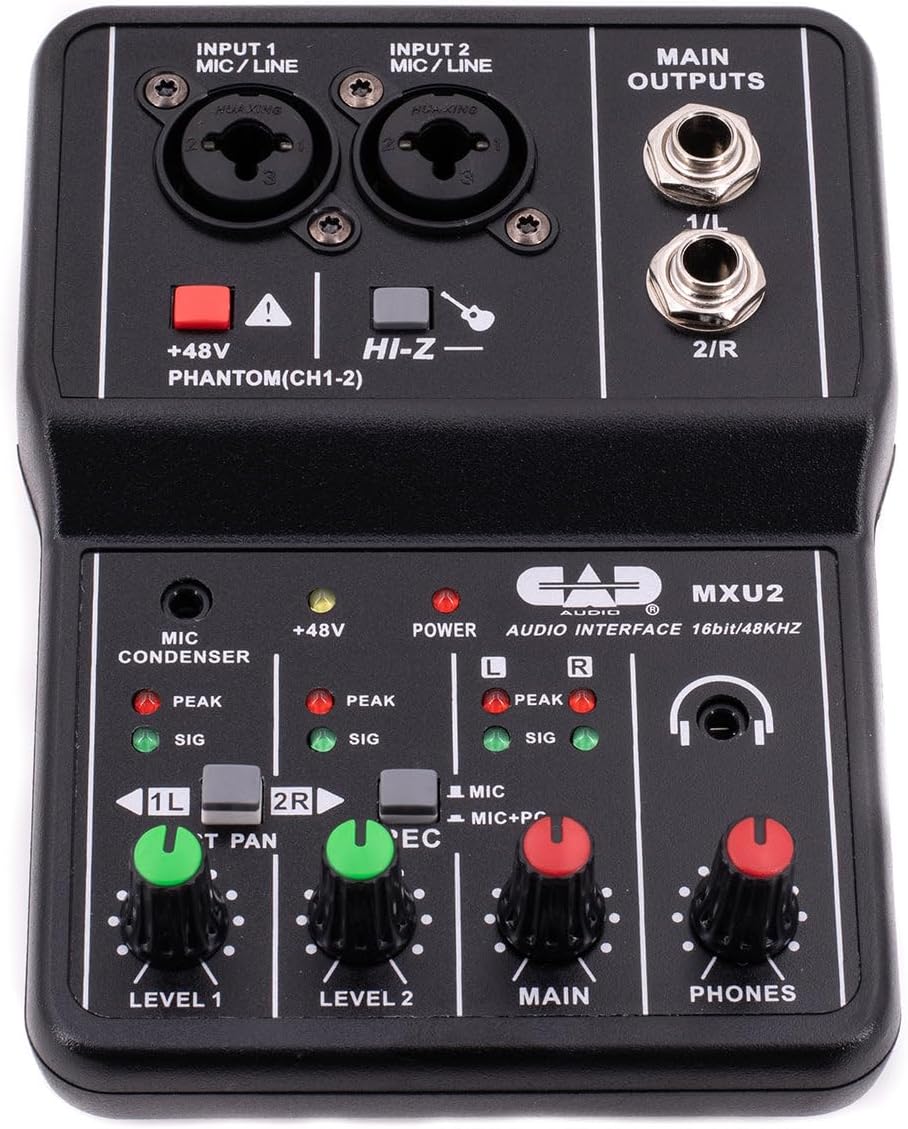
Slika 1: Odozgo prema dolje view of the CAD Audio MXU2 mixer, showing all controls and inputs/outputs.
- INPUT 1 / INPUT 2 (MIC/LINE): Combo jacks for connecting XLR microphones or 1/4-inch line/instrument cables.
- +48V PHANTOM (CH1-2): Red button to activate +48V phantom power for condenser microphones on both channels. An indicator LED illuminates when active.
- HI-Z: Switch for input 2 to optimize impedance for high-impedance instruments like electric guitars.
- LEVEL 1 / LEVEL 2: Rotary knobs to adjust the input gain for Channel 1 and Channel 2, respectively.
- ST PAN / 2R: Switch for Channel 2. In ST PAN mode, Channel 2 is panned to the right. In 2R mode, Channel 2 is routed to the right output.
- REC (MIC / MIC+PC): Switch to select the recording source for the USB output. MIC records only the mixer inputs. MIC+PC records mixer inputs mixed with audio from the computer.
- GLAVNI: Rotary knob to control the overall output level to the MAIN OUTPUTS.
- TELEFONI: Rotary knob to control the volume of the headphone output.
- MAIN OUTPUTS (1/L, 2/R): 1/4-inch TRS jacks for connecting to studio monitors or other amplifikacijski sustavi.
- USB Port (Rear): Connects the mixer to a computer for audio interface functionality and bus power.
- POWER Switch (Rear): Selects between PC (USB bus power) and DC (external power, adapter not included).

Slika 2: The MXU2 mixer with its USB cable connected, illustrating the compact design and connectivity.
Postavljanje
1. Povezivanje s računalom
- Ensure the MXU2's rear POWER switch is set to PC.
- Connect the provided USB cable from the MXU2's USB port to an available USB port on your computer.
- The mixer is typically plug-and-play, requiring no special drivers for most operating systems (Windows, macOS). Your computer should automatically recognize it as an audio device.
- Select the MXU2 as your input/output audio device in your computer's sound settings and your Digital Audio Workstation (DAW) or recording software.
2. Spajanje mikrofona i instrumenata
- Mikrofoni: Connect XLR microphones to the INPUT 1 or INPUT 2 combo jacks using XLR cables. For condenser microphones, press the +48V FANTOM button. The red LED will illuminate. Caution: Do not activate phantom power for dynamic microphones or ribbon microphones unless specified by the manufacturer, as it may cause damage.
- Instruments/Line-Level Devices: Connect instruments (e.g., guitar, bass) or line-level devices (e.g., keyboard, drum machine) to the INPUT 1 or INPUT 2 combo jacks using 1/4-inch TRS or TS cables. For high-impedance instruments like electric guitars, engage the HI-Z switch for Input 2.
3. Connecting Output Devices
- Studijski monitori/zvučnici: Connect your studio monitors or powered speakers to the MAIN OUTPUTS (1/L, 2/R) using 1/4-inch TRS cables.
- Slušalice: Plug your headphones into the 1/4-inch PHONES jack.
Operativni
1. Podešavanje ulazne razine
- Before playing or speaking, turn the RAZINA 1 i RAZINA 2 knobs fully counter-clockwise.
- Begin playing your instrument or speaking into the microphone. Slowly turn the corresponding LEVEL knob clockwise until the SIG (signal) LED illuminates consistently.
- Adjust the level so that the PEAK LED only flashes occasionally during the loudest parts of your performance. If the PEAK LED stays lit, the signal is clipping, and you should reduce the input level.
2. Main Output and Monitoring
- Podesite GLAVNI knob to control the overall volume sent to your studio monitors or speakers.
- Koristite TELEFONI knob to set a comfortable listening volume for your headphones.
3. Recording Modes (REC Switch)
- MIC: In this mode, only the audio from the mixer's inputs (microphones/instruments) is sent to your computer via USB. This is ideal for recording new tracks.
- MIC+PC: This mode mixes the audio from the mixer's inputs with the audio playback from your computer. This is useful for monitoring your performance along with backing tracks or previously recorded material.
4. Stereo Panning (ST PAN / 2R Switch)
- The ST PAN / 2R switch affects how Input 2 is routed. In ST PAN mode, Input 2 is panned to the right channel of the stereo output. In 2R mode, Input 2 is routed directly to the right output, bypassing the pan control.
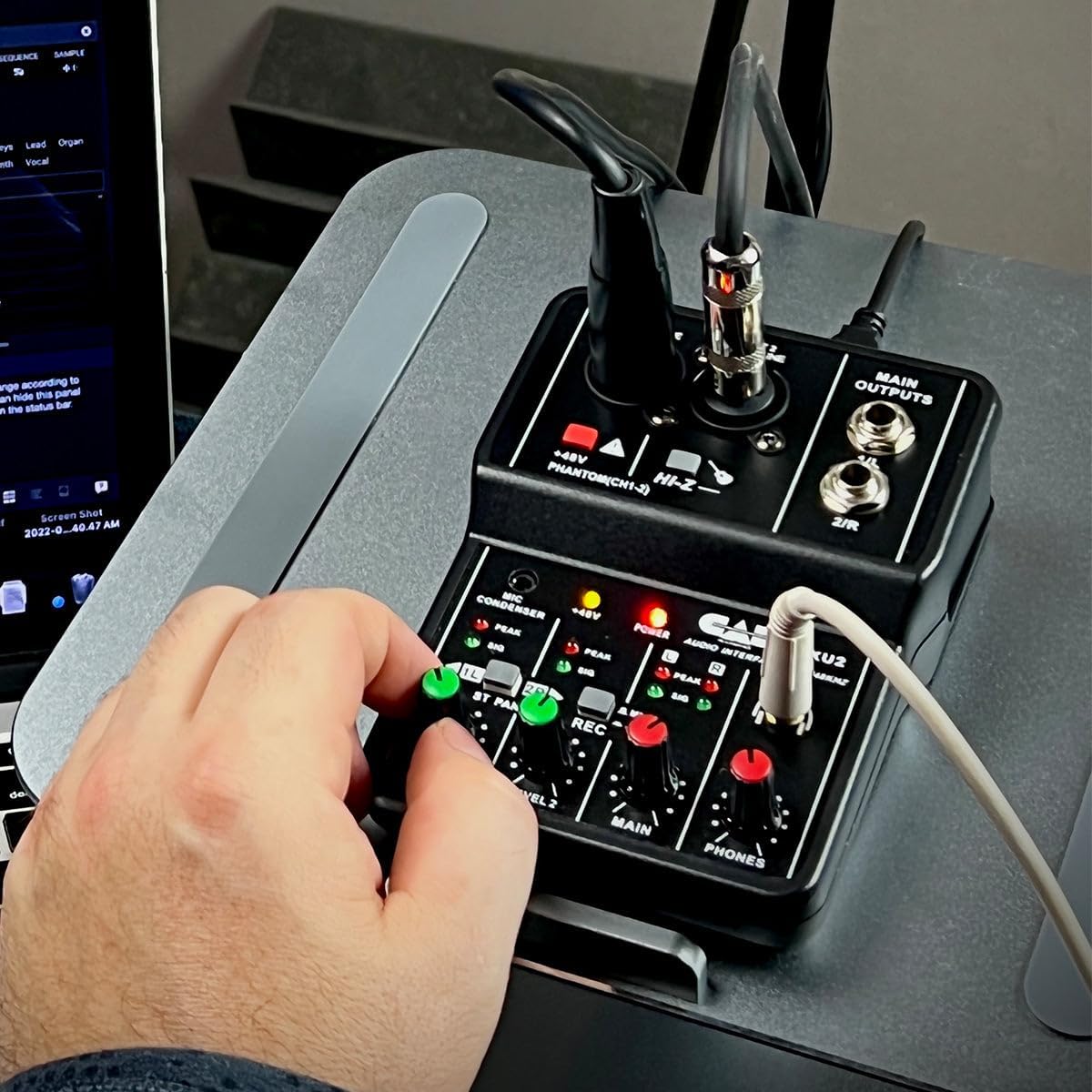
Slika 3: A user's hand adjusting a level knob on the MXU2 mixer, demonstrating typical operation.
Održavanje
Čišćenje
- Disconnect the mixer from all power sources and devices before cleaning.
- Za brisanje vanjske strane uređaja koristite meku, suhu krpu.
- Za tvrdokornu prljavštinu, malo damp Može se koristiti krpa, a zatim suha krpa. Izbjegavajte upotrebu jakih kemikalija, otapala ili abrazivnih sredstava za čišćenje.
- Ne dopustite da tekućina uđe u jedinicu.
Skladištenje
- Mješalicu čuvajte na hladnom i suhom mjestu, zaštićeno od izravne sunčeve svjetlosti i ekstremnih temperatura.
- Protect the unit from dust and moisture when not in use.
Opća njega
- Izbjegavajte ispuštanje ili izlaganje miksera jakim udarcima.
- Ne pokušavajte rastavljati ili modificirati uređaj, jer će to poništiti jamstvo.
- Osigurajte odgovarajuću ventilaciju oko uređaja tijekom rada.
Rješavanje problema
No Power / Device Not Recognized
- Provjerite USB vezu: Ensure the USB cable is securely connected to both the mixer and the computer. Try a different USB port on your computer.
- Power Switch Setting: Verify the rear POWER switch is set to PC for bus power. If using an external DC adapter (not included), ensure the switch is set to DC and the adapter is functioning.
- Integritet kabela: Isprobajte drugi USB kabel kako biste isključili mogućnost neispravnog kabela.
- Računalno prepoznavanje: Check your computer's Device Manager (Windows) or System Information (macOS) to see if the MXU2 is listed as an audio device. Restart your computer if necessary.
Nema zvuka
- Gumbi za podešavanje razine: Osigurati RAZINA 1, RAZINA 2, GLAVNI, i TELEFONI knobs are turned up sufficiently.
- Izlazne veze: Verify that your studio monitors/speakers are properly connected to the GLAVNI IZLAZI and are powered on. Check headphone connection.
- Computer Audio Settings: Confirm that the MXU2 is selected as the output device in your computer's sound settings and your recording software.
- Prekidač za snimanje: If you expect to hear computer audio, ensure the REC prekidač je postavljen na MIC+PC.
Distorted Sound / Clipping
- Razine unosa: Smanjite RAZINA 1 or RAZINA 2 knobs if the PEAK LED is constantly lit.
- Izlazne razine: Osigurajte GLAVNI i TELEFONI levels are not set too high, causing distortion in connected speakers or headphones.
- Kvaliteta kabela: Use high-quality, shielded cables to minimize interference.
Problemi s fantomskim napajanjem
- Aktivacija: Osigurajte +48V FANTOM button is pressed and its LED is illuminated when using condenser microphones.
- Kompatibilnost mikrofona: Confirm your microphone requires phantom power.
Tehnički podaci
| Značajka | Specifikacija |
|---|---|
| Marka | CAD audio |
| Model | MXU2 |
| Broj kanala | 2 |
| Tehnologija povezivanja | USB |
| Audio ulaz | XLR Combo (Mic/Line) |
| Vrsta izlaznog priključka | TRS (1/4-inch) |
| Fantomska snaga | +48V (preklopno) |
| Sampbrzina laga | 48 kHz |
| Dubina bita | 16-bitni |
| Izvor napajanja | USB Bus-Powered (PC mode) / Corded Electric (DC mode, adapter not included) |
| Težina artikla | 0.31 kilogram |
| UPC | 631922109399 |
Jamstvo i podrška
Informacije o jamstvu
The CAD Audio MXU2 2-Channel USB Mixer is covered by a 2-godišnje jamstvo proizvođačaOvo jamstvo obično pokriva nedostatke u materijalu i izradi pri normalnoj uporabi. Molimo sačuvajte dokaz o kupnji za potrebe jamstvenog zahtjeva.
Korisnička podrška
For technical assistance, troubleshooting beyond this manual, or warranty service, please contact CAD Audio customer support directly. You can usually find contact information, FAQs, and additional resources on the official CAD Audio website. When contacting support, please have your product model (MXU2) and proof of purchase available.


