
1. Uvod
The SteelSeries Arctis Nova 1X Gaming Headset delivers an immersive audio experience across multiple platforms. Designed for comfort and clarity, it features the Signature Arctis Sound and a ClearCast Gen 2 Microphone, making it ideal for Xbox Series X|S, PC, PlayStation, Switch, and mobile gaming.
This manual provides detailed instructions for setting up, operating, and maintaining your Arctis Nova 1X headset to ensure optimal performance and longevity.
2. Što je u kutiji
Upon unboxing your SteelSeries Arctis Nova 1X Gaming Headset, you should find the following components:
- Slušalice Arctis Nova 1X
- Main Headset Cable (3.5mm)
- Headband (pre-installed or separate, as per packaging)
- Vodič s informacijama o proizvodu

Slika: prednja strana view of the SteelSeries Arctis Nova 1X Gaming Headset, showcasing its sleek design and microphone.
3. Postavljanje
3.1 Spajanje slušalica
The Arctis Nova 1X is a wired headset designed for universal compatibility. To connect your headset:
- Locate the 3.5mm main headset cable.
- Plug one end of the 3.5mm cable into the audio jack on the left earcup of your Arctis Nova 1X headset.
- Plug the other end of the 3.5mm cable into the corresponding audio port on your gaming device (Xbox Series X|S controller, PC, PlayStation controller, Nintendo Switch, or mobile device).
Note: Ensure the cable is securely connected to both the headset and your device for optimal audio and microphone performance.

Image: Diagram illustrating the multi-platform compatibility of the Arctis Nova 1X headset, showing connections to various gaming devices.
4. Upravljanje slušalicama
4.1 Kontrola glasnoće
Adjust the audio volume directly from the headset:
- Locate the volume wheel on the left earcup.
- Roll the wheel up to increase the volume or down to decrease it.
4.2 Isključivanje mikrofona
To mute or unmute your microphone:
- Find the microphone mute button on the left earcup, adjacent to the volume wheel.
- Press the button to toggle the microphone on or off. A red indicator will typically show when the microphone is muted.
4.3 Retractable ClearCast Gen 2 Microphone
The ClearCast Gen 2 microphone is retractable for convenience:
- To use the microphone, gently pull it out from the left earcup until it reaches your desired position.
- To store the microphone, push it back into the earcup until it is fully retracted.
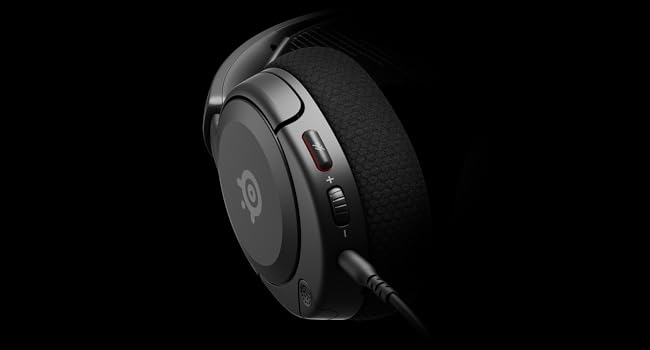
Slika: Krupni plan view of the left earcup of the Arctis Nova 1X, highlighting the volume wheel and microphone mute button for easy access during gameplay.
Video: Official SteelSeries video demonstrating the features of the Arctis Nova 1 headset, including its audio capabilities and microphone design.
5. Udobnost i pristajanje
The Arctis Nova 1X is designed for extended gaming sessions with its ComfortMAX System:
- Ultra lagani dizajn: Weighing only 236g, the headset minimizes pressure during long use.
- Height-Adjustable Earcups: The earcups can be adjusted vertically to fit various head sizes comfortably.
- Flexible Suspension Headband: The elastic headband conforms to your head for a secure yet gentle fit.

Image: The Arctis Nova 1X headset highlighting its ultra-lightweight and slim profile, designed for comfort.

Image: The Arctis Nova 1X headset demonstrating its height-adjustable earcups for a personalized and comfortable fit.
6. Zvučne značajke
Experience superior sound with the Arctis Nova 1X:
- Almighty Audio: The Nova Acoustic System with High Fidelity Drivers delivers crystal-clear highs, precise mids, and deep bass.
- 360° prostorni zvuk: Immerse yourself in the game with surround sound that allows you to pinpoint enemy positions and environmental cues.
- Pro-grade Parametric EQ: Prilagodite svog zvučnog profesionalcafile with the SteelSeries Sonar Audio Software Suite for a competitive edge.

Image: The Arctis Nova 1X headset highlighting its "Almighty Audio" capabilities for a rich sound experience.
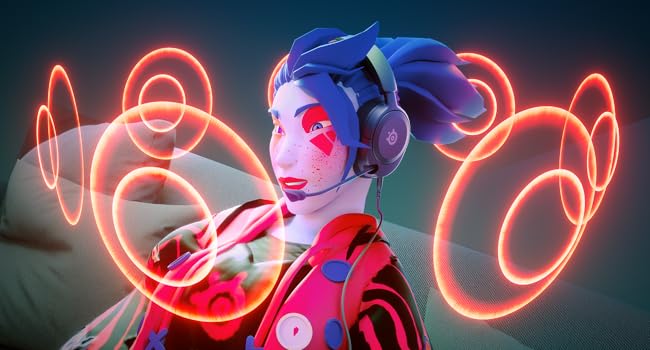
Image: Visual representation of 360° Spatial Audio, showing sound waves surrounding a gamer wearing the Arctis Nova 1X headset.
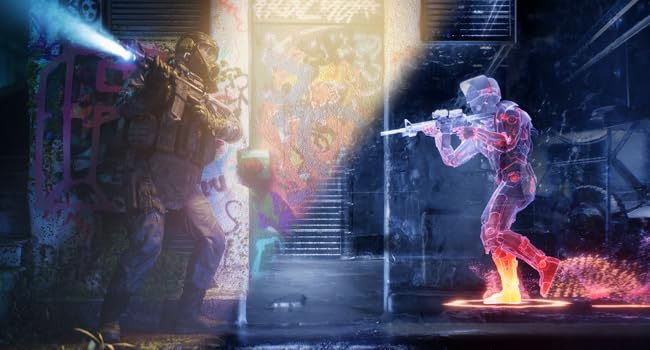
Image: Graphic illustrating the Pro-grade Parametric EQ, suggesting advanced audio customization options available with the headset.
7. Značajke mikrofona
The ClearCast Gen 2 Mic ensures clear communication:
- AI Noise Cancelling: Advanced AI algorithms filter out background noise, ensuring your voice is heard clearly by teammates.
- Uvlačivi dizajn: The microphone can be fully retracted into the earcup when not in use, maintaining a sleek profile.

Image: The Nova 1 AI Microphone, emphasizing its noise-cancelling capabilities for clear voice communication.
8. Održavanje
To ensure the longevity and optimal performance of your Arctis Nova 1X headset, follow these maintenance guidelines:
- Čišćenje: Za brisanje slušalica i trake za glavu koristite meku, suhu krpu. Za dublje čišćenje, laganoamp Može se koristiti krpa s blagim sapunom, pazeći da vlaga ne uđe u rešetke ili otvore zvučnika.
- Održavanje kabela: Avoid sharp bends or excessive pulling on the headset cable to prevent internal damage. Store the cable neatly when not in use.
- Skladištenje: Slušalice čuvajte na hladnom i suhom mjestu, dalje od izravne sunčeve svjetlosti i ekstremnih temperatura.
- Earbud Tips: If applicable, ensure earbud tips (if using with mobile) fit snugly. Replace worn-out earbud tips to maintain sound quality and comfort.
9. Rješavanje problema
If you encounter issues with your Arctis Nova 1X headset, try the following solutions:
- Nema zvuka/niska glasnoća:
- Ensure the 3.5mm cable is fully inserted into both the headset and your device.
- Check the volume wheel on the headset and your device's system volume.
- Testirajte slušalice s drugim uređajem kako biste isključili probleme specifične za uređaj.
- Mikrofon ne radi:
- Ensure the microphone mute button is not activated (red indicator off).
- Verify the microphone is fully extended and positioned correctly.
- Check your device's audio settings to ensure the correct microphone input is selected and its volume is not muted.
- Loša kvaliteta zvuka:
- Ensure the 3.5mm cable is not damaged and is securely connected.
- Adjust your device's audio settings or equalizer settings.
10. Specifikacije
| Značajka | Detalj |
|---|---|
| Marka | SteelSeries |
| Naziv modela | Arctis Nova 1X |
| Broj modela | 61616 |
| Tehnologija povezivanja | Žičano (3.5 mm priključak) |
| Postavljanje uha | Preko uha |
| Kontrola buke | Aktivno poništavanje buke (mikrofon) |
| Vrsta audio upravljačkog programa | Dinamički upravljački program |
| Frekvencijski raspon | 20 Hz - 20 000 Hz |
| Mikrofon | ClearCast Gen 2 (Retractable, AI Noise Cancelling) |
| Kompatibilni uređaji | Xbox Series X|S, PC, PlayStation, Switch, Mobile |
| Težina artikla | 1.1 funte (približno 500 g) |
| Boja | Crna |
| UPC | 850014119737 |
Video: 360-stupanjski pogled view of the SteelSeries Arctis Nova 1X headset in black, showcasing njegov dizajn iz svih kutova.
11. Jamstvo i podrška
11.1 Informacije o jamstvu
The SteelSeries Arctis Nova 1X Gaming Headset comes with a 1 godina ograničenog jamstva od datuma kupnje. Ovo jamstvo pokriva nedostatke u proizvodnji i osigurava da vaš proizvod funkcionira kako je predviđeno pri normalnoj uporabi. Molimo sačuvajte dokaz o kupnji za reklamacije u slučaju jamstva.
For detailed warranty terms and conditions, please refer to the official SteelSeries webweb-mjesto ili jamstveni list koji se nalazi u pakiranju proizvoda.
11.2 Korisnička podrška
For further assistance, technical support, or warranty claims, please contact SteelSeries customer support through their official webstranica:
You may also find additional resources, FAQs, and software downloads on their support page.