
1. Uvod
Thank you for choosing the NUBWO USB C Headset, Model HW02. This headset is designed for clear communication and comfortable use in various environments, including office, home, and call centers. It features a noise-cancelling microphone, in-line controls, and broad compatibility with USB-C enabled devices. This manual provides essential information for setting up, operating, maintaining, and troubleshooting your headset to ensure optimal performance.
2. Sadržaj paketa
Molimo provjerite jesu li svi artikli prisutni u vašem paketu:
- NUBWO USB C Headset (Model HW02)
- USB-C Cable (integrated with in-line control)
- Korisnički priručnik (ovaj dokument)
3. Upute za postavljanje
Follow these steps to set up your NUBWO USB C Headset:
- Spojite slušalice: Plug the USB-C connector of the headset directly into an available USB-C port on your laptop, phone, or computer. The headset is plug-and-play, requiring no additional drivers for most operating systems (Windows 7/8/10, Android, iOS).

Image: NUBWO USB C Headset connected to a laptop, illustrating its wide compatibility with PC, laptop, tablet, and smartphone devices running Android, iOS, Windows 7, Windows 8, and Windows 10.
- Podesite za udobnost: Adjust the headband to fit comfortably on your head. The headset features an adjustable headband and breathable ear muffs for extended wear.

Image: Diagram highlighting the comfortable design elements of the headset, including a 180-degree rotatable microphone, breathable earmuffs, and an adjustable headband for personalized fit.
- Postavite mikrofon: Rotate the microphone boom to position it optimally near your mouth for clear voice capture. The microphone is 180-degree rotatable.
Videozapis demonstracije postavljanja
Video: Detaljan pregledview of the NUBWO USB C Headset, demonstrating its lightweight design, in-line controls, and overall comfort for various uses. This video is provided by a seller and offers practical insights into the product's features.
4. Upute za rad
The NUBWO HW02 headset features convenient in-line controls for easy management of audio and microphone functions:
- Kontrola glasnoće: Use the '+' and '-' buttons on the in-line control unit to adjust the speaker volume.
- Isključivanje mikrofona: Press the microphone icon button to mute or unmute the microphone. A red indicator light will typically show when the microphone is muted.
- Isključenje zvučnika: Press the speaker icon button to mute or unmute the headset speakers. A red indicator light will typically show when the speakers are muted.
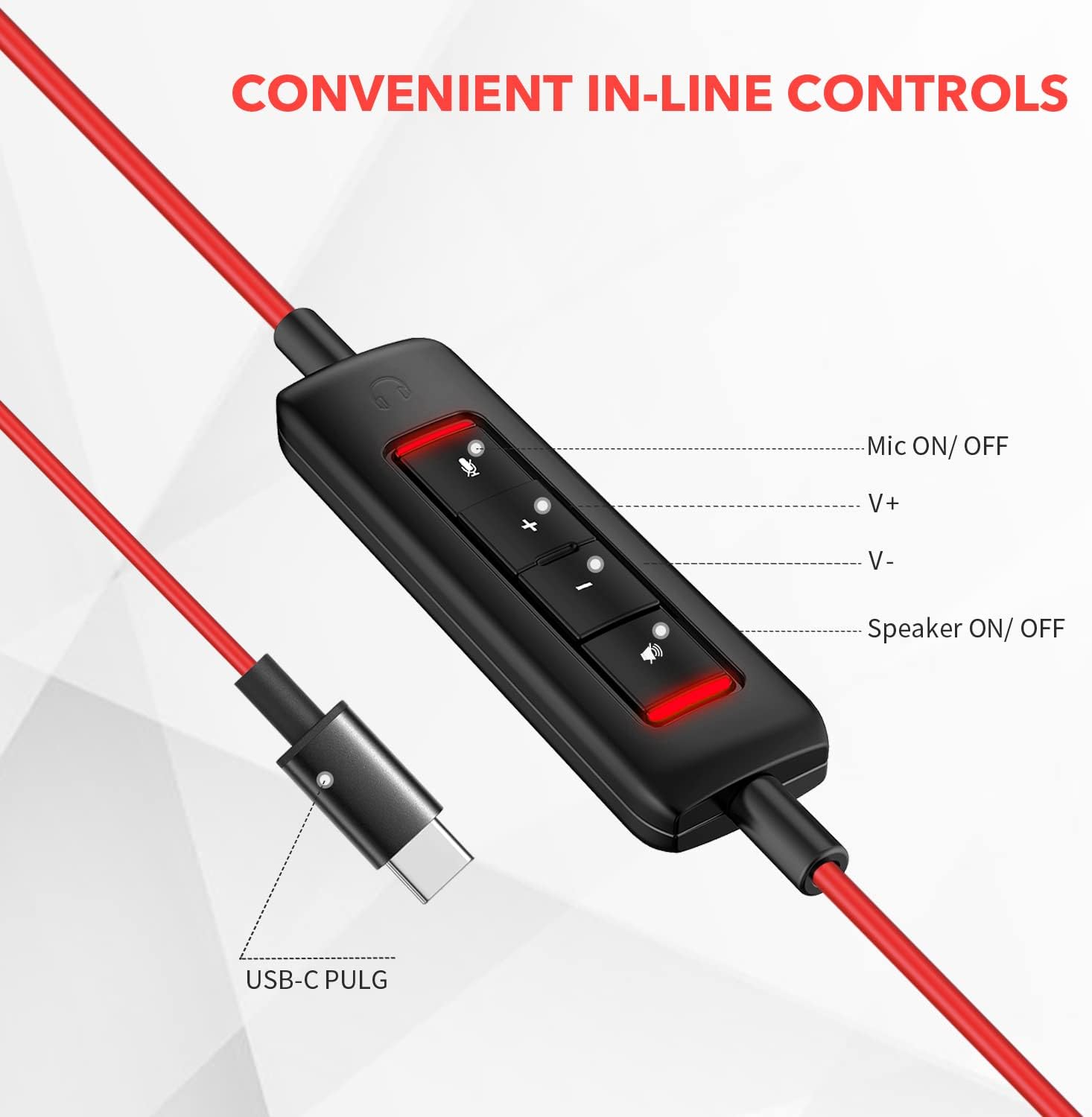
Slika: Krupni plan view of the in-line control unit, detailing the buttons for microphone mute/unmute, volume up, volume down, and speaker mute/unmute. The USB-C plug is also shown.
5. Održavanje
To ensure the longevity and optimal performance of your NUBWO USB C Headset, follow these maintenance guidelines:
- Čišćenje: Use a soft, dry cloth to wipe down the headset and cable. Avoid using harsh chemicals or abrasive materials.
- Skladištenje: When not in use, store the headset in a clean, dry place, preferably in the provided velvet bag, to protect it from dust and damage.
- Održavanje kabela: Izbjegavajte oštre savijanja ili pretjerano povlačenje kabela kako biste spriječili unutarnja oštećenja žica.
- Uvjeti okoliša: Do not expose the headset to extreme temperatures, humidity, or direct sunlight. The headset is not water resistant.
6. Rješavanje problema
If you encounter issues with your NUBWO USB C Headset, refer to the following common solutions:
- Nema zvuka iz slušalica:
- Provjerite je li USB-C priključak potpuno umetnut u priključak uređaja.
- Check the in-line control unit to ensure the speaker is not muted (red indicator light off).
- Increase the volume using the '+' button on the in-line control and your device's system volume settings.
- Provjerite jesu li slušalice odabrane kao zadani audio izlazni uređaj u postavkama zvuka računala.
- Mikrofon ne radi:
- Ensure the microphone is not muted on the in-line control unit (red indicator light off).
- Check that the microphone boom is correctly positioned.
- Verify that the headset microphone is selected as the default input device in your device's sound settings or communication application settings.
- Test the microphone with another application or device to rule out software-specific issues.
- Loša kvaliteta zvuka:
- Ensure the connection is secure and free from debris.
- Avoid using the headset in environments with high electromagnetic interference.
- Adjust the audio settings on your device.
7. Specifikacije
| Značajka | Specifikacija |
|---|---|
| Marka | NUBWO |
| Broj modela | HW02 |
| Tehnologija povezivanja | Žičano (USB-C) |
| Postavljanje uha | Na uhu |
| Impedancija | 32 Ohma |
| Frekvencijski raspon | 20 Hz - 20 000 Hz |
| Vrsta kontrole | Volume Control, Microphone Mute, Speaker Mute (in-line) |
| Kontrola buke | Aktivno poništavanje buke (mikrofon) |
| Težina artikla | 0.17 kilogram |
| Materijal | Plastični |
| Dodatne značajke | Adjustable Headband, Lightweight, Microphone Included |
| Kompatibilni uređaji | Laptops, Phones, Computers (with USB-C) |
8. Informacije o jamstvu
The NUBWO USB C Headset (Model HW02) comes with a 2-godišnje jamstvo proizvođača. For details regarding warranty claims and coverage, please refer to the official NUBWO webstranicu ili se obratite korisničkoj podršci.
Additionally, products purchased through Amazon may be eligible for a 30-day refund/replacement return policy, subject to Amazon's terms and conditions.
9. Podrška
For further assistance, technical support, or inquiries regarding your NUBWO USB C Headset, please visit the official NUBWO webweb-mjesto ili kontaktirajte njihov odjel za korisničku podršku. Kontaktni podaci obično se mogu pronaći na pakiranju proizvoda ili na službenoj mrežnoj stranici robne marke.