
Blackmagic Design CINECAMPOCHDEF6K2
Blackmagic Design Pocket Cinema Camera 6K G2 Instruction Manual
Model: CINECAMPOCHDEF6K2
1. Uvod
This manual provides essential information for the setup, operation, and maintenance of your Blackmagic Design Pocket Cinema Camera 6K G2. Please read this manual thoroughly before using the camera to ensure proper handling and optimal performance. This camera is designed for professional digital film production, offering advanced features for high-quality video capture.
2. Sigurnosne informacije
- Napajanje: Use only the specified power supply and battery. Incorrect power sources can damage the camera or cause fire.
- Voda i vlaga: Do not expose the camera to water or high humidity. This camera is not waterproof.
- Temperatura: Operate the camera within the recommended temperature range (typically 0°C to 40°C / 32°F to 104°F). Avoid extreme heat or cold.
- Rukovanje: Pažljivo rukujte fotoaparatom. Izbjegavajte ispuštanje ili izlaganje jakim udarcima.
- Lens Attachment: Always ensure the camera is powered off when attaching or detaching lenses to prevent damage to the sensor or lens mount.
- Čišćenje: Use a soft, dry cloth for cleaning. For the sensor, use specialized cleaning kits and follow manufacturer guidelines.
3. Sadržaj paketa
Provjerite jesu li svi artikli prisutni u vašem paketu:
- Blackmagic Design Pocket Cinema Camera 6K G2 Body
- DaVinci Resolve Studio Activation Key
- Lens Turret Dust Cap
- Traka za fotoaparat
- 30W Power Supply with Locking Connector and International Adapters
- Baterija NP-F570
- NP-F Series Battery USB Charger
4. Kamera gotovaview
The Blackmagic Design Pocket Cinema Camera 6K G2 features a compact design with a Super 35 sensor and an active EF/EF-S lens mount. It includes a large, bright adjustable tilt 5-inch LCD display for monitoring and menu navigation.

Slika 4.1: Kutni prednji dio view of the Blackmagic Design Pocket Cinema Camera 6K G2, showing the lens mount and grip.

Slika 4.2: Prednja strana view of the camera, highlighting the EF/EF-S lens mount and Super 35 sensor.
4.1. Priključci i portovi
The camera offers various connectivity options for audio, video output, and data transfer.

Slika 4.3: Detaljno view of the camera's side panel, showing various input/output ports.
- Ulaz za mikrofon: Connect consumer microphones or a timecode master clock.
- 3.5 mm izlaz za slušalice: Supports consumer headphones for audio monitoring.
- Full Size HDMI Connector: Outputs 1080p up to 60fps as clean feed or with camera data.
- USB Expansion Port (USB-C): For recording to external SSD storage or connecting focus demands.
- 12V istosmjerna struja: Main power supply input or for external batteries.
- XLR Audio Connection: Two professional balanced Mini XLR audio inputs with phantom power support.

Slika 4.4: Bočna strana view of the camera, illustrating the arrangement of the various ports.
4.2. Rear Panel and Controls
The rear panel features the tilting LCD touchscreen and essential control buttons.

Slika 4.5: Stražnji dio view of the camera displaying the menu interface on the 5-inch LCD screen.

Slika 4.6: Stražnji dio pod kutom view showing the camera's LCD screen tilted for flexible viewing kutova.
5. Postavljanje
5.1. Ugradnja i punjenje baterije
- Otvorite poklopac odjeljka za baterije koji se nalazi na dnu fotoaparata.
- Insert the NP-F570 battery, ensuring correct orientation. Close the cover securely.
- To charge, connect the included NP-F series battery USB charger to a power source and attach the battery. Alternatively, connect the camera to the 30W power supply with the battery installed.
5.2. Pričvršćivanje objektiva
- Provjerite je li kamera isključena.
- Remove the lens turret dust cap from the camera body and the rear cap from your EF/EF-S compatible lens.
- Poravnajte crvenu ili bijelu indeksnu oznaku na objektivu s odgovarajućom oznakom na nosaču objektiva fotoaparata.
- Pažljivo umetnite objektiv u nosač i okrećite ga u smjeru kazaljke na satu dok ne klikne na svoje mjesto.
5.3. Media Card Insertion
The camera supports SD/UHS-II and CFast 2.0 cards, as well as external SSDs via USB-C.
- Locate the SD card slot and CFast 2.0 card slot on the camera body.
- Insert the appropriate card into its slot until it clicks. Ensure the card is correctly oriented.
- For external SSD recording, connect a compatible SSD to the USB-C port.
5.4. Uključivanje/isključivanje
Press and hold the power button located on the top of the camera until the screen illuminates or turns off.
6. Upravljanje kamerom
6.1. Osnovno snimanje
To begin recording, press the red record button on the top of the camera. Press it again to stop recording.

Figure 6.1: Camera menu displaying recording settings such as project frame rate and preferred media.
- Frame Rates and Resolution: Navigate the menu on the LCD to select desired frame rates (e.g., 24 fps, 60 fps) and resolutions (up to 6K).
- File Formati: The camera supports industry-standard formats like Apple ProRes (up to 4K) and 12-bit Blackmagic RAW. Select your preferred format in the recording settings.
6.2. Focusing and Exposure
- Fokus: Use the lens's manual focus ring or electronic focus controls if available. The LCD offers focus assist tools.
- ISO: Adjust the dual gain ISO up to 25,600 to manage sensitivity in various lighting conditions.
- Aperture and Shutter Speed: Control these settings via the camera's physical dials or the touchscreen interface to achieve desired exposure and depth of field.
6.3. Audio snimanje
The camera includes a built-in stereo microphone. For professional audio, utilize the mini XLR or 3.5mm inputs for external microphones.
6.4. Praćenje
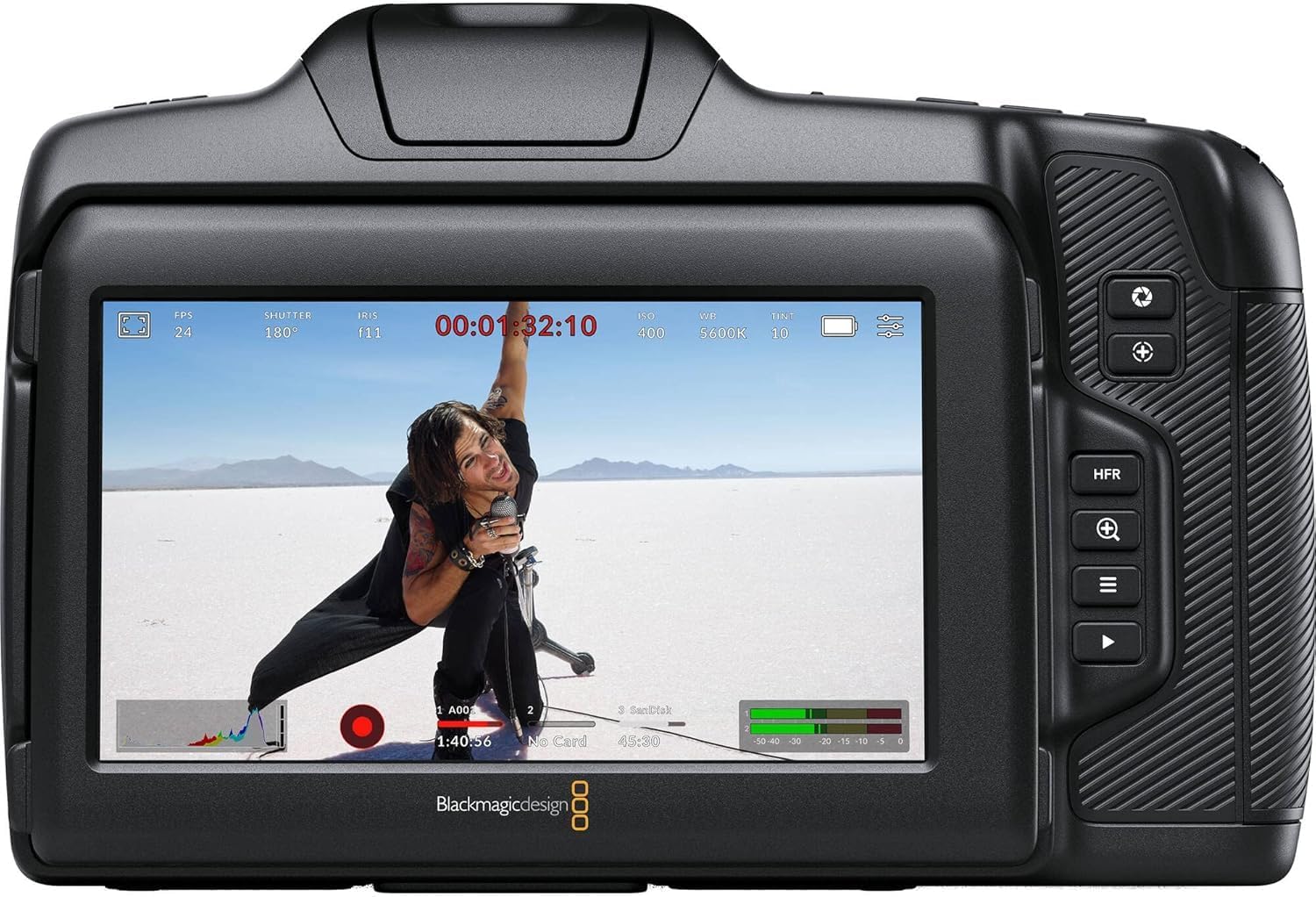
Slika 6.2: Stražnji dio view of the camera displaying live footage with overlays on the LCD screen.
The 5-inch LCD display provides a clear view od tvoje hranetage and camera settings. It can be tilted for better viewing angles. An external monitor can be connected via the HDMI port.

Figure 6.3: The camera's tilting LCD screen in an operational setup, demonstrating its flexibility.
6.5. DaVinci Resolve Studio
Your camera includes an activation key for DaVinci Resolve Studio. This software is a comprehensive solution for editing, color correction, visual effects, and audio post-production. Install and activate it on your computer to process your Blackmagic RAW and ProRes footage.
7. Održavanje
7.1. Čišćenje
- Tijelo kamere: Wipe with a soft, dry, lint-free cloth. Do not use harsh chemicals or solvents.
- Objektiv: Use a lens brush or air blower to remove dust, then gently clean with a lens cleaning solution and microfiber cloth.
- Senzor: Sensor cleaning should be performed with extreme care using a specialized sensor cleaning kit. If unsure, consult a professional.
7.2. Ažuriranja firmvera
Periodically check the Blackmagic Design website for firmware updates. Updates can improve performance, add features, and fix bugs. Follow the instructions provided by Blackmagic Design carefully during the update process.
7.3. Skladištenje
When not in use, store the camera in a cool, dry place, away from direct sunlight and extreme temperatures. Use a protective case to prevent dust and physical damage.
8. Rješavanje problema
| Problem | Mogući uzrok | Otopina |
|---|---|---|
| Kamera se ne uključuje | Battery depleted or incorrectly installed; power cable loose. | Charge battery, ensure correct installation. Check power cable connection. |
| Snimanje se neočekivano zaustavlja | Media card full or too slow; battery low. | Use a faster card (UHS-II, CFast 2.0), free up space, or replace/charge battery. |
| Loša kvaliteta slike | Incorrect exposure settings; dirty lens/sensor. | Adjust ISO, aperture, shutter speed. Clean lens or sensor. |
| Nema audio snimanja | Microphone not connected or configured correctly; audio levels too low. | Check microphone connections and camera audio settings. Adjust input levels. |
9. Specifikacije
Key technical specifications for the Blackmagic Design Pocket Cinema Camera 6K G2:
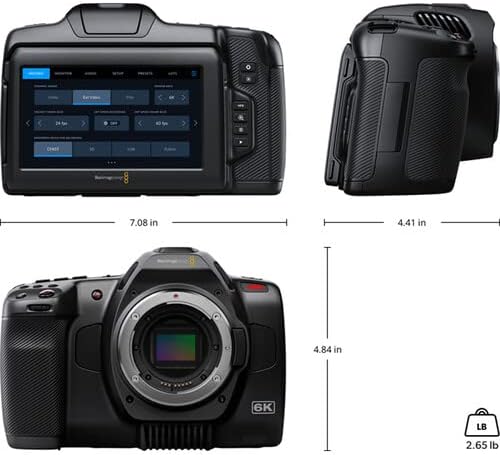
Figure 9.1: Dimensions of the Blackmagic Design Pocket Cinema Camera 6K G2.
| Značajka | Detalj |
|---|---|
| Broj modela | CINECAMPOCHDEF6K2 |
| Veličina senzora | Super 35 |
| Izvorna razlučivost | 6144 x 3456 |
| Dinamički raspon | 13 Zaustavlja se |
| Dual Gain ISO | Do 25,600 |
| Montaža objektiva | Active EF/EF-S |
| Veličina zaslona | 5 Inches (Adjustable Tilt LCD) |
| Mediji za pohranu | SD/UHS-II, CFast 2.0, External SSD via USB-C |
| Rezolucija video snimanja | 6K |
| Format za snimanje videa | Apple ProRes, Blackmagic RAW |
| Audio Format | WAV, BWF |
| Povezivost | HDMI, USB-C, 3.5mm Audio, Mini XLR Audio, 12V DC |
| Težina artikla | 3.8 funti |
| Dimenzije proizvoda | 9.1 x 9.1 x 9.1 inča |
| Baterija | 1 Lithium Ion (NP-F570 included) |
10. Jamstvo i podrška
For detailed warranty information and technical support, please refer to the official Blackmagic Design webweb-mjesto ili se obratite njihovoj korisničkoj službi. Sačuvajte dokaz o kupnji za slučaj zahtjeva za jamstvo.
Mrežni resursi: Posjetiti www.blackmagicdesign.com/support za upravljačke programe, priručnike i često postavljana pitanja.
Ask a question about this manual
Ask about setup, troubleshooting, compatibility, parts, safety, or missing instructions. Manuals+ will review the question and use this page’s manual context to help answer it.