
1. Uvod
Thank you for choosing the COMAOGO T002-W Mini Projector. This manual provides essential information for setting up, operating, and maintaining your projector to ensure optimal performance and longevity. The T002-W is a versatile projector featuring 9500 Lumens brightness, 1080P support, 5G WiFi, and Bluetooth 5.1 connectivity, designed for an immersive viewiskustvo do 220 inča.
2. Sadržaj paketa
Molimo provjerite paket za sljedeće stavke:
- 1 x COMAOGO T002-W Mini Projector
- 1 x daljinski upravljač
- 1 x kabel za napajanje
- 1 x HDMI kabel
- 1 x AV kabel
- 1 x korisnički priručnik
3. Proizvod je gotovview
Upoznajte se s komponentama i sučeljima projektora.

Image: COMAOGO T002-W Projector with 5G and 2.4G WiFi capabilities, showing wireless screen synchronization with a tablet and smartphone.
The projector features various ports for connectivity, including HDMI, USB, VGA, AV, and a TF card slot, along with a 3.5mm audio output. It also supports dual-band 5G and 2.4G WiFi for stable wireless connections and Bluetooth 5.1 for audio devices.

Image: COMAOGO T002-W Projector connected to various devices including a laptop, game console, and streaming stick, highlighting its multiple input ports (AV, HDMI, USB, TF, VGA).
4. Postavljanje
4.1 Postavljanje
Position the projector on a stable, flat surface or mount it on a tripod. Ensure there are no obstructions to the ventilation vents. For optimal viewing, the projection distance should be between 1.5 meters and 5.5 meters, yielding a screen size from 45 inches to 220 inches.
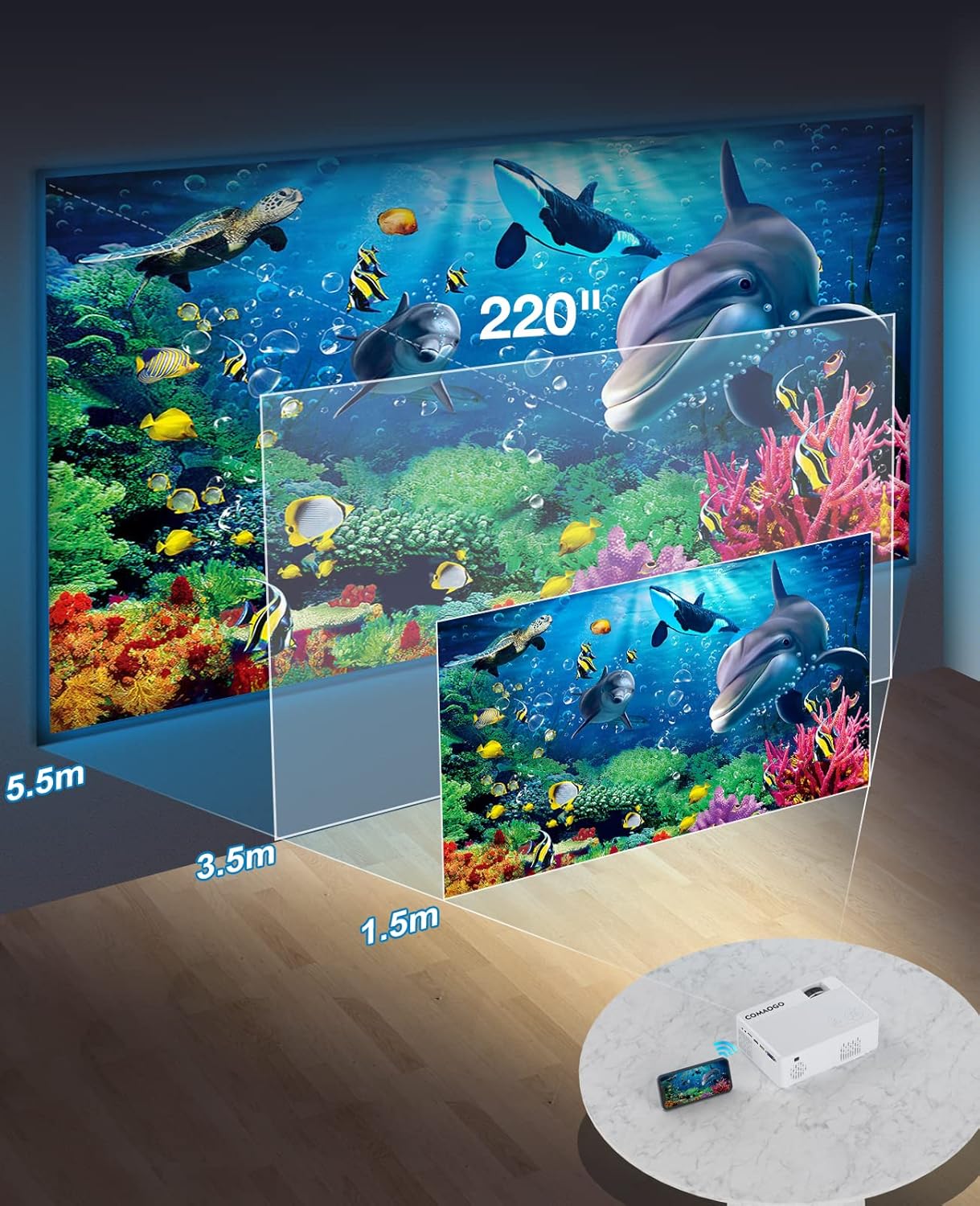
Image: Diagram illustrating the projection distances (1.5m to 5.5m) and corresponding screen sizes (45 to 220 inches) for the COMAOGO T002-W Projector.
4.2 Priključak za napajanje
Connect the power cable to the projector's power input and then plug it into a power outlet (AC 220V).
4.3 Fokus i korekcija trapezoidnog izobličenja
To achieve a clear and rectangular image:
- Podešavanje fokusa: Rotate the focus ring on the projector lens until the image appears sharp.
- Korekcija trapezoida: Adjust the keystone correction dial (if available, or via menu settings) to correct trapezoidal distortion, ensuring the image is rectangular. The projector supports ±15° keystone correction.

Image: Illustration of keystone correction and focus adjustment for the COMAOGO T002-W Projector, showing how to achieve a clear, rectangular image.
5. Upute za rad
5.1 Uključivanje/isključivanje
- Uključivanje: Pritisnite tipku za napajanje na projektoru ili daljinskom upravljaču.
- Isključivanje: Ponovno pritisnite gumb za napajanje kako biste isključili projektor.
5.2 Odabir ulaznog izvora
Use the "Source" button on the remote control or the projector's control panel to select the desired input source (e.g., HDMI, USB, VGA, AV).
5.3 Wireless Connectivity (WiFi)
The projector supports dual-band 5G and 2.4G WiFi for stable screen mirroring.
- Navigate to the WiFi settings on the projector's menu.
- Select your desired WiFi network (5G for faster, more stable connection; 2.4G for longer range and better penetration).
- Unesite lozinku za povezivanje.
- For screen mirroring, select the appropriate option (e.g., "iOS Cast" or "Android Cast") on the projector and follow the on-screen instructions to connect your smartphone or tablet.
5.4 Bluetooth povezivost
Connect external Bluetooth audio devices like speakers or headphones.

Image: COMAOGO T002-W Projector demonstrating Bluetooth 5.1 connection with a speaker and headphones.
- Idite na postavke Bluetootha u izborniku projektora.
- Provjerite je li vaš Bluetooth uređaj u načinu uparivanja.
- Odaberite svoj uređaj s popisa za uparivanje.
- Note: The projector's Bluetooth function is for connecting output devices (speakers, headphones) only.
5.5 Žičane veze
Spojite različite uređaje koristeći dostupne portove:
- HDMI: Connect laptops, PCs, game consoles (Xbox), TV sticks (Roku, Chromecast), DVD players.
- USB: Reprodukujte medije files directly from USB drives.
- VGA: Spojite starija računala ili prijenosna računala.
- OD: Connect legacy video devices.
- TF kartica: Insert a TF card to play media files.
- Important: Copyright-protected content from services like Netflix or Disney+ is not directly supported via screen mirroring. For these services, use an HDMI connection with a compatible adapter (e.g., Lightning Digital AV Adapter for iOS devices) or a streaming stick.
6. Održavanje
6.1 Čišćenje leće
Use a soft, lint-free cloth or lens cleaning paper to gently wipe the projector lens. Avoid using abrasive materials or harsh chemicals that could damage the lens coating.
6.2 Sustav hlađenja
The projector features an updated cooling system designed to reduce noise and maintain optimal operating temperature. Ensure the ventilation vents are clear of dust and obstructions to prevent overheating. Regular cleaning of the vents with a soft brush or compressed air is recommended.
7. Rješavanje problema
Ako naiđete na probleme s projektorom, pogledajte sljedeća uobičajena rješenja:
- Bez slike:
- Provjerite priključak za napajanje i uvjerite se da je projektor uključen.
- Provjerite odgovara li odabrani ulazni izvor vašem spojenom uređaju.
- Ensure all cables (HDMI, VGA, etc.) are securely connected.
- Adjust focus and keystone correction.
- Nema zvuka:
- Podesite glasnoću projektora.
- Ako koristite vanjske zvučnike, provjerite jesu li ispravno spojeni i uključeni.
- Check Bluetooth connection for external audio devices.
- Ensure the audio output from your source device is enabled.
- WiFi/Screen Mirroring Issues:
- Ensure both the projector and your device are connected to the same WiFi network.
- Check for strong WiFi signal.
- Restart both the projector and your source device.
- For Android devices, ensure "Wireless Projection" or "Screen Mirroring" is enabled. For iOS, use "Screen Mirroring" from Control Center.
- Slika je mutna:
- Podesite prsten za fokusiranje na objektivu.
- Provjerite je li udaljenost projekcije unutar preporučenog raspona.
- Slika je trapezoidna:
- Adjust the keystone correction dial or setting.
For further assistance or software updates, please contact COMAOGO customer support.
8. Specifikacije
| Značajka | Specifikacija |
|---|---|
| Marka | COMAOGO |
| Model | T002-W |
| Svjetlina | 9500 lumena (220 ANSI) |
| Omjer kontrasta | 6000:1 |
| Izvorna razlučivost | 1280 x 720 |
| Podržana razlučivost | 1080P |
| Veličina projekcije | 45" - 220" |
| Udaljenost projekcije | 1.5 m - 5.5 m |
| Ispravak ključa | ±15° |
| WiFi povezivost | Dual-band (5G + 2.4G) |
| Bluetooth | Bluetooth 5.1 |
| Hardversko sučelje | 3.5mm Audio, TF Card, USB 2.0, VGA, HDMI |
| Ugrađeni zvučnik | Da |
| Razina buke | 45 decibela |
| Potrošnja energije | 48 vata |
| Dimenzije | 20.32 x 15.24 x 7.62 cm |
| Težina | 1 kilograma |
9. Službeni video proizvoda
Watch this video for a visual guide on the COMAOGO T002-W Mini Projector's features and operation.
Video: An official product video demonstrating the features and usage of the COMAOGO T002-W Mini Projector, including connectivity and display capabilities.
10. Jamstvo i podrška
The COMAOGO T002-W Mini Projector comes with a standard manufacturer's warranty. For warranty claims, technical support, or inquiries regarding software updates, please contact COMAOGO customer service through the retailer where you purchased the product or visit the official COMAOGO webmjesto.
SOFTWARE UPDATES can be provided; please contact us if needed.