
Uvod
This manual provides detailed instructions for the setup, operation, and maintenance of your Amazon Basics Projection Alarm Clock. Please read this manual thoroughly before using the product to ensure proper function and to prevent damage.

Image: The Amazon Basics Projection Alarm Clock, showing its digital display and projection lens.
Sigurnosne upute
- Ne izlažite uređaj ekstremnim temperaturama, izravnom sunčevom svjetlu, prašini ili vlazi.
- Provjerite je li adapter za napajanje kompatibilan s vašim lokalnim napajanjem.
- Držite uređaj dalje od vode ili drugih tekućina.
- Ne pokušavajte rastavljati ili modificirati uređaj. Time ćete poništiti jamstvo.
- Clean the unit only with a soft, dry cloth. Do not use liquid cleaners.
- Pravilno odložite baterije u skladu s lokalnim propisima.
Sadržaj paketa
- Amazon Basics Projection Alarm Clock
- AC adapter za napajanje
- korisnički priručnik
Značajke proizvoda
- Projection of time onto a wall or ceiling.
- FM Radio with automatic/manual scan and up to 15 preset stations.
- USB port for charging mobile phones or tablets.
- 7-inch high-definition LED display with adjustable brightness.
- Dual alarms for separate wake-up times.
- Snooze function with adjustable duration (2 to 60 minutes).
- Sleep timer for automatic radio shut-off (5 to 90 minutes).
- DST button for Daylight Saving Time adjustment.
- Battery backup (requires 2 AAA batteries, not included) to maintain time settings during power outages.

Slika: Prekoview of key features including sleep timer, radio presets, and snooze function.
Kontrole i zaslon
Familiarize yourself with the buttons and ports on your alarm clock for optimal use.

Slika: Bočno view illustrating the location of controls, USB charging port, and projection lens.
- Gumb za postavljanje vremena: Koristi se za postavljanje trenutnog vremena.
- Tipke alarma 1/2: Koristi se za postavljanje i aktiviranje alarma 1 i alarma 2.
- Tipka za odgodu/prigušivanje zvuka: Activates snooze during an alarm; adjusts display brightness when not alarming.
- Radio/Sleep Button: Turns FM radio on/off; sets sleep timer.
- Volume/Tune Dial: Adjusts radio volume and tunes FM frequencies.
- Projection On/Off/Flip Button: Controls the projection feature and flips the projected time.
- Projection Focus Wheel: Adjusts the clarity of the projected time.
- Projection Angle Adjuster: Changes the angle of the projected time.
- USB priključak za punjenje: Za punjenje vanjskih uređaja.
- Gumb za ljetno vrijeme: Toggles Daylight Saving Time.
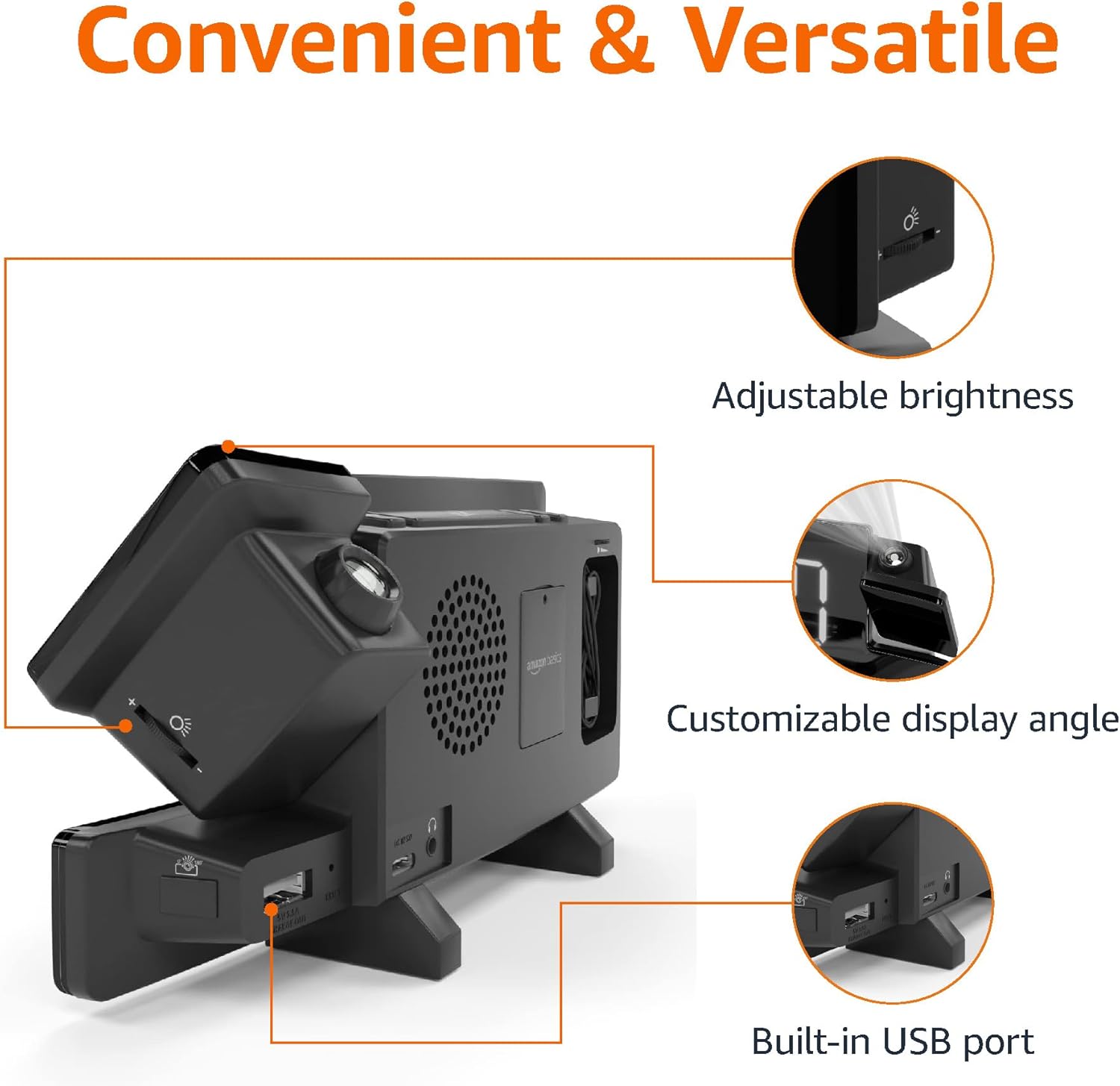
Image: Diagram highlighting the adjustable brightness, customizable projection angle, and USB charging port.
Postavljanje
1. Priključak za napajanje
Connect the AC power adapter to the DC IN port on the back of the alarm clock and plug it into a standard wall outlet. The display will light up.
2. Instalacija rezervne baterije
For battery backup, open the battery compartment on the bottom of the unit. Insert 2 AAA batteries (not included), ensuring correct polarity (+/-). Close the compartment. The battery backup maintains time settings during power outages but does not power the display or alarm functions.
3. Početno podešavanje vremena
- Pritisnite i držite Postavljeno vrijeme dugme. Brojke sati će treptati.
- Koristite Volume/Tune Dial za podešavanje sata. Pritisnite Postavljeno vrijeme ponovo za potvrdu.
- Znamenke minuta će bljeskati. Koristite Volume/Tune Dial za prilagodbu minuta. Pritisnite Postavljeno vrijeme ponovo za potvrdu.
- The time format (12H/24H) will flash. Use the Volume/Tune Dial to select your preferred format. Press Postavljeno vrijeme za potvrdu i izlaz iz načina podešavanja vremena.
4. Ljetno računanje vremena (DST)
Pritisnite tipku DST button to toggle Daylight Saving Time on or off. The DST indicator will appear or disappear on the display.
Upute za rad
1. Postavljanje alarma (Alarm 1 i Alarm 2)
- Pritisnite i držite Alarm 1 or Alarm 2 gumb. Znamenke sati alarma će bljeskati.
- Koristite Volume/Tune Dial to adjust the alarm hour. Press the respective Alarm ponovo za potvrdu.
- Znamenke minuta alarma će bljeskati. Koristite Volume/Tune Dial to adjust the alarm minutes. Press the respective Alarm ponovo za potvrdu.
- The alarm source (FM radio or buzzer) will flash. Use the Volume/Tune Dial to select your preference. Press the respective Alarm button to confirm and activate the alarm. An alarm icon will appear on the display.
- To deactivate an alarm, press the respective Alarm button once. The alarm icon will disappear.
2. Using Snooze
Kada se oglasi alarm, pritisnite tipku Odgodi/prigušivač button to temporarily silence the alarm. The alarm will sound again after the set snooze duration. The default snooze duration is 9 minutes. To adjust the snooze duration, press and hold the Odgodi/prigušivač gumb, a zatim upotrijebite Volume/Tune Dial to select a duration between 2 and 60 minutes. Press Odgodi/prigušivač ponovo za potvrdu.
3. Rad FM radija
- Uključivanje/isključivanje: Pritisnite tipku Radio/Sleep gumb za uključivanje ili isključivanje FM radija.
- Ugađanje postaja: Koristite Volume/Tune Dial to manually tune to a desired FM frequency.
- Automatsko skeniranje: Pritisnite i držite Radio/Sleep button to automatically scan and save available FM stations as presets.
- Odaberite unaprijed postavljene postavke: Once stations are saved, short press the Radio/Sleep button to cycle through the preset stations.
- Podešavanje glasnoće: Zakrenite Volume/Tune Dial to adjust the radio volume.
4. Mjerač vremena za spavanje
Dok FM radio svira, pritisnite tipku Radio/Sleep button repeatedly to set the sleep timer. Options typically range from 5 to 90 minutes. The radio will automatically turn off after the selected duration.
5. Funkcija projekcije

Image: The alarm clock projecting the time onto a bedroom ceiling.
- Aktiviraj/deaktiviraj: Pritisnite tipku Projection On/Off/Flip gumb za uključivanje ili isključivanje projekcije vremena.
- Podešavanje kuta: Manually adjust the projection arm to direct the time onto your desired surface (wall or ceiling).
- Fokus: Zakrenite Projection Focus Wheel to achieve a clear image.
- Preklopni zaslon: Pritisnite tipku Projection On/Off/Flip button repeatedly to rotate the projected time 180 degrees, ensuring correct orientation.

Image: The alarm clock on a nightstand, projecting the time onto a wall, demonstrating its use in a bedroom setting.
6. USB punjenje
Connect your mobile phone or tablet's USB charging cable to the USB priključak za punjenje on the back of the alarm clock. The device will begin charging. This port is for charging only and does not support data transfer.
7. Podešavanje svjetline zaslona
Pritisnite tipku Odgodi/prigušivač button (when no alarm is sounding) to cycle through different brightness levels for the main LED display.
Održavanje
1. Čišćenje
Wipe the unit with a soft, dry, lint-free cloth. Do not use abrasive cleaners, waxes, or solvents as they may damage the surface.
2. Zamjena baterije
If the battery backup is not functioning correctly (e.g., time resets after a power outage), replace the 2 AAA batteries in the battery compartment, ensuring correct polarity.
Rješavanje problema
| Problem | Mogući uzrok | Otopina |
|---|---|---|
| Zaslon je prazan. | Nema priključka za napajanje. | Provjerite je li AC adapter sigurno priključen u uređaj i ispravnu zidnu utičnicu. |
| Alarm se ne oglašava. | Alarm nije aktiviran ili je glasnoća preniska. | Check if the alarm icon is visible on the display. Re-set the alarm if necessary. Increase radio volume if FM is selected as alarm source. |
| Projektirano vrijeme je mutno. | Projection focus is not adjusted. | Zakrenite Projection Focus Wheel dok slika ne postane jasna. |
| Projected time is not visible. | Projection is off or room is too bright. | Pritisnite tipku Projection On/Off/Flip button to activate. The projection is best viewed in a dark room. |
| Radio prijem je loš. | Položaj antene ili smetnje. | Adjust the position of the FM antenna wire. Move the unit away from other electronic devices that may cause interference. |
| USB punjenje ne radi. | Problem s kabelom ili nekompatibilnost uređaja. | Ensure the USB cable is functional and properly connected. Try a different cable or device. |
Tehnički podaci
- Model: MET8831-US
- Ulazna snaga: AC adapter (uključen)
- Sigurnosna kopija baterije: 2 x AAA baterije (nisu uključene)
- Prikaz: 7-inčni LED
- Radijska frekvencija: FM
- USB izlaz: 5V, 1A (for charging)
- Dimenzije (D x Š x V): 7.1 x 1.6 x 3.7 inča (18.03 x 4.06 x 9.4 cm)
- Težina: Otprilike 0.59 lbs (267.62 g)

Image: Product dimensions for the Amazon Basics Projection Alarm Clock.
Informacije o jamstvu
This product is covered by the Amazon Basics warranty. For detailed information regarding warranty terms and conditions, please refer to the official Amazon Basics webstranicu ili se obratite korisničkoj podršci.
Korisnička podrška
For further assistance, troubleshooting, or product inquiries, please contact Amazon Basics customer support through the Amazon website or your purchase platform. Have your product model number (MET8831-US) and purchase details ready.