
Uvod
This manual provides detailed instructions for the safe and efficient operation of your Pristar PS-100E Label Maker Machine. Please read this manual thoroughly before using the device and keep it for future reference.
The Pristar PS-100E is a portable, handheld thermal transfer label printer designed for various organizational needs in office, home, and school environments. It features automatic cutting, multi-line printing, and compatibility with various TZe label tapes.
Sadržaj kutije
Provjerite jesu li sve dolje navedene stavke uključene u vaš paket.
- 1 x Pristar PS-100E Label Maker
- 1 x 0.47'' (12mm) TZe-FX231 Label Tape (White with Black Ink)
- 1 x DC adapter
- 1 x punjiva litij-polimerska baterija
- 1 x Operating Manual (this document)

Image: The Pristar PS-100E Label Maker shown with its included accessories: the label maker unit, a roll of TZe-FX231 label tape, a DC power adapter, a rechargeable lithium polymer battery, and the user manual.
Značajke proizvoda završeneview
The PS-100E label maker is equipped with several features designed for ease of use and versatility.
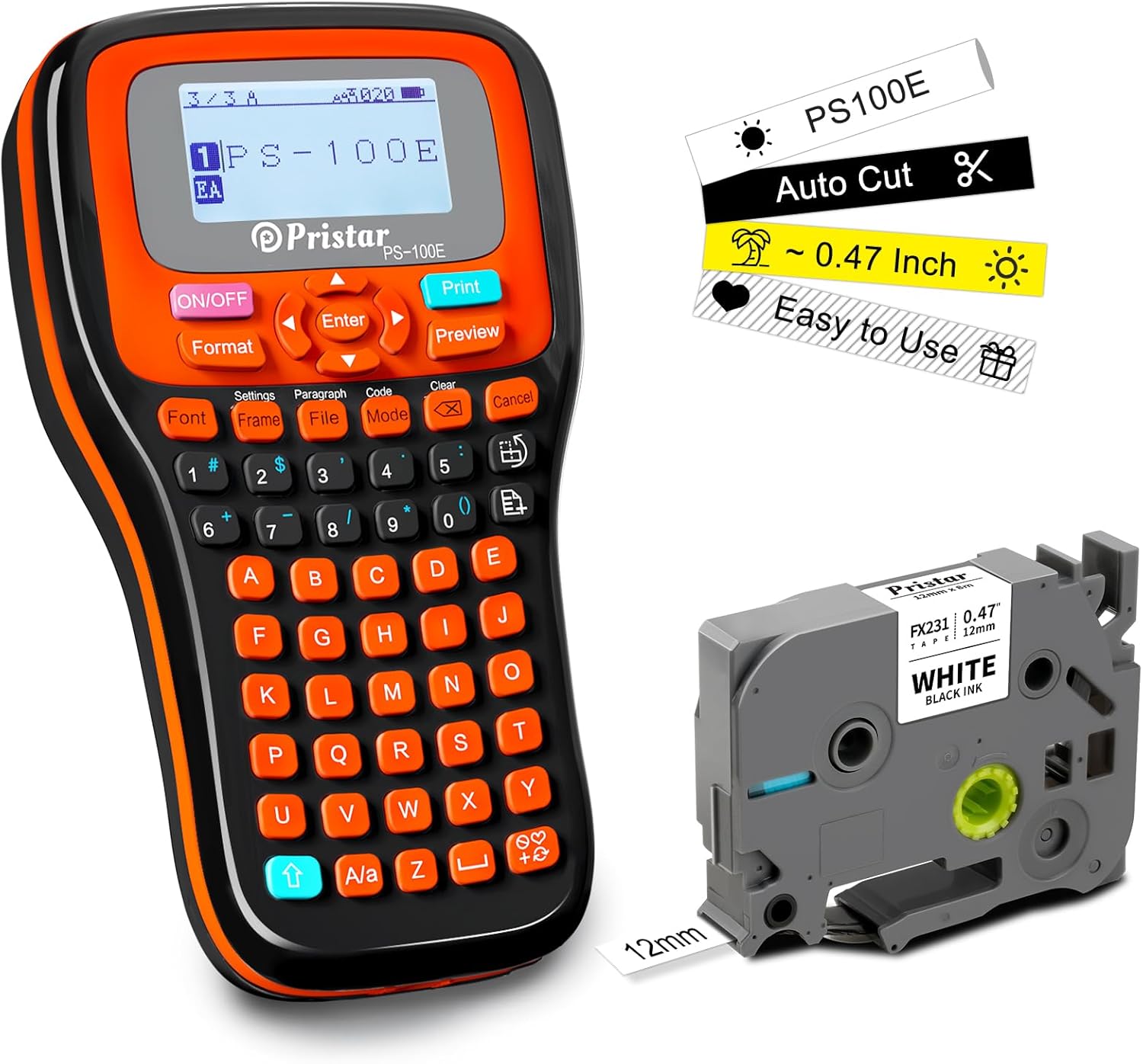
Slika: prednja strana view of the Pristar PS-100E Label Maker, highlighting its display, QWERTY keyboard, and key features such as auto-cut functionality and compatibility with 0.47-inch (12mm) tape.
- Automatsko rezanje: The device automatically cuts the label tape after printing, ensuring clean and precise labels without manual intervention.
- Multi-Line Printing: Supports printing up to 4 lines of text on compatible tapes.
- Zaslon s pozadinskim osvjetljenjem: The screen is backlit for clear visibility in various lighting conditions.
- QWERTY tipkovnica: Features a familiar keyboard layout for easy text input.
- Više opcija napajanja: Can be powered by the included rechargeable lithium polymer battery, DC adapter, or 6 x AAA dry batteries (not included).
- Wide Tape Compatibility: Supports TZe label tapes with widths of 3.5mm, 6mm, 9mm, and 12mm.
- Barcode and QR Code Printing: Capable of printing various barcode and QR code formats.

Image: A visual comparison highlighting the advantages of the Pristar PS-100E, including auto-cutting mode, 4-line max printing, 3-way charging, 4 margins setting, backlit screen, and auto-tighten tape feature, contrasted with typical features of other label makers.
Postavljanje
1. Napajanje uređaja
The PS-100E offers three power options:
- Rechargeable Lithium Polymer Battery: Insert the included rechargeable battery into the battery compartment located on the back of the device. Ensure correct polarity.
- Adapter istosmjerne struje: Connect the included DC adapter to the power port on the side of the label maker and plug it into a wall outlet. This also charges the rechargeable battery.
- AAA Dry Batteries (Optional): For portable use without the rechargeable battery or adapter, insert 6 x AAA batteries (not included) into the battery compartment. Ensure correct polarity.
2. Postavljanje naljepnice
- Open the tape cassette cover on the back of the label maker.
- Insert the label tape cassette (e.g., TZe-FX231) into the compartment, ensuring it clicks into place. The tape should feed smoothly through the tape guide.
- Zatvorite poklopac kasete s trakom.

Slika: Stražnja strana view of the Pristar PS-100E Label Maker with the tape compartment open, illustrating how to insert a label tape cassette. The auto-cutting mechanism is also visible.
Upute za rad
1. Osnovni rad
- Uključivanje/isključivanje: Pritisnite tipku UKLJUČENO/ISKLJUČENO gumb za uključivanje ili isključivanje uređaja.
- Unos teksta: Use the QWERTY keyboard to type your desired text. The backlit LCD screen will display your input.
- Navigacija: Use the arrow keys to move the cursor within the text.
- Unesite: Pritisnite tipku Uđi button to confirm selections or move to the next line.
- Jasan: Pritisnite tipku Jasan gumb za brisanje znakova.
- prijeview: Pritisnite tipku prijeview gumb kako biste vidjeli kako će vaša naljepnica izgledati prije ispisa.
2. Oblikovanje oznaka
The PS-100E offers various formatting options to customize your labels.
- Font: Pritisnite tipku Font button to change font styles and sizes.
- Format: Pritisnite tipku Format button to adjust text alignment, width, and other layout settings.
- Okvir: Pritisnite tipku Okvir button to add decorative frames around your text.
- Simboli: Access a wide range of symbols by pressing the Simbol key (often indicated by a symbol icon or accessed via Shift + a key).
- Multi-Line Printing: To print on multiple lines (up to 4), press the Uđi key after completing each line of text.
3. Napredne značajke
- Auto-Cut: The machine automatically cuts the label after printing. This feature ensures clean cuts and saves time.
- Continuous Printing: For printing multiple identical labels, use the continuous printing function. Refer to the on-screen menu under "Settings" or "Mode" for options like "Serial" or "Batch Print".
- Barcode/QR Code Printing: Select the "Code" or "Barcode" option from the menu to generate and print barcodes or QR codes. Ensure the data entered is valid for the chosen code type.
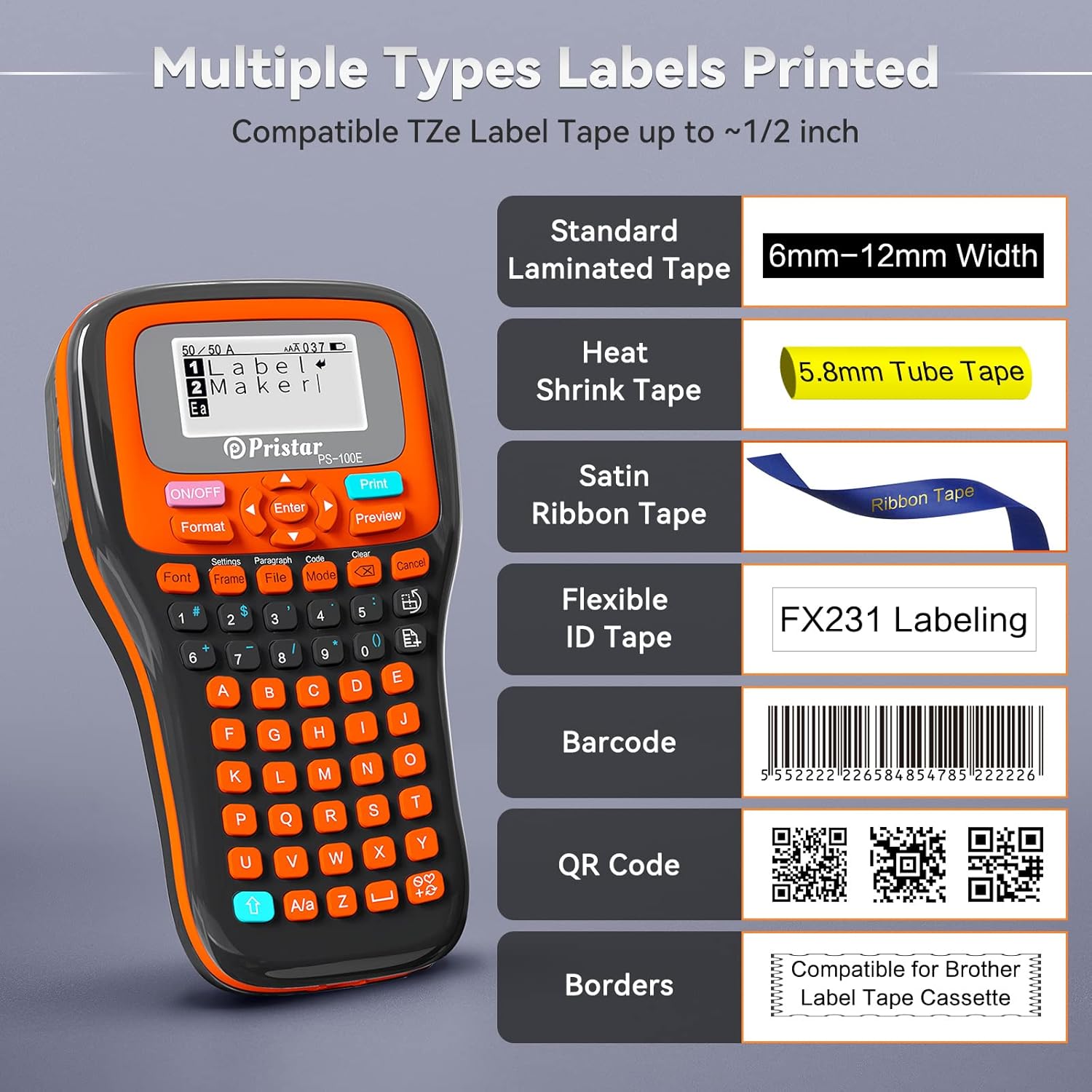
Image: The Pristar PS-100E Label Maker's screen showing examples of various label types it can print, such as standard laminated tape, heat shrink tubes, satin ribbon, flexible ID tape, barcodes, QR codes, and labels with decorative borders.
4. Tiskanje naljepnica
Nakon što ste dovršili tekst i formatiranje naljepnice, pritisnite Ispis button. The label maker will print and automatically cut the label.
Održavanje
- Čišćenje ispisne glave: If print quality degrades, gently clean the print head with a cotton swab dampened with isopropyl alcohol. Ensure the device is off and unplugged before cleaning.
- Cleaning the Cutter Blade: Periodically check the cutter blade for any tape residue. Use a soft brush to remove debris. Do not touch the blade directly.
- Njega baterije: If using the rechargeable battery, charge it regularly. If storing the device for an extended period, remove all batteries (rechargeable and AAA) to prevent leakage.
- Skladištenje: Uređaj za etiketiranje čuvajte na hladnom i suhom mjestu, dalje od izravne sunčeve svjetlosti i ekstremnih temperatura.
Rješavanje problema
| Problem | Mogući uzrok | Otopina |
|---|---|---|
| Uređaj se ne uključuje. | Low battery; Incorrect battery installation; Power adapter not connected. | Charge the rechargeable battery or replace AAA batteries. Ensure batteries are inserted with correct polarity. Verify DC adapter connection. |
| Loša kvaliteta ispisa (izblijedjelo, linije). | Print head dirty; Tape cassette not installed correctly; Low battery. | Clean the print head. Reinstall the tape cassette. Ensure sufficient power. |
| Tape does not feed or jams. | Tape cassette incorrectly installed; Tape tangled; Cutter blade obstructed. | Reinstall tape cassette. Check for and remove any tape tangles. Clean the cutter blade area. |
| Labels print multiple times unexpectedly. | "Multi-print" or "Serial" setting enabled. | Check the print settings (e.g., under "Mode" or "Settings") and ensure multi-print is set to 1 or disabled if not desired. |
| "Shift" button confusion. | The "Shift" function is often mapped to the blue arrow up button. | Use the blue arrow up button for "Shift" functionality to access secondary characters and functions. |
| Labels are not cutting automatically. | Auto-cut feature disabled; Cutter blade jammed. | Check settings to ensure auto-cut is enabled. Clean the cutter blade area for obstructions. |
Tehnički podaci
| Značajka | Detalj |
|---|---|
| Model | PS-100E |
| Metoda ispisa | Termotransfer ispis |
| Rezolucija | 180 dpi |
| Brzina ispisa | 15 mm/s |
| Kompatibilne širine trake | 3.5mm, 6mm, 9mm, 12mm (TZe series) |
| Način rezanja | Automatsko rezanje |
| Max Print Lines | 4 Linije |
| Mogućnosti napajanja | Rechargeable Lithium Polymer Battery (1500 mAh), DC Power Adapter (9V 1.5A), 6 x AAA Dry Batteries (not included) |
| Zaslon | LCD zaslon s pozadinskim osvjetljenjem |
| Tipkovnica | QWERTY (57 Silicone Buttons) |
| Dimenzije (D x Š x V) | 8.31 x 4.76 x 2.17 inča (otprilike 21.1 x 12.1 x 5.5 cm) |
| Težina (bez baterije) | 480g |
| Vrijeme pripravnosti | 500 sata |
Jamstvo i podrška
The Pristar PS-100E Label Maker comes with a Jamstvo 12 mjeseci od datuma kupnje. Ovo jamstvo pokriva proizvodne nedostatke i kvarove pri normalnoj uporabi.
For technical support, warranty claims, or inquiries about compatible accessories and tapes, please contact Pristar customer service. Refer to the contact information provided on the product packaging or the official Pristar webmjesto.
For more information and product updates, visit the official Pristar Store: Pristar Store on Amazon.
For general information about label makers and their applications, you may refer to resources like Wikipedia.
For information related to the manufacturer, you may visit www.cnkailan.com.
Prijave
The Pristar PS-100E is versatile and can be used for a wide range of labeling tasks, including:
- Organiziranje files and folders in offices.
- Labeling storage bins and containers at home.
- Marking cables and wires for identification.
- Creating labels for school projects and supplies.
- Labeling food containers and pantry items.
- Identifying plants in gardens.

Image: A collage demonstrating diverse applications of the Pristar PS-100E Label Maker, such as labeling small electronic components, network cables, office binders, kitchen spice jars, and plant pots.

Image: An electrician using the Pristar PS-100E Label Maker to create and apply labels for wires within an electrical panel, demonstrating its utility in industrial or technical settings for clear identification.