
Uvod
Welcome to the comprehensive instruction manual for your Samsung Galaxy S22 Ultra 5G. This guide provides essential information to help you set up, operate, maintain, and troubleshoot your device, ensuring you get the most out of its advanced features.
The Samsung Galaxy S22 Ultra 5G is a premium Android smartphone featuring an integrated S Pen, a powerful 108MP camera system, and a vibrant 6.8-inch Dynamic AMOLED display. Its robust design includes a formidable aluminum frame, the latest Gorilla Glass, and water resistance for both the phone and the S Pen.
Što je u kutiji
Upon unboxing your Samsung Galaxy S22 Ultra 5G, you will find the following items:
- Samsung Galaxy S22 Ultra 5G pametni telefon
- S olovka
- Podatkovni kabel (USB-C na USB-C)
- Zatik za izbacivanje
Note: Samsung Galaxy S22 models do not include a travel adapter (power brick).
Postavljanje
1. Umetanje SIM kartice
Locate the SIM card tray on the bottom edge of your device. Use the provided ejection pin to open the tray. Place your Nano-SIM card into the tray with the gold contacts facing down. Gently push the tray back into the slot until it clicks into place.

Slika 1: Bočna strana view of the Samsung Galaxy S22 Ultra 5G, highlighting the SIM card tray and USB-C port.
2. Početno uključivanje
Pritisnite i držite tipku za uključivanje/isključivanje/bočnu tipku (nalazi se na desnoj strani uređaja) dok se ne pojavi Samsung logotip. Slijedite upute na zaslonu za dovršetak početnog postavljanja, uključujući odabir jezika, Wi-Fi vezu i postavljanje Google računa.
3. S Pen Insertion and Removal
The S Pen is integrated into the bottom of the device. To remove it, gently press the end of the S Pen until it clicks and ejects slightly. Pull it out completely. To reinsert, push the S Pen back into its slot until it clicks securely.

Slika 2: Prednja strana view of the Samsung Galaxy S22 Ultra 5G with the S Pen partially ejected, demonstrating its integrated design.
Upravljanje vašim uređajem
1. Značajke zaslona
Your device features a 6.8-inch Dynamic AMOLED 2X display with a resolution of 3080 x 1440 pixels and a 120Hz refresh rate. This provides a smooth and immersive viewing experience with vibrant colors and deep blacks. The display is also incredibly bright, making it suitable for outdoor use even in direct sunlight.

Figure 3: The stunning 6.8-inch Dynamic AMOLED 2X display of the Samsung Galaxy S22 Ultra 5G.
2. S Pen Usage
The integrated S Pen allows for precise interaction with your device. You can use it to:
- Take notes and draw directly on the screen.
- Edit content with precision.
- Control your phone remotely using Air Actions.
- Convert handwriting to text.
3. Sustav kamera
The Samsung Galaxy S22 Ultra 5G boasts a powerful quad-camera system on the rear and a high-resolution front camera:
- Stražnje kamere: 108MP Wide-angle, 12MP Ultra-wide, 10MP Telephoto (3x optical zoom), 10MP Telephoto (10x optical zoom).
- Prednja kamera: 40MP.
The Pro-grade Camera corrects shake better than ever for steady clarity in each frame. Super HDR adjusts your shots for epic details and hues, displaying 64x more color even in tricky shadows or back-lit shots. You can also take full control over your shots by saving RAW files directly to the Gallery for fine-tuning.
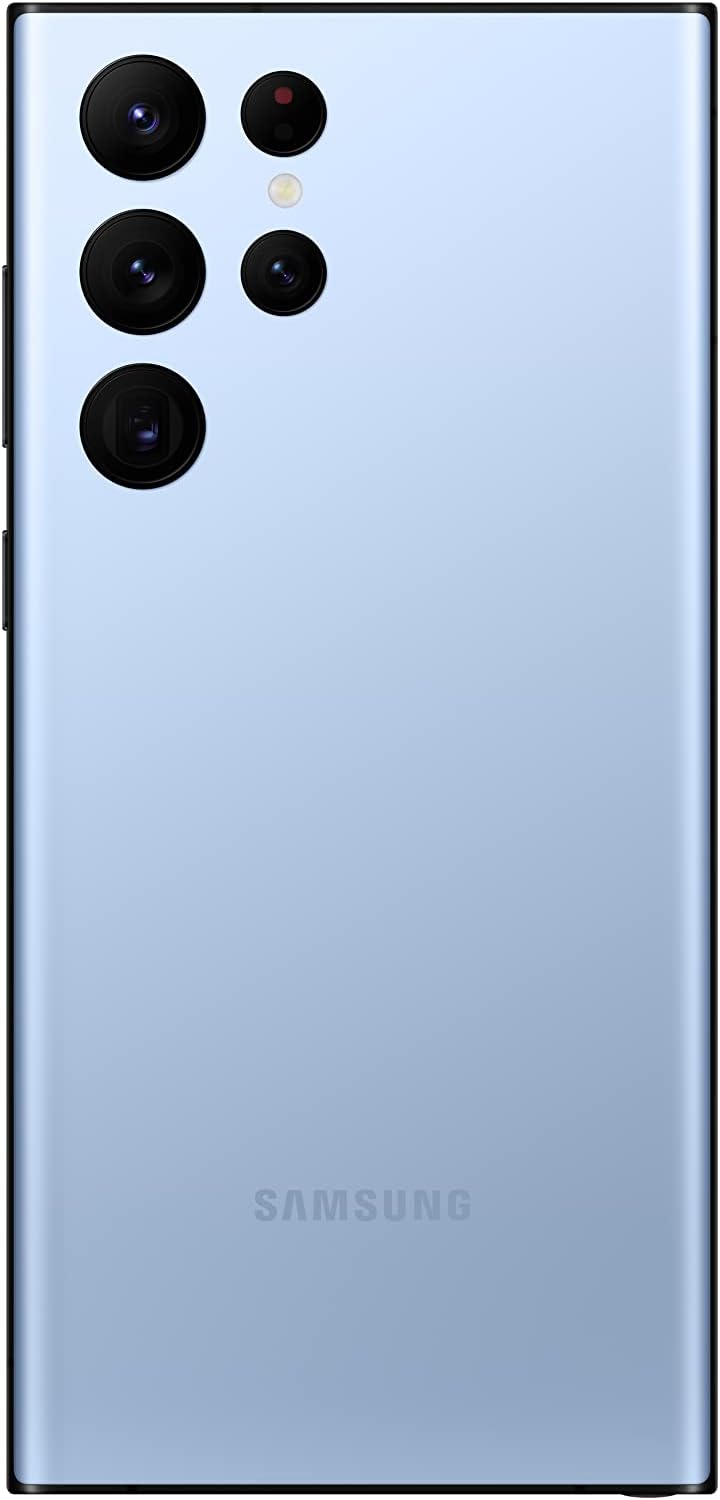
Figure 4: The advanced quad-camera system on the back of the Samsung Galaxy S22 Ultra 5G.
4. Performanse
Powered by the Snapdragon 8 Gen 1 CPU, the Galaxy S22 Ultra 5G delivers exceptional performance for multitasking, gaming, and demanding applications. It is available with 8GB or 12GB of RAM, depending on the storage configuration.
5. Baterija i punjenje
The device is equipped with a massive 5000mAh (typical) battery that intelligently saves power. It supports super-fast wired charging up to 45W (with a compatible adapter, sold separately) and wireless charging up to 15W. Reverse wireless charging is also available to power other compatible devices.
6. Povezivost i sigurnost
The Galaxy S22 Ultra 5G supports Bluetooth, USB, Wi-Fi, and 5G cellular connectivity. For security, it features an in-display ultrasonic fingerprint scanner and facial recognition.
Održavanje
1. Opća njega
Your Samsung Galaxy S22 Ultra 5G is built with a formidable aluminum frame and the latest Gorilla Glass for durability. It is also water-resistant. To maintain its condition, avoid exposing it to extreme temperatures, harsh chemicals, or physical impacts. Clean the screen and body with a soft, lint-free cloth.
2. Ažuriranja softvera
Samsung provides regular software updates for the Galaxy S22 Ultra 5G, including Android OS upgrades and security patches. Ensure your device is connected to Wi-Fi and has sufficient battery life before performing any updates. These updates enhance performance, add new features, and improve security.
Rješavanje problema
If you encounter any issues with your device, consider the following basic troubleshooting steps:
- Ponovno pokrenite uređaj: Jednostavno ponovno pokretanje često može riješiti manje softverske probleme.
- Provjerite ažuriranja softvera: Provjerite koristi li vaš uređaj najnoviju verziju softvera.
- Obriši predmemoriju aplikacije: If a specific app is causing issues, try clearing its cache in the App settings.
- Vraćanje na tvorničke postavke: Kao krajnje rješenje, možete izvršiti vraćanje uređaja na tvorničke postavke. Prije nego što nastavite, napravite sigurnosnu kopiju svih važnih podataka jer će se time izbrisati svi podaci na vašem uređaju.
For more detailed troubleshooting or persistent issues, please refer to Samsung's official support webstranicu ili se obratite službi za korisnike.
Tehnički podaci
| Značajka | Detalj |
|---|---|
| Naziv modela | S22 ULTRA |
| Operativni sustav | Android |
| Veličina zaslona | 6.8 inča |
| Rezolucija | 3080 x 1440 |
| Brzina osvježavanja | 120 Hz |
| OVAN | 12 GB (for 256GB storage variant) |
| Kapacitet pohrane memorije | 256 GB |
| Kapacitet baterije | 5000 Miliamp sati |
| Vrijeme razgovora telefonom | 22 sata |
| Tehnologije povezivanja | Bluetooth, USB, Wi-Fi |
| Bežični nosač | Otključan |
| Audio utičnica | USB tipa C |
| Ostale značajke kamere | Prednji, stražnji |
Jamstvo i podrška
Za detaljne informacije o jamstvu pogledajte jamstveni list koji ste dobili s proizvodom ili posjetite službenu Samsungovu podršku website. You can also find additional support, FAQs, and contact information on the Samsung trgovina na Amazonu.