
BIHUI Bu-llg12
BIHUI LLG12 Laser Level with 12 Lines User Manual
Model: Bu-llg12
1. Uvod
This user manual provides comprehensive instructions for the safe and effective operation, maintenance, and troubleshooting of your BIHUI LLG12 Laser Level. Please read this manual thoroughly before using the device to ensure optimal performance and to prevent damage or injury.
2. Sigurnosne upute
Always adhere to the following safety guidelines when operating the BIHUI LLG12 Laser Level:
- Lasersko zračenje: Do not stare directly into the laser beam. Avoid direct eye exposure. The laser level emits Class 2 laser radiation.
- Zaštitne naočale: Use the provided laser enhancement glasses (if included) to improve visibility of the laser lines, but note they do not offer eye protection against direct laser exposure.
- djeca: Držite uređaj izvan dohvata djece.
- Okruženje: Ne koristite lasersku libelu u eksplozivnim atmosferama, kao što je prisutnost zapaljivih tekućina, plinova ili prašine.
- Izmjene: Ne pokušavajte modificirati ili rastavljati lasersku libelu. Popravke smije obavljati samo ovlašteno servisno osoblje.
- Sigurnost baterije: Follow all battery manufacturer instructions for charging, handling, and disposal. Do not expose batteries to excessive heat or fire.
- Skladištenje: Čuvajte uređaj na suhom i hladnom mjestu kada nije u uporabi.
3. Proizvod je gotovview
The BIHUI LLG12 Laser Level is designed for precise leveling and alignment tasks. It projects 12 bright green laser lines (4 horizontal, 8 vertical) for comprehensive coverage.

Figure 3.1: The BIHUI LLG12 Laser Level with its complete set of accessories, including the main unit, carrying case, magnetic bracket, mini tripod, and laser enhancement glasses.
Ključne komponente:
- Laserski emiter: Projicira zelene laserske linije.
- Upravljačka ploča: Buttons for power, mode selection (horizontal/vertical lines), and pulse mode.
- Odjeljak za baterije: Sadrži punjivu bateriju.
- Brava njihala: Secures the pendulum for transport and manual mode operation.
- Montažni navoj: For attaching to a tripod or magnetic bracket.
- Magnetski nosač: Omogućuje pričvršćivanje na metalne površine.
- Mini tronožac: Provides a stable base for precise adjustments.
- Laser Enhancement Glasses: Improve visibility of laser lines in bright conditions.
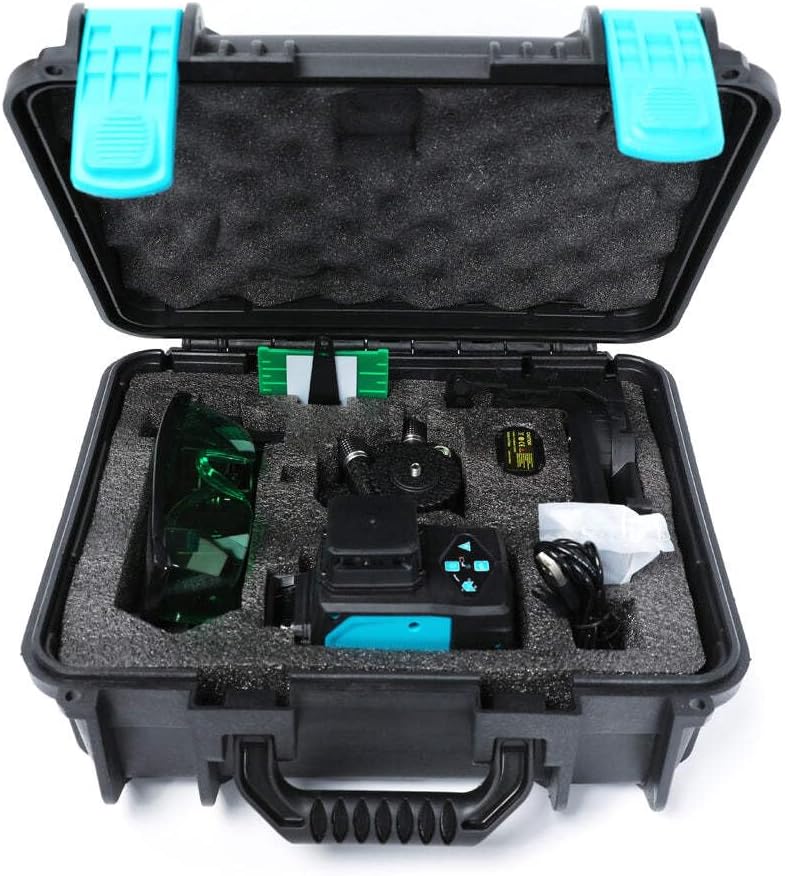
Figure 3.2: The BIHUI LLG12 Laser Level and its accessories neatly organized within the custom-fit protective carrying case, ensuring safe transport and storage.
4. Postavljanje
- Raspakiranje: Carefully remove the laser level and all accessories from the carrying case. Inspect for any signs of damage.
- Ugradnja baterije: Open the battery compartment and insert the rechargeable battery, ensuring correct polarity. Close the compartment securely. Charge the battery fully before first use.
- Plasman: Place the laser level on a stable, level surface. For elevated or precise positioning, attach it to the mini tripod or magnetic bracket using the mounting thread. Ensure the pendulum lock is in the unlocked position for self-leveling mode.
- Okruženje: Ensure the working area is free from obstructions and that the ambient light conditions allow for clear visibility of the laser lines.
5. Upute za rad
The BIHUI LLG12 offers multiple operating modes for various applications.
- Uključivanje/isključivanje:
- To power on, slide the pendulum lock switch to the unlocked position. The laser level will automatically enter self-leveling mode and project horizontal and vertical lines.
- To power off, slide the pendulum lock switch back to the locked position. This also secures the pendulum for transport.
- Način rada samoniveliranja:
- When the pendulum lock is unlocked, the device will self-level within its specified range (typically ±3°). If the device is outside this range, the laser lines will flash rapidly to indicate it cannot self-level. Adjust the position of the device until the lines become stable.
- Manual Mode (Slope Function):
- To activate manual mode, power on the device with the pendulum lock in the locked position. The laser lines will be projected but will not self-level, allowing you to project lines at any angle.
- This mode is useful for tasks like installing handrails or decorative patterns that require non-level lines.
- Odabir linije:
- Press the 'H' button to cycle through horizontal line combinations (e.g., one horizontal, two horizontal, all horizontal).
- Press the 'V' button to cycle through vertical line combinations (e.g., one vertical, two vertical, all vertical).
- Press both 'H' and 'V' buttons to activate all 12 lines.
- Pulse Mode (Outdoor Mode):
- Press the pulse mode button (often indicated by a 'P' or a receiver icon) to activate pulse mode. This mode is used when working with a laser receiver (not included) for extended working ranges or in bright outdoor conditions. The laser lines will appear dimmer to the naked eye in this mode.
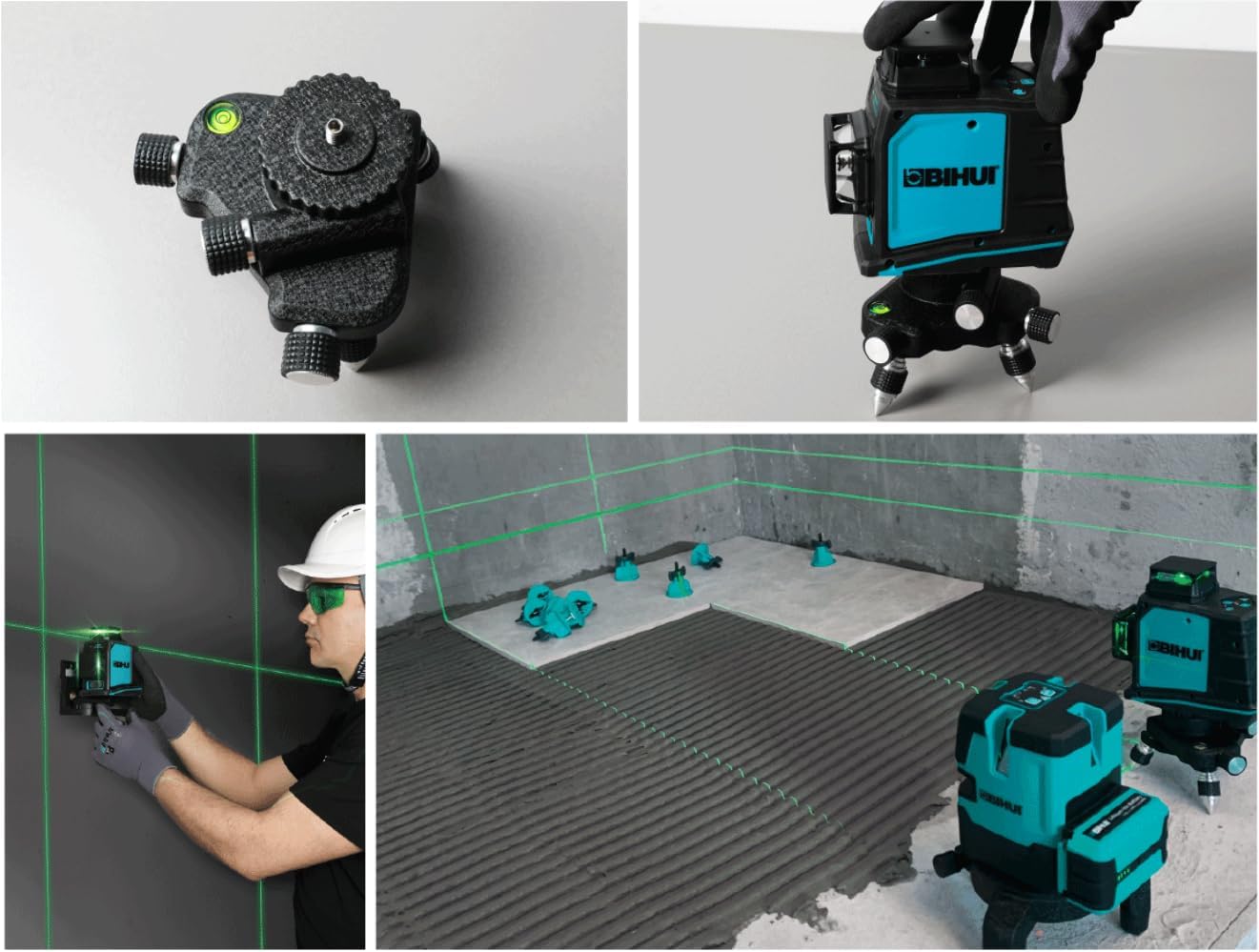
Slika 5.1: Npramples of the BIHUI LLG12 Laser Level in use for different construction and DIY applications, demonstrating its versatility for precise alignment on walls and floors.
6. Održavanje
Pravilno održavanje osigurava dugotrajnost i točnost vašeg laserskog nivelira.
- Čišćenje: Koristite meku, damp cloth to clean the device. Do not use abrasive cleaners or solvents. Keep the laser emission windows clean for optimal beam clarity.
- Skladištenje: Always engage the pendulum lock before storing or transporting the device. Store the laser level in its protective carrying case in a dry, cool place, away from direct sunlight and extreme temperatures.
- Njega baterije: If the device will not be used for an extended period, remove the battery to prevent leakage. Recharge the battery periodically to maintain its health.
- Kalibriranje: While the device is factory-calibrated, extreme impacts or prolonged use may affect its accuracy. If you suspect calibration issues, contact authorized service personnel.
7. Rješavanje problema
Za uobičajene probleme i njihova rješenja pogledajte sljedeću tablicu:
| Problem | Mogući uzrok | Otopina |
|---|---|---|
| Laserske linije brzo trepere. | Uređaj je izvan raspona samoniveliranja. | Postavite uređaj na ravniju površinu ili prilagodite njegov položaj dok se linije ne stabiliziraju. |
| Laser lines are not visible or very dim. |
|
|
| Uređaj se ne uključuje. |
|
|
| Laserske linije nisu ravne ili točne. |
|
|
8. Specifikacije
The following are the technical specifications for the BIHUI LLG12 Laser Level:
| Značajka | Detalj |
|---|---|
| Broj modela | Bu-llg12 |
| Dimenzije | 25 x 15 x 0.1 cm |
| Težina artikla | 800 grama |
| Broj linija | 12 (4 Horizontal, 8 Vertical) |
| Laserska klasa | Class 2 (typical for consumer laser levels) |
| Samonivelirajući domet | Typically ±3° (common for self-leveling lasers) |
| Izvor napajanja | Rechargeable Battery (type not specified, assumed standard) |
Note: Specific performance metrics like accuracy, working range, and battery life may vary based on environmental conditions and usage.
Ask a question about this manual
Ask about setup, troubleshooting, compatibility, parts, safety, or missing instructions. Manuals+ will review the question and use this page’s manual context to help answer it.