
1. Proizvod je gotovview
The havit GK59 Gaming Microphone is designed for clear audio capture during gaming, streaming, and voice communication. It features a condenser microphone for high-quality sound and a versatile design for ease of use.

Slika 1.1: Prednja strana view of the havit GK59 Gaming Microphone, showcasing its main body, stand, and control buttons.
Ključne karakteristike:
- Jednostavan za korištenje: Jednostavna plug-and-play funkcionalnost.
- Good Performance: Delivers clear and consistent audio.
- Good Quality: Durable construction for reliable use.
- Prijenosni dizajn: Kompaktan i jednostavan za transport.
- Podesivo postolje: Allows for flexible positioning.
2. Upute za postavljanje
2.1 Sadržaj paketa
Molimo provjerite paket za sljedeće stavke:
- havit GK59 Gaming Microphone
- USB priključni kabel
- Korisnički priručnik (ovaj dokument)
2.2 Spajanje mikrofona
The GK59 microphone offers versatile connectivity options for various devices.
- USB veza: Connect the provided USB cable to the USB-C port on the back of the microphone and the other end to an available USB port on your computer or gaming console. The microphone is plug-and-play and should be automatically recognized by most operating systems.
- 3.5mm Jack Connection: For devices supporting a 3.5mm auxiliary input, connect a 3.5mm audio cable (not included) to the 3.5mm jack on the back of the microphone and to your device's audio input.
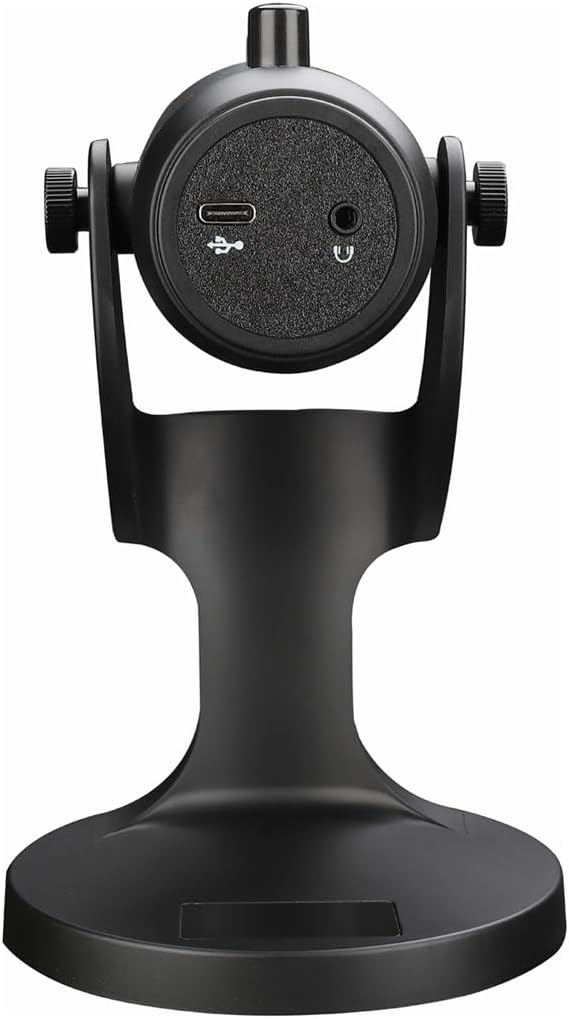
Slika 2.1: Stražnji dio view of the havit GK59 Gaming Microphone, highlighting the USB-C port for data and power, and the 3.5mm headphone jack for monitoring.
After connecting, ensure the microphone is selected as the default input device in your system's sound settings or your gaming/streaming software.
3. Upute za rad
3.1 Osnovne kontrole
The havit GK59 features intuitive controls located on the front of the microphone body:
- Gumb za isključivanje zvuka: Press to mute or unmute the microphone. An indicator light will typically show the mute status.
- MIC +/- Buttons: Adjust the microphone input sensitivity (gain). Press '+' to increase, '-' to decrease.
- Gumbi VOL +/-: Adjust the headphone output volume for monitoring. Press '+' to increase, '-' to decrease.
- ECHO +/- Buttons: Adjust the echo effect level. Press '+' to increase, '-' to decrease.
Slika 3.1: Detaljno view of the microphone's control panel, including the mute button, microphone gain, volume, and echo adjustment buttons.
3.2 Adjusting Microphone Position
The microphone is equipped with an adjustable stand, allowing you to optimize its position for best sound capture and comfort.
- Gently hold the microphone body and the base of the stand.
- Tilt the microphone forward or backward to achieve the desired angle. The stand's design helps reduce vibration and abnormal sounds during use.
- Za optimalnu jasnoću glasa, postavite mikrofon otprilike 15-30 cm od usta.

Figure 3.2: The havit GK59 microphone demonstrating its adjustable tilt feature on the stand, designed for anti-vibration.
4. Održavanje
4.1 Čišćenje
Za održavanje performansi i izgleda mikrofona:
- Disconnect the microphone from its power source before cleaning.
- Za brisanje vanjskih površina koristite meku, suhu krpu.
- Ne koristite tekuća sredstva za čišćenje, aerosole ili otapala jer mogu oštetiti završnu obradu ili unutarnje komponente.
4.2 Skladištenje
Kada se ne koristi, mikrofon čuvajte na hladnom i suhom mjestu, dalje od izravne sunčeve svjetlosti i ekstremnih temperatura. Zaštitite ga od prašine i vlage.
5. Rješavanje problema
If you encounter issues with your havit GK59 Gaming Microphone, please refer to the following table for common problems and solutions:
| Problem | Mogući uzrok | Otopina |
|---|---|---|
| No sound input from microphone | Mikrofon nije ispravno spojen Odabran je pogrešan ulazni uređaj Mikrofon isključen | Provjerite je li USB kabel sigurno spojen. Check system sound settings and select GK59 as input. Press the Mute button on the microphone to unmute. |
| Niska glasnoća mikrofona | Microphone gain too low System input volume too low | Press the 'MIC +' button on the microphone. Adjust input volume in your system's sound settings. |
| Iskrivljen ili nejasan zvuk | Microphone gain too high Microphone too close to mouth Okolišni šum | Press the 'MIC -' button on the microphone. Podesite položaj mikrofona (6-12 cm od usta). Smanjite pozadinsku buku u svom okruženju. |
| No headphone monitoring sound | Slušalice nisu spojene Glasnoća slušalica preniska | Ensure headphones are plugged into the 3.5mm jack. Press the 'VOL +' button on the microphone. |
6. Tehničke specifikacije
Below are the technical specifications for the havit GK59 Gaming Microphone:
| Značajka | Specifikacija |
|---|---|
| Marka | navika |
| Broj modela | GK59 |
| Tehnologija povezivanja | USB, 3.5 mm Jack (Auxiliary) |
| Preporučena upotreba | Igre |
| Polarni uzorak | Jednosmjerno |
| Faktor oblika mikrofona | Handheld (with desktop stand) |
| Težina artikla | 429 gram |
| Impedancija | 250 Ohma |
| Signal-to-Noise Ratio | 18 dB |
| Čujna buka | 18 decibela |
| Izvor napajanja | Električni s kabelom (putem USB-a) |
| Kompatibilni uređaji | Gaming Consoles, PCs |
| Dimenzije artikla (DxŠxV) | 5.59 x 4.92 x 9.06 inča |
| Boja | Crna |
7. Jamstvo i podrška
7.1 Informacije o jamstvu
The havit GK59 Gaming Microphone comes with a standard manufacturer's warranty. Please refer to the warranty card included in your product packaging or visit the official havit webstranicu za detaljne uvjete jamstva.
7.2 Korisnička podrška
For technical assistance, troubleshooting not covered in this manual, or warranty claims, please contact havit customer support through their official channels. You can find more information and contact details on the havit Trgovina na Amazonu ili njihov službenik webmjesto.