
1. Uvod
This manual provides detailed instructions for the setup, operation, and maintenance of your Graflsoa PG-9078 Bluetooth Wireless Gamepad. Please read this manual thoroughly before using the product to ensure proper functionality and to maximize your gaming experience. This gamepad is compatible with iOS, Android, Tablet, Phone, PC, Smart TV, and Set Top Box devices.
2. Sigurnosne informacije
- Do not expose the gamepad to extreme temperatures, humidity, or direct sunlight.
- Izbjegavajte ispuštanje ili izlaganje kontrolera za igre jakim udarcima.
- Ne pokušavajte rastavljati ili modificirati gamepad. Time ćete poništiti jamstvo.
- Keep the gamepad away from water and other liquids.
- Koristite samo priloženi kabel za punjenje ili njegov certificirani ekvivalent.
- Store the gamepad in a clean, dry place when not in use.
3. Sadržaj paketa
Molimo provjerite sadržaj paketa nakon raspakiranja:
- Graflsoa PG-9078 Wireless Gamepad
- USB kabel za punjenje
- Korisnički priručnik (ovaj dokument)
4. Proizvod je gotovview
Familiarize yourself with the components and features of your PG-9078 gamepad.
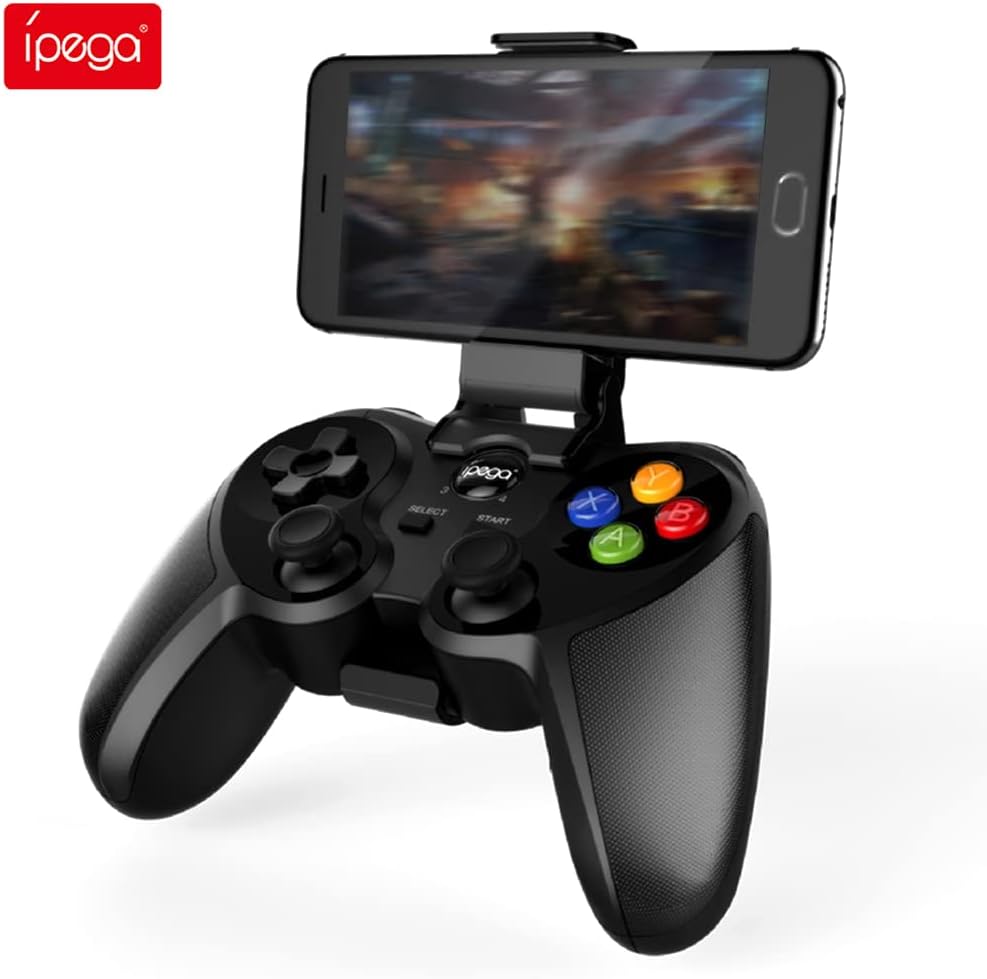
Figure 4.1: Graflsoa PG-9078 Wireless Gamepad with a smartphone mounted in the integrated holder.
The Graflsoa PG-9078 is a versatile Bluetooth gamepad designed for various gaming platforms. It features a comfortable ergonomic design, precise controls, and an integrated phone holder.
4.1 Ključne značajke
- Integrirani držač za telefon: Supports smartphones from 4 to 5.5 inches, with an adjustable angle for optimal viewing.
- Hall Effect Sensor Switches: Provides durable and responsive trigger input.
- High Accuracy Joysticks: 360-degree precision joysticks with anti-slip texture to prevent operational errors.
- Responzivni gumbi: Fast response time for all face buttons and shoulder buttons.
- Analog L2/R2 Triggers: Offers precise control for racing and other games requiring nuanced input.
- Bluetooth povezivanje: Stable wireless connection with a transmission distance of up to 8 meters.

Figure 4.2: The adjustable phone holder, designed to securely hold smartphones between 4 and 5.5 inches. The angle can be freely adjusted for user comfort.

Figure 4.3: The high-accuracy joystick, featuring 360-degree movement and an anti-slip texture for enhanced control.

Figure 4.4: The highly sensitive and responsive face buttons and shoulder buttons, designed for quick input.
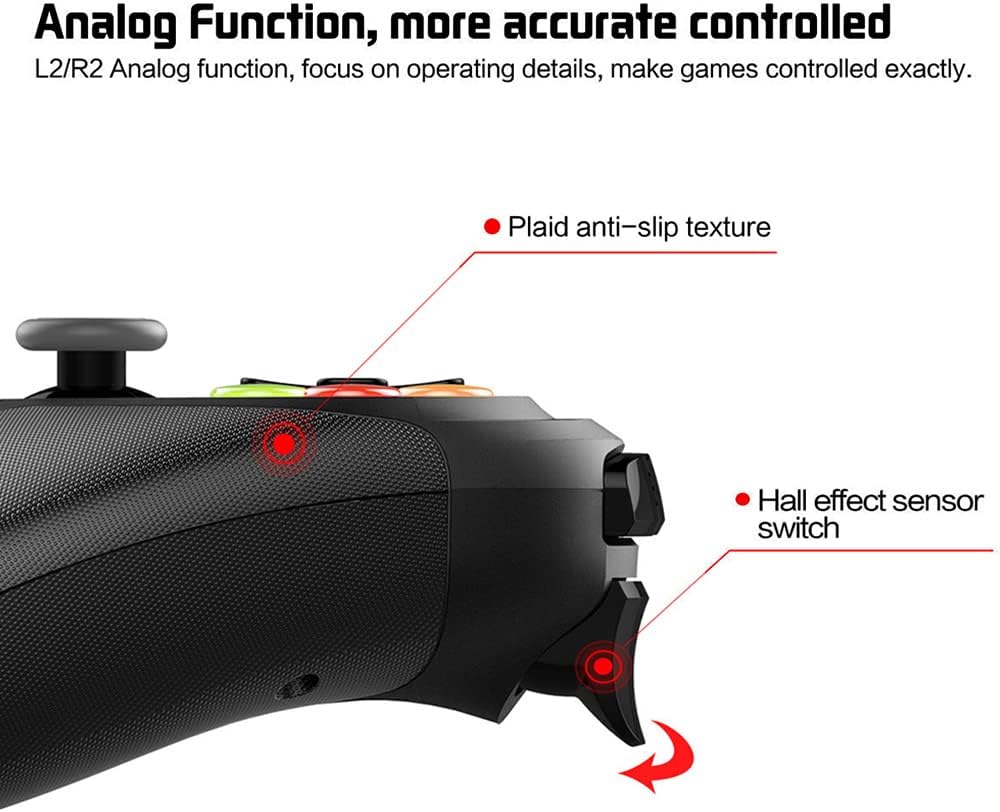
Figure 4.5: The L2/R2 analog triggers, providing accurate and detailed control for various in-game actions.

Figure 4.6: The gamepad utilizes Bluetooth technology for wireless connectivity, offering a stable connection up to 8 meters.
5. Upute za postavljanje
5.1 Punjenje Gamepad-a
- Spojite manji kraj USB kabela za punjenje na priključak za punjenje na gamepadu.
- Spojite veći kraj USB kabela za punjenje na USB izvor napajanja (npr. USB priključak računala, USB adapter za zid).
- The charging indicator light on the gamepad will illuminate during charging and turn off or change color when fully charged.
- Potpuno punjenje obično traje otprilike 2-3 sata.
5.2 Pričvršćivanje držača telefona
- Locate the phone holder attachment point on the top of the gamepad.
- Carefully slide the phone holder into the designated slot until it clicks securely into place.
- Adjust the angle of the holder to your preferred viewing položaj.
- Gently place your smartphone (4-5.5 inches) into the holder, ensuring it is securely gripped.
5.3 Bluetooth uparivanje
The PG-9078 supports multiple connection modes. Select the appropriate mode for your device.
5.3.1 Android Standard Mode
- Provjerite je li gamepad isključen.
- Pritisnite i držite "X" button + HOME button simultaneously until the indicator light flashes rapidly.
- On your Android device, enable Bluetooth and search for available devices.
- Select "PG-9078" from the list to pair. The indicator light will become solid once connected.
5.3.2 iOS Standard Mode
- Provjerite je li gamepad isključen.
- Pritisnite i držite "Y" button + HOME button simultaneously until the indicator light flashes rapidly.
- On your iOS device, enable Bluetooth and search for available devices.
- Select "PG-9078" from the list to pair. The indicator light will become solid once connected.
5.3.3 PC/Smart TV Mode (Direct Play)
- Provjerite je li gamepad isključen.
- Pritisnite i držite "A" button + HOME button simultaneously until the indicator light flashes rapidly.
- On your PC or Smart TV, enable Bluetooth and search for available devices.
- Select "PG-9078" from the list to pair. The indicator light will become solid once connected.
Note: After successful pairing, the gamepad will automatically connect to the last paired device when powered on in the same mode.
6. Upute za rad
6.1 Uključivanje/isključivanje
- Uključivanje: Pritisnite tipku tipka HOME for 1 second. The indicator light will flash, then connect to the last paired device.
- Isključivanje: Pritisnite i držite tipka HOME for 5 seconds until the indicator light turns off. The gamepad will also automatically power off after 5 minutes of inactivity.
6.2 Gamepad Modes
The PG-9078 supports different modes for optimal compatibility:
- Android Standard Mode (X + HOME): For most Android games and emulators.
- iOS Standard Mode (Y + HOME): For iOS games that support MFi controllers or specific gamepad protocols.
- PC/Smart TV Mode (A + HOME): For direct play on Windows PCs (requires Bluetooth adapter) and compatible Smart TVs.
Note: Game compatibility varies by platform and game title. Some games may require specific mapping or may not support external controllers.
6.3 Korištenje kontrola
The gamepad features standard controls:
- Smjerna tipka (D-Pad): Za precizan smjerni unos.
- Lijeva/desna analogna palica: Za kretanje od 360 stupnjeva i upravljanje kamerom.
- Gumbi na prednjoj strani (A, B, X, Y): Za radnje u igri.
- Gumbi za rame (L1, R1): For quick actions.
- Analog Triggers (L2, R2): For pressure-sensitive input, ideal for acceleration/braking in racing games.
- Tipke ODABERI/POKRENI: For menu navigation and game functions.
- Gumb HOME: For power on/off and mode switching.

Figure 6.1: Proper grip and button access on the Graflsoa PG-9078 gamepad, highlighting its ergonomic design and Hall effect sensor switches.
7. Održavanje
- Čišćenje: Use a soft, dry cloth to wipe the surface of the gamepad. Do not use harsh chemicals or abrasive cleaners.
- Skladištenje: Gamepad čuvajte na hladnom i suhom mjestu, dalje od izravne sunčeve svjetlosti i ekstremnih temperatura.
- Njega baterije: To prolong battery life, avoid fully discharging the gamepad frequently. Charge it regularly, even if not in constant use. If storing for an extended period, charge it to about 50% every few months.
8. Rješavanje problema
8.1 Gamepad Does Not Power On
- Ensure the gamepad is charged. Connect it to a power source using the USB cable and allow it to charge for at least 30 minutes before attempting to power on again.
- Pritisnite i držite tipku HOME 1 sekundu za uključivanje.
8.2 Unable to Pair via Bluetooth
- Ensure the gamepad is in the correct pairing mode for your device (Android: X+HOME, iOS: Y+HOME, PC/Smart TV: A+HOME).
- Provjerite je li Bluetooth omogućen na vašem uređaju i je li vidljiv.
- Move the gamepad closer to your device (within 8 meters).
- Forget/remove "PG-9078" from your device's Bluetooth list and attempt to pair again.
- Restart both your device and the gamepad.
8.3 Gumbi/džojstici ne reagiraju
- Verify that the gamepad is successfully connected to your device.
- Check game settings to ensure controller support is enabled and controls are mapped correctly.
- Some games may not fully support external gamepads.
- Try restarting the gamepad and your device.
9. Specifikacije
| Model | PG-9078 |
| Povezivost | Bluetooth bežični |
| Bluetooth domet | Do 8 metara |
| Kompatibilnost | iOS, Android, Tablet, Phone, PC, Smart TV, Set Top Box |
| Phone Holder Support | 4 - 5.5 inch smartphones |
| Posebne značajke | Hall Effect Sensor Switches, 360-degree High Accuracy Joysticks, Analog L2/R2 Triggers |
| Izvor napajanja | Rechargeable Battery (Internal) |
10. Jamstvo i podrška
Za informacije o jamstvu i tehničku podršku, molimo pogledajte dokumentaciju koja je priložena uz kupnju ili se obratite prodavaču. Sačuvajte dokaz o kupnji za bilo kakve reklamacije u okviru jamstva.