
1. Uvod
This manual provides instructions for the setup, operation, and maintenance of your FightBox F1-UFB-UP5 All Buttons Leverless Arcade Game Controller. This controller is designed for use with various gaming platforms including PlayStation 5, PlayStation 4, PlayStation 3, PC, Xbox Series X, and Nintendo Switch.
2. Proizvod je gotovview
The FightBox F1-UFB-UP5 is a high-performance leverless arcade controller, featuring an all-button layout for precise input. It incorporates the Brook Universal Fighting Board (UFB) and UFB-UP5 for broad platform compatibility and low-latency performance. The controller is equipped with Sanwa buttons, known for their responsiveness and durability.

This image illustrates the FightBox F1-UFB-UP5 controller alongside its internal components, specifically highlighting the Brook Universal Fighting Board and the UFB-UP5 module, which enable multi-platform compatibility.

Odozgo prema dolje view of the FightBox F1-UFB-UP5 controller, showcasing its all-button layout with red and black Sanwa buttons and the 'FIGHTBOX' branding.
3. Postavljanje
The FightBox F1-UFB-UP5 controller connects to your gaming platform via a standard USB cable. No additional drivers are typically required for console use, but PC users may need to ensure proper drivers are installed for optimal performance.
- Connect the USB cable from the controller to an available USB port on your gaming console (PlayStation 5, PlayStation 4, PlayStation 3, Xbox Series X, Nintendo Switch) or PC.
- The controller should be automatically recognized by most systems. For PC, if not automatically recognized, check your operating system's device manager for driver updates or visit the Brook webstranica za preuzimanje određenih upravljačkih programa.
- Ensure the correct input mode is selected if your console requires it (refer to your console's documentation).
4. Upute za rad
The F1-UFB-UP5 features a leverless button layout, replacing the traditional joystick with directional buttons for precise movement inputs. The primary action buttons are arranged for intuitive gameplay.

This diagram illustrates the button assignments for the PlayStation versions of the FightBox F1-UFB-UP5 controller. It identifies the USB port, Touchpad, Share, R3, L3, Option, and Home buttons, along with the directional and action buttons.
- Gumbi za usmjeravanje: The four red buttons on the left side control movement (Up, Down, Left, Right).
- Akcijski gumbi: The eight black buttons on the right side are for primary game actions.
- Gumb Option: Typically used for pausing games or accessing menus.
- Gumb Početna: Returns to the console's main menu or dashboard.
- Podijeli gumb: Used for sharing gameplay content (on PlayStation platforms).
- Touchpad: Functions as a touchpad input (on PlayStation platforms).
- R3/L3 Buttons: These buttons correspond to pressing down the right and left analog sticks on a standard controller.
For specific button mappings on different platforms (Xbox, Nintendo Switch), the controller automatically adapts. Consult your game's control settings for customization options.
5. Održavanje
Proper maintenance ensures the longevity and performance of your FightBox F1-UFB-UP5 controller.
- Čišćenje: Use a soft, dry cloth to wipe down the surface of the controller. For stubborn marks, a slightly damp Može se koristiti krpa s blagim sapunom, a zatim suho brisanje. Izbjegavajte abrazivna sredstva za čišćenje ili otapala.
- Skladištenje: Store the controller in a cool, dry place away from direct sunlight and extreme temperatures.
- Održavanje kabela: Avoid sharp bends or kinks in the USB cable. Disconnect by pulling the plug, not the cable itself.
- Njega gumba: Do not apply excessive force to the buttons. If a button feels sticky, it may require professional cleaning or replacement.
6. Rješavanje problema
If you encounter issues with your FightBox F1-UFB-UP5 controller, refer to the following common solutions.
- Kontroler nije prepoznat:
- Provjerite je li USB kabel sigurno spojen i na kontroler i na konzolu/računalo.
- Pokušajte s drugim USB priključkom.
- Ponovno pokrenite konzolu ili računalo.
- For PC, check device manager for driver issues and update if necessary.
- Gumbi ne reagiraju:
- Verify the controller is powered on and connected.
- Test buttons in a different game or system menu to isolate the issue.
- If only specific buttons are affected, they may require cleaning or replacement.
- Input Lag:
- Ensure you are using a direct USB connection, avoiding unpowered USB hubs.
- Check for any background processes on your PC that might be consuming resources.
- Ensure your console's firmware and game software are up to date.
7. Specifikacije
Detailed specifications for the FightBox F1-UFB-UP5 All Buttons Leverless Arcade Game Controller.
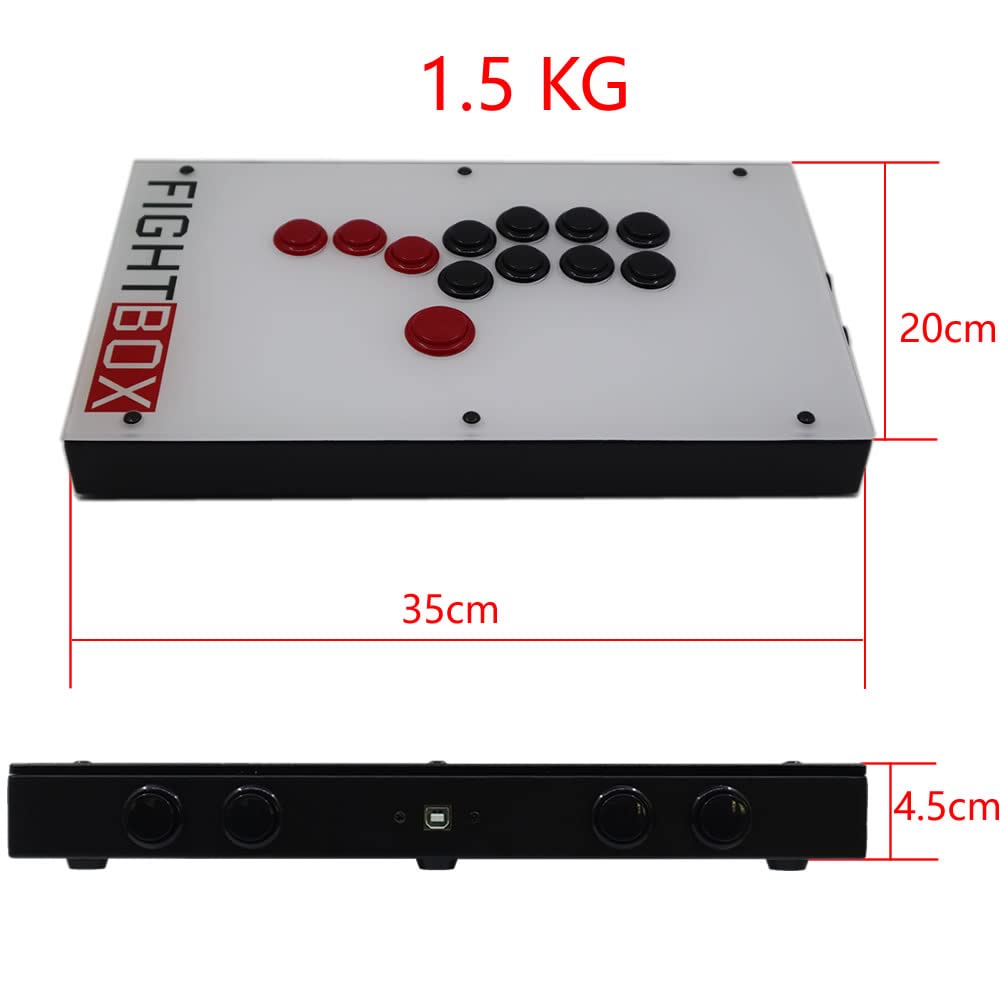
This image provides the physical dimensions of the FightBox F1-UFB-UP5 controller, showing a length of 35cm, width of 20cm, and height of 4.5cm, with a total weight of 1.5 kg.
| Značajka | Detalj |
|---|---|
| Model | F1-UFB-UP5 |
| Marka | FightBox |
| Povezivost | USB |
| Vrsta kontrolera | Leverless Arcade Controller |
| Količina gumba | 12 |
| Posebne značajke | Touchpad |
| Kompatibilni uređaji | PlayStation 5, PlayStation 4, PlayStation 3, PC, Xbox Series X, Nintendo Switch |
| Dimenzije (D x Š x V) | 15.75 x 9.84 x 3.94 inča (otprilike 35 x 20 x 4.5 cm) |
| Težina | 1.5 kilogram |
| Interni odbor | Brook Universal Fighting Board (UFB) + UFB-UP5 |
| Gumbi | Sanwa |
| UPC/GTIN | 635648885254 |
8. Jamstvo i podrška
For warranty information and technical support, please refer to the official FightBox webweb-mjesto ili se obratite prodavaču. Sačuvajte račun kao dokaz o kupnji.
Za dodatnu pomoć posjetite: FightBox Official Store