
1. Uvod
This manual provides detailed instructions for the installation, operation, and maintenance of the Supermicro X13SEI-F Server Motherboard. This motherboard is designed for high-performance server applications, supporting Intel Xeon processors with an LGA4677 socket and DDR5 memory.
Please read this manual thoroughly before attempting to install or operate the motherboard to ensure proper setup and to prevent damage to the components.
2. Sigurnosne informacije
Pridržavajte se sljedećih sigurnosnih mjera kako biste spriječili ozljede i oštećenje opreme:
- Uvijek isključite kabel za napajanje iz napajanja prije ugradnje ili uklanjanja bilo kakvih komponenti.
- Wear an anti-static wrist strap when handling the motherboard and other components to prevent electrostatic discharge (ESD).
- Ensure the installation environment is dry and free from static electricity.
- Ne izlažite matičnu ploču vlazi ili ekstremnim temperaturama.
- Držite matičnu ploču za rubove kako biste izbjegli dodirivanje osjetljivih komponenti.
- Za sigurnosne smjernice vezane uz spajanje na napajanje pogledajte priručnik za napajanje.
3. Sadržaj paketa
Provjerite jesu li svi artikli prisutni i u dobrom stanju. Ako su neki artikli oštećeni ili nedostaju, obratite se svom dobavljaču.
- Supermicro X13SEI-F Server Motherboard
- I / O štit
- SATA kablovi (količina može varirati)
- Quick Reference Guide / User Manual (this document)
- CD/DVD ili USB pogon s upravljačkim programima (ili upute za preuzimanje)
4. Proizvod je gotovview
The Supermicro X13SEI-F is a high-performance server motherboard featuring the LGA4677 socket, designed to support Intel Xeon Scalable processors. It offers robust memory capabilities with 8 DDR5 DIMM slots, supporting up to 4800MHz memory speed. The board also includes multiple PCIe slots for expansion.
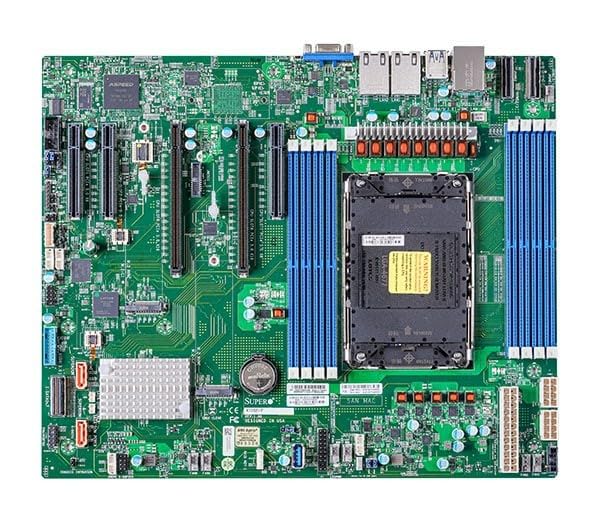
Figure 1: Supermicro X13SEI-F Server Motherboard. This image displays the overall layout of the motherboard, including the CPU socket, DIMM slots, and various connectors.
4.1 Ključne značajke
- Procesorska utičnica: LGA4677 for Intel Xeon Scalable Processors
- Čipset: Intel C621
- Memorija: 8x DDR5 DIMM slots, up to 4800MHz
- Utori za proširenje: Multiple PCIe slots (specific configuration depends on model variant)
- Skladištenje: Support for various storage interfaces (SATA, NVMe - specific details in specifications)
- Umrežavanje: Integrated LAN controllers
5. Postavljanje i instalacija
Before beginning installation, ensure your system case is compatible with the motherboard's form factor and that you have all necessary components.
5.1 CPU Installation (LGA4677)
- Pronađite LGA4677 utor na matičnoj ploči.
- Carefully open the CPU socket retention mechanism according to the instructions provided with your CPU or motherboard.
- Align the CPU with the socket, ensuring the triangular mark on the CPU matches the mark on the socket. Do not force the CPU into the socket.
- Pažljivo spustite CPU u utičnicu.
- Close the CPU socket retention mechanism until it locks securely.
- Instalirajte hladnjak procesora prema uputama proizvođača.
5.2 Instalacija RAM-a (DDR5)
- Locate the 8 DDR5 DIMM slots on the motherboard.
- Otvorite kopče za zadržavanje na oba kraja DIMM utora.
- Poravnajte zarez na DDR5 memorijskom modulu s ključem u DIMM utoru.
- Insert the memory module firmly into the slot until the retention clips snap into place. Ensure both clips are closed.
- For optimal performance, refer to the motherboard's manual for recommended memory population order.
5.3 Instalacija PCIe kartice
- Identify the appropriate PCIe slot for your expansion card (e.g., GPU, RAID card).
- Uklonite odgovarajući poklopac utora za proširenje s kućišta.
- Align the PCIe card with the slot and press down firmly until it is fully seated.
- Pričvrstite karticu vijkom ili kopčom za kućište.
5.4 Instalacija uređaja za pohranu
- SATA diskovi: Connect SATA data cables from the motherboard's SATA ports to your SATA hard drives or SSDs. Connect power cables from the PSU to the drives.
- NVMe M.2 Drives: Locate the M.2 slots. Insert the M.2 drive at an angle, then push it down and secure it with the provided screw or retention mechanism.
5.5 Priključci za napajanje
- Connect the 24-pin ATX power connector from your power supply to the main power socket on the motherboard.
- Connect the 8-pin (or 4+4 pin) EPS 12V CPU power connector(s) to the corresponding sockets near the CPU.
- Provjerite jesu li svi priključci za napajanje sigurni.
5.6 Priključci prednje ploče
Connect the front panel cables (Power LED, HDD LED, Power Switch, Reset Switch, USB, Audio) from your chassis to the corresponding headers on the motherboard. Refer to the motherboard's silkscreen labels or the detailed manual for exact pin configurations.
6. Upute za rad
6.1 Prvo pokretanje
- After completing all hardware installations, connect the monitor, keyboard, and mouse.
- Connect the power cord to the power supply and turn on the power switch on the PSU.
- Pritisnite gumb za napajanje na kućištu.
- The system should power on, and you should see the BIOS/UEFI POST screen.
6.2 Postavljanje BIOS-a/UEFI-ja
Za ulazak u uslužni program za postavljanje BIOS-a/UEFI-ja pritisnite DEL or F2 key repeatedly during the POST process. Within the BIOS/UEFI, you can configure:
- Redoslijed pokretanja
- Sustavno vrijeme i datum
- Postavke procesora i memorije
- Storage configurations (RAID, AHCI)
- Kontrola brzine ventilatora
- Sigurnosne postavke
Save changes before exiting the BIOS/UEFI.
6.3 Instalacija operativnog sustava
Insert your operating system installation media (USB drive or DVD) and set it as the primary boot device in the BIOS/UEFI. Follow the on-screen instructions to install your preferred operating system. After installation, install all necessary drivers from the Supermicro webweb-mjesto ili priloženi medij s upravljačkim programima.
7. Održavanje
7.1 Čišćenje
- Regularly clean dust from the motherboard and system components using compressed air.
- Prije čišćenja provjerite je li sustav isključen i iskopčan iz struje.
- Izbjegavajte korištenje tekućih sredstava za čišćenje izravno na komponentama.
7.2 ažuriranja firmvera
Povremeno provjeravajte Supermicro website for updated BIOS/UEFI firmware. Firmware updates can improve system stability, performance, and compatibility. Follow the specific instructions provided by Supermicro for updating the firmware to avoid system damage.
8. Rješavanje problema
Ovaj odjeljak nudi rješenja za uobičajene probleme s kojima se možete susresti.
8.1 Nema napajanja / Nema POST-a (samotestiranje pri uključivanju)
- Provjerite priključke napajanja: Ensure the 24-pin ATX and 8-pin EPS 12V power connectors are securely seated.
- Verify PSU: Test the power supply unit (PSU) with another system or a PSU tester.
- Ponovno namještanje komponenti: Reseat the CPU, RAM modules, and any expansion cards.
- Očisti CMOS: Refer to the motherboard manual for instructions on how to clear the CMOS (Complementary Metal-Oxide-Semiconductor) settings, which can resolve boot issues.
- Minimalna konfiguracija: Try booting with only the CPU, one RAM stick, and the necessary power connections.
8.2 Nema izlaza za prikaz
- Povezivanje monitora: Ensure the monitor is properly connected to the graphics output (either integrated or discrete GPU) and is powered on.
- Grafička kartica: If using a discrete graphics card, ensure it is fully seated in its PCIe slot and has all necessary power connectors from the PSU.
- Integrirana grafika: If your CPU supports integrated graphics, try connecting the monitor to the motherboard's video output to rule out a discrete GPU issue.
8.3 Operating System Not Booting
- Redoslijed pokretanja: Check the BIOS/UEFI settings to ensure the correct boot device (e.g., SSD, HDD) is selected as the primary boot option.
- Drive Connections: Verify that your storage drives are properly connected (data and power).
- Instalacija OS-a: If the OS is newly installed, ensure the installation process completed successfully and all drivers are installed.
9. Specifikacije
| Značajka | Detalj |
|---|---|
| Marka | Supermikro |
| Naziv modela | MBD-X13SEI-F-B |
| CPU utičnica | LGA 4677 |
| Kompatibilni procesori | Intel Xeon Scalable |
| Vrsta čipseta | Intel C621 |
| Tehnologija RAM memorije | DDR5 |
| Brzina memorije | 4800 MHz |
| RAM utori | 8x DDR5 DIMM slots |
| Dimenzije proizvoda (DxŠxV) | 16 x 12 x 5 inča |
| Težina artikla | 3.19 funti |
| Prvi dostupan datum | 20. siječnja 2023 |
Note: Specifications are subject to change without notice. For the most current information, please refer to the official Supermicro product page.
10. Jamstvo i tehnička podrška
10.1 Informacije o jamstvu
Supermicro products are covered by a limited warranty. For detailed warranty terms and conditions, including duration and coverage, please visit the official Supermicro website or consult the warranty card included with your product. Keep your proof of purchase for warranty claims.
10.2 Tehnička podrška
For technical assistance, driver downloads, BIOS updates, and further product information, please visit the official Supermicro support webstranica:
https://www.supermicro.com/support
Before contacting support, please have your motherboard model number (MBD-X13SEI-F-B) and serial number ready.