
IK Multimedia TONEX Pedal
IK Multimedia TONEX Upute za uporabu pedale
Model: TONEX Pedal
Marka: IK Multimedia
1. Uvod
The IK Multimedia TONEX Pedal is a stereo multi-effects guitar and bass pedal designed to bring ultra-realistic amp and pedal tones to your live performance or studio setup. Utilizing breakthrough AI Machine Modeling technology, it offers a vast library of authentic tone models, along with a comprehensive suite of built-in effects. This manual provides essential information for setting up, operating, maintaining, and troubleshooting your TONEX Pedal.
2. Sigurnosne informacije
- Napajanje: Use only the provided 9V DC power supply. Ensure the correct voltage and polarity to prevent damage.
- Voda i vlaga: Do not expose the unit to water, rain, or excessive moisture. Avoid operating in damp okruženja.
- Izvori topline: Držite uređaj dalje od izvora topline kao što su radijatori, grijalice, peći ili drugi uređaji koji proizvode toplinu.
- Ventilacija: Osigurajte pravilnu ventilaciju. Ne blokirajte ventilacijske otvore.
- Čišćenje: Čistite samo suhom krpom. Nemojte koristiti tekuća sredstva za čišćenje ili sredstva za čišćenje u spreju.
- Servisiranje: Za sve servisne radove obratite se kvalificiranom servisnom osoblju. Ne pokušavajte sami servisirati ovaj proizvod.
3. Sadržaj paketa
- IK Multimedia TONEX Pedal
- 9V istosmjerno napajanje
- USB kabel
- Registration Card/Software Download Instructions
4. Proizvod je gotovview
The TONEX Pedal features a robust anodized aluminum chassis designed for durability. Its intuitive layout provides quick access to essential controls and versatile connectivity options.
4.1. Kontrole na prednjoj ploči
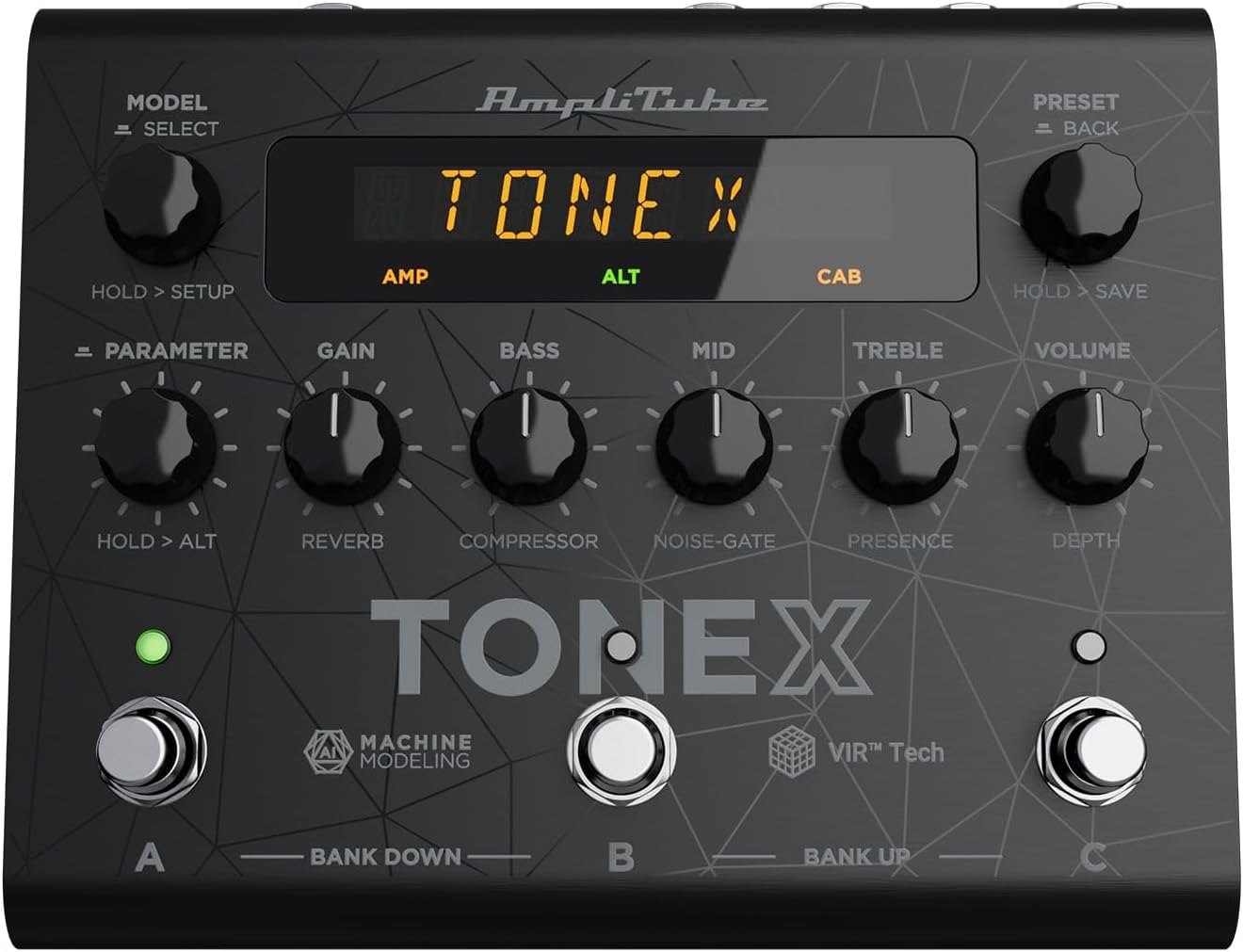
Figure 1: TONEX Pedal Front Panel
Ova slika prikazuje vrh view of the TONEX Pedal, highlighting its compact design and the arrangement of knobs, footswitches, and the digital display. Key controls such as 'Model/Select', 'Preset/Back', 'Parameter', 'Gain', 'Bass', 'Mid', 'Treble', and 'Volume' are visible, along with the three footswitches labeled A, B, and C.
- MODEL / SELECT Knob: Used to select tone models and navigate menus. Press and hold for Setup menu.
- PRESET / BACK Knob: Used to select presets and go back in menus. Press and hold to save presets.
- PARAMETER Knob: Adjusts various parameters. Press and hold for alternative parameters.
- Gumb GAIN: Controls the input gain of the tone model.
- Gumb za bas: Podešava niskofrekventni odziv.
- MID gumb: Podešava odziv srednjih frekvencija.
- TREBLE gumb: Podešava visokofrekventni odziv.
- Gumb za jačinu zvuka: Kontrolira ukupnu izlaznu glasnoću.
- Nožni prekidači A, B, C: Select presets within a bank. Also used for bank up/down (A+B, B+C) and bypass.
- Prikaz: Shows current preset, parameter values, and menu options.
4.2. Priključci stražnje ploče

Figure 2: TONEX Pedal Rear Panel Connections
This image shows the rear panel of the TONEX Pedal, detailing its various input and output connections. Visible ports include the instrument input, left and right outputs (mono), headphone output, MIDI In/Out, external control input, USB port, and the 9V DC power input. This panel facilitates integration into various audio setups, from live rigs to studio environments.
- ULAZNI: 1/4" mono input for your guitar or bass.
- OUTPUT L/R (MONO): 1/4" stereo outputs for connecting to a PA system, power amp, or audio interface. Use the L output for mono operation.
- SLUŠALICE: 1/4" stereo output for silent practice.
- MIDI ULAZ/IZLAZ: 5-pin DIN connectors for MIDI control and integration with other MIDI devices.
- EXT. CONTROL: 1/4" input for an external expression pedal or footswitch.
- USB: USB-B port for connecting to a computer (PC/Mac) for software control, preset management, and using the pedal as an audio interface.
- POWER 9V DC: Input for the included 9V DC power supply.
5. Postavljanje
5.1. Početne veze
- Spojite svoj instrument na ULAZNI utičnicu na stražnjoj ploči.
- Spojite IZLAZ L (i R for stereo) to your amplifier, PA system, or audio interface.
- If desired, connect headphones to the SLUŠALICE utičnica.
- Spojite priloženo 9V DC napajanje na NAPAJANJE 9V DC input and plug it into a power outlet. The pedal will power on automatically.
5.2. Instalacija softvera
To unlock the full potential of your TONEX Pedal, including access to ToneNET and advanced editing features, install the TONEX Editor software on your computer.
- Visit the IK Multimedia website and register your product using the provided registration card.
- Download and install the TONEX Editor software for your operating system (Windows 10 or later, macOS 10.15 or later).
- Connect the TONEX Pedal to your computer via the USB port. The pedal can function as a 24-bit/44.1 kHz USB audio interface for studio recording.
- Follow the on-screen instructions in the software to update firmware and manage your tone models and presets.
6. Upute za rad
6.1. Navigacija unaprijed postavljenim postavkama
The TONEX Pedal comes preloaded with 150 gig-ready presets, organized into 50 banks of three presets each.
- Odabir unaprijed postavljenih postavki: Zakrenite PRESET / BACK knob to quickly scroll through and audition available presets.
- Using Footswitches: Tap footswitches A, B, ili C to load different presets within the current bank.
- Promjena banke: Simultaneously press footswitches A i B to move down a bank, or B i C to move up a bank.
- Bypass Tone Model: Once a preset is loaded, tapping its corresponding footswitch a second time will bypass the tone model, allowing for a clean signal.
6.2. Podešavanje parametara
The TONEX Pedal offers five main and five alternative parameters on the front panel for tone shaping.
- Glavni parametri: Directly adjust DOBITI, BASS, MID, SOPRANO, i VOLUMEN using their respective knobs.
- Alternativni parametri: Držite pritisnuto PARAMETAR encoder to access alternative parameters: Reverb Level, Compressor Threshold, Noise Gate Threshold, Presence, and Depth. Rotate the corresponding knobs to adjust these.
- Dodatni parametri: Pritisnite tipku PARAMETAR encoder once to access further parameters for fine-tuning your sound.
6.3. Spremanje unaprijed postavljenih postavki
- Saving with Renaming/Relocation: Držite PRESET / BACK encoder. You can then rotate the PRESET knob to edit characters for renaming, and rotate the MODEL knob to move the cursor or change the bank location. Press the PRESET knob again to confirm and save.
- Quick Save: To quickly save a preset with the same name in the same location, press the MODEL i PRESET encoders simultaneously. The display will show "SAVED".
6.4. Cab Emulation
If connecting to a standard guitar or bass amp with its own speaker cabinet, you may wish to turn off the TONEX Pedal's internal cab emulation to avoid redundant processing. This can be done via the Setup menu (hold MODEL / SELECT gumb).
6.5. Official Product Video: TONEX Pedal Main Features
Video 1: Overview of the IK Multimedia TONEX Pedal's main features, including its controls, connectivity, and basic operation. This video demonstrates how to navigate presets, adjust parameters, and utilize the pedal's various functions for live and studio use.
7. Održavanje
- Čišćenje: Regularly wipe the pedal with a soft, dry cloth to remove dust and grime. Avoid abrasive cleaners.
- Skladištenje: Store the pedal in a cool, dry place when not in use. Protect it from extreme temperatures and humidity.
- Uprava za kabele: Ensure cables are not kinked or strained to prevent damage to the connectors and ports.
8. Rješavanje problema
- Bez napajanja: Ensure the 9V DC power supply is correctly connected to the pedal and a working power outlet.
- Nema zvuka: Check all audio cable connections (instrument input, outputs to amp/PA, headphones). Verify volume levels on the pedal and connected devices. Ensure the tone model is not bypassed.
- Unexpected Behavior/Glitches: Try performing a factory reset (refer to the full online manual for specific steps). Ensure your firmware is up to date via the TONEX Editor software.
- Problemi s povezivanjem softvera: Ensure the USB cable is securely connected. Try a different USB port or cable. Restart both the pedal and your computer.
9. Specifikacije
| Značajka | Specifikacija |
|---|---|
| Broj modela | TONEX pedala |
| Dimenzije (D x Š x V) | 6.93 x 5.59 x 2.17 inča (otprilike 17.6 x 14.2 x 5.5 cm) |
| Težina artikla | 2.86 funti (otprilike 1.3 kg) |
| Boja | Crna |
| Izvor napajanja | 9V DC (Corded Electric) |
| Hardversko sučelje | USB |
| Format signala | Digitalni |
| Kompatibilnost operativnog sustava | Windows® 10 or later, macOS® 10.15 or later (macOS® 11 Big Sur required for Modeler) |
| Frekvencijski odziv | 5 Hz - 24 kHz |
| Dinamički raspon | 123 dB |
10. Jamstvo i podrška
IK Multimedia products are covered by a limited warranty. For detailed warranty information, product registration, and technical support, please visit the official IK Multimedia webweb-mjesto ili se obratite njihovoj korisničkoj službi. Sačuvajte dokaz o kupnji za slučaj zahtjeva za jamstvo.
Webstranica: www.ikmultimedia.com
Ask a question about this manual
Ask about setup, troubleshooting, compatibility, parts, safety, or missing instructions. Manuals+ will review the question and use this page’s manual context to help answer it.