
1. Uvod
Thank you for choosing the ANYPLUS 11-in-1 USB C Hub. This versatile docking station is designed to expand the connectivity of your USB-C enabled devices, providing a comprehensive solution for your peripheral needs. It offers multiple ports including HDMI, VGA, USB-A, USB-C PD, Ethernet, and card readers, making it an ideal partner for laptops, tablets, and other compatible devices.
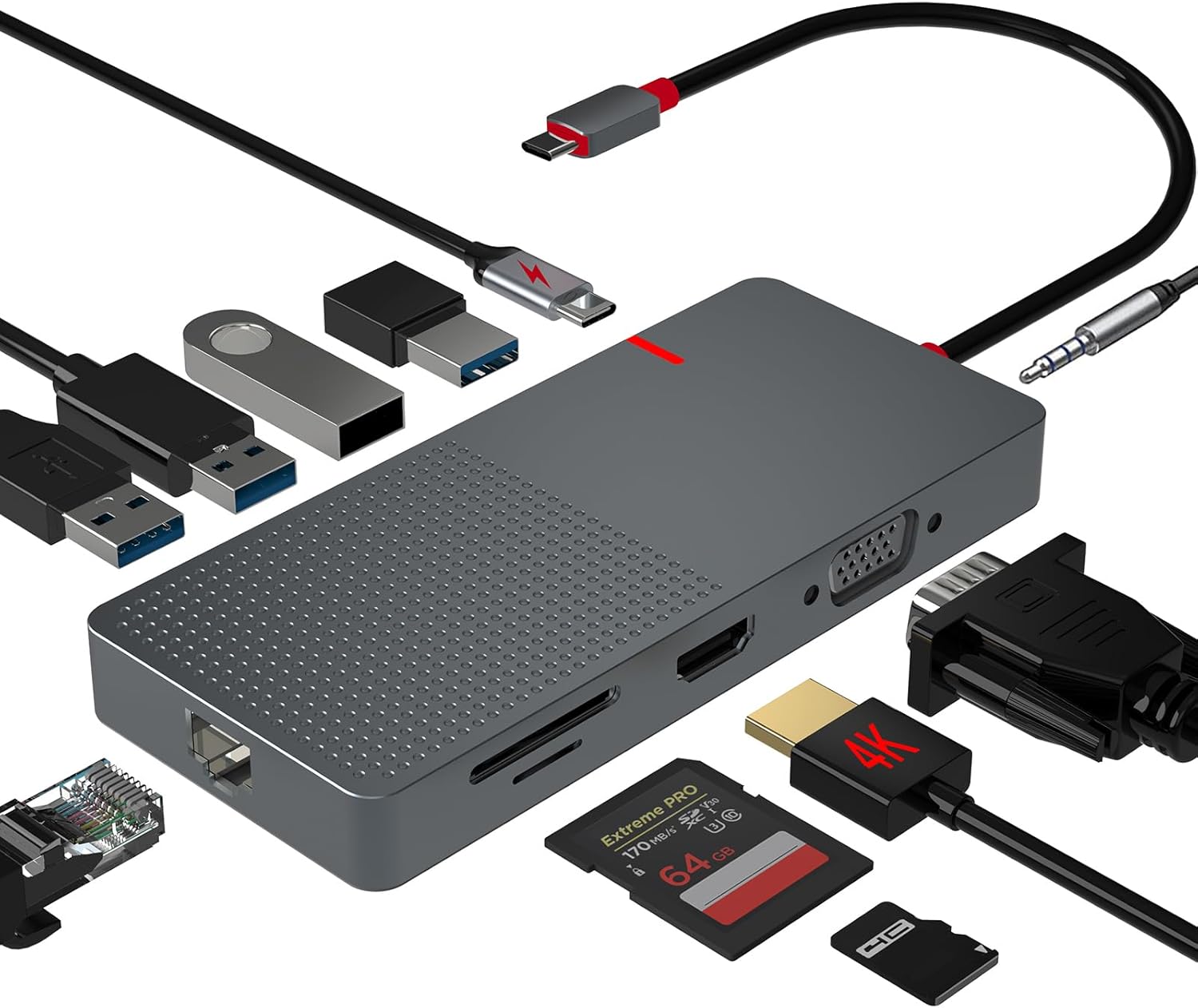
Figure 1: The ANYPLUS 11-in-1 USB C Hub and its various connectivity options.
2. Ključne značajke
- 11-u-1 povezivost: Provides 1 HDMI output, 1 USB-C PD fast charging port, 2 USB 3.0 Type-A Ports, 2 USB 2.0 Type-A Ports, 1080p VGA port, 1 Ethernet port (up to 1000Mbps), 1 3.5mm AUX port, and 2 SD/microSD card slots.
- 4K HDMI izlaz: Supports video output up to 4K@30Hz for mirroring or extending your screen to HDTVs, monitors, or projectors.
- Stable Gigabit Ethernet: Offers faster and more secure data transfers compared to Wi-Fi, ideal for unstable network conditions.
- USB portovi velike brzine: Two USB 3.0 ports for data transfer up to 5Gbps, and two USB 2.0 ports for stable connection with wireless peripherals like mouse and keyboard.
- Isporuka snage 100 W: Allows charging of your laptop (up to 100W) while using multiple peripherals.
- Universal SD/TF Card Compatibility: Jednostavan pristup files from universal SD and Micro SD memory cards with speeds up to 104MB/s.
- Izdržljiv i prenosiv dizajn: Constructed from aluminum alloy for efficient heat dissipation, small and easy to carry.

Slika 2: Detaljno view of the 11-in-1 USB C Hub ports.
3. Upute za postavljanje
- Povezivanje s glavnim uređajem: Plug the USB-C input connector of the hub into the USB-C port of your laptop, tablet, or compatible device. The hub is plug-and-play, requiring no driver installation.
- Napajanje (opcionalno): For charging your host device, connect your USB-C power adapter to the USB-C PD fast charging port on the hub. This allows power passthrough up to 100W.
- Povežite periferne uređaje:
- HDMI/VGA Displays: Connect your monitor, HDTV, or projector to the HDMI or VGA ports for video output.
- USB uređaji: Plug in your USB-A devices (e.g., external hard drives, flash drives, keyboards, mice) into the USB 3.0 or USB 2.0 ports.
- Ethernet: For a wired network connection, connect an Ethernet cable to the RJ45 Gigabit Ethernet port.
- Audio: Connect headphones or speakers to the 3.5mm AUX port for audio output.
- Memorijske kartice: Umetnite SD ili microSD kartice u predviđene utore za pristup podacima.

Slika 3: Gotovoview of the hub's ports and their specifications.

Figure 4: Connecting the hub for fast charging.
4. Upute za rad
4.1 Načini prikaza
The hub supports various display configurations depending on your operating system.
- Windows: Supports triple displays (laptop screen + 2 external monitors) in extended mode. If mirrored, the resolution will match the laptop's display.
- Mac: For Apple laptops, it does not support expanding two different screens. The display is only in mirror mode (A-A), meaning the two external monitors will show the same content. However, the laptop screen can display different content from them. Note: M1/M2 MacBooks only support output to one display. MacBook Pro/Air models do not support dual displays.

Figure 5: Display configurations for Windows and Mac.
4.2 Prijenos podataka
Utilize the USB 3.0 ports for high-speed data transfer up to 5Gbps, suitable for large files and external storage. The USB 2.0 ports are ideal for connecting devices like keyboards, mice, and other peripherals that do not require high bandwidth, ensuring stable connections without wireless interference.

Slika 6: Mogućnosti prijenosa podataka velikom brzinom.
5. Održavanje
- Održavajte središte čistim brisanjem mekom, suhom krpom.
- Izbjegavajte izlaganje koncentratora ekstremnim temperaturama, vlazi ili izravnoj sunčevoj svjetlosti.
- Ne pokušavajte sami rastaviti ili popraviti uređaj. Obratite se korisničkoj podršci za pomoć.
- Ensure proper ventilation around the hub during prolonged use to prevent overheating, although its aluminum alloy construction aids in heat dissipation.
6. Rješavanje problema
- Nema izlaza za prikaz:
- Provjerite je li USB-C veza s vašim glavnim uređajem sigurna.
- Verify that the HDMI/VGA cable is properly connected to both the hub and the display.
- Check the display input source settings.
- Confirm your host device supports video output over USB-C (DisplayPort Alternate Mode).
- USB uređaji nisu prepoznati:
- Reconnect the USB device to a different port on the hub.
- Ensure the hub is receiving sufficient power, especially if connecting high-power devices.
- Pokušajte spojiti USB uređaj izravno na glavni uređaj kako biste isključili probleme s uređajem.
- Slow Ethernet Speed:
- Verify your Ethernet cable is functioning correctly.
- Check your network settings on the host device.
- Ensure your router/modem is providing the expected speed.
- Problemi s punjenjem:
- Ensure your power adapter is connected to the USB-C PD port on the hub.
- Provjerite ima li vaš adapter za napajanje dovoljno snagetage (e.g., 100W) for your laptop and connected peripherals.
7. Specifikacije
| Atribut | Vrijednost |
|---|---|
| Dimenzije proizvoda | 5 x 0.55 x 2.2 inča |
| Težina artikla | 2.93 unci |
| Broj modela artikla | HJ-003 |
| Marka | ANYPLUS |
| Boja | Grey-11 IN 1 |
| Hardversko sučelje | Ethernet, HDMI, MicroSD, USB 2.0, USB 3.0, USB Type C, VGA |
| Posebna značajka | Brzi prijenos podataka |
| Isporuka energije | Do 100W |
| Ethernet brzina | Do 1000Mbps |
| HDMI rezolucija | Do 4K@30Hz |
8. Jamstvo i podrška
ANYPLUS is committed to providing excellent customer service. If you encounter any problems with your product, please feel free to contact our 24-hour online customer service. We will do our best to solve your problem.
For further assistance, please refer to the contact information provided with your product packaging or visit the official ANYPLUS store online.