
LEVOIT LTF-F422-WUS
LEVOIT Classic 42-inch Tower Fan User Manual
This manual provides essential information for the safe and efficient operation, maintenance, and troubleshooting of your LEVOIT Classic 42-inch Tower Fan.
Važne sigurnosne upute
To reduce the risk of fire, electric shock, or injury, please read and follow all instructions and warnings before using this appliance.
- Always place the fan on a stable, level surface.
- Nemojte koristiti ventilator s oštećenim kabelom ili utikačem.
- Držite ventilator dalje od vode iliamp područja.
- Ne stavljajte prste ili strane predmete u bilo kakve otvore.
- Isključite ventilator iz struje prije čišćenja ili bilo kakvog održavanja.
- Ovaj proizvod sadrži kemikalije za koje je državi Kaliforniji poznato da uzrokuju rak i urođene mane ili druge reproduktivne štete.
Proizvod gotovview
The LEVOIT Classic 42-inch Tower Fan (Model: LTF-F422-WUS) is designed to provide powerful and quiet air circulation for your home. It features a DC motor for energy efficiency and a user-friendly design.

Slika: prednja strana view of the LEVOIT Classic 42-inch Tower Fan in white, showing its sleek design, digital display, and the included remote control. Blue arrows indicate airflow and oscillation.
Ključne karakteristike:
- Snažan protok zraka: Experience 1252 CFM airflow with speeds up to 25ft/s.
- Tihi rad: Operates as low as 25dB, ideal for bedrooms and quiet environments.
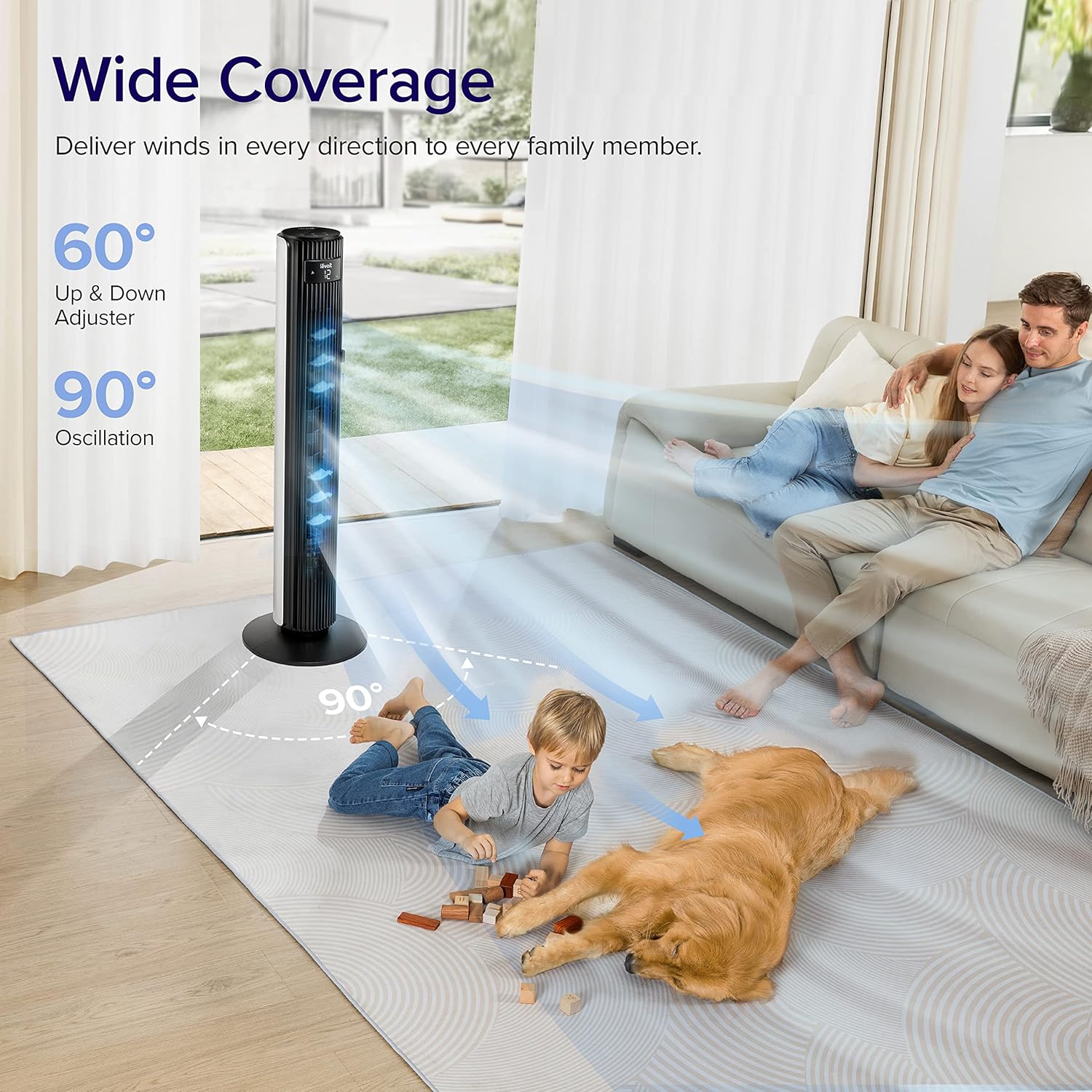
- Široka oscilacija: Features 90° horizontal and 60° vertical oscillation for comprehensive air distribution.
- Prilagodljiva udobnost: Offers 12 speed settings and 4 modes (Normal, Auto, Turbo, Advanced Sleep).
- Temperature-Responsive: Built-in sensor adjusts fan speed based on room temperature in Auto mode.
- Jednostavno održavanje: Detachable back cover and filter for thorough cleaning.
- Dizajn prilagođen korisniku: Includes a hidden handle and built-in remote storage.
Vodič za postavljanje
1. Raspakiranje i provjera komponenti
Carefully open the box from the indicated side and remove all components. Ensure all parts are present before proceeding with assembly.
Video: This video demonstrates the unboxing process, base assembly, remote control storage, and fan blade removal for cleaning.
2. Sklop baze
The fan base comes in two halves. Align the two pieces and attach them together securely. Unscrew the nut from the bottom of the tower fan, then attach the assembled base to the fan and fasten the nut to secure it.

Image: Diagram illustrating the assembly of the fan base, showing how the two halves connect and attach to the main fan unit.
3. Postavljanje daljinskog upravljača
The remote control comes with an insulating tab to preserve battery life. Pull out this tab before first use. The remote can be stored neatly in a dedicated slot on the back of the fan.
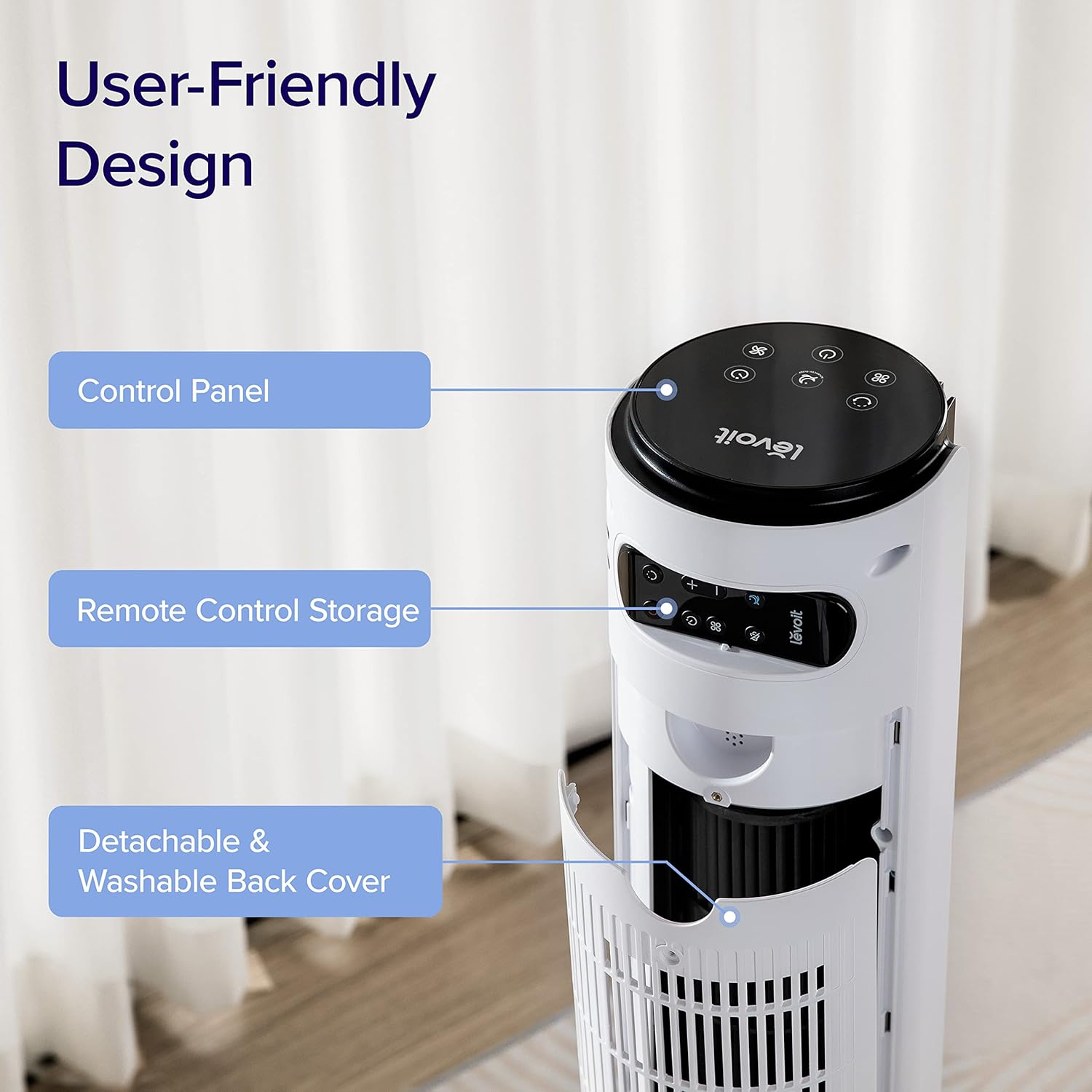
Slika: Krupni plan view of the top rear of the LEVOIT Tower Fan, highlighting the integrated storage compartment for the remote control.
Operating Your Tower Fan
Your LEVOIT tower fan offers various settings for personalized comfort.
1. Upravljačka ploča i zaslon
The fan features a touch-sensitive control panel on top and an LED display on the front. The display shows current settings such as speed, mode, and timer.
Slika: Od vrha prema dolje view of the LEVOIT Tower Fan's control panel with various touch buttons for power, mode, speed, oscillation, and timer. The front LED display shows the current fan speed.
2. Načini rada
- Normalni način rada: Default mode allowing manual speed adjustment.
- Automatski način rada: Fan speed adjusts automatically based on room temperature detected by the built-in sensor.
- Turbo način rada: Provides quick cooling and air circulation, starting at the highest speed with oscillation. Speed decreases as room temperature drops.
- Advanced Sleep Mode: Display and sound automatically turn off after 5 seconds. Fan does not oscillate for the first hour, then oscillates and decreases speeds to maintain comfort. Speed then changes by temperature.
3. Speed and Oscillation
- Postavke 12 brzine: Choose from gentle breezes (1-3) to storm-strength winds (10-12).
- Horizontalna oscilacija od 90°: Distributes air across a wide area.
- Vertikalna oscilacija od 60°: Adjusts airflow up to 30° up or down for targeted cooling.

Image: A family and a dog enjoying the wide coverage of the LEVOIT Tower Fan's 90-degree horizontal and 60-degree vertical oscillation, illustrating effective air distribution.
4. Funkcija odbrojavanja
Set the fan to automatically turn off after a specified period, up to 12 hours, for energy saving and convenience.
Održavanje i čišćenje
Redovito čišćenje osigurava optimalne performanse i dugotrajnost vašeg ventilatora.
1. Detachable Back Cover and Filter
Unlike traditional tower fans, the LEVOIT Classic features a detachable back cover and filter for easy and thorough cleaning. This allows access to the wind wheel for maintenance.

Image: Illustration of the LEVOIT Tower Fan's detachable back cover and internal fan blade, submerged in water to demonstrate its washable components for hassle-free cleaning.
2. Upute za čišćenje
- Prije čišćenja isključite ventilator.
- Use a soft cloth or brush to clean the exterior surfaces.
- To clean the internal wind wheel, remove the screw under the remote storage slot, then remove the back cover. Locate and remove the screw at the bottom of the fan blade, then carefully pull out the fan blade. Clean with a soft cloth or water.
- Provjerite jesu li svi dijelovi potpuno suhi prije ponovnog sastavljanja.
Vodič za rješavanje problema
| Problem | Otopina |
|---|---|
| Fan suddenly starts to oscillate. | This is normal in Advanced Sleep Mode. It automatically starts oscillating after one hour of operation. |
| Air output decreased after cleaning the wind wheel. | Ensure screws are aligned with the flat surface of the motor shaft during installation, not the arc surface. Incorrect alignment will reduce air output. |
| Fan suddenly stops. | Check if the timer was accidentally set. Kindly check and try again. |
| Top control panel is not responsive. | Check if the fan is in Advanced Sleep Mode or if the screen is manually turned off. In screen-off state, the operation panel enters a semi-sleep state to prevent accidental touch. Press twice to wake up the panel and then adjust settings. |
Specifikacije proizvoda
- Marka: LEVOIT
- Naziv modela: Classic 42-inch
- Broj modela: LTF-F422-WUS
- Boja: Bijela
- Dimenzije proizvoda: 6.3"D x 6.7"Š x 42.4"V
- Težina artikla: 11 funti
- Izvor napajanja: DC
- Wattage: 26 vata
- Razina buke: 25 dB
- Kapacitet protoka zraka: 1252 kubičnih stopa po minuti (CFM)
- Broj razina snage: 12
- Oscilacija: 90° vodoravno, 60° okomito
- Odbrojavanje: 12 sata
- Metoda kontrole: Daljinski, dodir
- Uključene komponente: Daljinski
- Materijal: Plastični
- Certifikati: CA65, FCC, TSCA
Jamstvo i podrška
LEVOIT products come with a limited warranty. For detailed warranty information and customer support, please refer to the official LEVOIT webstranicu ili se obratite njihovoj službi za korisnike.
LEVOIT Customer Support:
- Visit the official LEVOIT Store: LEVOIT trgovina na Amazonu
- For further assistance, refer to the contact information provided in your product packaging or on the LEVOIT webmjesto.
Povezani dokumenti - LTF-F422-WUS
 |
Levoit 42-inčni toranjski ventilator Korisnički priručnik User manual for the Levoit 42-Inch Tower Fan, including safety information, product features, operating instructions, maintenance, troubleshooting, and warranty details. |
 |
Levoit 42-inčni toranjski ventilator Korisnički priručnik Comprehensive user manual for the Levoit 42-Inch Tower Fan (Model LTF-F422-WUS), covering safety information, operation, maintenance, and troubleshooting. |
 |
Levoit Classic 42-Inch Smart Tower Fan User Manual - Setup, Operation, and Troubleshooting Comprehensive user manual for the Levoit Classic 42-Inch Smart Tower Fan (Model LTF-F422S-WUS). Includes setup instructions, operating guide, safety information, maintenance tips, troubleshooting, and warranty details. |
 |
Levoit Classic 42-inčni pametni toranj ventilator Korisnički priručnik Sveobuhvatni korisnički priručnik za Levoit Classic 42-inčni pametni toranj ventilator (model LTF-F422S-WUS), koji pokriva postavljanje, rad, sigurnost, održavanje i rješavanje problema. |
 |
Levoit TempSense 42 DC Tower Fan Korisnički priručnik Korisnički priručnik za Levoit TempSense 42 DC toranjski ventilator (model: LTF-F422-KEUR) s detaljnim informacijama o specifikacijama, sigurnosnim smjernicama, kontrolama, načinima rada, održavanju, rješavanju problema i jamstvu. |
 |
Levoit TempSense 42 DC Tower Fan Korisnički priručnik (LTF-F422-KEUR) - Učinkovito i tiho hlađenje Korisnički priručnik za Levoit TempSense 42 DC toranjski ventilator (Model: LTF-F422-KEUR). Obuhvaća postavljanje, rad, sigurnost, održavanje, rješavanje problema i jamstvo za učinkovito i tiho hlađenje doma. |
Ask a question about this manual
Ask about setup, troubleshooting, compatibility, parts, safety, or missing instructions. Manuals+ will review the question and use this page’s manual context to help answer it.