
1. Uvod
Welcome to the BOSGAME H77 Mini PC user manual. This guide provides essential information for setting up, operating, maintaining, and troubleshooting your new mini PC. Please read this manual thoroughly to ensure proper usage and to maximize the performance and longevity of your device.
2. Proizvod je gotovview
The BOSGAME H77 is a compact yet powerful mini PC designed for a wide range of applications, from daily productivity to light gaming. It features an AMD Ryzen 7 7735HS processor, 32GB DDR5 RAM, and a 512GB NVMe M.2 SSD, offering high performance in a small form factor.

Figure 2.1: Powerful Performance. This image illustrates the core specifications of the BOSGAME H77 Mini PC, emphasizing its AMD Ryzen 7 7735HS processor with 8 cores, 16 threads, a clock speed range of 3.2 to 4.75GHz, and a Thermal Design Power (TDP) of 35W. A benchmark comparison for Cinebench R23 (Multi-Core) is also shown, positioning the 7735HS favorably against other Ryzen models.

Figure 2.2: Speedy Response. This image highlights the gaming capabilities of the BOSGAME H77 Mini PC, powered by AMD Radeon 680M integrated graphics. It displays estimated frames per second (FPS) for popular games such as League of Legends (148.0 FPS), Fortnite (132.0 FPS), CS:GO (135.0 FPS), Grand Theft Auto (98.0 FPS), and DOTA 2 (178.0 FPS), indicating smooth performance. The image also notes the system's 32GB DDR5 RAM, 512GB SSD, and support for up to 2TB HDD.

Figure 2.3: Triple Screen Display Support. This image demonstrates the BOSGAME H77 Mini PC's ability to support up to three displays simultaneously. It features two HDMI 2.0 ports and one Type-C (USB4.0) port, allowing for a versatile multi-monitor setup suitable for daily tasks, work, and entertainment. Key features like Wi-Fi 6, Bluetooth 5.2, cooling fan with heat sink, and 4K 60Hz support are also highlighted.
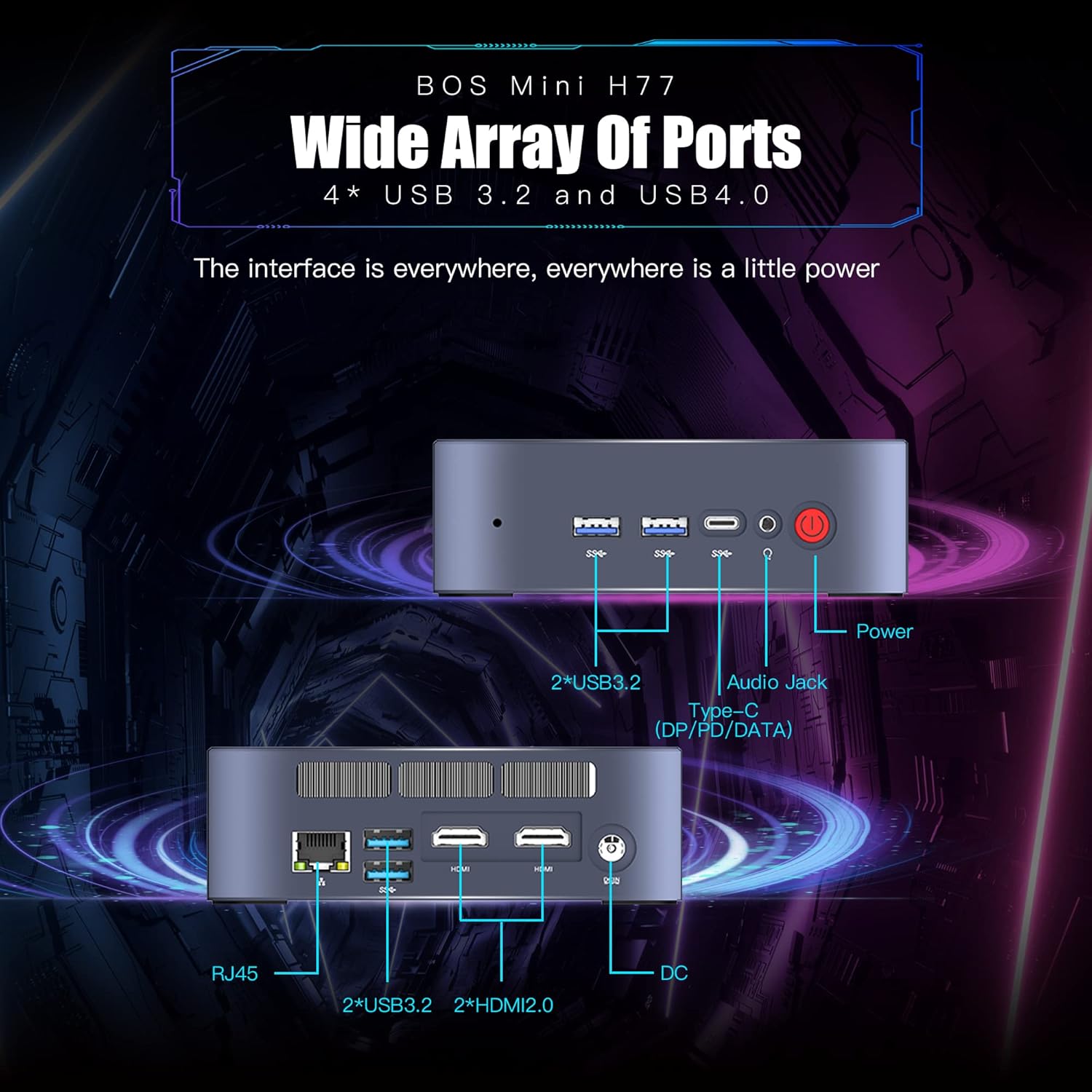
Figure 2.4: Wide Array of Ports. Ova slika pruža detaljan prikaz view of the BOSGAME H77 Mini PC's connectivity options. The front panel includes two USB 3.2 ports, one USB4.0 Type-C port (supporting DP/PD/DATA), an audio jack, and the power button. The rear panel features an RJ45 Ethernet port, two additional USB 3.2 ports, two HDMI 2.0 ports, and the DC power input. This comprehensive selection of ports ensures broad compatibility with various peripherals and displays.

Slika 2.5: Kompaktni dizajn. This image emphasizes the compact and space-saving design of the BOSGAME H77 Mini PC. With a 0.6L body and dimensions of 126mm (length), 112mm (width), and 40.8mm (height), its honeycomb design is both aesthetically pleasing and functional, allowing it to fit into various environments without occupying much space.
3. Vodič za postavljanje
3.1 Sadržaj paketa
Prije nego što nastavite, provjerite jesu li svi artikli prisutni u paketu:
- BOSGAME H77 Mini PC
- Adapter napajanja
- HDMI kabel
- Korisnički priručnik (ovaj dokument)
3.2 Spajanje perifernih uređaja
- Poveži zaslon: Use the provided HDMI cable to connect your monitor to one of the HDMI ports on the rear of the Mini PC. For triple display, connect additional monitors using the second HDMI port and the USB4.0 Type-C port (requires a compatible adapter, not included).
- Spojite tipkovnicu i miš: Plug your USB keyboard and mouse into any available USB 3.2 ports on the front or rear of the Mini PC.
- Priključite napajanje: Connect the power adapter to the DC input port on the rear of the Mini PC, then plug the adapter into a power outlet.
- Mrežna veza (nije obavezno): For a wired connection, plug an Ethernet cable into the RJ45 port on the rear. For wireless, ensure Wi-Fi is enabled during initial setup or via Windows settings.
3.3 Početno pokretanje
- Pritisnite gumb za napajanje na prednjoj strani Mini PC-ja. Indikator napajanja će se upaliti.
- Follow the on-screen instructions to complete the Windows 11 Pro setup. This typically involves selecting your region, language, creating a user account, and connecting to a network.
4. Upute za rad
4.1 Uključivanje/isključivanje
- Uključivanje: Pritisnite jednom tipku za napajanje.
- Zatvoriti: Click the Windows Start button, then select Power > Shut down. Do not unplug the power adapter directly without proper shutdown to prevent data loss.
- Ponovno pokretanje: Kliknite gumb Start sustava Windows, a zatim odaberite Napajanje > Ponovo pokreni.
4.2 Mrežna povezivost
- Wi-Fi: To connect to a wireless network, click the Wi-Fi icon in the taskbar, select your desired network, and enter the password. The device supports Wi-Fi 6 for fast wireless speeds.
- Ethernet: If an Ethernet cable is connected, the system will automatically detect and connect to the wired network.
- Bluetooth: To connect Bluetooth devices (e.g., headphones, speakers), go to Windows Settings > Bluetooth & devices, and pair your device. The Mini PC supports Bluetooth 5.2.
4.3 Korištenje USB priključaka
The BOSGAME H77 features multiple USB 3.2 ports and a versatile USB4.0 Type-C port. These ports can be used for connecting external storage, peripherals, or for data transfer.
- USB 3.2: Provides high-speed data transfer for compatible devices.
- USB4.0 Type-C: This port supports DisplayPort (DP) for video output, Power Delivery (PD) for charging compatible devices, and high-speed data transfer.
4.4 Postavljanje trostrukog zaslona
To utilize the triple display feature:
- Spojite svoj primarni monitor na jedan HDMI priključak.
- Connect your second monitor to the other HDMI port.
- Connect your third monitor to the USB4.0 Type-C port using a compatible USB-C to DisplayPort or USB-C to HDMI adapter (sold separately).
- Once connected, right-click on the desktop, select "Display settings," and configure your displays (extend, duplicate, etc.) as needed.
5. Održavanje
5.1 Cleaning the Mini PC
Regular cleaning helps maintain optimal performance and extends the lifespan of your device.
- Vanjski: Use a soft, dry, lint-free cloth to wipe the exterior surfaces. For stubborn marks, slightly dampnamočite krpu vodom. Izbjegavajte jake kemikalije.
- Ventilacija: Povremeno koristite komprimirani zrak za čišćenje prašine s ventilacijskih rešetki kako biste osigurali pravilan protok zraka i spriječili pregrijavanje.
5.2 Ažuriranja softvera
Keep your Windows 11 Pro operating system and drivers updated to ensure security, stability, and performance.
- Ažuriranja za Windows: Go to Windows Settings > Windows Update and check for available updates.
- Ažuriranja upravljačkih programa: Visit the BOSGAME official website for the latest drivers for your H77 Mini PC.
5.3 Upravljanje pohranom
The 512GB NVMe M.2 SSD provides fast storage. To maintain performance:
- Redovito brišite nepotrebne files i aplikacije.
- Utilize Windows Disk Cleanup tool to free up space.
- Razmotrite vanjska rješenja za pohranu velikih files if the internal SSD becomes full.
6. Rješavanje problema
This section addresses common issues you might encounter with your BOSGAME H77 Mini PC.
6.1 Bez napajanja
- Provjerite je li adapter za napajanje sigurno spojen i na Mini PC i na ispravnu utičnicu.
- Provjerite je li utičnica funkcionalna tako da priključite drugi uređaj.
- Provjerite adapter za napajanje ima li vidljivih oštećenja.
6.2 Nema zaslona
- Confirm the HDMI cable (or USB-C display cable) is securely connected to both the Mini PC and the monitor.
- Ensure the monitor is powered on and set to the correct input source (HDMI 1, HDMI 2, DisplayPort, etc.).
- Try connecting the Mini PC to a different monitor or TV to rule out monitor issues.
6.3 Problemi s mrežnom povezivošću
- Wi-Fi: Check if Wi-Fi is enabled in Windows settings. Restart your router/modem. Ensure you are within range of your Wi-Fi network.
- Ethernet: Verify the Ethernet cable is properly connected. Check your router/modem for internet access.
6.4 Usporavanje ili zamrzavanje sustava
- Zatvorite nepotrebne aplikacije koje rade u pozadini.
- Provjerite Upravitelj zadataka (Ctrl+Shift+Esc) za procese koji troše puno CPU-a, RAM-a ili diska.
- Ensure your system is up-to-date with the latest Windows and driver updates.
- Izvršite čišćenje diska i provjerite ima li zlonamjernog softvera.
Ako naiđete na probleme koji nisu ovdje obuhvaćeni, za dodatnu pomoć pogledajte odjeljak za podršku.
7. Specifikacije
| Značajka | Specifikacija |
|---|---|
| Marka | BOSGAME |
| Broj modela | H77 |
| Operativni sustav | Windows 11 Pro |
| Model procesora | AMD Ryzen 7 7735HS (8 Cores, 16 Threads) |
| Brzina procesora | Up to 4.75 GHz (Base 3.2 GHz) |
| Grafički koprocesor | Integrirana AMD Radeon 680M grafika |
| Veličina instalirane RAM memorije | 32 GB DDR5 SDRAM |
| Dostupni memorijski utori | 2 |
| Opis tvrdog diska | 512 GB NVMe M.2 SSD |
| Video izlazno sučelje | 2x HDMI, 1x USB4.0 Type-C (DP support) |
| Maksimalna razlučivost zaslona | 3840 x 2160 piksela (4K) |
| Ukupno USB priključaka | 4x USB 3.2, 1x USB4.0 Type-C |
| Tehnologija povezivanja | Ethernet, HDMI, LAN, Wi-Fi |
| Bežična kompatibilnost | Wi-Fi 6 (802.11ax), Bluetooth 5.2 |
| Metoda hlađenja | Zrak |
| Boja | Crna |
| Dodatne značajke | Čitač memorijskih kartica |
8. Jamstvo i podrška
Your BOSGAME H77 Mini PC comes with a standard manufacturer's warranty. Please refer to the warranty card included in your package for specific terms and conditions, including warranty duration and coverage details.
For technical support, troubleshooting assistance, or warranty claims, please visit the official BOSGAME webweb-mjesto ili se obratite njihovoj korisničkoj službi. Imajte pri ruci račun za kupnju i serijski broj proizvoda kada tražite podršku.