
1. Uvod
Thank you for choosing the Aigo AC SE 360 Rainbow 360mm Water Cooler. This all-in-one liquid cooling solution is designed to provide efficient thermal management for your high-performance CPU, featuring a 360mm triple radiator and vibrant ARGB lighting. This manual provides essential information for proper installation, operation, and maintenance to ensure optimal performance and longevity of your product.

Image 1.1: Aigo AC SE 360 Rainbow 360mm Water Cooler assembled view.
2. Sigurnosne informacije
- Prije instalacije ili održavanja uvijek isključite računalo iz napajanja.
- Pažljivo rukujte komponentama kako biste izbjegli oštećenja.
- Osigurajte ispravno uzemljenje kako biste spriječili električne opasnosti.
- Držite proizvod dalje od vlage i ekstremnih temperatura.
- Do not attempt to open the pump or radiator, as this may void the warranty and cause leaks.
- Čuvati izvan dohvata djece.
3. Sadržaj paketa
Provjerite jesu li sve dolje navedene komponente prisutne u vašem paketu:
- 1x Aigo AC SE 360 Water Cooler Unit (Radiator, Pump/CPU Block, Tubing)
- 3x 120 mm ARGB ventilatora
- Mounting Hardware for Intel Sockets (LGA 115X, 1200, 1700, 2011, 2066)
- Mounting Hardware for AMD Sockets (AM2, AM3, AM4, AM5)
- Termalna pasta
- Fan Screws and Radiator Screws
- ARGB Controller (if included with your specific model)
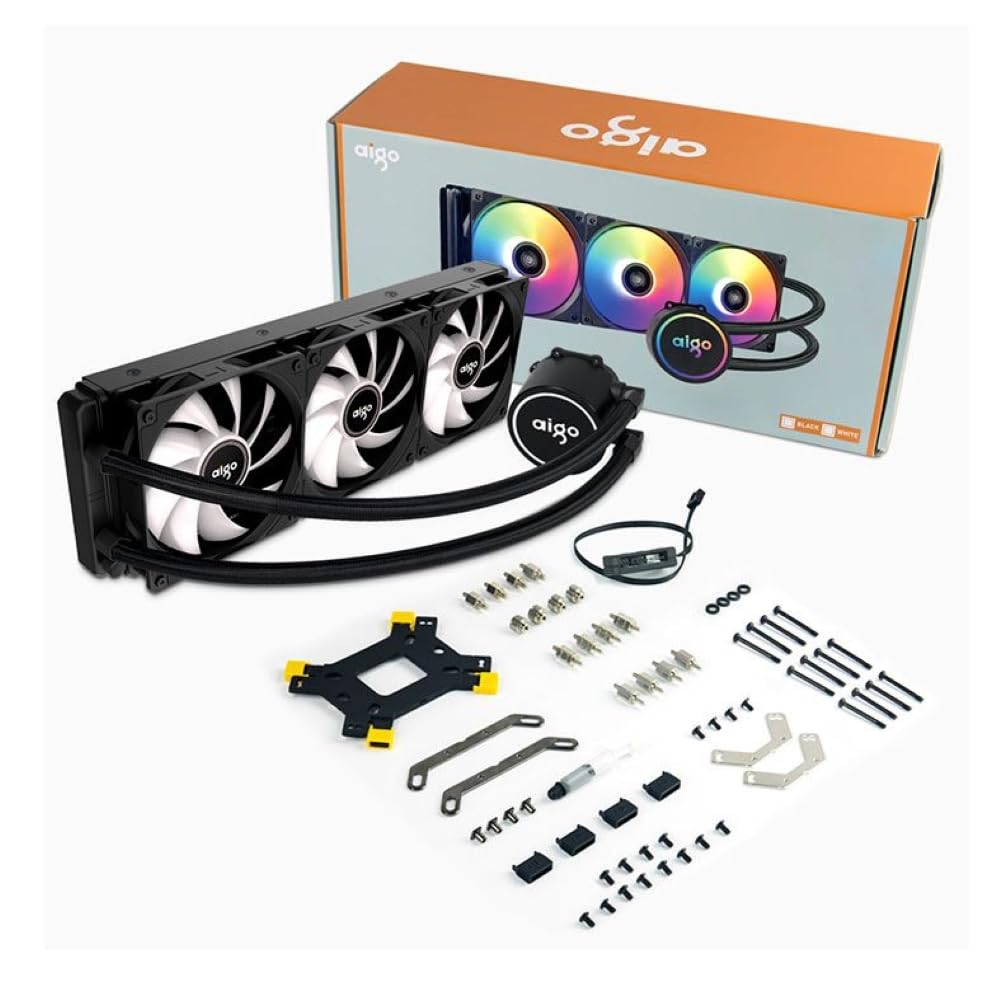
Image 3.1: All components included in the Aigo AC SE 360 package.
4. Postavljanje i instalacija
Follow these steps for proper installation of your Aigo AC SE 360 Water Cooler:
- Pripremite matičnu ploču: Install the appropriate backplate and standoffs for your CPU socket (Intel: 115X, 1200, 1700, 2011, 2066; AMD: AM2, AM3, AM4, AM5). Refer to your motherboard manual for specific instructions.
- Nanesite termalnu pastu: Clean the CPU surface. Apply a small amount of thermal paste to the center of the CPU IHS (Integrated Heat Spreader).
- Mount the CPU Block/Pump: Carefully place the CPU block onto the CPU, aligning it with the standoffs. Secure it with the provided screws, tightening them in a diagonal pattern until snug. The magnetic block design allows for easy rotation to align the logo or tubing as desired.
- Install Fans to Radiator: Attach the three 120mm ARGB fans to the radiator using the longer screws provided. Ensure the fan airflow direction is correct for your case configuration (typically blowing air through the radiator).
- Montaža radijatora: Install the radiator assembly into your PC case. The 360mm radiator is compatible with most ATX cases that support this size. Secure it with the appropriate screws.
- Connect Fans (Daisy Chain): The fans feature a daisy chain connection system. Connect the fans to each other in series, then connect the final fan's cable to the motherboard's fan header or an ARGB controller. This simplifies cable management by reducing the number of cables.
- Spojite ARGB rasvjetu: Connect the ARGB cables from the fans and pump to a 3-pin, 5V ARGB header on your motherboard or a dedicated ARGB controller. Ensure the voltage is correct (5V) to prevent damage.
- Connect Pump Power: Connect the pump's 4-pin power connector to a dedicated AIO_PUMP or CPU_FAN header on your motherboard.
- Uprava za kabele: Organize all cables neatly to ensure proper airflow and a clean build.
5. Upute za rad
Once installed, the Aigo AC SE 360 Water Cooler operates automatically to maintain optimal CPU temperatures. Here are key operational aspects:
- Automatic Cooling: The pump and fans will adjust their speed based on CPU temperature, ensuring efficient cooling. The pump operates at 12V with 3200 RPM, and fans operate between 800-1800 RPM.
- ARGB upravljanje rasvjetom: The Rainbow ARGB lighting can be controlled via your motherboard's ARGB software (if connected to a compatible header) or through an included ARGB controller. This allows for various lighting effects and synchronization with other ARGB components.
- Razina buke: The cooler is designed for quiet operation, with a noise level of approximately 30 dB.
6. Održavanje
Regular maintenance helps ensure the longevity and performance of your water cooler:
- Čišćenje prašine: Povremeno čistite rebra hladnjaka i lopatice ventilatora kako biste spriječili nakupljanje prašine, koja može ometati protok zraka i hlađenje. Koristite komprimirani zrak ili meku četku.
- Pregledajte cijevi: Provjerite ima li na cijevi znakova savijanja, curenja ili oštećenja.
- Monitor temperature: Use monitoring software to keep an eye on your CPU temperatures. Significant increases may indicate a need for further inspection or cleaning.
- Termalna pasta: While not frequently required, reapplying thermal paste every few years can help maintain optimal thermal transfer.
7. Rješavanje problema
If you encounter issues with your Aigo AC SE 360 Water Cooler, refer to the following common problems and solutions:
| Problem | Mogući uzrok | Otopina |
|---|---|---|
| Visoke temperature procesora | Insufficient thermal paste, poor contact, dust buildup, pump failure, fan failure. | Reapply thermal paste, ensure CPU block is securely mounted, clean radiator and fans, check pump/fan connections. |
| Ventilatori se ne okreću | Loose fan connection, incorrect fan header, faulty fan. | Check fan cables and connections, ensure connected to appropriate motherboard header, test fans individually if possible. |
| No ARGB Lighting | Loose ARGB connection, incorrect ARGB header (e.g., 12V instead of 5V), faulty ARGB component. | Verify ARGB cables are securely connected to a 3-pin, 5V ARGB header. Check motherboard manual for correct header. |
| Neobične buke | Air bubbles in loop, fan rubbing, pump issue. | Gently tilt the PC case to help dislodge air bubbles. Check for obstructions around fans. If pump noise persists, contact support. |
8. Specifikacije
| Značajka | Detalj |
|---|---|
| Model | AC SE 360 |
| Veličina radijatora | 360 mm (394 x 120 x 27 mm) |
| Veličina ventilatora | 120 mm |
| Brzina ventilatora | 800-1800 okretaja u minuti |
| Strujanje zraka | 64.05 CFM |
| Statički tlak | 1.85 mmHXNUMX |
| Razina buke | 30 dB |
| Pumpa Voltage | 12 volti |
| Brzina pumpe | 3200 okretaja u minuti |
| Potrošnja energije | 3.24 vata |
| Vrsta ležaja | Keramički ležaj |
| TDP Supported | 280 W |
| Kompatibilne utičnice | Intel (LGA 115X, 1200, 1700, 2011, 2066), AMD (AM2, AM3, AM4, AM5) |
| Priključak za napajanje | 4-pinski |
| ARGB konektor | 3-pinski, 5 V |
9. Jamstvo i podrška
The Aigo AC SE 360 Water Cooler comes with a Jamstvo 12 mjeseci od datuma kupnje. Ovo jamstvo pokriva nedostatke u proizvodnji u normalnim uvjetima upotrebe.
For technical support, warranty claims, or any questions not covered in this manual, please contact your retailer or the Aigo customer support team. Please have your proof of purchase and product model number (ACSE360) ready when contacting support.