
1. Uvod
Thank you for choosing the Podofo 1 Din Android Car Stereo. This device integrates advanced features such as a 7-inch retractable touch screen, Android operating system, Bluetooth, GPS navigation, Wi-Fi connectivity, FM/RDS radio, Mirror Link, AUX-in, and support for a backup camera. This manual provides essential information for installation, operation, maintenance, and troubleshooting to ensure optimal performance and user experience.

Image 1.1: Podofo 1 Din Android Car Stereo with its main components and accessories.
2. Sadržaj paketa
Molimo pažljivo provjerite paket kako biste bili sigurni da su svi elementi prisutni:
- 1 x Single DIN Car Stereo Unit
- 1 x rezervna kamera
- 1 x GPS antena
- 1 x Power Cable Harness
- 1 x Speaker Cable Harness
- 2 x Disassembly Keys
- 1 x korisnički priručnik
- 1 x set nosača za montažu

Slika 2.1: Vizualni prikaz sadržaja pakiranja.
3. Specifikacije
| sustav | Android 10.0 |
| Veličina zaslona | 7-inch Retractable Touch Screen |
| Rezolucija | 1024 x 600 |
| Bluetooth verzija | 4.2 |
| Domet FM radija | 87.5 ~ 108 MHz |
| Radna temperatura | -10 ℃ ~ +60 ℃ |
| USB sučelje | USB 2.0 |
| Voltage | 12 V |
| Izlazna snaga | 60 W |
| Skladištenje | 1GB RAM + 16GB ROM |
| Audio formati | MP3 / WMA / WA / OGG / FLAC / APE |
| Video formati | RM / RMVB / MP4 / FLV / MKV / 3GP / AVIASF / SWFMP1 |
| Format slike | JPG |
| Povezivost | Wi-Fi |
| Dimenzije proizvoda (D x Š x V) | 18.8cm x 5.8cm x 16.5cm |
| Težina | 1660 gram |

Image 3.1: Product details including dimensions and rear panel connections.
4. Postavljanje i instalacija
Before installation, ensure your vehicle's power is disconnected. Professional installation is recommended.
4.1 Spajanje ožičenja
- Priključak za napajanje: Connect the power cable harness to your vehicle's power supply (ACC, B+, GND). Ensure correct polarity.
- Spajanje zvučnika: Connect the speaker cable harness to your vehicle's speakers. Match positive and negative terminals.
- GPS antena: Connect the GPS antenna to the dedicated port on the back of the unit and mount it in a location with a clear view od neba.
- Rezervna kamera: Connect the backup camera's video output to the 'CAMERA IN' port on the stereo. Connect the camera's power to your vehicle's reverse light circuit for automatic activation.
- AUX-in/USB: Connect external devices via the AUX-in port or USB ports as needed.
- Upravljanje volanom (SWC): If your vehicle supports SWC, connect the SWC wires (KEY1, KEY2) to the corresponding wires from your vehicle's harness. Configuration will be done in the settings menu.

Image 4.1: Backup camera wiring diagram.
4.2 Montaža jedinice
Insert the single DIN unit into your vehicle's dashboard opening. Secure it using the provided mounting brackets and screws. Ensure the retractable screen mechanism has enough clearance to operate freely.
5. Upute za rad
5.1 Osnovni rad
- Uključivanje/isključivanje: Press the power button (usually labeled SRC or PWR) to turn the unit on or off.
- Kontrola glasnoće: Use the rotary knob or on-screen controls to adjust the volume.
- Uvlačenje zaslona: Manually adjust the screen's angle or retract it into the unit as desired.
5.2 Bluetooth povezivost (Bluetooth 4.2)
Pair your mobile phone with the car stereo for hands-free calling and audio streaming.
- Go to the Bluetooth menu on the car stereo.
- Omogućite Bluetooth na svom mobilnom telefonu i potražite dostupne uređaje.
- Select "MY PODOFO" or a similar name from the list on your phone.
- Potvrdite kod za uparivanje ako se to od vas zatraži.
- Nakon uparivanja možete upućivati/primati pozive i reproducirati glazbu putem autoradio uređaja.

Image 5.1: Bluetooth connection and FM/RDS radio interface.
5.3 FM/RDS radio
Access the Radio application to listen to FM broadcasts. The RDS function displays station names and program information where available.
- Open the "Radio" app from the main menu.
- Pomoću kontrola na zaslonu možete tražiti postaje, ručno ugađati ili odabirati unaprijed postavljene postaje.
5.4 GPS navigacija
The unit supports both online and offline navigation. Ensure the GPS antenna is properly connected.
- Open the "Navigation" or "Maps" app.
- For offline maps, download them via Wi-Fi before driving.
- Enter your destination and follow the voice-guided directions.
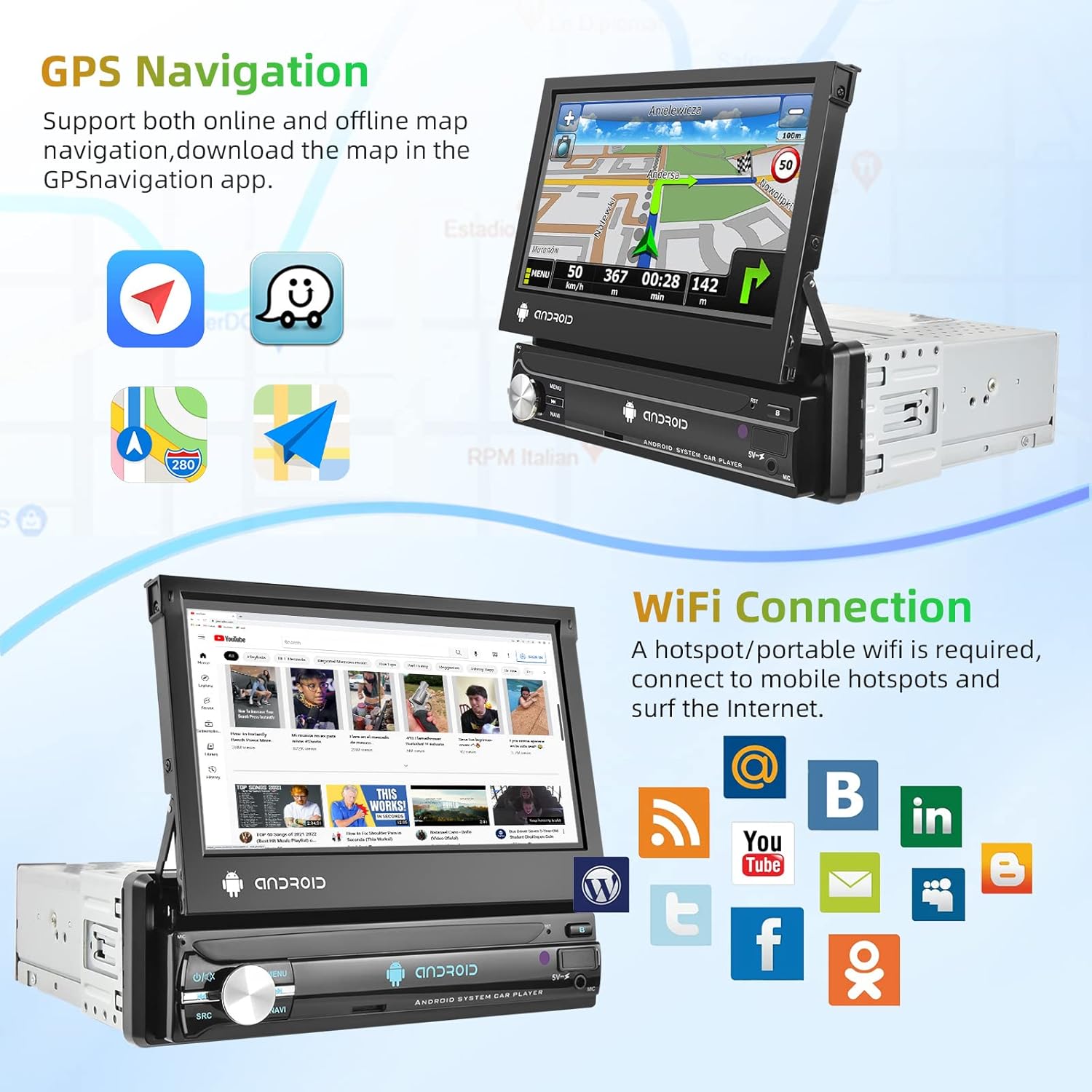
Image 5.2: GPS navigation and Wi-Fi connection features.
5.5 Wi-Fi veza
Connect to a mobile hotspot or Wi-Fi network to access online features, download apps, and browse the internet.
- Idite na "Postavke" i odaberite "Wi-Fi".
- Turn on Wi-Fi and select your desired network.
- Unesite lozinku ako je potrebno.
5.6 Zrcalna veza
Project your smartphone screen onto the car stereo display. Supports both Android and iOS devices via USB connection.
- Connect your smartphone to the car stereo via a USB cable.
- Follow the on-screen prompts on both your phone and the stereo to establish the connection.

Image 5.3: Split screen, EQ settings, Mirror Link, and Steering Wheel Control features.
5.7 Prikaz kamere za vožnju unatrag
When the vehicle is shifted into reverse gear, the car stereo will automatically display the view s priključene kamere za vožnju unatrag.
5.8 Upravljanje volanom (SWC)
Configure your vehicle's steering wheel buttons to control the car stereo functions.
- Go to "Settings" and find the "Steering Wheel Control" or "SWC Learning" option.
- Slijedite upute na zaslonu za dodjeljivanje funkcija svakom gumbu.
5.9 EQ Setting
Adjust audio equalization for a personalized sound experience.
- Access the "EQ" or "Sound Settings" menu.
- Choose from preset equalizer modes or manually adjust frequency bands.
5.10 Podijeljeni zaslon
Istovremeno pokrenite dvije aplikacije na zaslonu za poboljšani multitasking.
- While an app is open, long-press the recent apps button or drag an app to one side of the screen (depending on Android version).
- Select another app to open on the other side.
6. Održavanje
- Čišćenje zaslona: Zaslon osjetljiv na dodir nježno obrišite mekom krpom koja ne ostavlja dlačice. Izbjegavajte abrazivna sredstva za čišćenje ili otapala.
- Generalno čišćenje: Keep the unit free from dust and debris. Use a dry cloth for the main body.
- Ažuriranja softvera: Povremeno provjeravajte ažuriranja softvera putem postavki sustava kako biste osigurali optimalne performanse i pristup novim značajkama.
7. Rješavanje problema
| Problem | Mogući uzrok | Otopina |
|---|---|---|
| Jedinica se ne uključuje. | Neispravno ožičenje, pregorjeli osigurač, nema napajanja. | Check power cable connections (ACC, B+, GND). Verify vehicle fuse. Ensure vehicle battery is charged. |
| Nema zvuka. | Žice zvučnika isključene, glasnoća preniska, pogrešan izvor zvuka. | Check speaker wiring. Increase volume. Select correct audio source (FM, Bluetooth, USB, AUX). |
| GPS signal je izgubljen ili netočan. | GPS antenna improperly connected or obstructed. | Ensure GPS antenna is securely connected and mounted in a clear location (e.g., dashboard, not under metal). |
| Bluetooth se ne povezuje. | Bluetooth off on either device, incorrect pairing process. | Ensure Bluetooth is enabled on both the stereo and phone. Delete previous pairings and try pairing again. |
| Kamera za vožnju unatrag se ne prikazuje. | Camera not powered, video cable disconnected, reverse trigger wire not connected. | Check camera power and video connections. Ensure the reverse trigger wire is correctly connected to the vehicle's reverse light. |
8. Jamstvo i podrška
8.1 Informacije o jamstvu
Ovaj proizvod dolazi s 2-godišnje jamstvo proizvođačaMolimo sačuvajte dokaz o kupnji za reklamacije u jamstvenom roku. Jamstvo pokriva nedostatke u materijalu i izradi pri normalnoj uporabi.
8.2 Korisnička podrška
For technical assistance, troubleshooting beyond this manual, or warranty inquiries, please contact Podofo customer support through the retailer where the product was purchased or visit the official Podofo webstranica za kontakt podatke.