
NexiGo D621
NexiGo 3-kanalna kamera za automobil D621 Korisnički priručnik
Model: D621
1. Uvod
This manual provides detailed instructions for the installation, operation, and maintenance of your NexiGo 3 Channel Dash Cam D621. Please read this manual thoroughly before using the device to ensure proper functionality and safety. Keep this manual for future reference.
2. Što je u kutiji
Verify that all items are present and in good condition upon unboxing.
- NexiGo D621 Dash Cam
- SD kartica od 128 GB
- Usisni nosač
- Auxiliary Power Cable (11.5 ft)
- Rear Camera with Extension Cable (21.3 ft)
- Alat za izvlačenje
- Krpa za čišćenje
- korisnički priručnik

Image: NexiGo D621 Dash Cam and its components, including the main unit, suction mount, cables, and SD card.
3. Proizvod je gotovview
The NexiGo D621 is a 3-channel dash cam designed to record front, interior, and rear views simultaneously. It features a rotatable interior/front camera for flexible recording options.
Ključne karakteristike:
- Rotatable Interior/Front Camera: Allows the interior camera to be rotated to face forward, providing dual front-facing recording.
- Snimanje visoke rezolucije: Front camera records in 4K/2K, interior and rear cameras in 1080P.
- Sony STARVIS Sensors: Enhanced low-light performance for clear night vision.
- Ugrađeni Wi-Fi: Supports 5.0 GHz and 2.4 GHz for fast file transfer and app connectivity.
- Integrirani GPS: Records real-time trip data including location and speed.
- 24-satni način parkiranja: Monitors your vehicle when parked (requires hard-wire kit, sold separately).
- G-senzor: Automatically locks emergency footage upon impact detection.
- Snimanje petlje: Overwrites oldest footage kada je SD kartica puna.

Image: Diagram illustrating the three-channel recording capability of the NexiGo D621, showing simultaneous front, interior, and rear views.

Image: Visual representation of the optimized field of view for the front (88°) and interior (132°) cameras of the NexiGo D621.
4. Postavljanje
4.1. Početna instalacija
- Pričvrstite usisni nosač: Slide the suction cup mount into the slot on the top of the dash cam until it clicks securely into place.
- Umetnite SD karticu: If not already inserted, gently push the provided 128GB Micro SD card into the TF slot on the side of the dash cam until it clicks. The dash cam supports up to 256GB.
- Montaža kamere za automobil: Clean the desired area on your windshield. Attach the suction mount firmly to the windshield, ensuring it does not obstruct your view.
- Priključite napajanje: Plug the auxiliary power cable into the dash cam and then into your vehicle's 12V auxiliary power outlet.
- Ugradnja stražnje kamere: Connect the rear camera to the main unit using the extension cable. Route the cable neatly along the vehicle's interior trim using the pry tool. Mount the rear camera on the rear windshield or above the license plate.
Video: Official NexiGo D621 User Guide demonstrating the physical installation of the dash cam and its components.
4.2. Powering On and Initial Settings
- Nakon što je spojen na napajanje, kamera za automobil će se automatski uključiti i započeti snimanje.
- Use the physical buttons below the screen to navigate the menu.
- Access "Settings" (gear icon) to configure basic settings like date, time, and time zone.
- Ensure the date and time are correct for accurate timestamping of recordings.
5. Upute za rad
5.1. Načini snimanja
- Normalno snimanje: Automatically starts when the vehicle is powered on. Footage is saved in continuous loops.
- Hitno snimanje: Activated by the G-sensor upon detecting an impact. This footage is locked and will not be overwritten.
- Način parkiranja: When connected to a hard-wire kit (ASIN: B0C5RYDBBD, sold separately), the dash cam can monitor your vehicle for impacts or motion while parked.
5.2. Adjusting Camera Views
The interior camera can be rotated to face forward, effectively providing two front-facing cameras. To do this:
- Physically rotate the interior camera lens until it faces forward.
- Navigate to "Camera Settings" in the menu.
- Toggle "Rear Camera: Flip Horizontally" to ON if needed to correct the image orientation.
- Set "Interior Camera Recording" to "Front" to ensure it records the forward view.
Video: Official NexiGo D621 User Guide demonstrating how to rotate the interior camera and adjust settings for dual front-facing recording.
5.3. Night Vision and Exposure
The D621 features Sony STARVIS sensors and infrared LED lights for enhanced night vision. You can adjust the exposure level for optimal clarity in low-light conditions, especially for capturing license plates.
- Press and hold the OK button to quickly access the front camera's special exposure settings.
- Use the up and down buttons to adjust the exposure level until license plates are clearly visible.
- To automate this, go to "Camera Settings" and select "Set special exposure time" to define a time range (e.g., sunset to sunrise) for automatic exposure adjustments.

Image: Comparison showing a default image versus an image with Manual Highlight Compensation (HLC) enabled, demonstrating improved readability of license plates at night.
6. Wi-Fi Connection and App Usage
The NexiGo D621 features built-in Wi-Fi (2.4 GHz and 5.0 GHz) for seamless connection to the NexiGo app on your iOS or Android device.
- Preuzmi aplikaciju: Tražiti "NexiGo Dash Cam" in your device's app store and install it.
- Omogućite Wi-Fi na kameri za automobil: On the dash cam, navigate to "Settings" > "Wi-Fi Settings" > "Wi-Fi Information" to view the Wi-Fi SSID and password.
- Connect Phone to Dash Cam Wi-Fi: On your smartphone, go to Wi-Fi settings, find the NexiGo dash cam's SSID, and connect using the provided password.
- Koristite aplikaciju:
- Živjeti View: Strimujte hranu u stvarnom vremenutags kamere u automobilu na vaš telefon.
- Reprodukcija i preuzimanje: Access recorded videos and photos stored on the SD card. You can stream them directly or download them to your phone.
- postavke: Adjust dash cam settings directly from the app, including video resolution, loop recording duration, G-sensor sensitivity, and Wi-Fi password.

Image: Illustration of the NexiGo D621 Dash Cam wirelessly transferring data to a smartphone via Wi-Fi, showing different transfer speeds for 5G and 2.4G Wi-Fi.
Video: Official NexiGo D621 User Guide demonstrating the process of connecting the dash cam to the mobile app and navigating its features.
7. Održavanje
- Čiste leće: Regularly clean the camera lenses with the provided cleaning cloth to ensure clear recordings.
- Formatirajte SD karticu: Format the Micro SD card periodically (e.g., once a month) to prevent data corruption and ensure optimal performance. This can be done via the dash cam's settings menu.
- Ažuriranja firmvera: Check the NexiGo webweb-mjesto ili aplikaciju za sva dostupna ažuriranja firmvera za poboljšanje performansi i dodavanje novih značajki.
- Temperatura: The dash cam is designed to operate in temperatures from -4°F (-20°C) to 158°F (70°C). Avoid prolonged exposure to extreme temperatures outside this range.
Video: Official NexiGo D621 User Guide demonstrating how to format the Micro SD card.
8. Rješavanje problema
- Kamera u automobilu se ne uključuje:
- Ensure the power cable is securely connected to both the dash cam and the vehicle's 12V outlet.
- Provjerite ima li napajanja u 12V utičnici vozila.
- Pokušajte s drugim kabelom za napajanje ili utičnicom ako je dostupna.
- Recording Issues (e.g., blurry footage, missing files):
- Očistite leće fotoaparata.
- Formatirajte SD karticu.
- Ensure the SD card is properly inserted and not full. Replace the SD card if it's old or damaged.
- Provjerite postavke rezolucije videa u izborniku.
- Problemi s Wi-Fi vezom:
- Provjerite je li Wi-Fi omogućen na kameri za automobil i vašem pametnom telefonu.
- Verify the correct SSID and password are being used.
- Forget the dash cam's Wi-Fi network on your phone and reconnect.
- Ponovno pokrenite i kameru za automobil i pametni telefon.
- GPS Data Not Displaying Correctly:
- Provjerite je li GPS modul pravilno spojen i ima li jasan view od neba.
- Check time zone settings in the dash cam menu.
- For full GPS data, download the DVPlayer app from nexigo.com/dashcam i view fujtage na računalu.
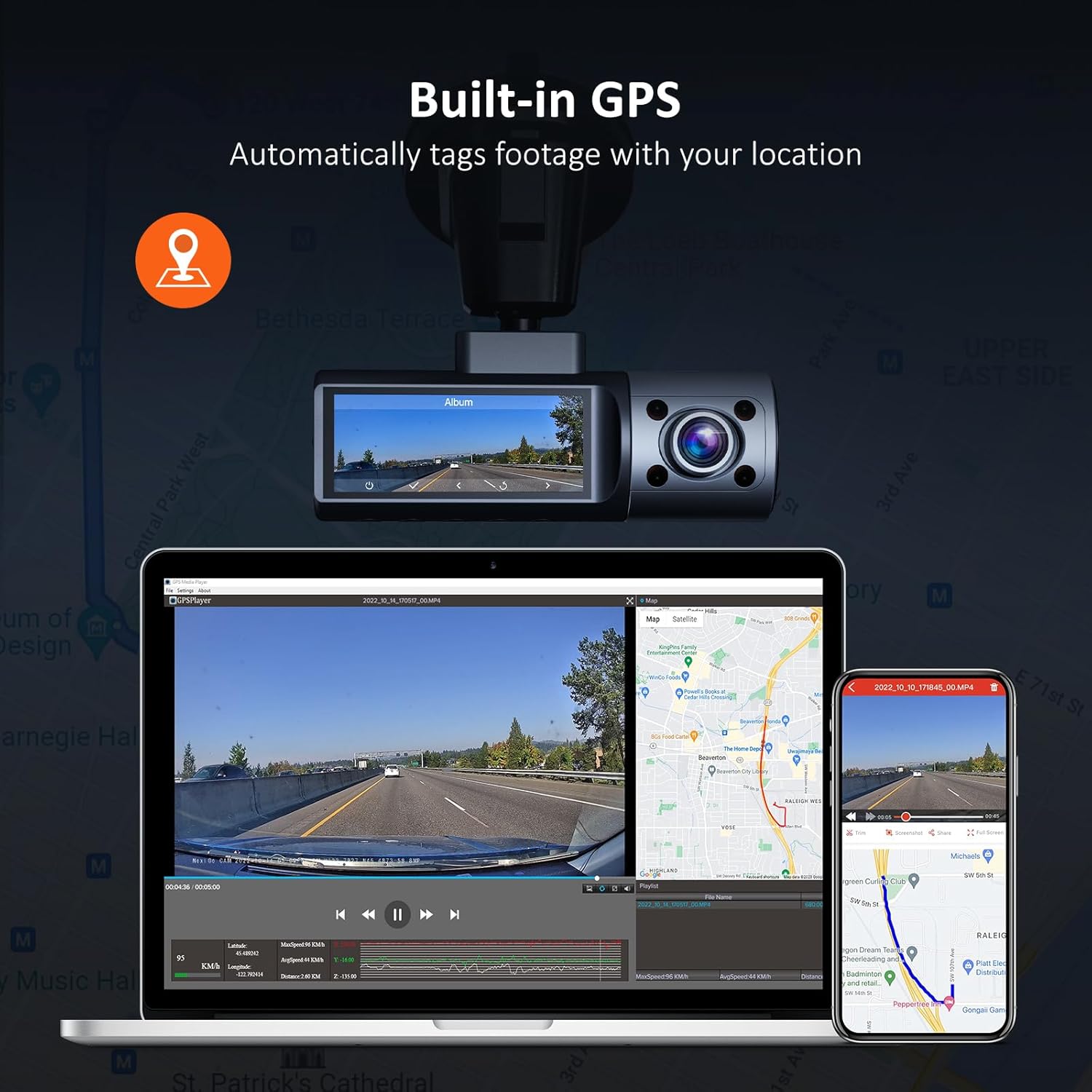
Image: Illustration of the NexiGo D621 Dash Cam's built-in GPS, showing how it tags fujtage with location data, viewable on a map via the app or desktop software.
9. Specifikacije
| Model | D621 |
| Video rezolucija | Front: 4K/2K (1440P), Interior: 1080P, Rear: 1080P |
| Polje od View (FOV) | Front: 88°, Interior: 132°, Rear: 132° |
| Senzori | Sony STARVIS IMX335 & IMX307 |
| Povezivost | Wi-Fi (2.4 GHz & 5.0 GHz), GPS |
| Skladištenje | Supports up to 256GB Micro SD Card (128GB included) |
| Radna temperatura | -4°F do 158°F (-20°C do 70°C) |
| Izvor napajanja | Super kondenzator |
| Dimenzije | 5 x 4 x 2 inča |
| Težina | 1.79 funti |
10. Jamstvo i podrška
NexiGo products come with a standard manufacturer's warranty. For specific warranty details, product registration, or technical support, please visit the official NexiGo webstranicu ili se obratite njihovoj službi za korisnike.
- Službenik Webstranica: www.nexigo.com
- E-pošta podrške: Pogledajte pakiranje proizvoda ili službene webstranica za kontakt podatke.
Za dodatnu zaštitu, razmislite o kupnjiasing an extended protection plan. Options may include 2-Year or 3-Year Protection Plans, or a Complete Protect plan for broader coverage.
Ask a question about this manual
Ask about setup, troubleshooting, compatibility, parts, safety, or missing instructions. Manuals+ will review the question and use this page’s manual context to help answer it.