
amazon basics B0C58TDFPR
Amazon Basics Ručni Gimbal Stabilizer Korisnički priručnik
Model: B0C58TDFPR
Uvod
Ručni stabilizator gimbala Amazon Basics dizajniran je za glatko i stabilno kretanje.tage for your smartphone photography and videography. This manual provides essential information for setting up, operating, maintaining, and troubleshooting your device.

Image: The Amazon Basics Handheld Gimbal Stabiliser with a smartphone attached, ready for use.
Sadržaj paketa
Prije nego što započnete, provjerite jesu li sve stavke prisutne u paketu:
- 1N Ručni gimbal s priloženim držačem
- 1N kabel za punjenje
- 1N Korisnički priručnik (ovaj dokument)
- 1 Stativ
- 1N Hanging belt
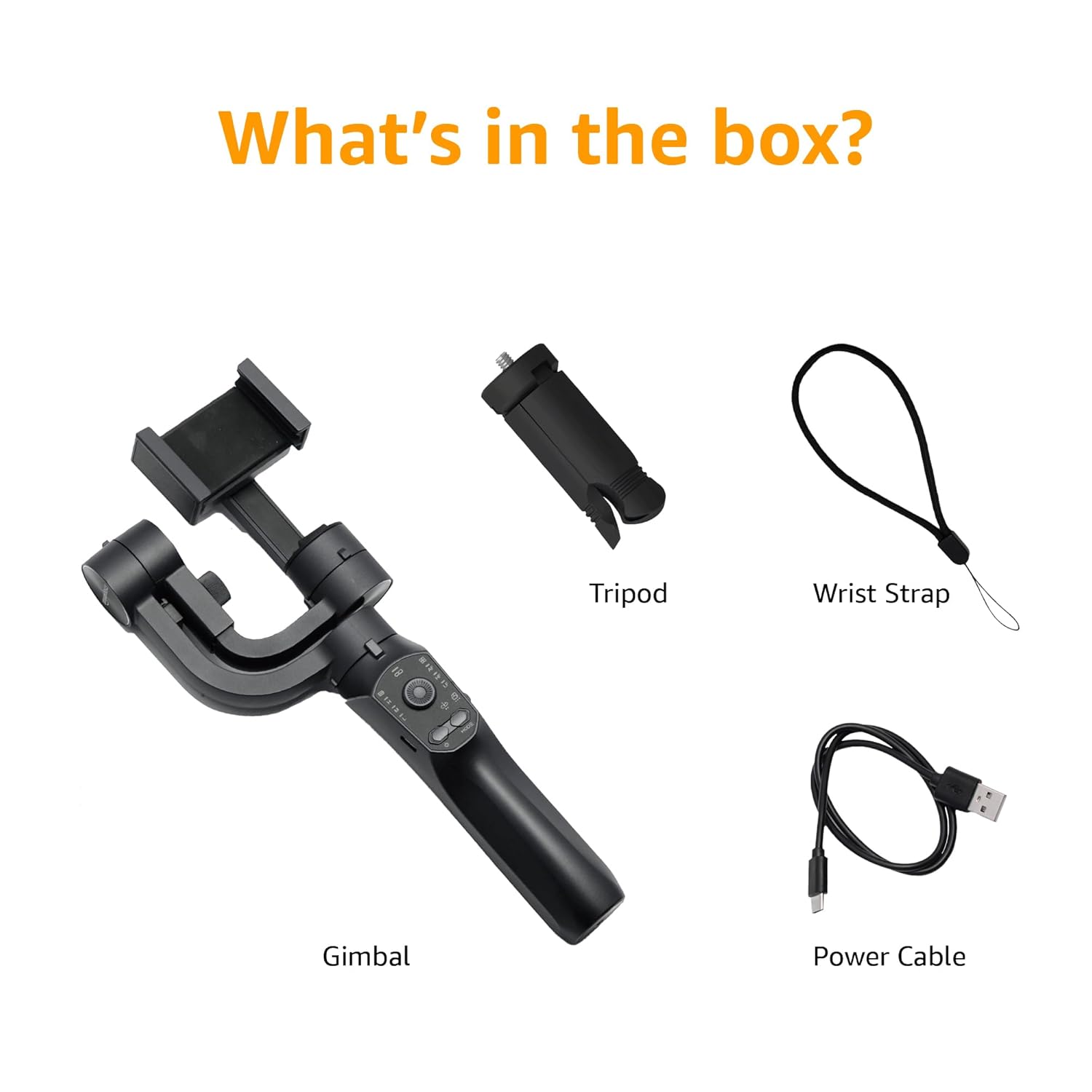
Image: A visual representation of the package contents, including the gimbal, tripod, power cable, and wrist strap.
Komponente proizvoda
Familiarize yourself with the different parts of your gimbal stabiliser:
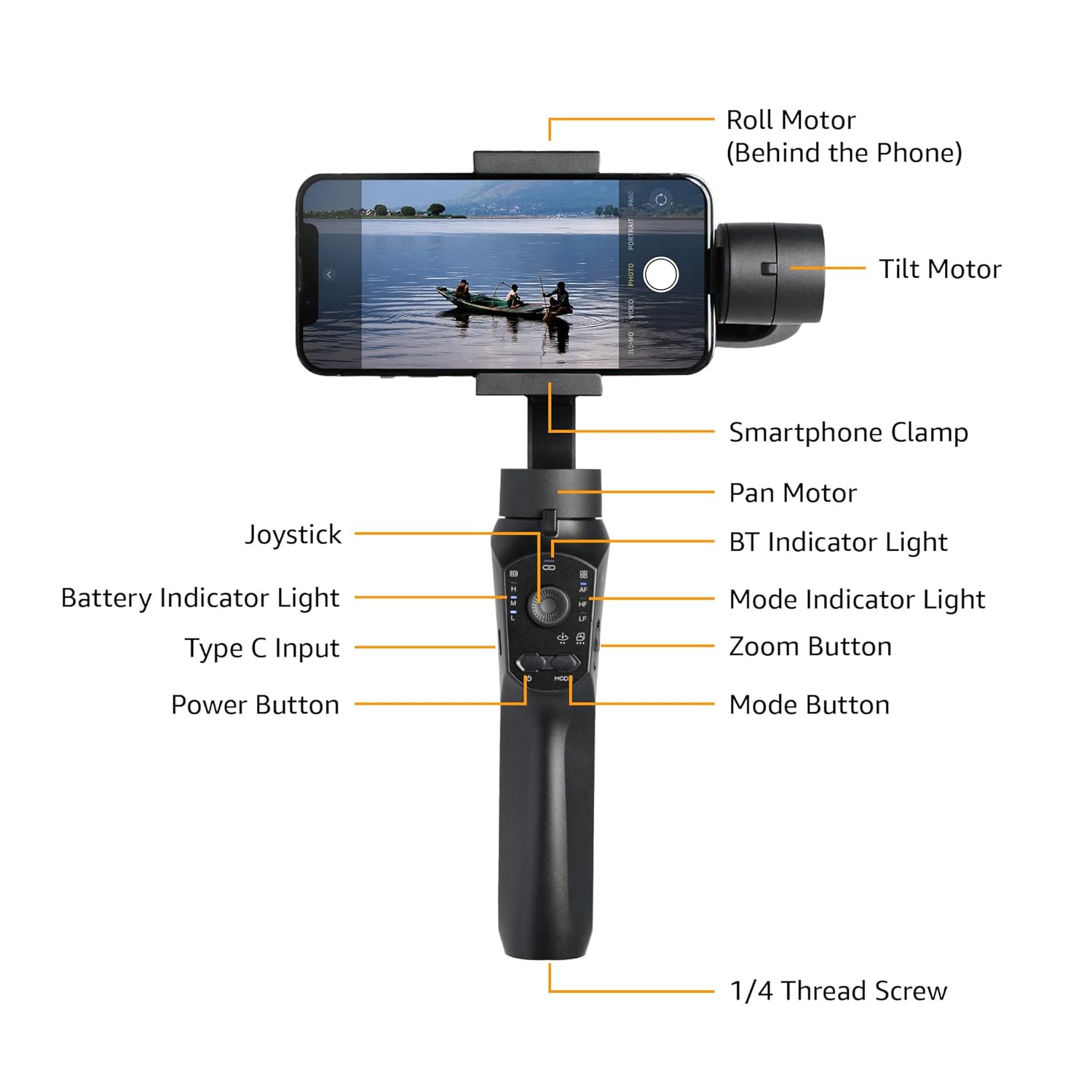
Image: Labeled diagram showing the various components of the gimbal, including the Roll Motor, Tilt Motor, Smartphone Clamp, Pan Motor, BT Indicator Light, Mode Indicator Light, Zoom Button, Mode Button, Power Button, Type C Input, Battery Indicator Light, Joystick, and 1/4 Thread Screw.
- Motor kotrljanja: Controls the roll axis (rotation along the lens axis).
- Motor nagiba: Controls the tilt axis (up and down movement).
- Pametni telefon Clamp: Sigurno drži vaš pametni telefon.
- Pan motor: Controls the pan axis (left and right rotation).
- joystick: For manual control of gimbal movement.
- BT indikatorska lampica: Označava status Bluetooth veze.
- Indikatorsko svjetlo baterije: Prikazuje trenutnu razinu baterije.
- Unos tipa C: Charging port for the gimbal.
- Gumb za napajanje: Uključuje/isključuje gimbal.
- Indikatorska lampica načina rada: Prikazuje trenutni način rada.
- Gumb za zumiranje: Controls digital zoom (via app).
- Gumb za način rada: Switches between different operating modes.
- 1/4 Thread Screw: For attaching accessories like the included tripod.
Postavljanje
- Napunite gimbal: Before first use, fully charge the gimbal using the provided Type-C charging cable. The battery indicator light will show charging status.
- Install the Smartphone:
- Produžite trajanje pametnog telefonaamp and carefully place your smartphone in the center.
- Ensure the phone is balanced as centrally as possible within the clamp to reduce motor strain.
- Manual Balancing (Crucial):
Important: Do not switch on this Gimbal without manual balancing. Doing so may lead to motor damage and fast battery draining.
- With the smartphone mounted, adjust the position of the phone within the clamp until it remains level when you release it. This minimizes the work the motors need to do.
- Adjust the horizontal arm if necessary to achieve perfect balance.
- Uključivanje: Press and hold the Power Button until the gimbal powers on and stabilizes.
- Preuzmite aplikaciju: Download the "Gimbal Pro" app from your smartphone's app store (available for Android and iOS). This app unlocks advanced features and controls.
- Povežite se putem Bluetootha: Open the Gimbal Pro app and follow the on-screen instructions to connect your gimbal via Bluetooth. The BT Indicator Light will confirm a successful connection.

Image: An illustration demonstrating the three axes of stabilization: Tilt Axis, Roll Axis, and Pan Axis, which work together to keep footage postojan.
Upute za rad
Osnovna operacija
- Uključivanje/isključivanje: Pritisnite i držite tipku za napajanje.
- Upravljanje džojstikom: Use the joystick to manually control the pan and tilt movements of the gimbal.
- Gumb za način rada: Press the Mode Button to cycle through different operating modes (e.g., Pan Follow, Lock Mode, FPV). The Mode Indicator Light will change accordingly.
- Gumb za zumiranje: Use the Zoom Button to zoom in or out within the Gimbal Pro app.
- Multifunction Push Key: This key allows you to focus or zoom, providing a more professional photography experience.
Advanced Features (via Gimbal Pro App)
The Gimbal Pro app unlocks a variety of advanced shooting modes and features:
- Facial Tracking: Automatically tracks a subject's face to keep them in frame.
- Vremenski odmak: Capture stunning time-lapse videos.
- Usporeni snimak: Record high-frame-rate videos for slow-motion effects.
- Inteligentni zum: Provides precise zoom control.
- Hitchcockov način rada: Creates a "Dolly Zoom" effect.
- Način rada bijesnog psa: A dynamic, fast-response mode.
- Početni način rada: Rotates the camera 360 degrees along the roll axis.
- FPV način: Follows the gimbal's orientation for an immersive first-person view.

Slika: Visual examples of features available through the mobile app, including Facial Tracking, Time Lapse Shooting, Slow Motion, and Intelligent Zoom.

Image: Icons illustrating various shooting modes such as Mad Dog Mode, Hitchcock Mode, Inception Mode, and FPV Mode, available on the gimbal.
Portrait-to-Landscape Rotation
The gimbal supports effortless rotation between portrait and landscape orientations for versatile shooting.

Image: A three-panel image demonstrating the gimbal's ability to effortlessly rotate a smartphone from portrait to landscape orientation.
Baterija i punjenje
The gimbal is equipped with a 3600mAh Lithium Ion battery, providing up to 10 hours of operational time.
- Punjenje: Connect the provided Type-C cable to the gimbal's charging port and a suitable USB power source.
- Power Bank funkcija: The gimbal can also function as a power bank to charge your smartphone during extended shoots. Connect your smartphone to the gimbal's Type-C port using a compatible cable.
- Indikator baterije: Monitor the battery level using the Battery Indicator Lights on the control panel.
Održavanje
- Čišćenje: Za čišćenje gimbala koristite meku, suhu krpu. Izbjegavajte upotrebu jakih kemikalija ili abrazivnih materijala.
- Skladištenje: Gimbal čuvajte na hladnom i suhom mjestu, dalje od izravne sunčeve svjetlosti i ekstremnih temperatura.
- Njega baterije: For long-term storage, charge the battery to approximately 50-60% to prolong its lifespan. Recharge every 3 months if not in use.
- Izbjegavajte preopterećenje: Do not mount smartphones heavier than the recommended payload capacity (approx. 180 grams, as per user experience). Overloading can damage the motors.
Rješavanje problema
| Problem | Mogući uzrok | Otopina |
|---|---|---|
| Gimbal se ne uključuje. | Prazna baterija. | Charge the gimbal fully. |
| Gimbal motors vibrate or do not stabilize properly. | Improper manual balancing. | Ensure the smartphone is perfectly balanced before powering on. Refer to the "Manual Balancing" section under Setup. |
| Gimbal disconnects from phone or app features not working. | Bluetooth connection issue; App malfunction. |
|
| fujtage is still shaky. | Improper balancing; Exceeding gimbal's stabilization limits. |
|
Tehnički podaci
| Značajka | Detalj |
|---|---|
| Broj modela | B0C58TDFPR |
| Stabilizacija | 3-Axis (Pan, Tilt, Roll) |
| Vrsta baterije | Litij ion |
| Kapacitet baterije | 3600 mAh |
| Operativno vrijeme | Do 10 sati |
| Priključak za punjenje | Tip-C |
| Kompatibilni uređaji | pametni telefoni |
| Dimenzije proizvoda (DxŠxV) | 10 x 7 x 28.9 cm |
| Težina artikla | 460 g |
| Boja | Crna |
| Proizvođač | SHENZHEN JX ROBOT TECHNOLOGY CO. LTD |

Image: A diagram illustrating the dimensions of the gimbal in both folded and extended states.
Jamstvo i podrška
This Amazon Basics Handheld Gimbal Stabiliser comes with a 1-godišnje ograničeno jamstvo od datuma kupnje.
For warranty claims, technical support, or any product-related inquiries, please contact Amazon Basics customer service or refer to the official Amazon support channels.
Ask a question about this manual
Ask about setup, troubleshooting, compatibility, parts, safety, or missing instructions. Manuals+ will review the question and use this page’s manual context to help answer it.