
1. Uvod
This manual provides detailed instructions for the setup, operation, and maintenance of your Creative Sound Blaster Katana SE Multi-Channel Gaming Soundbar. Designed for an immersive audio experience, this soundbar features 180W peak power, a bi-amplified 4-driver design, Super X-Fi technology, and customizable RGB lighting. Please read this manual thoroughly before using your device to ensure optimal performance and safety.

Figure 1: Creative Sound Blaster Katana SE Gaming Soundbar
2. Važne sigurnosne informacije
- Pročitajte ove upute.
- Čuvajte ove upute.
- Obratite pažnju na sva upozorenja.
- Slijedite sve upute.
- Ne koristite ovaj uređaj u blizini vode.
- Čistite samo suhom krpom.
- Ne blokirajte ventilacijske otvore. Instalirajte u skladu s uputama proizvođača.
- Ne instalirajte u blizini izvora topline kao što su radijatori, grijači, peći ili drugi uređaji (uključujući amplifiers) koji proizvode toplinu.
- Zaštitite kabel za napajanje od gaženja ili prignječenja, osobito na utikačima, utičnicama i na mjestu gdje izlaze iz uređaja.
- Koristite samo dodatke/dodatke koje je naveo proizvođač.
- Isključite ovaj uređaj iz struje tijekom grmljavinske oluje ili ako ga nećete koristiti dulje vrijeme.
3. Sadržaj paketa
Provjerite jesu li svi artikli prisutni u vašem paketu:
- Creative Sound Blaster Katana SE Soundbar
- Subwoofer (wired)
- Daljinski upravljač
- Adapter napajanja
- USB-C kabel
- Optički kabel
4. Proizvod je gotovview
The Sound Blaster Katana SE is an all-in-one soundbar designed for powerful and immersive audio. It features a sleek design with integrated controls and a front-facing display.
4.1. Komponente zvučne trake
- Kontrole na gornjoj ploči: Power, Volume Up/Down, Source, Mode, SXFI.
- Prednji zaslon: Shows current source (USB, AUX, OPTICAL, BT, TV), volume level, and selected sound mode.
- Front Headphone Jack: For connecting headphones directly.
- Ugrađeni mikrofon: Za govornu komunikaciju.
- RGB Lighting Strip: Customizable lighting effects located at the bottom of the soundbar.
- Vozači: Dvo-amplified 4-driver design for clear and precise audio.

Slika 2: Prednja strana view of the Sound Blaster Katana SE with RGB lighting
4.2. Priključci stražnje ploče
The rear panel provides various ports for connecting to your devices:
- HDMI Out (ARC): For connecting to a TV with Audio Return Channel support.
- SXFI Out: Dedicated port for Super X-Fi enabled headphones.
- USB audio ulaz: For digital audio connection to PC/Mac.
- Aux ulaz: 3.5 mm analogni audio ulaz.
- Optički ulaz: Digitalni optički audio ulaz.
- Sub Out: For connecting the wired subwoofer.
- Ulazna snaga: Za strujni adapter.

Figure 3: Rear panel with HDMI ARC, SXFI Out, USB Audio In, Aux In, Optical In, Sub Out, and Power Input.
4.3. Subwoofer
The included wired subwoofer enhances bass response for a more dynamic audio experience.

Slika 4: Interno view showing the soundbar's bi-amplified drivers and the subwoofer's design.
5. Postavljanje
Follow these steps to set up your Sound Blaster Katana SE:
- Plasman: Place the soundbar on a stable surface below your TV or monitor. Position the subwoofer on the floor near the soundbar for optimal bass.
- Povežite subwoofer: Connect the wired subwoofer cable to the 'Sub Out' port on the soundbar's rear panel.
- Priključite napajanje: Connect the power adapter to the soundbar's power input and then plug it into a wall outlet.
- Spoji audio izvor: Choose your preferred audio connection method (HDMI ARC, Optical, USB, Aux, or Bluetooth) and connect the appropriate cable.
Video 1: Official product video demonstrating the Sound Blaster Katana SE's features and connectivity options.
6. Mogućnosti povezivanja
The Sound Blaster Katana SE offers a wide range of connectivity to suit various devices:
- HDMI Out (ARC): Connect to your TV's HDMI ARC port for high-quality audio and control.
- USB audio ulaz: Ideal for connecting to PCs, Macs, or gaming consoles that support USB audio.
- Aux ulaz: Za spajanje uređaja s analognim audio izlazom koristite 3.5 mm audio kabel.
- Optički ulaz: For digital audio connection from TVs, game consoles, or other media players.
- Bluetooth 5.0: Pair wirelessly with your mobile devices, tablets, or computers for convenient audio streaming.
- SXFI Out: Connect Super X-Fi certified headphones for a personalized holographic audio experience.

Figure 5: Soundbar showcasing versatile connectivity with gaming consoles and mobile devices.
7. Upute za rad
7.1. Uključivanje/isključivanje
Press the Power button on the soundbar's top panel or the remote control to turn the device on or off.
7.2. Kontrola glasnoće
Use the Volume Up (+) and Volume Down (-) buttons on the soundbar or remote to adjust the audio level. The current volume will be displayed on the front panel.
7.3. Odabir izvora
Press the 'Source' button on the soundbar or remote to cycle through available input sources (HDMI ARC, USB, Aux, Optical, Bluetooth).
7.4. Načini zvuka
The soundbar features optimized sound modes for different content types. Press the 'Mode' button on the soundbar or remote to switch between:
- Glazba: Poboljšano za reprodukciju glazbe.
- Filmovi: Optimizirano za kinematografski zvuk.
- Igre: Tailored for immersive gaming soundscapes.
- Effects Off: Neutral audio profile.
7.5. Korištenje daljinskog upravljača
The included remote control provides full functionality for the soundbar, including power, volume, source, mode, SXFI, RGB lighting, and custom buttons.
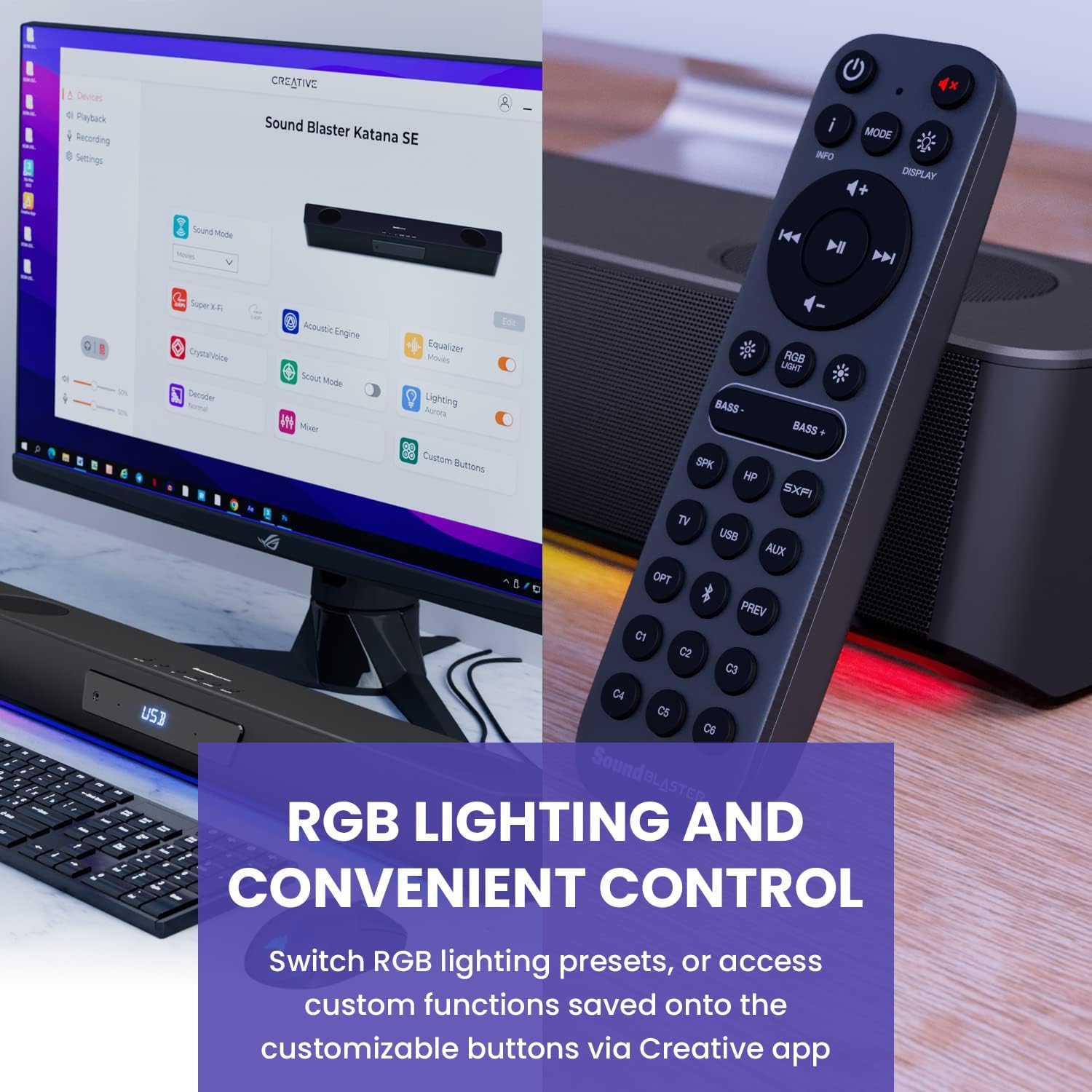
Figure 6: Remote control for the Sound Blaster Katana SE.
7.6. Creative App Customization
For advanced customization, download the Creative app on your PC or Mac. The app allows you to:
- Tune Audio Performance: Adjust EQ settings and activate Sound Blaster processing technologies.
- Prilagodite RGB rasvjetu: Select from various RGB presets or create your own custom lighting effects.
- Map Custom Functions: Assign specific commands to the six customizable buttons on the remote control.

Figure 7: Creative app interface showing sound mode, Super X-Fi, Acoustic Engine, Equalizer, CrystalVoice, Scout Mode, Lighting, Decoder, Mixer, and Custom Buttons.
8. Super X-Fi Technology
Super X-Fi technology personalizes your headphone audio experience for optimized and realistic listening. It recreates the soundstage of a multi-speaker system in your headphones.
- SXFI Battle Mode: Ostvarite konkurentski napredaktage in FPS games by accurately pinpointing enemy locations through enhanced audio cues.

Figure 8: Super X-Fi and SXFI Battle Mode for enhanced gaming audio.
9. Ugrađeni mikrofon
The Sound Blaster Katana SE includes a built-in beamforming microphone, allowing you to participate in calls or in-game voice chat directly through the soundbar.
10. RGB osvjetljenje
The integrated RGB lighting strip can be customized to match your setup or mood. Use the remote control to cycle through presets or the Creative app for advanced color and effect adjustments.
11. Održavanje
To ensure the longevity and performance of your Sound Blaster Katana SE:
- Održavajte uređaj čistim brisanjem mekom, suhom krpom.
- Avoid using liquid cleaners or aerosols.
- Osigurajte da ventilacijski otvori nisu začepljeni.
- Ne izlažite uređaj ekstremnim temperaturama ili vlazi.
12. Rješavanje problema
Ako naiđete na probleme sa soundbarom, pogledajte sljedeća uobičajena rješenja:
- Nema zvuka: Check all cable connections (power, audio source, subwoofer). Ensure the correct input source is selected on the soundbar. Verify the volume is not muted or too low.
- Izobličen zvuk: Try reducing the volume. Check audio cable integrity. Ensure the audio source is providing a clean signal.
- Problemi s Bluetooth vezom: Ensure the soundbar is in Bluetooth pairing mode. Delete the soundbar from your device's Bluetooth list and re-pair. Move closer to the soundbar to reduce interference.
- Daljinski upravljač ne radi: Check battery levels and replace if necessary. Ensure there are no obstructions between the remote and the soundbar.
- RGB svjetla ne rade: Check settings in the Creative app. Ensure RGB lighting is enabled via the remote or app.
13. Specifikacije
| Značajka | Specifikacija |
|---|---|
| Naziv modela | 51MF8415AA000 27585486 |
| Vrsta zvučnika | Soundbar |
| Vrsta montaže | Stolni nosač |
| Posebna značajka | Bass Boost, Built In Microphone, Radio, Stereo Pairing, USB Port |
| Preporučena upotreba proizvoda | For Gaming Consoles, For Computers |
| Kompatibilni uređaji | Stolno računalo, prijenosno računalo, MP3 player, projektor, pametni telefon, tablet, televizor |
| Broj jedinica | 1.0 Broj |
| Konfiguracija kanala surround zvuka | 5.1 |
| Boja | 180W Peak Power with Bluetooth 5.0 |
| Uključene komponente | Daljinski |
| Dimenzije proizvoda | 25.6"D x 4.3"Š x 3.1"V |
| Težina artikla | 5.9 funti |
| Je vodootporan | NETOČNO |
| Vrsta jamstva | ograničeno |
| Broj stavki | 1 |
| Metoda kontrole | Daljinski |
| Bežična komunikacijska tehnologija | Bluetooth |
| Veličina zvučnika | 1 inča |
| Izvor napajanja | Električni na kabel |
| Promjer visokotonca | 1 inča |
| Razina vodootpornosti | Nije vodootporan |
| Vrsta paketa za kupca | FFP |
| Vrsta audio upravljačkog programa | Dinamički upravljački program |
| Tehnologija povezivanja subwoofera | Bežični |
| Broj razina snage | 1 |
| Specifične namjene proizvoda | Gaming Consoles, Computers |
| UPC | 054651195639 |
| Proizvođač | Kreativni laboratoriji |
| Oblik | pravokutna prizma |
| Težina artikla | 5.9 funti |
| ASIN | B0C5DFMB93 |
| Broj modela artikla | MF8415 |
| Datum prve dostupnosti | 16. svibnja 2023 |
| Marka | Kreativno |
| Maksimalna izlazna snaga zvučnika | 100 vata |
| Frekvencijski odziv | 20000 Hz |
| Tehnologija povezivanja | Bluetooth |
| Način audio izlaza | Surround, Stereo |
14. Jamstvo i podrška
Your Creative Sound Blaster Katana SE comes with a Limited Warranty. For detailed warranty information, product registration, technical support, and customer service, please visit the official Creative webstranicu ili pogledajte jamstveni list koji se nalazi u vašem paketu.