
1. Uvod i krajview
The Vertiv Liebert GXT5 Lithium-Ion N Online UPS (Uninterruptible Power Supply) provides reliable, high-quality AC power to IT equipment. This unit is designed to protect critical loads from power disturbances and outages, ensuring continuous operation. Featuring Lithium-Ion battery technology, it offers extended battery life and reduced maintenance compared to traditional UPS systems. This manual provides essential information for the safe and efficient installation, operation, and maintenance of your UPS.
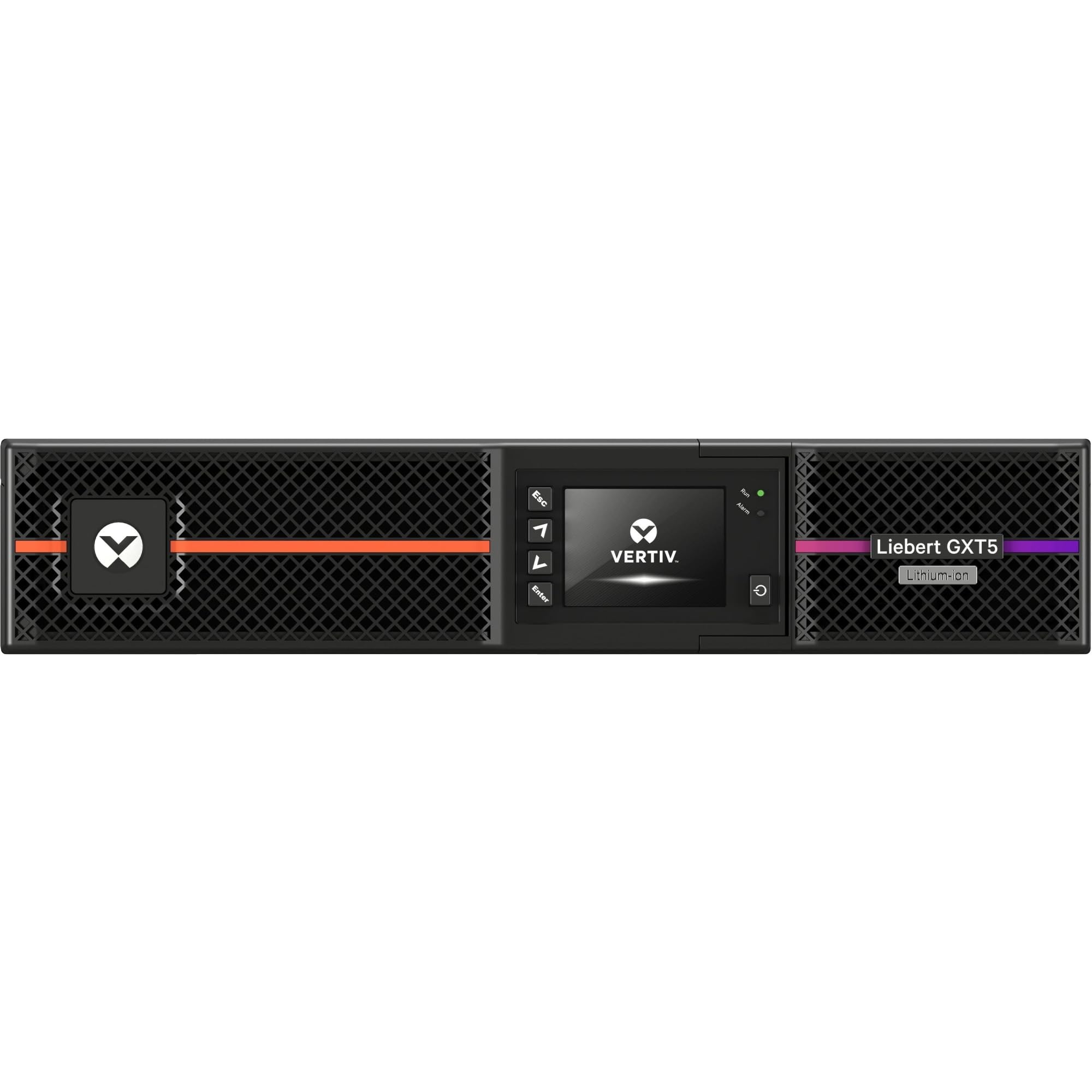
Slika 1: Prednja strana view of the Vertiv Liebert GXT5 UPS, showing the display and ventilation.
2. Sigurnosne informacije
Prije instalacije, rada ili održavanja UPS-a, molimo pročitajte i razumite sve sigurnosne upute. Nepoštivanje ovih uputa može uzrokovati strujni udar, požar ili ozbiljne ozljede.
- Električna opasnost: Ova jedinica sadrži opasni voltages. Do not open the UPS enclosure. Refer all servicing to qualified service personnel.
- Sigurnost baterije: The UPS contains Lithium-Ion batteries. Do not dispose of batteries in a fire. Batteries may explode. Do not open or mutilate batteries. Released electrolyte is harmful to the skin and eyes.
- Uzemljenje: Ensure the UPS is properly grounded to reduce the risk of electric shock.
- Okruženje: Install the UPS in a controlled environment, free from excessive dust, humidity, and extreme temperatures.
- Težina: The UPS unit is heavy. Use proper lifting techniques or assistance during installation to prevent injury.
3. Sadržaj paketa
Verify that all items are present in the packaging. If any items are missing or damaged, contact your supplier.
- Vertiv Liebert GXT5 Lithium-Ion N Online UPS Unit
- Ulazni kabel za napajanje
- Output Power Cords (quantity may vary)
- USB kabel
- Serijski kabel
- Rackmount Kit (rails, hardware)
- Tower Stands (for tower configuration)
- Vodič za brzi početak i sigurnosne upute
4. Postavljanje
4.1 Fizička instalacija
The GXT5 UPS can be installed in either a rackmount or tower configuration.
Tower Configuration:
Attach the provided tower stands to the bottom of the UPS unit for stable vertical placement. Ensure adequate clearance for ventilation.

Figure 2: UPS unit configured for tower installation with stands.
Rackmount Configuration:
Install the rackmount rails into your standard 19-inch equipment rack. Slide the UPS unit onto the installed rails and secure it with the provided screws.
4.2 Connecting Power and Equipment
- Spojite ulaznu snagu: Plug the UPS input power cord into a properly grounded electrical outlet.
- Spojite opremu: Plug your critical equipment (servers, network devices, etc.) into the output receptacles on the rear panel of the UPS. Note that some outlets may be individually controllable.
- Komunikacijski priključci: For monitoring and management, connect the USB or serial cable to your computer or network device.
- Optional RDU101 Card: If using the optional RDU101 network management card, insert it into the Intellislot and connect an Ethernet cable for remote monitoring.
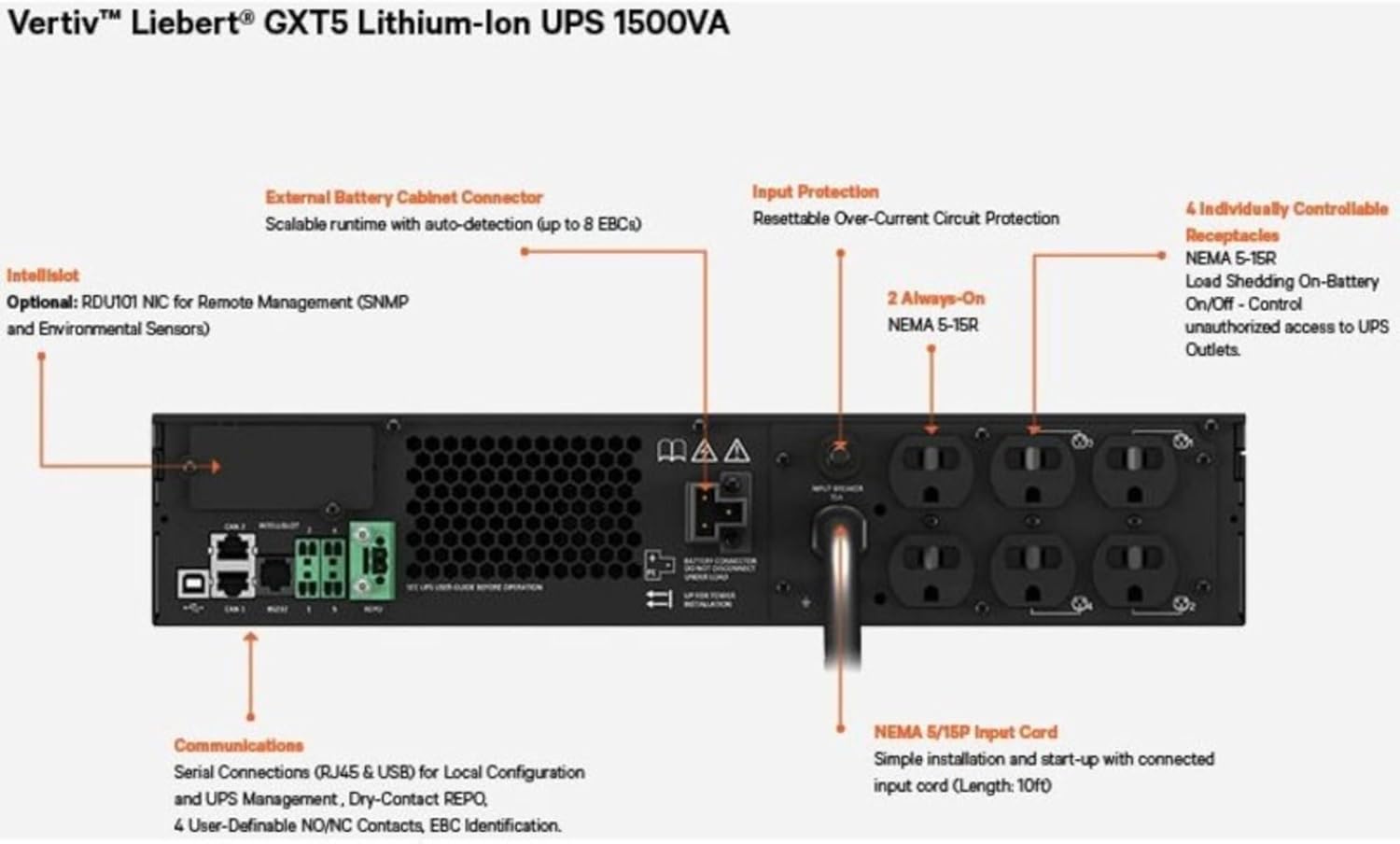
Figure 3: Rear panel connections, including input power, output receptacles, and communication ports.

Figure 4: RDU101 network management card with labeled ports.
4.3 Početno uključivanje
After all connections are secure, press the power button on the front panel to turn on the UPS. The display will illuminate, and the UPS will perform a self-test. Allow the batteries to charge for at least 24 hours before relying on them for extended backup time.
5. Upravljanje UPS-om
5.1 Zaslon i kontrole na prednjoj ploči
LCD zaslon na prednjoj ploči prikazuje informacije o statusu u stvarnom vremenu, uključujući glasnoću ulaza/izlazatage, load level, battery status, and alarm conditions. Use the navigation buttons to access menus and configure settings.
5.2 načina rada
- Online način rada: Normal operation where the UPS continuously converts AC input to DC to charge batteries and then back to AC to power connected equipment, providing maximum protection.
- Način rada baterije: When input power fails, the UPS automatically switches to battery power to keep connected equipment running.
- Bypass način rada: In certain conditions or for maintenance, the UPS can transfer the load directly to utility power, bypassing the UPS's power conditioning.
5.3 Postupci isključivanja
To safely shut down the UPS, first power off all connected equipment. Then, press and hold the power button on the UPS front panel until the unit powers off. Disconnect the input power cord only after the UPS is completely off.
6. Održavanje
6.1 Njega baterija
The Lithium-Ion batteries in your GXT5 UPS are designed for a long service life. Regular maintenance is generally not required. However, ensure the UPS operates within recommended temperature ranges to maximize battery lifespan. Avoid frequent deep discharges if possible.
6.2 Čišćenje
Keep the UPS free from dust and debris. Use a soft, dry cloth to clean the exterior. Do not use liquid cleaners or solvents. Ensure ventilation openings are clear and unobstructed.
6.3 ažuriranja firmvera
Periodically check the Vertiv website for available firmware updates for your UPS model. Firmware updates can provide performance enhancements, bug fixes, and new features. Follow the instructions provided with the update package carefully.
7. Rješavanje problema
This section provides solutions to common issues you may encounter with your UPS. For more complex problems, contact Vertiv technical support.
| Problem | Mogući uzrok | Otopina |
|---|---|---|
| UPS se ne uključuje | No input power; Battery deeply discharged; Power button not pressed correctly. | Check input power cord connection and wall outlet. Allow UPS to charge for several hours. Press and hold power button for 2-3 seconds. |
| UPS neprestano pišti | On battery power; Overload condition; Battery fault. | Check input power. Reduce connected load. Check battery status on display. |
| Priključena oprema gubi napajanje | UPS battery depleted; UPS shut down due to overload; UPS fault. | Check UPS display for error messages. Ensure load is within UPS capacity. |
8. Specifikacije
| Značajka | Specifikacija |
|---|---|
| Broj modela | GXT5LI-1500LVRT2UXLN |
| Kapacitet (VA/Watti) | 1500 VA / 1350 W |
| Ulazni voltage | 120 volti |
| Vrsta baterije | Litij ion |
| Dimenzije proizvoda (D x Š x V) | 24 x 22.5 x 9.5 inča |
| Težina artikla | 55.4 funti |
| Boja | Crna |
9. Jamstvo i podrška
Your Vertiv Liebert GXT5 UPS is covered by a manufacturer's warranty. Please refer to the warranty card included with your product or visit the official Vertiv webstranicu za detaljne uvjete jamstva.
For technical assistance, troubleshooting, or to inquire about service, please contact Vertiv customer support. You can also explore additional resources and product information through the Vertiv Virtual Showroom:
Visit the Vertiv Virtual Showroom

Figure 5: Scan this QR code to access the Vertiv Virtual Showroom for more product information and support.