
symcode USA-6709DA-Green
Symcode Wireless Bluetooth Barcode Scanner User Manual
Model: USA-6709DA-Green
1. Uvod
This user manual provides comprehensive instructions for the Symcode Wireless Bluetooth Barcode Scanner, Model USA-6709DA-Green. This device is designed for accurate and efficient data capture, supporting various 1D and 2D barcode types. It offers versatile connectivity options including Bluetooth, 2.4G wireless, and USB wired connections, making it suitable for a wide range of business applications.

Image 1: Symcode Wireless Bluetooth Barcode Scanner and accessories.
2. Sadržaj paketa
Molimo provjerite jesu li svi artikli prisutni u vašem paketu:
- Symcode Barcode Scanner (Model: USA-6706DA-Green)
- USB kabel za punjenje
- 2.4G USB ključ
- korisnički priručnik

Image 2: Components included with the Symcode Barcode Scanner.
3. Značajke proizvoda
- Napredna tehnologija skeniranja: CMOS optical imaging for quick and precise scanning of 1D and 2D barcodes (QR, DataMatrix, PDF417, Aztec, Hanxin, etc.) even on damaged or poorly printed labels.
- Trostruki načini povezivanja: Supports Bluetooth, 2.4G wireless, and USB wired connections for maximum flexibility.
- Prošireni bežični domet: Up to 200m in open environments and 30m indoors with the 2.4G USB dongle.
- Dugo trajanje baterije: 2000mAh battery provides up to 30 hours of continuous scanning, with a full recharge in approximately 2 hours.
- Svestrana konfiguracija: Features include hands-free intelligent sensor mode, trigger scan mode, vibration/buzzer settings, data storage/instant upload modes, multiple keyboard languages, and customizable prefix/suffix options.
- Vrhunska izdržljivost: Constructed with strong ABS material, designed to withstand drops of up to 2.4 meters (8 ft) and features an integrated dustproof housing (IP67 rated).
4. Postavljanje i povezivanje
The scanner offers three primary connection methods:
4.1. 2.4G bežična veza
- Uključite 2.4G USB adapter u slobodni USB priključak na računalu.
- Turn on the scanner. It will automatically pair with the dongle.
- A successful connection is indicated by a specific beep sound and LED indicator.
4.2. Bluetooth veza
- Ensure your device (smartphone, tablet, computer) has Bluetooth enabled.
- Scan the Bluetooth pairing barcode (usually found in the user manual or on a setup card).
- On your device, search for Bluetooth devices and select "Symcode Scanner" (or similar name).
- Potvrdite uparivanje.
4.3. Žičana USB veza
- Spojite skener na računalo pomoću priloženog USB kabela.
- Skener će funkcionirati kao žičani uređaj i istovremeno će se puniti.

Image 3: Connectivity options for the Symcode Barcode Scanner.

Image 4: Operating system compatibility.
5. Upute za rad
5.1. Basic Scanning Operation
To scan a barcode, point the scanner's window at the barcode and press the trigger button. A successful scan will be indicated by a beep and/or vibration, and the data will be transmitted to your connected device.
5.2. Data Upload Modes
The scanner supports two data upload modes:
- Način trenutnog slanja: Data is transmitted to the connected device immediately after each scan. This is the default mode.
- Offline Storage Mode: Scanned data is stored in the scanner's internal memory (up to 10,000 codes). To upload stored data, scan the specific setup code for 'Upload Data' found in your detailed user manual.

Image 5: Instant Upload Mode vs. Offline Storage Mode.
5.3. Decoding Capabilities
The scanner can decode a wide array of barcode types, including:
- 1D bar kodovi: UPC/EAN, Code 39, Code 128, Codabar, Interleaved 2 of 5, Code 93, MSI, Code 11, RSS variants, etc.
- 2D bar kodovi: QR Code, Data Matrix, PDF417, Aztec, Hanxin.
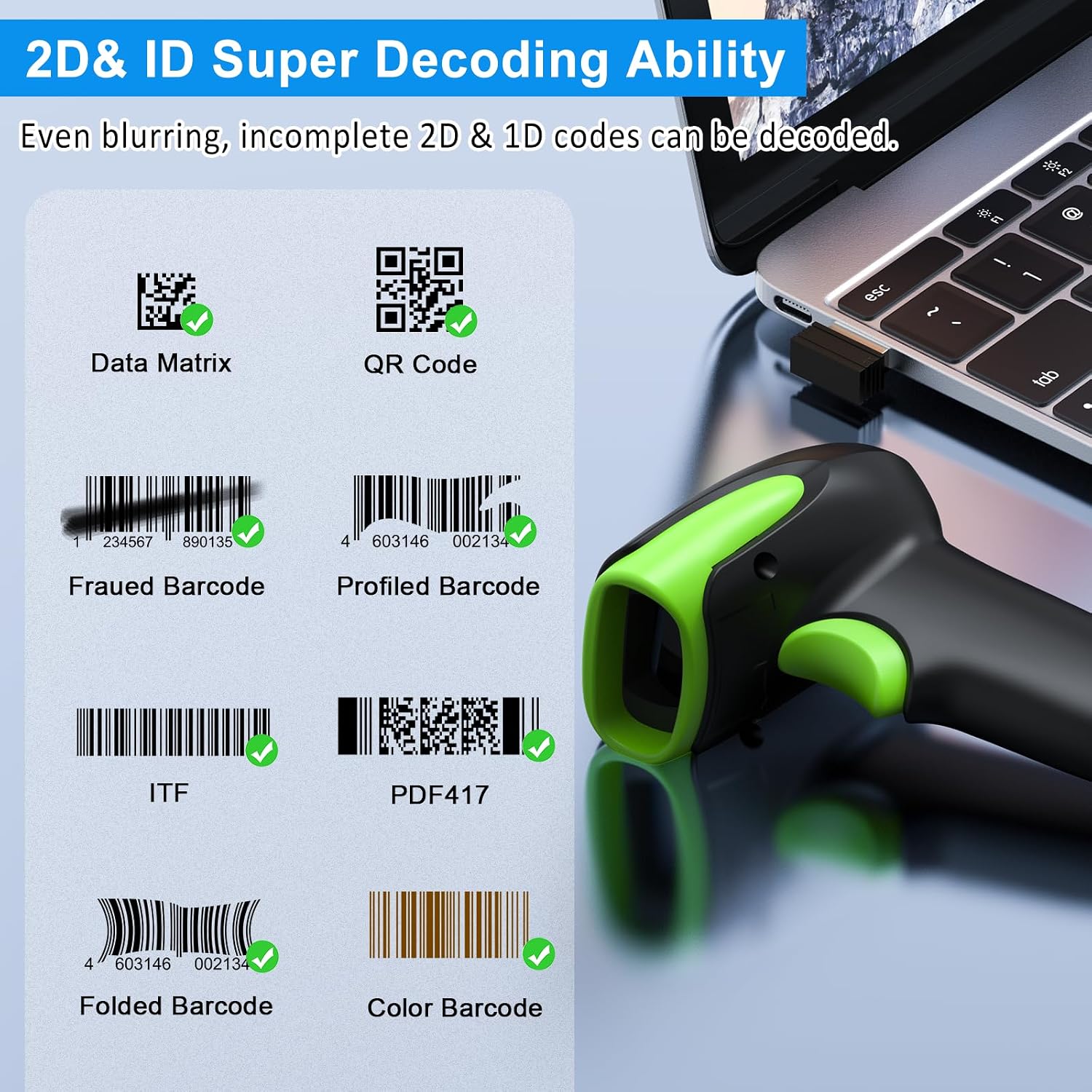
Slika 6: Primjeramples of decodable 1D and 2D barcodes.
6. Održavanje
To ensure optimal performance and longevity of your scanner:
- Čišćenje: Use a soft, dry cloth to clean the scanner's exterior. For the scanning window, use a lens cleaning cloth to avoid scratches. Do not use abrasive cleaners or solvents.
- Punjenje: Recharge the battery using the provided USB cable. Avoid overcharging or completely draining the battery for extended periods.
- Skladištenje: Skener čuvajte na hladnom i suhom mjestu, dalje od izravne sunčeve svjetlosti i ekstremnih temperatura.
- Izdržljivost: While rugged, avoid intentional drops or impacts. The scanner is designed to withstand accidental drops up to 2.4 meters.

Image 7: The scanner's rugged design and drop resistance.
7. Rješavanje problema
If you encounter issues with your scanner, please refer to the following common problems and solutions:
- Skener se ne povezuje:
- Provjerite je li skener napunjen.
- Verify the correct connection mode (Bluetooth, 2.4G, USB) is selected and properly set up.
- For 2.4G, ensure the dongle is securely plugged in. For Bluetooth, ensure your device's Bluetooth is on and the scanner is paired.
- Try restarting both the scanner and the host device.
- Skener ne čita barkodove:
- Ensure the barcode is not excessively damaged, smudged, or poorly printed.
- Check the distance and angle of the scanner to the barcode.
- Verify that the barcode type is supported by the scanner.
- Clean the scanning window if it is dirty.
- Data not transmitting:
- Confirm the scanner is successfully connected to your device.
- Check if the scanner is in 'Offline Storage Mode' and needs to be manually uploaded.
- Ensure the application on your device is ready to receive input.
For further assistance, please refer to the comprehensive troubleshooting section in the full user manual or contact Symcode customer support.
8. Specifikacije
| Značajka | Specifikacija |
|---|---|
| Broj modela | USA-6709DA-Green |
| Ulazni voltage | DC5V±0.25v |
| Current (Work/Instantaneous) | 25 mA / 95 mA |
| Decoding Speed | 100 puta / sek |
| Wireless Range (2.4G) | Up to 200m (open air), 30m (indoors) |
| Vrijeme punjenja | cca. 2.5 sati |
| Trajanje baterije | Up to 30 Hours (continuous scanning) |
| Vrsta baterije | 1 litij-polimerska baterija (uključena) |
| Povezivost | Bluetooth 6.1, Wireless 2.4G, USB Cable |
| Kompatibilni uređaji | Desktop, Laptop, Smartphone, POS systems |
| Operacijski sustavi | Windows 11/10/8/7/XP, Mac OS, iOS, Android, Linux |
| Težina artikla | 10.2 unci |
| Dimenzije paketa | 6.89 x 4.49 x 3.31 inča |

Image 8: Wireless transmission range.
9. Jamstvo i podrška
This Symcode product is manufactured by USA Scanner. For any product inquiries, technical support, or warranty claims, please contact USA Scanner directly. Refer to the contact information provided in your product packaging or visit the official Symcode brand store on Amazon for support resources.
Posjetite Symcode Store za više informacija.
Ask a question about this manual
Ask about setup, troubleshooting, compatibility, parts, safety, or missing instructions. Manuals+ will review the question and use this page’s manual context to help answer it.