
1. Uvod
This manual provides detailed instructions for the installation, operation, and maintenance of your Tiandy TC-C32XN 2MP Fixed IP Dome Turret Camera. Please read this manual thoroughly before using the product to ensure correct usage and optimal performance. Keep this manual for future reference.
2. Sigurnosne informacije
- Ensure the power supply matches the camera's requirements to prevent damage.
- Ne izlažite kameru ekstremnim temperaturama, vlazi ili korozivnim okruženjima.
- Izbjegavajte dulje usmjeravanje fotoaparata izravno prema jakim izvorima svjetlosti jer to može oštetiti slikovni senzor.
- Pažljivo rukujte fotoaparatom. Ne ispuštajte ga niti ga izlažite jakim vibracijama.
- All installation and service should be performed by qualified personnel.
- Isključite napajanje prije čišćenja ili održavanja.
3. Sadržaj paketa
Provjerite jesu li svi artikli prisutni u vašem paketu:
- Tiandy TC-C32XN 2MP Fixed IP Dome Turret Camera
- Adapter
- Vijci za montažu i zidni tiplovi
- Kratki vodič (ako je uključen)
4. Proizvod je gotovview
The Tiandy TC-C32XN is a 2MP Fixed IP Dome Turret Camera designed for reliable surveillance. It features Smart IR for clear night vision up to 30 meters, a built-in microphone, and an SD card slot for local storage.

Slika 4.1: Prednja strana view of the Tiandy TC-C32XN camera, showing the lens and IR illuminators.
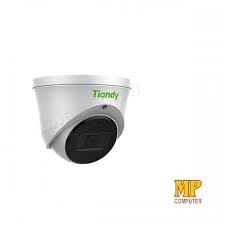
Slika 4.2: Bočna strana view of the Tiandy TC-C32XN camera, highlighting its dome turret form factor.
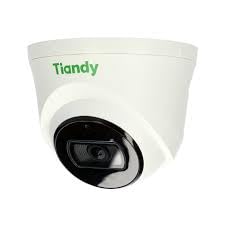
Slika 4.3: Kutno view of the Tiandy TC-C32XN camera, showcasing njegov kompaktni dizajn.
5. Postavljanje i instalacija
5.1 Montaža
- Odaberite lokaciju: Choose a suitable outdoor or indoor location (IP67 rated for outdoor use) that provides the desired viewing angle and is within reach of power and network connections. The camera is designed for protruding mounting.
- Izbušite rupe: Use the provided mounting template (if applicable) to mark and drill holes for the mounting screws.
- Osigurajte kameru: Attach the camera base securely to the mounting surface using the provided screws and wall plugs.
5.2 Ožičenje
- Priključak za napajanje: Connect the provided adapter to the camera's power input and then to a power outlet. The camera operates on corded electric power.
- Mrežna veza: Connect an Ethernet cable from your network router or PoE switch to the camera's Ethernet port. This camera supports Ethernet connectivity for data transmission.
5.3 Početna konfiguracija
- Uključivanje: Once wired, power on the camera.
- Network Discovery: Use the Tiandy client software or a network scanner tool to discover the camera's IP address on your local network.
- Pristup kameri: Otvori a web preglednik i unesite IP adresu kamere za pristup web interface. Log in using the default credentials (refer to the quick start guide for default username/password).
- Promjena zadane lozinke: Radi sigurnosti, odmah promijenite zadanu lozinku prilikom prve prijave.
- Integracija NVR-a: If using with an NVR, add the camera to your NVR system following the NVR's instructions. This camera is compatible with all brand NVRs.
- Postavljanje mobilne aplikacije: Download the official Tiandy mobile application (available for Android and iOS) and follow the in-app instructions to add your camera for remote viewing i kontrolu.
6. Upute za rad
6.1 Uživo View i Snimanje
Pristupite prijenosu uživo s kamere view kroz web interface, NVR, or mobile app. Configure recording schedules and methods (continuous, motion-triggered) via the camera's settings.
6.2 Smart IR and Night Vision
The camera features Smart IR technology, which automatically adjusts the intensity of its infrared LEDs to prevent overexposure of objects close to the camera, ensuring clear images in low-light conditions up to 30 meters. It also supports 'Night Color' low light technology for enhanced visibility.
6.3 Detekcija pokreta i upozorenja
Configure motion detection zones and sensitivity in the camera settings. The camera supports 'Motion Only' alert types. When motion is detected, the camera can trigger recordings, send notifications to your mobile device, or activate other configured actions. It also supports advanced features like tripwire and perimeter intrusion detection.
6.4 Funkcionalnost zvuka
The built-in microphone allows for audio monitoring of the surveillance area. Audio settings can be adjusted in the camera's web interface or NVR.
6.5 SD Card Storage
Insert a compatible SD card into the camera's SD card slot for local storage of recordings. Ensure the card is formatted correctly via the camera's settings. The camera supports SD flash memory type.
6.6 Gumb za resetiranje
A reset button is included for restoring the camera to its factory default settings. Consult the quick start guide for the exact location and procedure for your model.
7. Održavanje
- Čišćenje: Nježno obrišite objektiv i tijelo fotoaparata mekom, suhom krpom. Nemojte koristiti jake kemikalije ili abrazivna sredstva za čišćenje.
- Ažuriranja firmvera: Regularly check the Tiandy official website for firmware updates. Keeping your camera's firmware up-to-date ensures optimal performance and security.
- Pregled kabela: Povremeno pregledavajte sve kabele na znakove istrošenosti ili oštećenja, posebno kod vanjskih instalacija.
8. Rješavanje problema
- Bez napajanja: Provjerite je li adapter za napajanje sigurno spojen i je li utičnica ispravna.
- Nema videa: Check network cable connections. Verify the camera's IP address and network settings. Ensure the camera is properly added to your NVR or viewing softvera.
- Loša kvaliteta slike: Clean the camera lens. Adjust focus if applicable. Check lighting conditions and camera placement.
- Problemi s mrežnom vezom: Verify router and network cable functionality. Restart the camera and network devices.
- Ne mogu pristupiti Web sučelje: Ensure your computer is on the same network segment as the camera. Verify the camera's IP address. Try resetting the camera to factory defaults if necessary (this will erase all settings).
9. Specifikacije
| Značajka | Specifikacija |
|---|---|
| Model | TC-C32XN |
| Učinkovito još uvijek razrješenje | 2 MP (1920x1080) |
| Frame Rate | 30 sličica u sekundi |
| Tehnologija foto senzora | CMOS (1/2.8") |
| Domet noćnog vida | 30 Metres (Smart IR) |
| Tehnologija slabog osvjetljenja | Noćna boja |
| Optički zum | 3 x |
| Ugrađeni mikrofon | Da |
| Utor za SD karticu | Yes (Flash Memory Type: SD) |
| Vrsta upozorenja | Motion Only (supports tripwire and perimeter) |
| Tehnologija povezivanja | Wireless (IR), Ethernet |
| Izvor napajanja | Električni na kabel |
| Međunarodna ocjena zaštite | IP67 |
| Form Factor | Dome Turret |
| Vrsta montaže | Stršeći |
| Kompatibilnost operativnog sustava | Android, iOS |
| Dimenzije proizvoda (D x Š x V) | 50 x 50 x 70 milimetara |
| Težina artikla | 20 gram |
| Uključene komponente | Adapter |
| Boja | Bijela |
10. Jamstvo i podrška
For warranty information and technical support, please refer to the warranty card included with your product or visit the official Tiandy website. Contact the seller or manufacturer directly for assistance with product issues or inquiries.