
Formovie X5
Korisnički priručnik za Formovie X5 4K laserski TV projektor
Model: X5 | Brand: Formovie
Uvod
The Formovie X5 4K Laser TV Projector is a portable mini smart projector designed to deliver a cinematic experience in your home. Featuring ALDP Laser Display Technology, 2450 lumens brightness, and built-in Denon speakers, it offers stunning 4K resolution and immersive audio. This manual provides essential information for setting up, operating, and maintaining your projector.
Proizvod gotovview
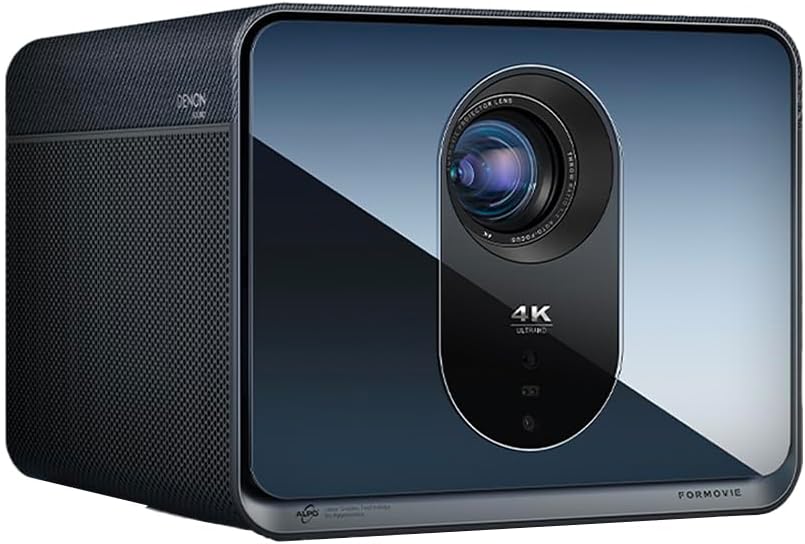
Ispred view of the Formovie X5 projector, showcasinsvojim elegantnim dizajnom i istaknutom lećom.
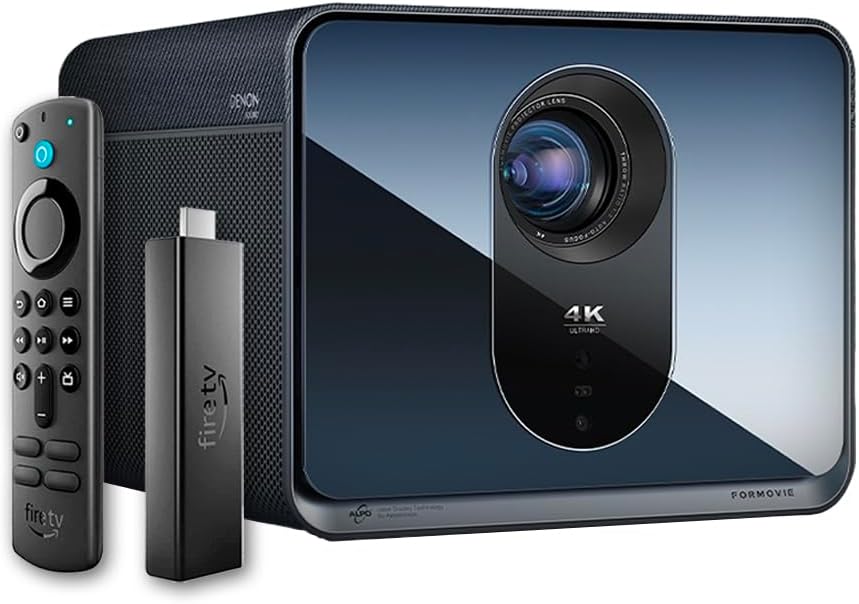
The Formovie X5 projector shown alongside its included Amazon Fire TV Stick 4K Max and remote control.

Stražnji view of the Formovie X5 projector, displaying various connectivity ports including LAN, USB, HDMI, and S/PDIF.
Vodič za postavljanje
1. Raspakiranje i postavljanje
- Pažljivo izvadite projektor i svu dodatnu opremu iz pakiranja.
- Place the projector on a stable, flat surface. Ensure adequate ventilation around the unit.
- Position the projector directly in front of your desired projection surface (wall or screen) for optimal image geometry. While the projector has auto-correction, a direct alignment is recommended for the best experience.
2. Priključak za napajanje
- Spojite adapter za napajanje na ulazni priključak za napajanje projektora.
- Utaknite strujni adapter u odgovarajuću električnu utičnicu.
3. Initial Power On and Auto-Focus
- Pritisnite tipku za napajanje na projektoru ili daljinskom upravljaču kako biste uključili uređaj.
- The projector will automatically initiate its auto-focus and omnidirectional auto-correction features. Allow a few moments for the image to stabilize and sharpen.
4. Connecting the Fire TV Stick 4K Max
- Insert the Amazon Fire TV Stick 4K Max into an available HDMI port on the projector.
- Connect the Fire TV Stick to its power source.
- Select the corresponding HDMI input on the projector's menu.
Upute za rad
Funkcije daljinskog upravljanja
The included remote control allows full navigation and control of the projector and the connected Fire TV Stick.
- Gumb za napajanje: Uključuje/isključuje projektor.
- Navigacijska podloga: Koristi se za navigaciju izbornicima i odabir opcija.
- Gumb Natrag: Povratak na prethodni ekran.
- tipka za početak: Vraća se na glavni izbornik.
- Gumbi za glasnoću: Podešava glasnoću zvuka.
- Gumb za glasovnu kontrolu: Activates voice commands for the Fire TV Stick.
Podešavanje postavki slike
The Formovie X5 features advanced automatic adjustment tools. For manual adjustments:
- Ručni fokus: If auto-focus is not satisfactory, access the projector settings to manually adjust focus.
- Korekcija trapezoida: While omnidirectional auto-correction is standard, manual keystone adjustment is available in the settings for fine-tuning image shape.
- Ambient Light Adaptive: The projector automatically adjusts brightness based on ambient light conditions. This can be toggled or fine-tuned in the display settings.
Ključne značajke
- 4K ALDP Laser Display Technology: Experience breathtaking visuals with true 4K resolution and a wide color gamut, ensuring crystal-clear and vibrant images.
- Cinema-Like Projection Size: Project images from 60 inches up to a massive 1,000 inches, providing an immersive viewing experience for movies, sports, and gaming.
- Powerful Adjustment Tools: Equipped with omnidirectional auto-correction, ambient light adaptive technology, laser autofocus, and automatic curtain alignment for hassle-free setup and optimal picture quality.
- Built-In Three-Way Denon Speakers: The X5 is the first projector to feature integrated three-way speakers powered by Denon, delivering rich, immersive audio without the need for external sound systems.
- Integrated Amazon Fire TV: Stream directly from your favorite apps like Netflix, Prime Video, Disney+, and more, with the convenience of the included Fire TV Stick 4K Max.
Održavanje
- Čišćenje leća: Nježno obrišite leću projektora mekom krpom koja ne ostavlja dlačice, posebno namijenjenom za optičke površine. Nemojte koristiti abrazivna sredstva za čišćenje ili pretjeranu silu.
- Ventilacija: Ensure the projector's ventilation ports are clear of dust and obstructions to prevent overheating. Regularly clean the vents with a soft brush or compressed air.
- Skladištenje: Kada se projektor ne koristi dulje vrijeme, pohranite ga na hladnom i suhom mjestu, dalje od izravne sunčeve svjetlosti i ekstremnih temperatura.
Rješavanje problema
| Problem | Mogući uzrok | Otopina |
|---|---|---|
| Nema projicirane slike | Power cable disconnected, incorrect input source, projector in standby mode. | Check power connection, select correct HDMI input, press power button to wake. |
| Slika je mutna | Out of focus, lens dirty. | Allow auto-focus to complete or manually adjust focus. Clean the lens. |
| Slika je iskrivljena (trapezoidnog oblika) | Projector not perpendicular to screen, auto-correction issue. | Reposition projector directly in front of the screen. Use manual keystone correction if needed. |
| Nema zvuka | Volume too low, mute activated, external audio device not connected properly. | Increase volume, check mute status, ensure external audio (if used) is correctly connected. |
| Upozorenje na pregrijavanje | Blokirana ventilacija, dugotrajna upotreba u vrućem okruženju. | Ensure vents are clear. Turn off projector and allow it to cool down. Operate in a well-ventilated area. |
Tehnički podaci
| Značajka | Detalj |
|---|---|
| Marka | Oblici |
| Broj modela | X5 |
| Razlučivost zaslona | 3840 x 2160 (4K) |
| Tehnologija izvora svjetlosti | ALDP Laser |
| Svjetlina (ANSI lumeni) | 2450 lumena |
| Tehnologija povezivanja | HDMI, USB, LAN |
| Posebne značajke | Portable, Omnidirectional Auto-Correction, Ambient Light Adaptive, Laser Autofocus, Automatic Curtain Alignment, Built-In Denon Three-Way Speakers, Integrated Amazon Fire TV |
| Težina artikla | 15.14 funti |
| Dimenzije proizvoda | 8.27 x 8.54 x 6.57 inča |
Jamstvo i podrška
For warranty information, please refer to the documentation included with your product or visit the official Formovie website. For technical support, troubleshooting assistance, or to access additional resources, please contact Formovie customer service.
- Korisnički priručnik (PDF): preuzimanje
- Korisnički priručnik (PDF): preuzimanje
- Visit the Formovie Store: Formovie Store
Ask a question about this manual
Ask about setup, troubleshooting, compatibility, parts, safety, or missing instructions. Manuals+ will review the question and use this page’s manual context to help answer it.