
Uvod
The Havit Gamenote KB885L mechanical keyboard is engineered for precision, durability, and customization. It features a gasket structure design, providing a soft and stable typing experience while minimizing noise. The full key rollover with multi-key response ensures fast and accurate input, crucial for gaming. With customizable RGB backlighting, you can personalize your keyboard with various lighting modes and effects. The detachable USB-C cable enhances portability and simplifies cable management. This keyboard is built with mechanical switches rated for 50 million key presses, making it suitable for gamers, typists, and professionals who require long-lasting performance.
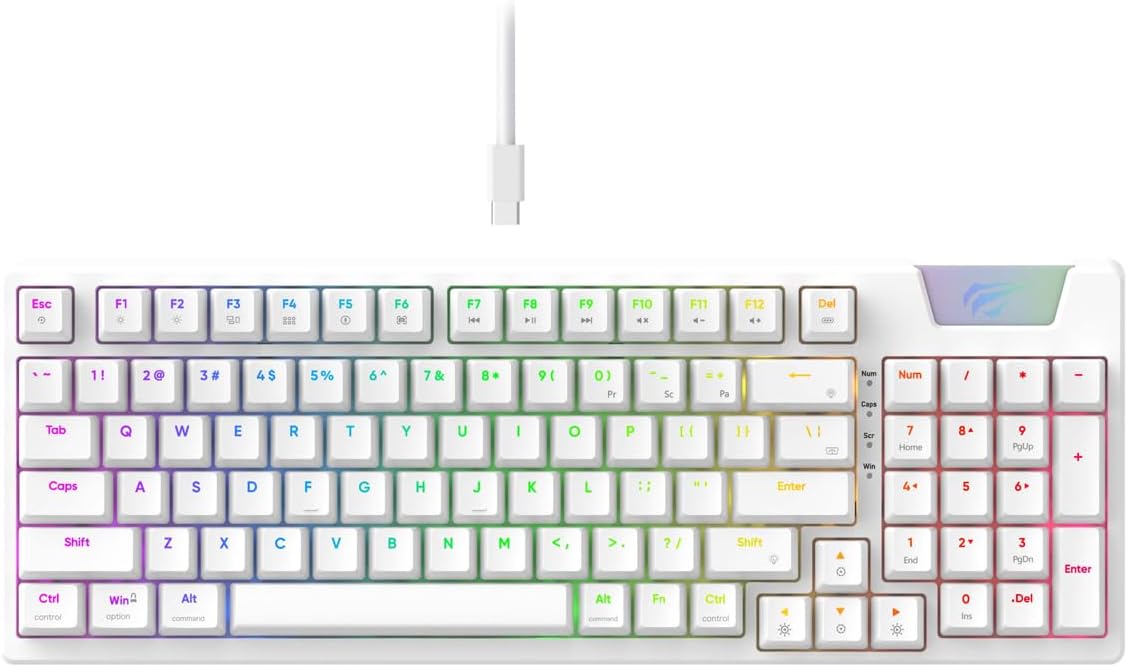
Image: The Havit Gamenote KB885L mechanical keyboard in white, showcasing its full layout and detachable USB-C cable.
Vodič za postavljanje
Follow these steps to set up your Havit Gamenote KB885L mechanical keyboard:
- Raspakirajte tipkovnicu: Pažljivo izvadite tipkovnicu i njezin pribor iz pakiranja.
- Spojite USB-C kabel: Insert the detachable USB Type-C cable into the port on the keyboard.
- Povežite se s računalom: Uključite drugi kraj USB kabela u slobodni USB priključak na računalu.
- Instalacija upravljačkog programa: The keyboard is plug-and-play and typically does not require additional drivers. Your operating system should automatically detect and install the necessary drivers.
- Funkcionalnost testiranja: Open a text editor or browser to test key presses and ensure all functions are working correctly.

Image: A close-up of the Havit Gamenote KB885L keyboard highlighting its portable design and detachable cable for easy setup and transport.
Upute za rad
The Havit Gamenote KB885L keyboard offers various features for an enhanced user experience:
RGB kontrola pozadinskog osvjetljenja
Tipkovnica ima prilagodljivo RGB pozadinsko osvjetljenje. Koristite sljedeće kombinacije tipki za podešavanje svjetlosnih efekata:
- Fn + [tipka]: Cycle through different RGB lighting modes. (Specific key combinations may vary, refer to on-keyboard legends if available).
- Fn + tipke sa strelicama: Adjust brightness and speed of lighting effects.

Image: The Havit Gamenote KB885L keyboard displaying its vibrant RGB backlighting, illustrating customizable lighting effects.
Full Key Rollover (NKRO)
This keyboard supports Full Key Rollover, meaning every key press is registered independently, regardless of how many keys are pressed simultaneously. This feature is essential for fast-paced gaming and typing, preventing ghosting or missed inputs.
Ergonomski dizajn
The keyboard is designed with ergonomics in mind to provide comfort during extended use. Its layout and keycap profile aim to reduce strain on your wrists and fingers.

Slika: A view of the Havit Gamenote KB885L keyboard highlighting its ergonomic design for comfortable use.
Održavanje
Pravilno održavanje osigurava dugotrajnost i optimalne performanse vaše tipkovnice:
- Čišćenje: Regularly clean the keyboard with a soft, dry cloth. For deeper cleaning, use compressed air to remove dust and debris from between the keycaps. For stubborn dirt, a slightly damp Može se koristiti krpa s blagim sapunom, pazeći da tekućina ne uđe u tipkovnicu.
- Izbjegavajte izlijevanje: Keep liquids away from the keyboard to prevent damage to the internal components. In case of a spill, immediately disconnect the keyboard and allow it to dry completely before reconnecting.
- Održavanje kabela: Pažljivo rukujte odvojivim USB-C kabelom. Izbjegavajte oštre savijanja ili pretjerano povlačenje kako biste spriječili oštećenje kabela ili konektora.
- Skladištenje: Kada se ne koristi, tipkovnicu čuvajte na čistom i suhom mjestu, dalje od ekstremnih temperatura.
Rješavanje problema
If you encounter issues with your Havit Gamenote KB885L keyboard, try the following solutions:
- Tipkovnica ne reagira:
- Provjerite je li USB-C kabel sigurno spojen i na tipkovnicu i na računalo.
- Pokušajte priključiti tipkovnicu u drugi USB priključak na računalu.
- Testirajte tipkovnicu na drugom računalu kako biste utvrdili je li problem s tipkovnicom ili vašim sustavom.
- RGB svjetla ne rade:
- Check if the lighting is turned off using the Fn key combinations.
- Ensure the keyboard is properly powered via the USB connection.
- Tipke se ne registriraju / tipke se ne registriraju:
- Due to full key rollover, this is unlikely. However, ensure no debris is lodged under the keycap.
- If a specific key is consistently failing, it might indicate a switch issue. Contact support if the problem persists.
Tehnički podaci
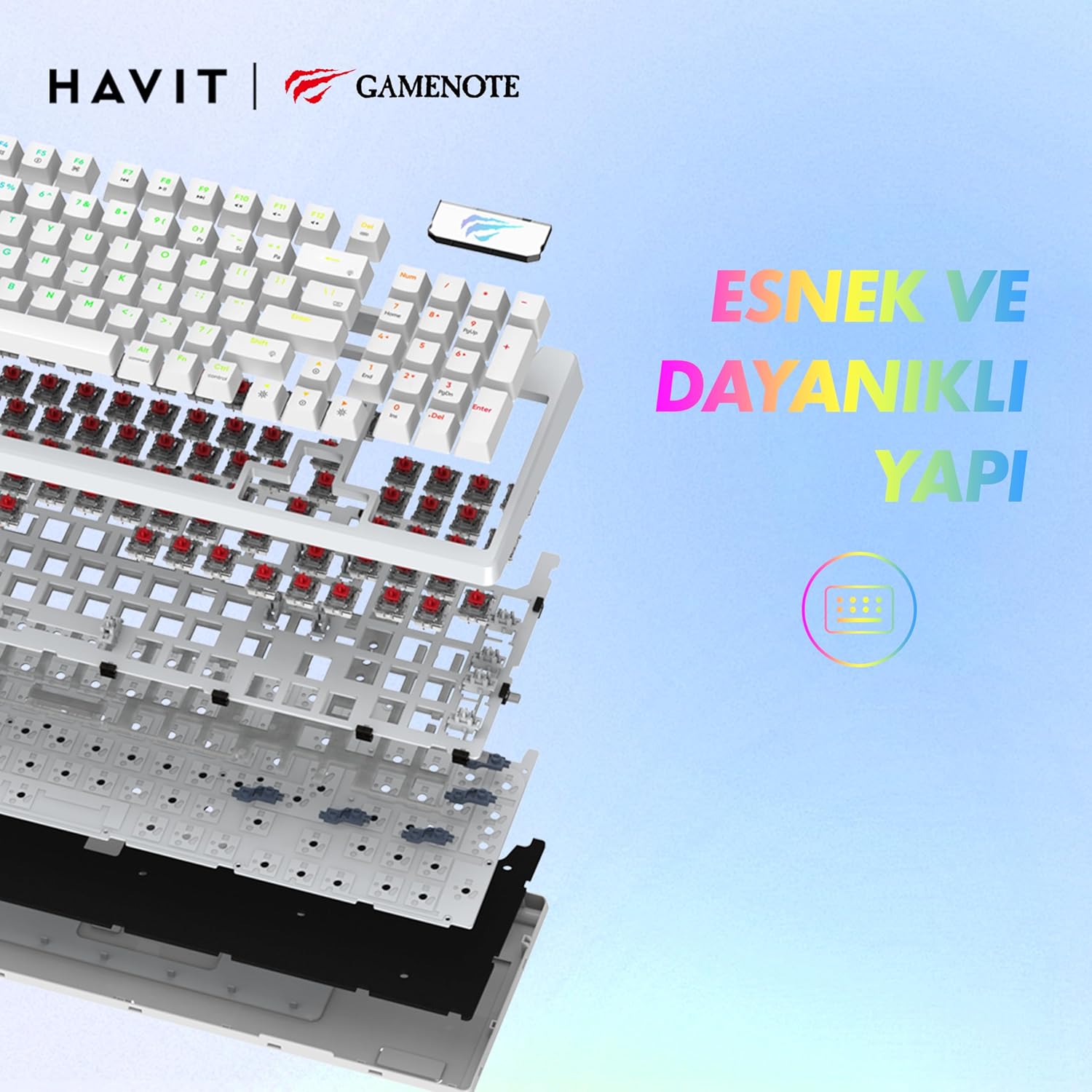
Slika: Eksplodirala view of the Havit Gamenote KB885L keyboard, illustrating its internal gasket structure for enhanced stability and typing feel.
| Značajka | Detalj |
|---|---|
| Marka | Havit |
| Broj modela | KB885L |
| Kompatibilni uređaji | Računalo |
| Tehnologija povezivanja | USB |
| Opis tipkovnice | Igre |
| Preporučena upotreba | Igre |
| Posebna značajka | Prijenosni |
| Boja | Bijela |
| Podrška za boju pozadinskog osvjetljenja | RGB (Red, Green, Blue model) |
| Stil | Moderno |
| Dimenzije proizvoda (D x Š x V) | 38.7 x 14 x 4.5 cm |
| Jezik | engleski |
| Izvor napajanja | USB napajanje |
| Tip prekidača | Taktilni |
| Raspored tipkovnice | QWERTY |
| Orijentacija ruke | Dvoličan |
| Broj tipki | 95 |
| Količina gumba | 104 |
| Uključene komponente | USB kabel |
| Materijal | Plastični |
| Key Press Lifespan | 50 Million (from description) |

Image: An illustration highlighting the Havit Gamenote KB885L's durable mechanical switches, rated for a 50 million key press lifespan.
Informacije o jamstvu
The Havit Gamenote KB885L Mechanical Keyboard comes with a jednogodišnje jamstvo from the date of purchase. This warranty covers manufacturing defects and issues arising from normal use. It does not cover damage caused by misuse, accidents, unauthorized modifications, or improper maintenance. Please retain your proof of purchase for warranty claims.
Korisnička podrška
For further assistance, technical support, or warranty inquiries, please contact Havit customer service through their official website or the retailer where you purchased the product. Have your model number (KB885L) and proof of purchase ready when contacting support.