
1. Proizvod je gotovview
The SYLVOX 75-inch Deck Pro 2.0 Smart Outdoor TV is designed for outdoor entertainment, offering a 4K Ultra HD display with 1000 nits brightness for clear viewing in partial sun and shaded areas. It features an IP55 waterproof rating and a durable all-metal casing to withstand various outdoor conditions. Powered by Android 11.0, it provides access to a wide range of applications and supports Google Assistant and Chromecast for seamless content streaming.

Slika 1.1: Prednja strana view of the SYLVOX 75-inch Deck Pro 2.0 Smart Outdoor TV.
2. Sigurnosne informacije
Please read all safety instructions carefully before installation and operation. Failure to follow these instructions may result in electric shock, fire, or damage to the product.
- Električna sigurnost: Ensure the power outlet meets the TV's voltage requirements. Do not overload power outlets. Disconnect power during lightning storms or when unused for long periods.
- Montaža: Use appropriate mounting hardware and ensure the mounting surface can support the TV's weight. Professional installation is recommended for outdoor wall mounts.
- Ventilacija: Do not block ventilation openings. Ensure adequate airflow around the TV to prevent overheating.
- Temperatura: The TV is designed to operate within a specific temperature range (-22°F to 122°F). Avoid exposing it to temperatures outside this range.
- Čišćenje: Isključite napajanje prije čišćenja. Koristite meku,amp krpom. Izbjegavajte jake kemikalije ili abrazivna sredstva za čišćenje.
3. Što je u kutiji
Prije nastavka instalacije provjerite jesu li sve komponente prisutne.
- 75-inch Outdoor Smart TV
- Voice Remote Control (2 AAA batteries included)
- Korisnički priručnik
- Jamstveni list
- Kabel za napajanje
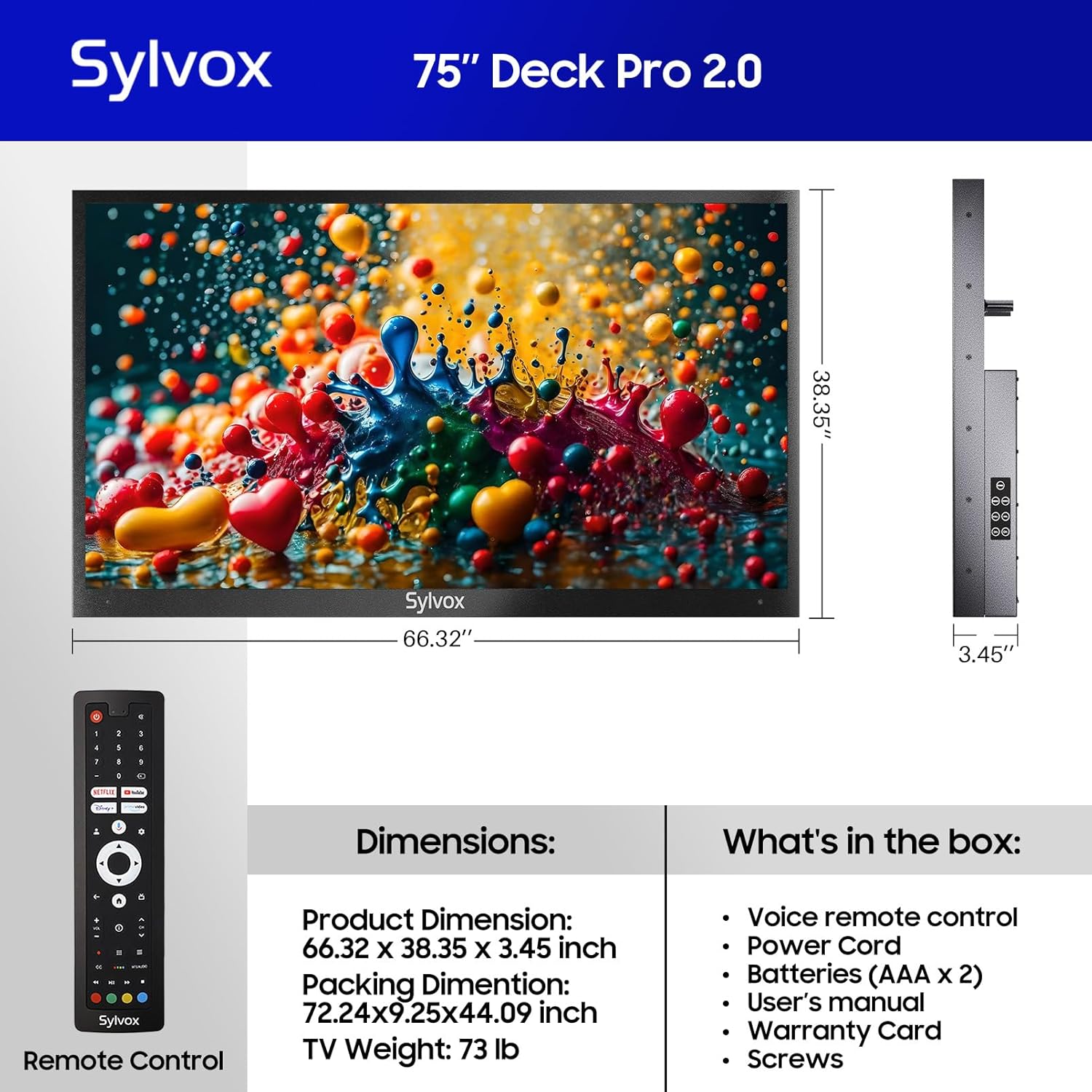
Figure 3.1: Included components and dimensions of the TV.
Video 3.1: Unboxing the Deck Pro 2.0 Series Outdoor TV, showing how components are packaged.
4. Postavljanje
4.1 Fizička instalacija
The SYLVOX Deck Pro 2.0 TV is designed for outdoor installation. It features a robust all-metal body for enhanced durability and weather resistance.

Slika 4.1: Bočna strana view illustrating the durable all-metal casing.
For wall mounting, ensure you use a compatible VESA mount (not included) and secure it to a sturdy structure. The TV's back panel is designed to accommodate standard VESA mounting patterns.

Slika 4.2: Natrag view of the TV with VESA mounting points.
4.2 Veze
The TV offers multiple connectivity options. Access the ports by removing the protective cover on the back of the unit.
- HDMI: For connecting external devices like gaming consoles or media players.
- USB: Za reprodukciju medija s USB pogona.
- Ethernet: Za žičanu internetsku vezu.
- Bežični: Built-in WiFi and Bluetooth for network and accessory connections.

Figure 4.3: Rear input panel with various connectivity ports.
4.3 Početno uključivanje
Connect the power cord to the TV and a suitable outdoor-rated power outlet. Press the power button on the remote control or the TV's side panel to turn on the unit. Follow the on-screen instructions to complete the initial setup, including network connection and Google account login.
5. Upute za rad
5.1 Daljinski upravljač
The included voice remote control allows for easy navigation and control of your TV. It features dedicated buttons for popular streaming services and Google Assistant.

Figure 5.1: Voice remote control for the SYLVOX Outdoor TV.
5.2 Sučelje Google TV-a
The TV runs on the Android 11.0 system with the Google TV interface, offering personalized recommendations and easy access to over 10,000 apps including YouTube, Netflix, Prime Video, Hulu, and Disney+.

Figure 5.2: Google TV interface with access to numerous applications.
Video 5.1: Demonstration of the Sylvox Smart Google Outdoor TV interface and features.
5.3 Ključne značajke
- 4K Ultra HD rezolucija: Enjoy crystal-clear images with stunning detail.
- Dolby Atmos: Immerse yourself in a panoramic sound experience.
- Svjetlina od 1000 nita: Provides optimal visibility in outdoor environments with partial sun.
- Ugrađeni Chromecast: Jednostavno emitirajte sadržaj s mobilnih uređaja na televizor.
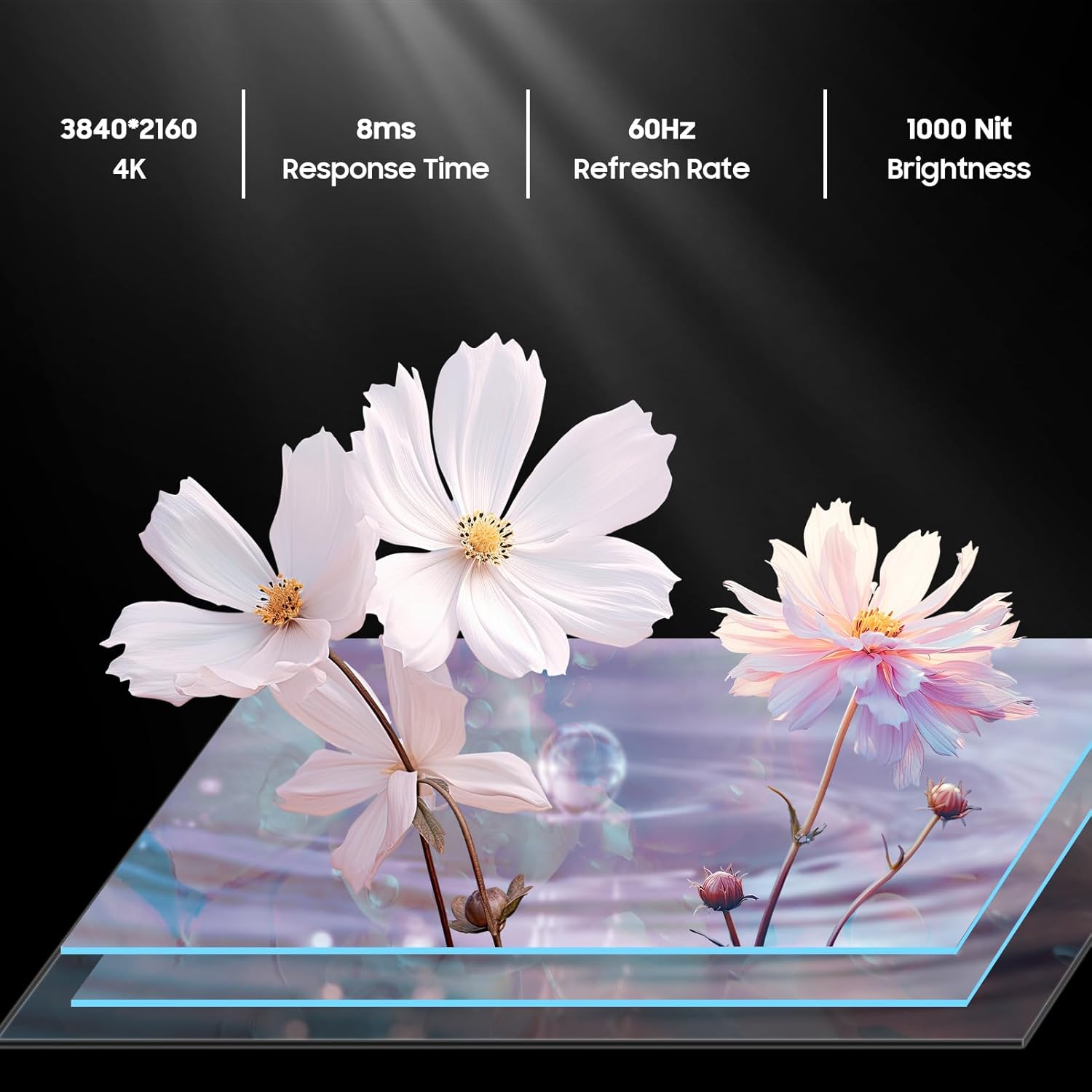
Figure 5.3: Visual representation of 4K resolution and 1000 nit brightness.
Video 5.2: Krajview of the Deck Pro 2.0 Outdoor TV, highlighting Google TV and Dolby Atmos features.
5.4 Outdoor Use Considerations
The TV is IP55 waterproof, meaning it is protected against dust and low-pressure water jets from any direction. This makes it suitable for use in various outdoor weather conditions, including rain and snow.

Figure 5.4: The TV operating effectively during rainfall, showcasing njegovu vodootpornu ocjenu IP55.
Video 5.3: A short clip demonstrating the TV's ability to function in various weather conditions.
6. Održavanje
- Čišćenje ekrana: Nježno obrišite zaslon mekom krpom koja ne ostavlja dlačice. Za tvrdokorne mrlje, laganoampNamočite krpu vodom. Ne prskajte sredstva za čišćenje izravno na zaslon.
- Čišćenje C-aasing: Koristite meku, damp cloth to clean the all-metal casing. Izbjegavajte abrazivne materijale koji bi mogli ogrebati površinu.
- Poklopci luka: Ensure all port covers on the back of the TV are securely closed when not in use to maintain its waterproof rating.
- Sezonsko skladištenje: While designed for all-weather use, consider covering the TV during prolonged periods of extreme weather or when not in use for extended periods to prolong its lifespan.
7. Rješavanje problema
- Bez napajanja: Provjerite je li kabel za napajanje sigurno spojen i na televizor i na utičnicu. Osigurajte da utičnica radi.
- Nema slike/zvuka: Provjerite je li odabran ispravan ulazni izvor. Provjerite sve kabelske spojeve (HDMI, itd.).
- Daljinski ne reagira: Zamijenite AAA baterije u daljinskom upravljaču. Provjerite da nema prepreka između daljinskog upravljača i televizora.
- Poor Wi-Fi Connection: Ensure the TV is within range of your Wi-Fi router. Try restarting your router.
- Image Glare in Sunlight: While the TV has 1000 nits brightness, direct, intense sunlight can still cause glare. Adjust the TV's position or consider additional shading for optimal viewing.
8. Specifikacije
| Značajka | Opis |
|---|---|
| Marka | SYLVOX |
| Naziv modela | Deck Pro 2.0 |
| Veličina zaslona | 75 inča |
| Rezolucija | 4K Ultra HD (3840x2160) |
| Svjetlina | 1000 nita |
| Brzina osvježavanja | 60 Hz |
| Operativni sustav | Android 11.0 with Google TV |
| Ocjena vodootpornosti | IP55 |
| Posebne značajke | Dolby Atmos, Google Assistant, Chromecast Built-in |
| Povezivost | Ethernet, Wireless (Wi-Fi), Bluetooth, HDMI, USB |
| Dimenzije proizvoda | 3.45"D x 66.32"Š x 38.35"V |
| Težina artikla | 100.8 funti |
| Boja | Crna |
| Baterije | Potrebne 2 AAA baterije (uključene) |
9. Jamstvo i podrška
The SYLVOX 75-inch Deck Pro 2.0 Smart Outdoor TV comes with a one-year warranty. For technical assistance, troubleshooting, or warranty claims, please contact SYLVOX customer service. Keep your purchase receipt and warranty card for reference.
Služba za korisnike: Available 24/7. Refer to the warranty card for contact details or visit the official SYLVOX webmjesto.