
1. Uvod
Thank you for choosing the techno line WT2600 Digital Calendar. This device provides accurate time, date, indoor temperature, and humidity readings, along with alarm functions. This manual will guide you through the setup, operation, and maintenance of your new digital calendar.
2. Sigurnosne informacije
- Ne izlažite uređaj ekstremnim temperaturama, izravnoj sunčevoj svjetlosti ili visokoj vlažnosti.
- Izbjegavajte ispuštanje uređaja ili njegovo izlaganje jakim udarcima.
- Ne pokušavajte sami rastavljati ili popravljati uređaj. Obratite se kvalificiranom servisnom osoblju.
- Iskorištene baterije odložite odgovorno u skladu s lokalnim propisima.
- Držite uređaj izvan dohvata djece.
3. Sadržaj paketa
Molimo provjerite jesu li svi artikli prisutni u vašem paketu:
- techno line WT2600 Digital Calendar Unit
- Korisnički priručnik (ovaj dokument)
- Batteries (may be included depending on region)
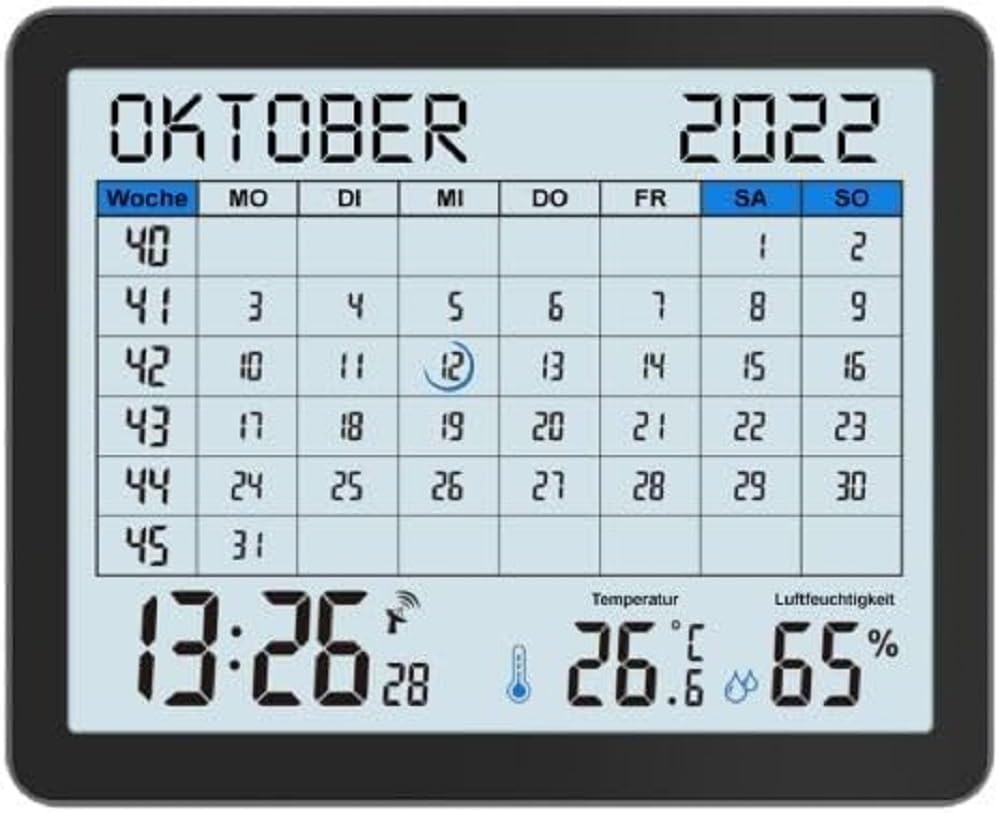
Image of the techno line WT2600 Digital Calendar packaging, showing the device and its key features.
4. Značajke proizvoda
The techno line WT2600 Digital Calendar offers the following key features:
- DCF-77 Radio-Controlled Clock: Automatic time synchronization for precise timekeeping, with an option for manual setting.
- 12/24-satni prikaz vremena: Select your preferred time format.
- Prikaz kalendara: Prikazuje trenutni datum, dan u tjednu i mjesec.
- 7-Language Month Display: Choose from seven languages for the month display.
- Prikaz unutarnje temperature: Shows indoor temperature in Celsius (°C) or Fahrenheit (°F).
- Indoor Humidity Display: Displays the current indoor humidity level.
- MIN/MAX Display: Records and displays the minimum and maximum temperature and humidity values.
- Dvostruki alarmi s odgodom: Set two independent alarms with a convenient snooze function.
- Indikator niske baterije: Obavještava vas kada je potrebno zamijeniti baterije.
- Svestrani položaj: Designed for both wall mounting and table standing.

Ispred view of the techno line WT2600 Digital Calendar display, showing the calendar grid, current time, temperature, and humidity.
5. Postavljanje
5.1 Ugradnja baterije
- Pronađite odjeljak za baterije na stražnjoj strani jedinice.
- Otvorite poklopac odjeljka za baterije.
- Insert the required batteries (e.g., 2 x AAA, not specified in data, common for such devices) according to the polarity markings (+ and -).
- Čvrsto zatvorite poklopac odjeljka za baterije.
5.2 Initial Power On and DCF-77 Signal Reception
Upon battery insertion, the device will power on and automatically begin searching for the DCF-77 radio signal. This process may take several minutes. For optimal reception, place the unit near a window and away from electronic interference.
- A signal icon (e.g., an antenna symbol) will flash during signal search.
- Once the signal is received, the time and date will be set automatically, and the signal icon will become solid.
- If no signal is received after 10-15 minutes, try repositioning the unit.
5.3 Ručno podešavanje vremena i datuma
If automatic synchronization is not desired or unsuccessful, you can set the time and date manually.
- Press and hold the 'SET' button (or similar, refer to device buttons) for a few seconds to enter manual setting mode.
- Use the '+' or '-' buttons to adjust the flashing value (e.g., hour, minute, year, month, day).
- Press 'SET' again to confirm the current setting and move to the next adjustable parameter.
- Repeat until all settings are complete.
5.4 Postavka jezika
To change the display language for the month:
- Enter the setting mode (e.g., by pressing 'SET').
- Navigate through the settings until the language option appears.
- Use the '+' or '-' buttons to cycle through the available 7 languages.
- Potvrdite svoj odabir.
6. Operativni
6.1 Viewing Time, Date, Temperature, and Humidity
The main display continuously shows the current time, date, indoor temperature, and indoor humidity. You can switch between 12-hour and 24-hour time formats by pressing a dedicated button (e.g., '12/24H' or 'MODE').
6.2 Postavljanje alarma
The device features two independent alarms.
- Press the 'ALARM' button (or similar) to view Alarm 1 puta.
- Press and hold 'ALARM' to enter Alarm 1 setting mode.
- Use '+' or '-' to adjust the hour and minute, pressing 'ALARM' to confirm each.
- Repeat for Alarm 2.
- To activate/deactivate an alarm, press 'ALARM' repeatedly until the alarm icon appears/disappears.
6.3 Using Snooze
When an alarm sounds, press the 'SNOOZE' button (or similar, often a large button on top) to temporarily silence the alarm. The alarm will sound again after a few minutes (typically 5-10 minutes). To stop the alarm completely, press any other button.
6.4 MIN/MAX Display Function
The device records the minimum and maximum temperature and humidity values since the last reset.
- Press the 'MIN/MAX' button (or similar) once to view the maximum recorded values.
- Press it again to view the minimum recorded values.
- To reset the MIN/MAX records, press and hold the 'MIN/MAX' button while viewuvođenje zapisa.

Close-up of the techno line WT2600 Digital Calendar display, highlighting the time, temperature, and humidity readings.
7. Održavanje
7.1 Čišćenje
Obrišite uređaj mekom, damp krpu. Nemojte koristiti abrazivna sredstva za čišćenje ili otapala jer mogu oštetiti zaslon iliasing.
7.2 Zamjena baterije
When the low battery indicator appears on the display, replace all batteries with new ones of the same type. Follow the battery installation steps in Section 5.1.
8. Rješavanje problema
- Nema zaslona: Provjerite polaritet baterija i uvjerite se da su baterije svježe.
- Netočno vrijeme/datum: Ensure the DCF-77 signal icon is solid. If not, reposition the unit or set the time manually (Section 5.3). Check your time zone setting if applicable (not explicitly mentioned in data, but common).
- Očitavanja temperature/vlažnosti izgledaju netočna: Ensure the unit is placed in a location with good air circulation, away from direct heat sources or drafts. Allow some time for readings to stabilize after initial setup or relocation.
- Alarm se ne oglašava: Verify that the alarm is activated (alarm icon displayed) and the alarm time is set correctly.
9. Specifikacije
| Značajka | Specifikacija |
|---|---|
| Broj modela | WT2600 |
| Dimenzije (D x Š x V) | 17.3 x 3.81 x 14 cm |
| Težina | 380 g |
| Boja | Crna |
| Materijal | Plastični |
| Izvor napajanja | Napajanje na baterije |
| Vrsta zaslona | Digitalni |
| Unutarnja/vanjska upotreba | Zatvoreni |
10. Jamstvo i podrška
Information regarding product warranty and customer support was not available in the provided product data. Please refer to the retailer or manufacturer's official webstranicu za detalje o jamstvenom pokriću i mogućnostima podrške.