
1. Uvod
This manual provides detailed instructions for the operation and maintenance of the LAUNCH CRP129E Plus OBD2 Scanner. Please read this manual thoroughly before using the device to ensure proper and safe operation. The CRP129E Plus is a comprehensive diagnostic tool designed for automotive professionals and enthusiasts, offering full system diagnostics and various service reset functions.
2. Proizvod je gotovview
2.1. Komponente uređaja
The LAUNCH CRP129E Plus features a user-friendly interface with a 5-inch touchscreen and physical buttons for navigation.

Slika 2.1: The LAUNCH CRP129E Plus OBD2 Scanner and its protective carrying case.
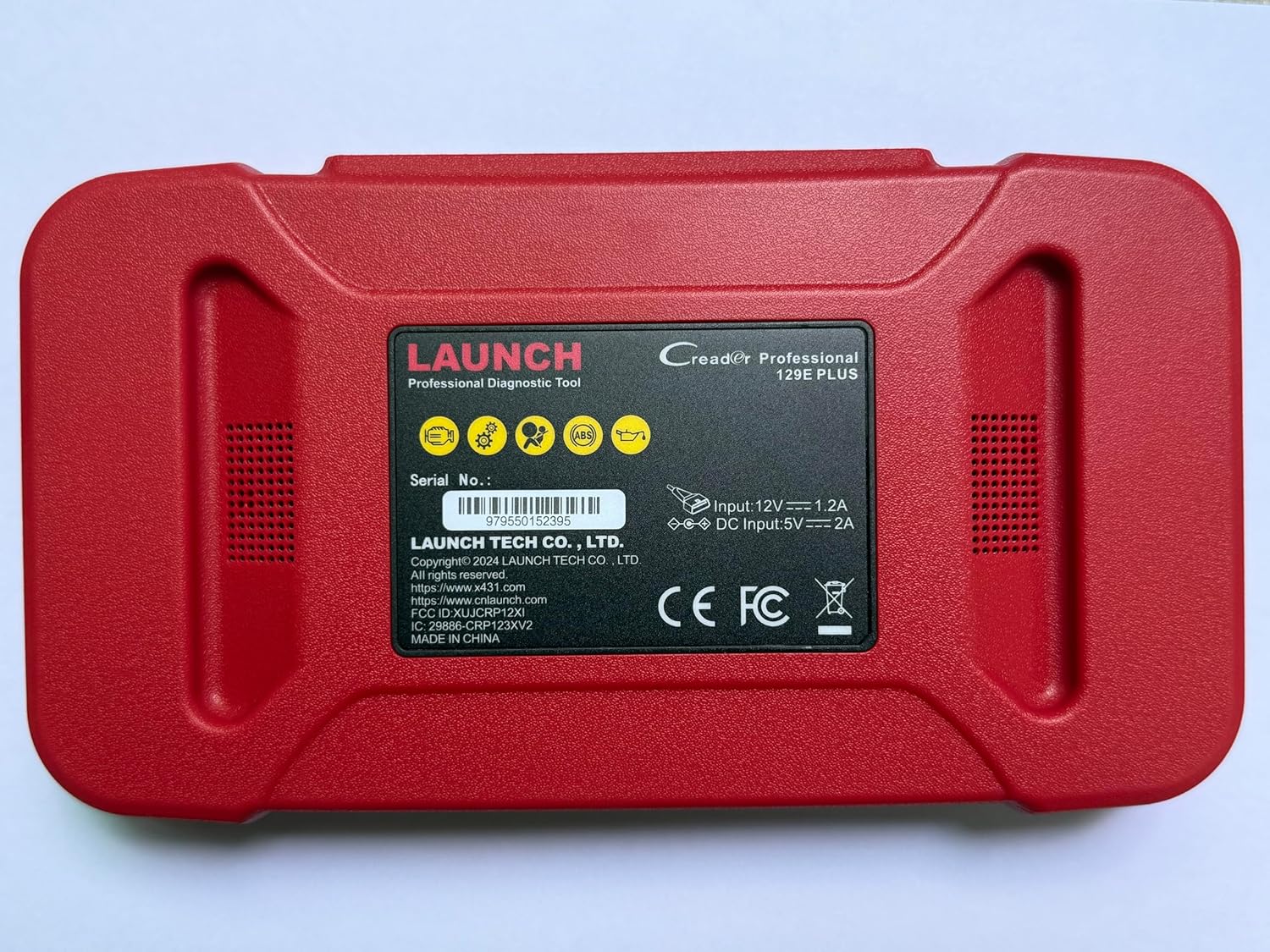
Slika 2.2: Stražnji view of the CRP129E Plus, displaying input voltage, current specifications, and serial number (e.g., 979550152395).
2.2. Sadržaj paketa
Nakon raspakiranja provjerite jesu li prisutni svi dolje navedeni elementi:
- CRP129E PLUS OBD2 Scanner (x1)
- OBDII Cable (x1)
- 5V DC Charging Cable (x1)
- Korisnički priručnik (x1)
- Vodič za brzi početak (x1)
- Torba za nošenje (x1)

Slika 2.3: Visual representation of the CRP129E Plus package contents.
3. Postavljanje i početna upotreba
3.1. Punjenje uređaja
Before first use, ensure the device is fully charged using the provided 5V DC charging cable. Connect the cable to the device and a suitable power source.
3.2. Uključivanje/isključivanje
- Uključivanje: Pritisnite i držite gumb za napajanje dok se zaslon ne osvijetli.
- Isključivanje: Press and hold the power button, then select "Power Off" from the options.
3.3. Povezivanje s vozilom
Locate the vehicle's OBDII port, typically under the dashboard on the driver's side. Connect the provided OBDII cable from the CRP129E Plus to the vehicle's OBDII port. Ensure the vehicle's ignition is in the ON position (engine off or running, depending on the diagnostic task).
3.4. Wi-Fi Connection and Updates
The CRP129E Plus supports one-click Wi-Fi updates. Connect the device to a stable Wi-Fi network to download the latest software and vehicle data. Regular updates ensure compatibility with new vehicle models and improved diagnostic functions.
- U glavnom izborniku dodirnite "Postavke".
- Select "WLAN" and connect to an available network.
- Return to the main menu and tap "Upgrade".
- Select the desired software updates and tap "Update".

Slika 3.1: The device interface showing options for updates, DTC lookup, live data stream, and battery test.
4. Upute za rad
4.1. Auto VIN skeniranje
The device can automatically identify vehicle information. After connecting to the vehicle, select "Diagnose" and the device will attempt an Auto VIN scan to quickly identify the vehicle's make, model, and year.

Slika 4.1: Visual representation of the Auto VIN scan process and systems covered by diagnosis.
4.2. Potpuna dijagnostika sustava
The CRP129E Plus can access and diagnose all available vehicle systems. This includes, but is not limited to, Engine, ABS, SRS, SAS, TCM, TPMS, Body, Chassis, Powertrain, Fuel System, and Lighting System.
- U glavnom izborniku odaberite "Dijagnosticiraj".
- Choose "Health Report" or select specific systems for diagnosis.
- The device will scan for Diagnostic Trouble Codes (DTCs) and display results.
- You can read fault codes, clear fault codes, and view tokovi podataka uživo.

Slika 4.2: Nadview of the comprehensive system diagnostic capabilities.
4.3. Funkcije OBD2 sustava
The device supports all 10 modes of OBDII testing for emissions-related issues.
- Čitanje/brisanje DTC-ova: Dohvati i izbriši dijagnostičke kodove grešaka.
- Prijenos podataka uživo: View real-time data from the vehicle's sensors.
- I/M spremnost: Provjerite status monitora povezanih s emisijama.
- Podaci zamrznutog okvira: View snimku stanja vozila kada je postavljen kod greške.
- Test O2 senzora: Preuzmite rezultate ispitivanja monitora O2 senzora.
- Test ugrađenog monitora: Retrieve results for emission-related powertrain components.
- Ispitivanje EVAP sustava: Započnite ispitivanje sustava za isparavanje.
- Podaci o vozilu: Preuzmite identifikacijski broj vozila (VIN), ID kalibracije i broj za provjeru kalibracije (CVN).
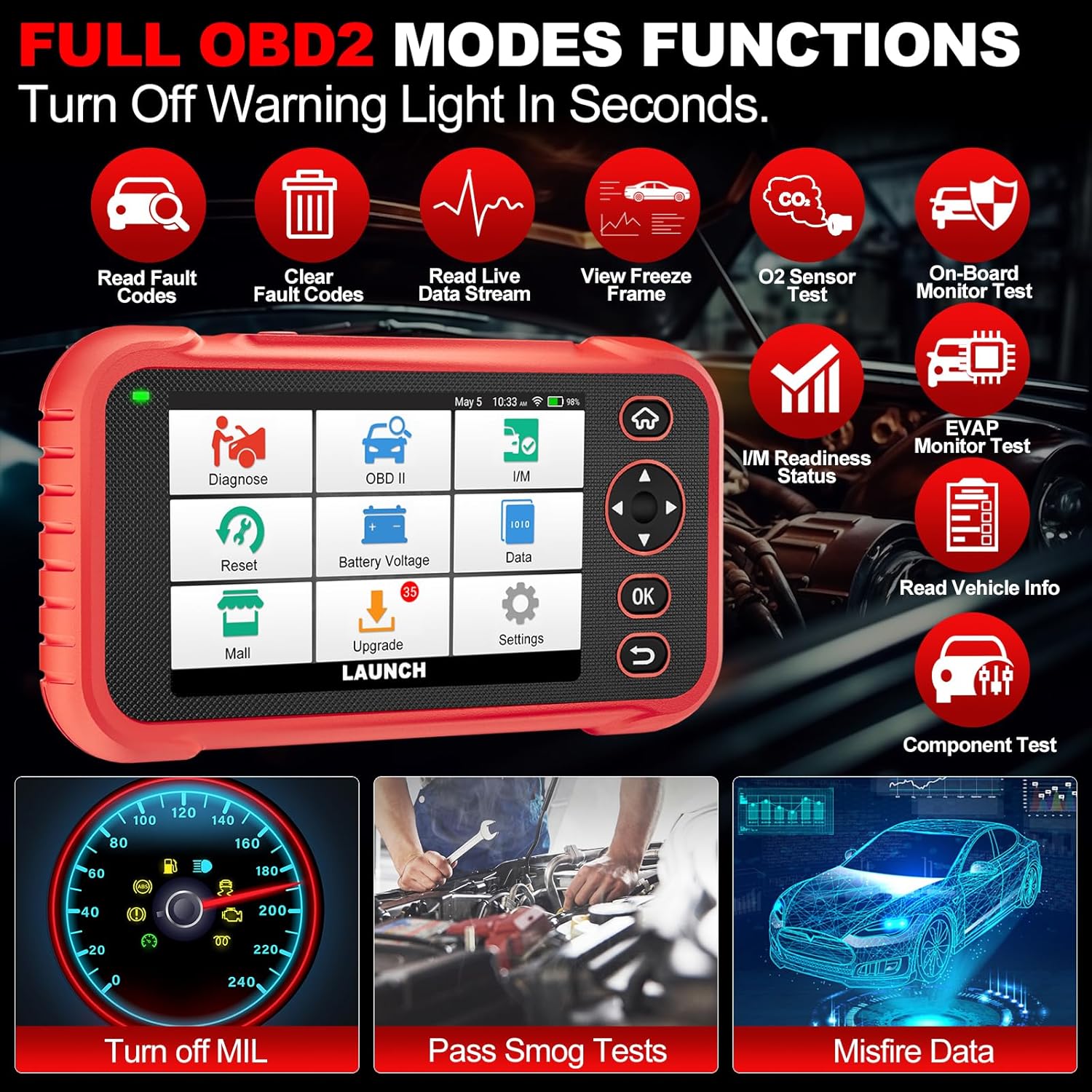
Slika 4.3: Main menu options for OBD2 functions.
4.4. Service Reset Functions
The CRP129E Plus offers 12+ essential service reset functions for common maintenance tasks.
- Resetiranje ulja: Resetira sustav vijeka trajanja ulja nakon izmjene ulja.
- Prilagodba gasa: Inicijalizira aktuatore leptira za gas u zadano stanje.
- Resetiranje AdBluea: Resets the urea after the diesel exhaust fluid (AdBlue) is replaced or refilled.
- Headlamp Podudaranje: Calibrates the adaptive front lighting system.
- TPMS resetiranje: Resetira senzore sustava za nadzor tlaka u gumama.
- SAS resetiranje: Kalibrira senzor kuta upravljanja.
- Usklađivanje baterije (BMS resetiranje): Registrira novu zamjenu baterije.
- Resetiranje zraka: Podešava parametre omjera zraka i goriva.
- Regeneracija DPF-a: Uklanja čestice iz DPF filtera.
- Kodiranje injektora: Kodira nove brojeve injektora u ECU.
- Resetiranje EPB-a: Resetira pločice elektroničke ručne kočnice nakon zamjene.
- Krvarenje iz ABS-a: Performs bleeding of the brake system.

Slika 4.4: Nadview of available service reset functions.
4.5. Live Data Graphing and Recording
The device can display live data streams in merged quadrant graphs, allowing for comprehensive analysis of up to four parameters simultaneously. Data can also be recorded and played back for further review.

Slika 4.5: Example of 4-in-1 live data graphing and diagnostic report generation.
4.6. Baterija Voltage Test
Pratite napunjenost akumulatora vozilatage in real-time to assess its status and identify potential issues.

Slika 4.6: Baterija voltage test interface and other diagnostic support features.
5. Održavanje
- Čišćenje: Za čišćenje uređaja koristite meku, suhu krpu. Izbjegavajte abrazivna sredstva za čišćenje ili otapala.
- Skladištenje: Uređaj čuvajte u njegovoj torbici za nošenje na hladnom i suhom mjestu kada se ne koristi.
- Ažuriranja softvera: Regularly check for and install software updates via Wi-Fi to ensure optimal performance and vehicle compatibility.
- Njega baterije: Avoid fully discharging the battery frequently. Charge the device regularly, even if not in active use, to maintain battery health.
6. Rješavanje problema
| Problem | Mogući uzrok | Otopina |
|---|---|---|
| Uređaj se ne uključuje. | Slaba baterija; neispravan gumb za uključivanje/isključivanje. | Charge the device for at least 30 minutes. If issue persists, contact support. |
| Komunikacijska greška s vozilom. | Loose OBDII connection; vehicle ignition off; incompatible vehicle protocol. | Ensure cable is securely connected. Turn ignition to ON. Verify vehicle compatibility. |
| Unable to update software. | No Wi-Fi connection; unstable internet; insufficient storage. | Check Wi-Fi connection. Ensure stable internet. Free up storage if necessary. |
| Zaslon ne reagira. | Softverski kvar; fizičko oštećenje. | Ponovno pokrenite uređaj. Ako problem i dalje postoji, obratite se podršci. |
7. Specifikacije
- Model: CRP129E PLUS
- Operativni sustav: Android 7.0
- Prikaz: 5-inčni zaslon osjetljiv na dodir
- Memorija: 16 GB
- Baterija: 6100 mAh
- Povezivost: Wi-Fi
- Dimenzije: 7.09 x 6.3 x 2.36 inča
- Težina artikla: 2.27 funti
- Podržani protokoli: OBDII/EOBD
- Pokrivanje vozila: Over 85 brands (1996-2025)
- UPC: 884508007774

Slika 7.1: Summary of key hardware and software specifications.

Slika 7.2: Extensive vehicle brand coverage and multi-language support.
8. Jamstvo i podrška
The LAUNCH CRP129E Plus comes with a manufacturer's warranty. Please refer to the official LAUNCH webweb-mjesto ili vašu dokumentaciju o kupnji za specifične uvjete jamstva.
- Jamstvo: 5 Years (as per product information)
- Return/Replace Policy: 90 Days (as per product information)
- Tehnička podrška: 24/7 technical support is available. For assistance, please contact LAUNCH customer service.
- Povratne informacije na mreži: The device supports online feedback for quick resolution of diagnostic issues.
For further assistance or to provide feedback, please visit the official LAUNCH support channels.


