
1. Uvod
Thank you for choosing the HICON Vittoria Gaming Chair. This manual provides essential information for the safe assembly, operation, and maintenance of your new chair. Please read these instructions carefully before use and retain them for future reference.

Slika: prednja strana view of the HICON Vittoria Gaming Chair, showcasing its ergonomic design and red finish.
2. Sigurnosne informacije
- Prije sastavljanja provjerite jesu li svi dijelovi prisutni i neoštećeni. Nemojte koristiti ako neki dijelovi nedostaju ili su slomljeni.
- Follow assembly instructions precisely. Incorrect assembly can lead to instability and injury.
- Ne stojte na stolici. Koristite je samo za sjedenje.
- Ne prekoračujte maksimalnu nosivost od 150 kg (330 lbs).
- Držite djecu i kućne ljubimce podalje od stolice tijekom sastavljanja.
- Izbjegavajte izlaganje stolice izravnoj sunčevoj svjetlosti ili ekstremnim temperaturama kako biste spriječili degradaciju materijala.
- Redovito provjeravajte sve vijke i matice kako biste bili sigurni da su čvrsto zategnuti. Po potrebi ih ponovno zategnite.
3. Sadržaj paketa
Provjerite jesu li sve sljedeće komponente uključene u vaš paket:
- naslon za leđa
- Seat Base with Armrests and Footrest mechanism
- Star Base (5-star aluminum base)
- Kotačići (5 komada)
- Cilindar za plinsko podizanje
- Poklopac plinskog lifta
- Lumbar Support Cushion with Massage Function (USB powered)
- Jastuk za naslon za glavu
- Pribor za montažu (vijci, podloške, imbus ključ)
4. Postavljanje i sastavljanje
Follow these steps to assemble your HICON Vittoria Gaming Chair:
- Pričvrstite kotačiće na zvjezdastu bazu: Umetnite svaki od pet kotačića u rupe na kraju svake noge zvjezdaste baze. Čvrsto pritisnite dok ne kliknu na svoje mjesto.
- Umetnite plinski lift: Place the gas lift cylinder into the center hole of the assembled star base. Cover the gas lift with the telescopic plastic cover.
- Pričvrstite naslon za bazu sjedala: Align the backrest with the mounting brackets on the seat base. Secure it using the provided screws and Allen key. Ensure all screws are tightened evenly.
- Postavite sastavljeno sjedalo na plinski lift: Pažljivo postavite sastavljeno sjedalo i naslon na plinski cilindar, pazeći da bude centriran i stabilan.
- Pričvrstite jastuke: Secure the headrest cushion to the top of the backrest using its straps. Attach the lumbar support cushion to the lower backrest using its straps. Connect the USB cable from the lumbar cushion to a power source (e.g., power bank, USB adapter) for the massage function.

Image: Close-up of the OmniRoll casters, designed for hard floors and carpets, attached to the chair's stable base.

Image: Detail of the NitroLift gas lift, providing durability and a load capacity of up to 250 kg.
5. Upute za rad
Your HICON Vittoria Gaming Chair offers several adjustable features for personalized comfort:
- Podešavanje visine sjedala: To raise the seat, lift the lever located under the right side of the seat while taking your weight off the chair. To lower the seat, lift the lever while seated. Adjust until your feet are flat on the floor and your knees are at a 90-110 degree angle.
- Nagib naslona za leđa: Pull the lever on the right side of the chair (below the seat) to unlock the backrest. Lean back to your desired angle (between 90 and 170 degrees) and push the lever down to lock it in place.
- Armrest Adjustment (Adapto Arm): The armrests can be adjusted in height and forward-backward. Locate the buttons or levers on the armrests to unlock and adjust them to your preferred position. Ensure your forearms rest comfortably and your elbows are at approximately a 90-degree angle.
- Lumbar Support Massage (PneuMassage): The lumbar cushion features a vibration massage mechanism. Connect the USB cable to a power source to activate the massage function. Adjust the cushion's position on the backrest for optimal lower back support and comfort.
- Extendable Footrest (LegRest): To extend the footrest, pull it out from under the seat. To retract, push it back in until it is fully stored. Use the footrest for additional leg support when reclining.
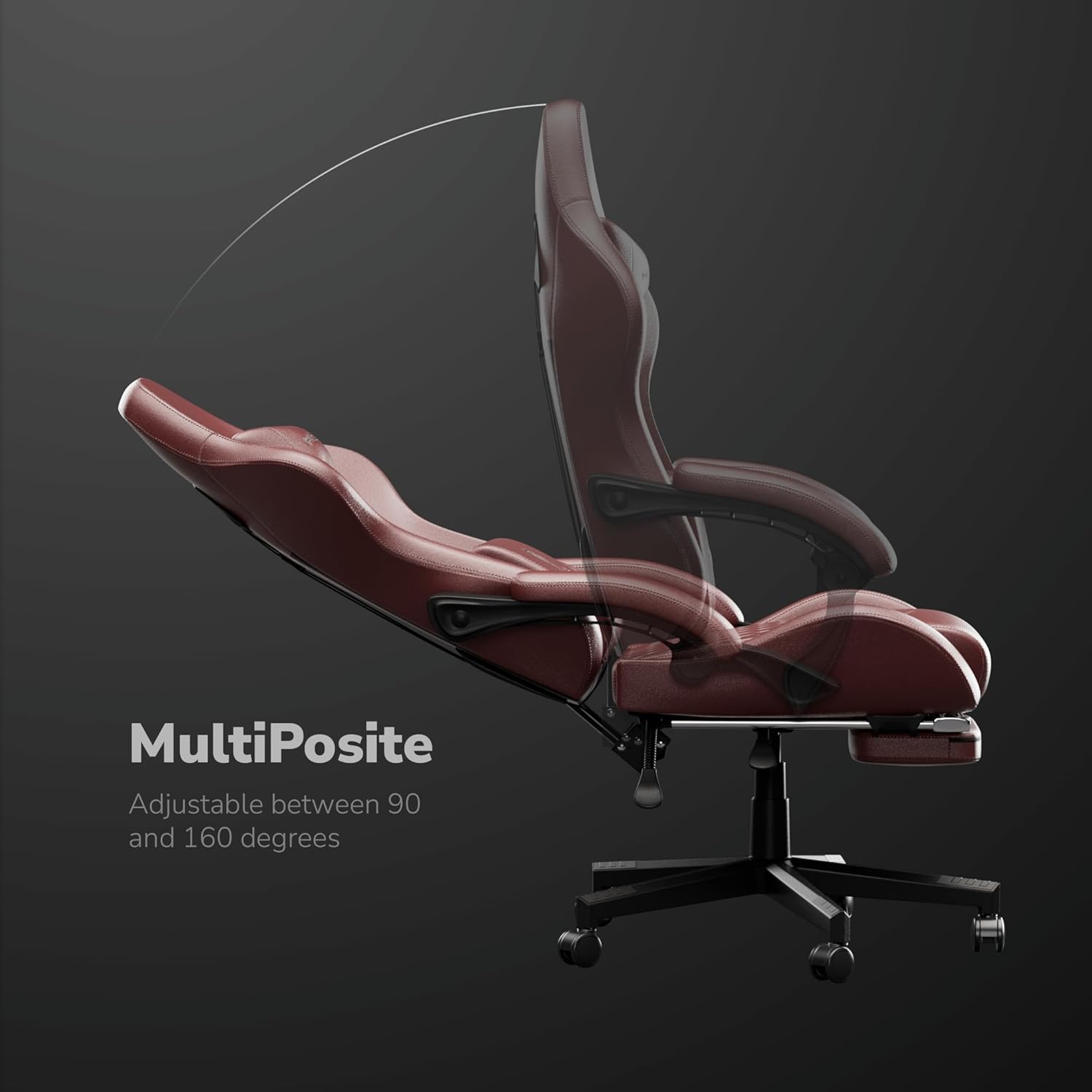
Image: The MultiPosite feature illustrates the adjustable recline range of the chair, from 90 to 160 degrees.

Image: Close-up of the Adapto Arm, highlighting its adjustable height and forward-backward movement for optimal arm support.

Image: Detail of the PneuMassage lumbar cushion, featuring a vibration mechanism for enhanced comfort and support.

Image: Close-up of the LegRest, providing foot support for comfort during extended sitting or reclining.
6. Održavanje
- Čišćenje: Obrišite površine od PU kože mekom,amp krpom. Za tvrdokorne mrlje upotrijebite blagu otopinu sapuna, a zatim obrišite čistom krpom.amp krpom. Izbjegavajte jake kemikalije ili abrazivna sredstva za čišćenje.
- Provjera hardvera: Povremeno provjeravajte sve vijke i matice kako biste bili sigurni da su zategnuti. Po potrebi ih ponovno zategnite kako biste održali stabilnost i sigurnost.
- Njega kotačića: Kotačiće održavajte čistima od kose i ostataka kako biste osigurali nesmetano kretanje.
- Izbjegavajte preopterećenje: Do not place excessive weight on the armrests or backrest.

Image: Detail of the DuraBreathe material, highlighting its durable, waterproof, and easy-to-clean properties.
7. Rješavanje problema
- Škripanje stolice: Provjerite jesu li svi vijci i matice zategnuti. Po potrebi nanesite malu količinu silikonskog maziva na pokretne dijelove.
- Teškoće s podešavanjem visine: Provjerite je li poluga plinskog podizača potpuno učvršćena. Ako problem i dalje postoji, možda je potrebno zamijeniti cilindar plinskog podizača.
- Kotačići se ne okreću glatko: Remove any hair or debris wrapped around the caster wheels. Clean the wheels thoroughly.
- Backrest Not Locking: Verify that the recline lever is fully pushed down to lock the backrest in position.
8. Specifikacije
| Značajka | Specifikacija |
|---|---|
| Marka | HICON |
| Broj modela | HC-6689 |
| Boja | crvena |
| Materijal | Aluminij, umjetna koža |
| Materijal okvira | Metal |
| Vrsta materijala sjedala | Memorijska pjena |
| Težina artikla | 16 kilogram |
| Preporučena maksimalna težina | 150 kilogram |
| Dimenzije predmeta (D x Š x V) | 64 x 62 x 124 centimetara |
| Dubina sjedala | 55 centimetara |
| Broj položaja za ležanje | 3 |
| Podesiva | Da |
| Potrebna montaža | Da |
| Unutarnja/vanjska upotreba | Zatvoreni |
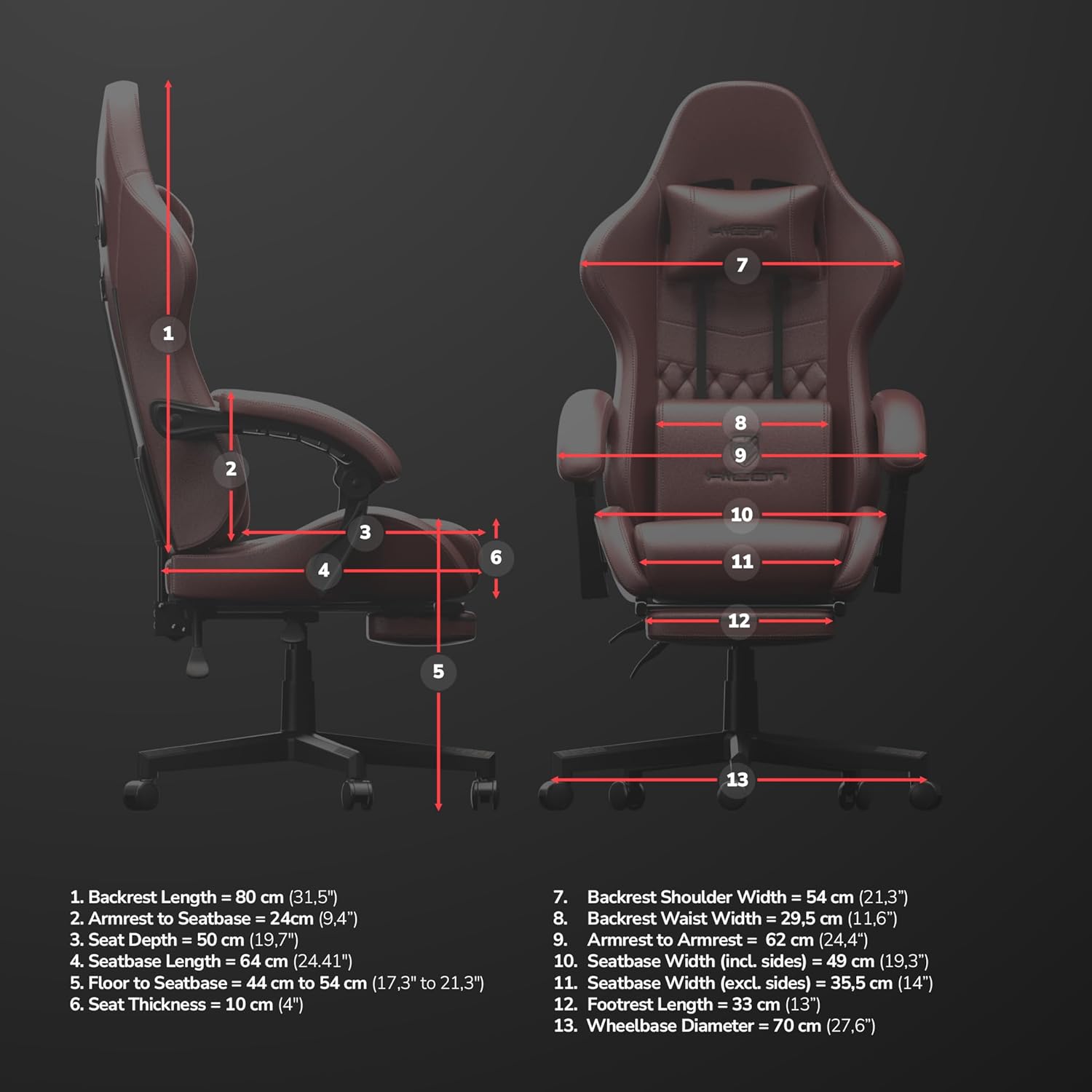
Image: Detailed dimensional diagram of the HICON Vittoria Gaming Chair, showing various measurements for reference.
9. Jamstvo i podrška
For warranty information or technical support, please refer to the documentation included with your purchase or contact the retailer/manufacturer directly. Keep your proof of purchase for warranty claims.