
1. Uvod
Welcome to the KRUPS Sensation C10 EA910A10 Superautomatic Coffee Machine user manual. This guide provides comprehensive instructions for the safe and efficient operation, maintenance, and troubleshooting of your new coffee machine. Please read this manual thoroughly before first use and keep it for future reference.
2. Važne sigurnosne upute
Za siguran rad uvijek slijedite ove osnovne sigurnosne mjere:
- Pročitajte sve upute prije uporabe uređaja.
- Ne uranjajte uređaj, kabel za napajanje ili utikač u vodu ili druge tekućine.
- Ovaj uređaj je namijenjen samo za upotrebu u kućanstvu.
- Osigurajte voltagOznaka e navedena na uređaju odgovara naponu vaše električne mreže.tage.
- Uvijek isključite uređaj iz električne utičnice prije čišćenja ili kada ga ne koristite.
- Nemojte koristiti uređaj s oštećenim kabelom ili utikačem, ili nakon što uređaj ne radi ispravno ili je na bilo koji način oštećen.
- Držite djecu podalje od uređaja tijekom rada.
- Koristite samo pribor koji preporučuje proizvođač.
- Avoid contact with hot surfaces, such as the coffee spouts or steam nozzle.
3. Komponente proizvoda
Familiarize yourself with the main components of your KRUPS Sensation C10 EA910A10 coffee machine:
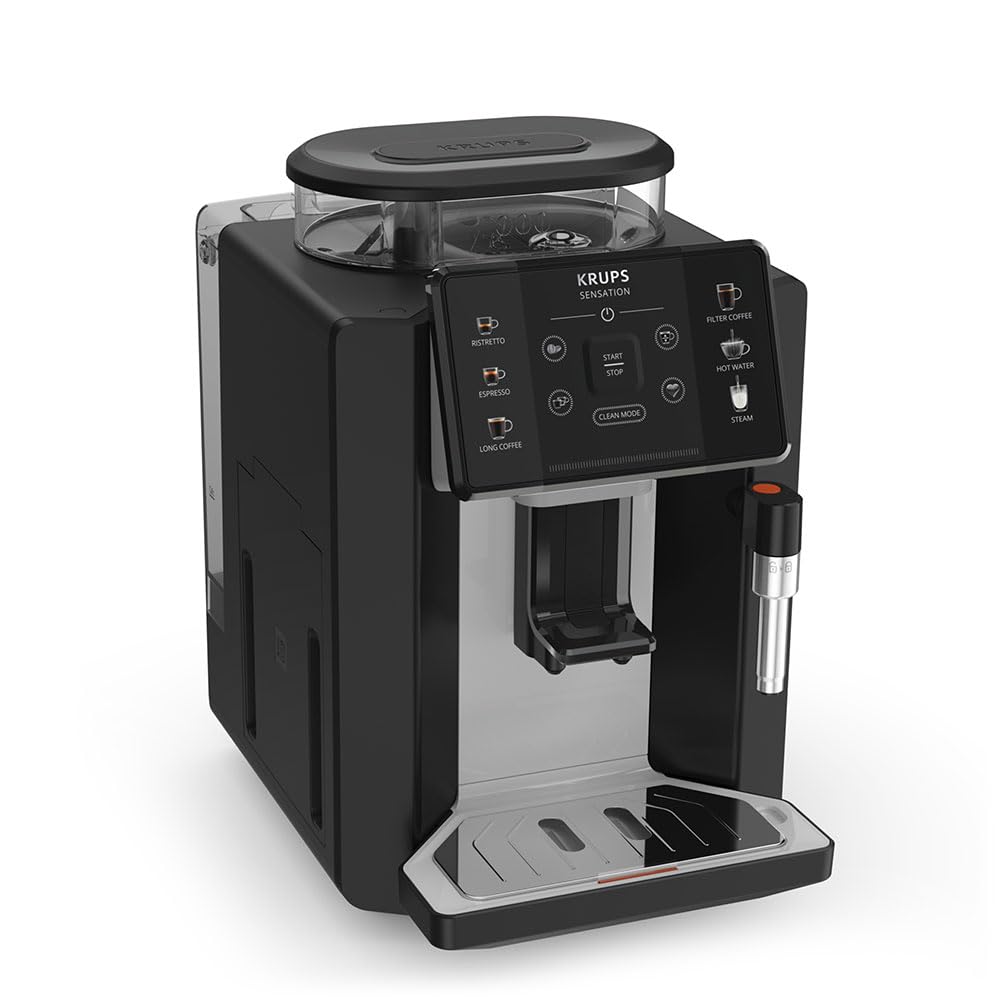
Slika: Prednja desna strana view of the KRUPS Sensation C10 EA910A10 Superautomatic Coffee Machine, showing the bean hopper, control panel, coffee spouts, and drip tray. Two cups of coffee are being dispensed.
- Posuda za zrna s poklopcem
- Spremnik za vodu
- Control Panel (Touchscreen)
- Coffee Spouts (Adjustable)
- Posuda za kapanje s rešetkom
- Spremnik za talog kave
- Steam Nozzle / Hot Water Spout
- Spajanje kabela za napajanje
4. Početno postavljanje
4.1. Raspakiranje
- Pažljivo izvadite aparat za kavu iz ambalaže.
- Uklonite sav materijal za pakiranje, uključujući zaštitne folije i naljepnice.
- Uređaj postavite na stabilnu, ravnu, toplinski otpornu površinu, dalje od izvora vode i topline.
4.2. Priprema za prvu upotrebu
- Ispiranje spremnika za vodu: Remove the water tank, rinse it thoroughly with fresh water, and fill it to the MAX level. Reinsert the tank securely.
- Napunite spremnik za grah: Open the lid of the bean hopper and fill it with fresh coffee beans. Do not use ground coffee in the bean hopper.
- Priključak za napajanje: Uključite kabel za napajanje u uređaj, a zatim u uzemljenu električnu utičnicu.
- Početni ciklus ispiranja: The machine will prompt you to perform an initial rinse cycle. Follow the instructions on the touchscreen. This primes the system and cleans internal components.
5. Upute za rad
5.1. Kontrolna ploča završenaview

Image: A hand interacting with the intuitive touchscreen control panel of the KRUPS Sensation C10 EA910A10, highlighting its ease of use.
The KRUPS Sensation C10 EA910A10 features an intuitive touchscreen control panel for easy operation. Key functions include:
- Ristretto: For a very short, concentrated espresso.
- Izrazio: For a classic espresso shot.
- Duga kava: Za veću količinu kave.
- Filter kava: For a milder, filter-style coffee.
- Topla voda: Za čaj ili druge tople napitke.
- Steam: Za pjenjenje mlijeka.
- Start/Stop: To begin or end a brewing cycle.
- Čisti način rada: Initiates cleaning cycles.
- Coffee Strength/Volume Adjustment: Icons to customize your drink.
5.2. Kuhanje kave
To brew a coffee beverage:
- Provjerite je li spremnik za vodu napunjen i je li u spremniku za zrna dovoljno zrna.
- Place a cup under the coffee spouts. Adjust the spout height if necessary.
- Select your desired coffee type (e.g., Espresso, Long Coffee) from the touchscreen.
- Adjust coffee strength and volume using the on-screen options if desired.
- Pritisnite gumb "Start" za početak kuhanja.
- The machine will grind the beans, brew the coffee, and dispense it into your cup.
- The machine will automatically stop when the brewing is complete.

Image: A selection of coffee beverages, including espresso, long coffee, and a milk-based drink, demonstrating the versatility of the KRUPS Sensation C10 EA910A10.
5.3. Funkcija tople vode
- Stavite šalicu ispod grlića tople vode.
- Select the "Hot Water" option on the touchscreen.
- Press "Start" to dispense hot water. Press "Stop" to cease dispensing.
5.4. Steam Function (for milk frothing)
- Napunite vrč hladnim mlijekom.
- Postavite mlaznicu za paru u mlijeko.
- Select the "Steam" option on the touchscreen.
- Press "Start" to activate the steam. Move the pitcher up and down to froth the milk.
- Press "Stop" when desired froth is achieved.
- Važno: Clean the steam nozzle immediately after use to prevent milk residue buildup.
6. Održavanje i čišćenje
Redovito čišćenje i održavanje osiguravaju optimalne performanse i dugotrajnost vašeg aparata za kavu.
6.1. Dnevno čišćenje
- Posuda za kapanje i posuda za talog kave: Svakodnevno ispraznite i isperite posudu za kapanje i posudu za talog kave ili kada to od vas zatraži aparat.
- Izljevi za kavu: Obrišite izljeve za kavu oglasomamp tkanina.
- Spremnik za vodu: Spremnik za vodu svakodnevno ispirite svježom vodom.
6.2. Uklanjanje kamenca
The machine will indicate when descaling is required. Follow the on-screen instructions and use a KRUPS-approved descaling solution.

Image: A hand inserting a cleaning tablet into the designated slot of the KRUPS Sensation C10 EA910A10, illustrating the ease of the cleaning process.
6.3. Zamjena filtera za vodu
If your machine uses a water filter, replace it every 2-3 months or as indicated by the machine to ensure optimal water quality and prevent limescale buildup.
7. Rješavanje problema
Uobičajene probleme i njihova rješenja potražite u donjoj tablici.
| Problem | Mogući uzrok/rješenje |
|---|---|
| Stroj se ne uključuje. | Check if the power cord is securely plugged into the machine and the electrical outlet. Ensure the outlet is functional. |
| Kava se ne toči. | Water tank empty: Fill the water tank. Bean hopper empty: Fill with coffee beans. Coffee grounds container full: Empty and clean. Descaling required: Perform descaling cycle. |
| Kava je preslaba. | Adjust coffee strength settings on the control panel. Check if the bean hopper is sufficiently filled. Ensure fresh beans are used. |
| Voda curi iz stroja. | Check if the water tank is correctly inserted. Ensure the drip tray is properly positioned. If leakage persists, contact customer support. |
| "Clean Mode" alert persists. | Perform the indicated cleaning cycle (e.g., descaling, rinsing). Ensure all removable parts are clean and correctly reinserted. |
| Steam nozzle not frothing milk effectively. | Clean the steam nozzle thoroughly after each use to prevent blockages. Ensure cold milk is used. |
| Grinder is unusually loud or not grinding. | Check for foreign objects in the bean hopper. Ensure the bean hopper is not empty. Contact customer support if the issue persists. |
8. Tehničke specifikacije
| Značajka | Specifikacija |
|---|---|
| Broj modela | EA910A10 |
| Marka | KRUPS |
| Voltage | 145 volti |
| Vlast | 1450 vata |
| Materijal | Čelik |
| Težina proizvoda | 7.5 kg |
| Sučelje | Zaslon osjetljiv na dodir |

Image: The KRUPS Sensation C10 EA910A10 coffee machine with indicated dimensions: 24 cm width, 34.6 cm depth, and 36.4 cm height.
9. Informacije o jamstvu
Your KRUPS Sensation C10 EA910A10 Superautomatic Coffee Machine is covered by a manufacturer's warranty. Please refer to the warranty card included in your product packaging for specific terms, conditions, and duration. Keep your proof of purchase for warranty claims.
10. Korisnička podrška
For further assistance, technical support, or spare parts, please contact KRUPS customer service. Contact details can typically be found on the KRUPS official webweb-mjestu ili u jamstvenoj dokumentaciji koja je isporučena s vašim uređajem.