
1. Uvod
This manual provides essential instructions for the safe and efficient operation of your SHARP SMC1169KS Countertop Microwave Oven. Please read all instructions thoroughly before using the appliance and retain this manual for future reference. This microwave oven features a 1.1 cubic feet capacity, 1000 watts of cooking power, and is compatible with Alexa for voice control. It also includes a removable 12.4-inch carousel turntable and a child lock function.
2. Važne sigurnosne informacije
Pri korištenju električnih uređaja potrebno je pridržavati se osnovnih sigurnosnih mjera, uključujući sljedeće:
- Pročitajte sve upute prije uporabe.
- Nemojte koristiti pećnicu ako je oštećena ili neispravna.
- Osigurajte odgovarajuću ventilaciju oko mikrovalne pećnice.
- Ne zagrijavajte zatvorene posude jer mogu eksplodirati.
- U ovom aparatu nemojte koristiti korozivne kemikalije ili pare.
- Pažljivo nadzirite djecu dok je mikrovalna pećnica u upotrebi.
- Ne pokušavajte sami servisirati ili popravljati pećnicu. Obratite se kvalificiranom servisnom osoblju.
- Uvijek koristite posuđe prikladno za mikrovalnu pećnicu.
- Tekućine zagrijane u mikrovalnoj pećnici mogu neočekivano prokuhati. Budite oprezni prilikom vađenja posuda.
3. Proizvod je gotovview
The SHARP SMC1169KS is a stainless steel countertop microwave oven designed for convenient food preparation. Key features include:
- Kapacitet: 1.1 kubičnih stopa
- Izlazna snaga: 1000 vata
- Okretnica: Removable 12.4-inch glass carousel for even cooking
- Kontrolirati: Digital display with touch controls and Alexa voice compatibility
- Interijer: Gray interior with LED lighting
- Sigurnost: Child Safety Lock function
- Funkcije kuhanja: 10 power levels, 2-stage cooking, Auto Cook menus, Weight and Time Defrost, Express Cook, +30 seconds key.

Ispred view of the SHARP SMC1169KS Countertop Microwave Oven, showcasing njegovu završnu obradu i upravljačku ploču od nehrđajućeg čelika.
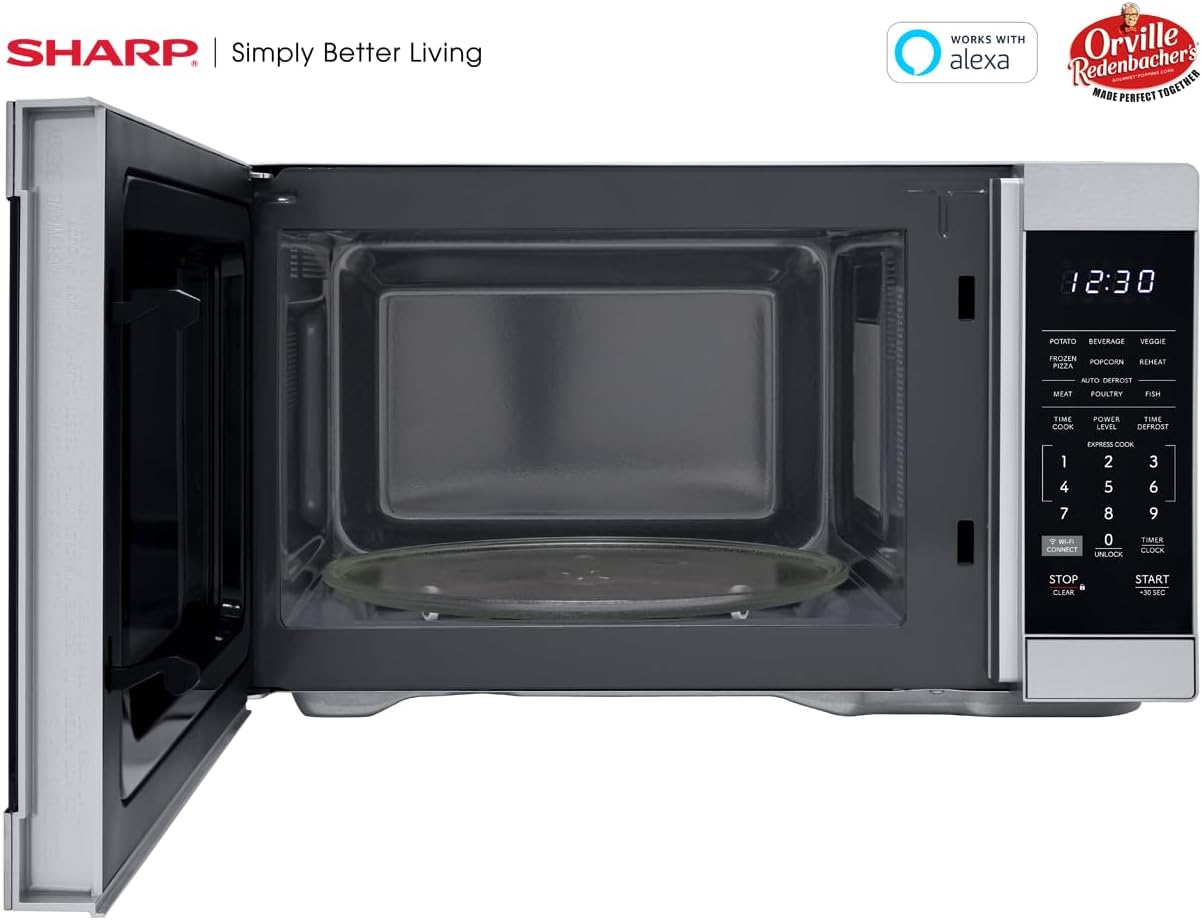
Interijer view of the SHARP SMC1169KS microwave oven, highlighting the removable glass carousel turntable for uniform heating.

Close-up of the SHARP SMC1169KS microwave oven control panel, featuring the digital display, number pad, and dedicated function buttons.
4. Postavljanje
4.1 Raspakiranje i postavljanje
- Remove all packing materials from inside and outside the microwave oven.
- Place the microwave on a flat, stable surface that is strong enough to hold the oven and the food being cooked.
- Ensure there is at least 4 inches (10 cm) of space on the top, back, and sides for proper ventilation. Do not block any ventilation openings.
- Držite mikrovalnu pećnicu dalje od izvora topline i jakih magnetskih polja.
4.2 Instalacija gramofona
- Stavite prsten okretnog tanjura u unutrašnjost mikrovalne pećnice.
- Position the glass turntable plate securely on top of the turntable ring. Ensure it is centered and sits properly on the coupler.
4.3 Priključak za napajanje
Plug the power cord into a standard 3-prong, 120V AC, 60Hz grounded electrical outlet. Do not use an extension cord or adapter.
4.4 Initial Setup (Clock & Wi-Fi/Alexa)
- Podešavanje sata: Pritisnite tipku TIMER/SAT button once. Use the number pad to enter the current time. Press TIMER/SAT ponovo za potvrdu.
- Connecting to Wi-Fi/Alexa: Refer to the separate Alexa setup guide or the Sharp Home Appliances app for detailed instructions on connecting your microwave to your home Wi-Fi network and linking it with your Amazon Alexa account. Press the WI-FI POVEZIVANJE button to initiate pairing mode.
5. Upute za rad
5.1 Osnovno kuhanje u mikrovalnoj pećnici (kuhanje s vremenskim ograničenjem)
- Stavite hranu u posudu prikladnu za mikrovalnu pećnicu na okretni tanjur.
- Zatvori vrata.
- Pritisnite tipku VREMENSKA KUHARICA dugme.
- Unesite željeno vrijeme kuhanja pomoću numeričke tipkovnice.
- Pritisnite START/+30 SEK.
5.2 Podešavanje razine snage
- After entering cooking time (Step 3 of Basic Cooking), press RAZINA SNAGE.
- Enter the desired power level from 1 to 10 (10 being 100% power).
- Pritisnite START/+30 SEK.
5.3 Brzo kuhanje
For quick cooking at 100% power, simply press the number pad (1-6) for 1 to 6 minutes of cooking time. The oven will start immediately.
5.4 izbornika automatskog kuhanja
The microwave includes preset cooking options for common food items:
- POTATO: Za pečenje krumpira.
- PIĆE: Za zagrijavanje pića.
- VEGGIE: For cooking vegetables.
- ZAMRZNUTA PIZZA: For heating frozen pizza.
- KOKICE: Optimized for Orville Redenbacher's popcorn (3.3 oz Classic or 1.16 oz Mini Bag).
- PODGRIJATI: For reheating various foods.
- MEAT, POULTRY, FISH: For specific meat types.
To use an Auto Cook menu: Press the desired menu button, then follow the display prompts (e.g., enter quantity) and press START/+30 SEK.
5.5 Odmrzavanje
Mikrovalna pećnica nudi dva načina odmrzavanja:
- Odmrzavanje težine: Pritisnite ODMRZIVANJE VREMENA, unesite težinu hrane, a zatim pritisnite START/+30 SEK.
- Vrijeme odmrzavanja: Pritisnite ODMRZIVANJE VREMENA twice, enter the desired defrosting time, then press START/+30 SEK.
5.6 Funkcija dječje brave
Da biste aktivirali Child Lock:
- Pritisnite i držite STOP/CLEAR button for 3 seconds. The lock indicator will appear on the display.
Za deaktiviranje Child Lock-a:
- Pritisnite i držite OTKLJUČATI button (0) for 3 seconds. The lock indicator will disappear.
5.7 Glasovno upravljanje pomoću Alexa
Once connected to Alexa, you can use voice commands for various functions. Exampuključuju:
- "Alexa, zagrijavaj u mikrovalnoj pećnici 1 minutu."
- "Alexa, odmrzni pola kilograma piletine."
- "Alexa, microwave Classic Popcorn."
Refer to the Alexa app or Sharp's online resources for a comprehensive list of voice commands.
6. Održavanje
6.1 Čišćenje unutrašnjosti
Regularly clean the interior of the oven to prevent food particles from accumulating. Use a mild detergent and a soft cloth. For stubborn stains, place a cup of water with lemon juice in the microwave and heat for 2-3 minutes, then wipe clean.
6.2 Čišćenje vanjskog dijela
Obrišite vanjske površine mekom, damp krpom. Izbjegavajte abrazivna sredstva za čišćenje ili abrazivne spužvice koje bi mogle ogrebati površinu nehrđajućeg čelika.
6.3 Održavanje gramofona
Stakleni okretni tanjur i prsten okretnog tanjura mogu se ukloniti i oprati u toploj vodi sa sapunom ili u perilici posuđa. Prije vraćanja u pećnicu provjerite jesu li potpuno suhi.
7. Rješavanje problema
If you encounter issues with your microwave, refer to the table below for common problems and solutions.
| Problem | Mogući uzrok | Otopina |
|---|---|---|
| Pećnica se ne pokreće | Vrata nisu pravilno zatvorena; Kabel za napajanje nije u utičnici; Pregorjeli osigurač/isključena je sklopka. | Provjerite jesu li vrata sigurno zatvorena; Provjerite priključak kabela za napajanje; Provjerite osigurač/prekidač strujnog kruga u kući. |
| Hrana se ne kuha ravnomjerno | Hrana se ne miješa/ne okreće; Okretni tanjur se ne okreće. | Stir or rearrange food during cooking; Ensure turntable and ring are correctly placed and free of obstructions. |
| Zaslon prikazuje "LOCK" | Aktivirana je blokada za djecu. | Pritisnite i držite OTKLJUČATI button (0) for 3 seconds to deactivate. |
| Alexa naredbe ne rade | No Wi-Fi connection; Microwave not linked to Alexa; Incorrect command. | Check Wi-Fi connection; Re-link microwave in Alexa app; Use correct voice commands. |
Ako problem i dalje postoji nakon isprobavanja ovih rješenja, obratite se korisničkoj podršci.
8. Specifikacije
| Značajka | Specifikacija |
|---|---|
| Broj modela | SMC1169KS |
| Kapacitet | 1.1 kubičnih stopa |
| Wattage | 1000 vata |
| Voltage | 120 volti |
| Dimenzije proizvoda (D x Š x V) | 14.7 cm x 20.6 cm x 11.8 cm |
| Težina artikla | 34.9 funti |
| Materijal | Nehrđajući čelik |
| Posebna značajka | Child Safety Lock, Alexa Compatible |

Dimensional diagram of the SHARP SMC1169KS microwave oven.
9. Informacije o jamstvu
SHARP products are manufactured to high-quality standards. For specific warranty details, including coverage period and terms, please refer to the warranty card included with your product or visit the official Sharp webstranicu. Sačuvajte račun kao dokaz o kupnji za slučaj reklamacije.
10. Korisnička podrška
For further assistance, technical support, or service inquiries, please visit the official Sharp webweb-mjesto ili se obratite njihovoj službi za korisnike. Kontaktne podatke obično možete pronaći na proizvođačevoj webmjestu ili pakiranju proizvoda.