
1. Uvod
This manual provides essential information for the installation, operation, and maintenance of your SYLVOX 43-inch Outdoor Signage TV (Model SS43A0KAGD). Please read this manual thoroughly before using the product to ensure proper function and safety. This television is designed for commercial outdoor use, offering high brightness and robust weather protection.
2. Sigurnosne informacije
Pridržavajte se sljedećih sigurnosnih mjera opreza kako biste spriječili oštećenje proizvoda i osigurali sigurnost korisnika:
- Napajanje: Osigurajte da izvor napajanja odgovara voltagZahtjevi navedeni na etiketi proizvoda.
- Voda i vlaga: While the TV is IP55 waterproof, avoid direct high-pressure water jets. Ensure all port covers are securely closed when not in use.
- Ventilacija: Ne blokirajte ventilacijske otvore. Odgovarajući protok zraka je potreban kako bi se spriječilo pregrijavanje.
- Montaža: Use appropriate mounting hardware and follow VESA standards (400 x 200 mm) for secure installation. Professional installation is recommended for outdoor environments.
- Čišćenje: Isključite napajanje prije čišćenja. Koristite meku,amp tkanina. Izbjegavajte jake kemikalije.
- Temperatura: Operate the TV within the specified temperature range (-4°F to 113°F).
3. Sadržaj paketa
Provjerite jesu li svi artikli prisutni u paketu:
- SYLVOX 43-inch Outdoor Signage TV
- Daljinski upravljač (uključene 2 AAA baterije)
- Kabel za napajanje
- Korisnički priručnik
- Jamstveni list
- Screws for mounting (BM8X14MM for full motion cantilever mount, BM8X28MM & Gasket for fixed wall mount)

Figure 3.1: Included accessories with the SYLVOX 43-inch Outdoor Signage TV.
4. Proizvod je gotovview
4.1 Ključne značajke
- Prikaz: 43-inch 4K UHD (3840x2160) LED display with 1000 nits brightness and 1.07 Billion Colors.
- Izdržljivost: IP55 waterproof rating, corrosion-resistant and scratch-resistant metal casing. Designed for 7x24 hour operation with temperature protection.
- Operativni sustav: Linux-based system with pre-installed applications (Netflix, Pandora, Facebook, YouTube, Twitter). Note: Signage 1.0 series does not support downloading additional apps.
- Povezivost: Built-in ATSC & NTSC tuners, Bluetooth, 2.4G WiFi.
- Audio: Built-in speakers.

Figure 4.1: SYLVOX 43-inch Outdoor Signage TV in a commercial setting, showcasing its bright 4K display.

Figure 4.2: The TV's IP55 waterproof and wide temperature range capabilities.

Figure 4.3: Visual representation of 4K UHD picture quality and color depth.

Slika 4.4: Gotovoview of the Linux system and integrated features.
4.2 Portovi i veze
The TV offers a variety of input and output ports for versatile connectivity:
- RS232
- USB Input x 2 (USB 1.0, USB 2.0, USB 3.0 compatible)
- RJ45 (Ethernet)
- HDMI x 3
- Optički izlaz
- Audio L/R In
- YPbPr In
- Antenna In (ATSC/NTSC Tuner)
- Izlaz za slušalice
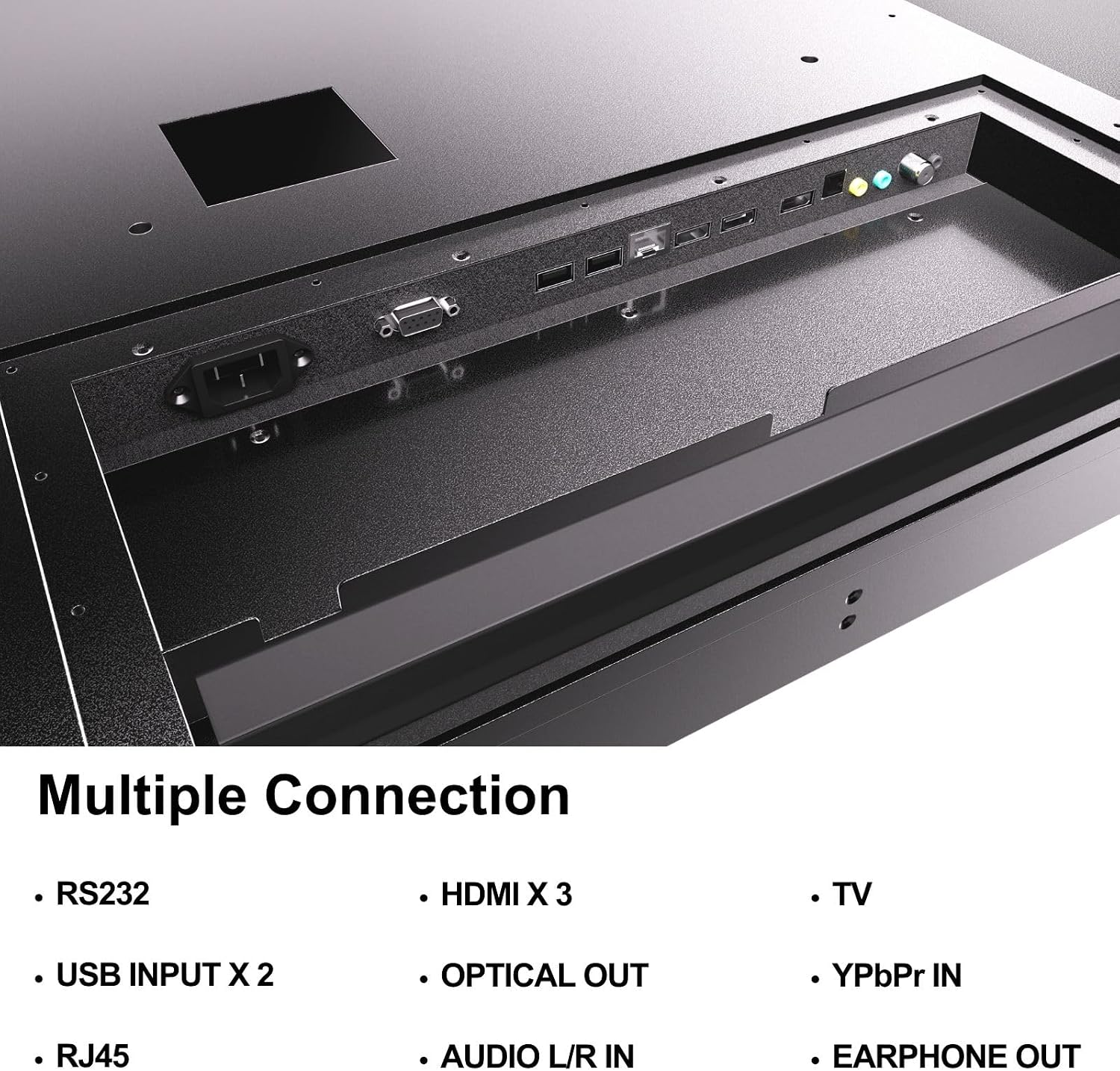
Figure 4.5: Rear panel connections of the SYLVOX Outdoor Signage TV.
5. Postavljanje
5.1 Mounting the TV
The SYLVOX Outdoor Signage TV supports wall mounting. Ensure the mounting surface is sturdy enough to support the TV's weight and is suitable for outdoor conditions.
- Odaberite lokaciju: Odaberite lokaciju koja pruža optimalno viewing and protection from extreme weather, even with the TV's waterproof rating.
- Instalirajte zidni nosač: Attach a VESA-compatible wall mount (400 x 200 mm) to the desired location according to the mount manufacturer's instructions. Use the provided screws (BM8X14MM for full motion, BM8X28MM with gasket for fixed mount).
- Attach TV to Mount: Carefully lift the TV and secure it to the installed wall mount. Ensure all connections are tight and secure.
5.2 Početno uključivanje
- Priključite napajanje: Plug the power cord into the TV's power input and then into a grounded outdoor-rated power outlet.
- Umetnite baterije: Open the remote control battery compartment and insert the two AAA batteries, observing polarity.
- Uključivanje: Pritisnite gumb za napajanje na daljinskom upravljaču ili televizoru.
- Čarobnjak za početno postavljanje: Follow the on-screen instructions to select language, time zone, and perform initial channel scanning.
5.3 Mrežna veza
To access smart TV features and streaming applications, connect the TV to your network.
- Wi-Fi veza: Navigate to the TV's settings menu, select 'Network', then 'Wi-Fi'. Choose your network from the list and enter the password.
- Ethernet veza: Connect an Ethernet cable from your router to the RJ45 port on the TV. The TV will automatically detect the wired connection.
- Bluetooth: For connecting audio devices, go to the Bluetooth settings, enable Bluetooth, and pair with your desired device.
6. Upute za rad
6.1 Osnovne funkcije televizora
- Vlast: Pritisnite tipku Vlast button on the remote to turn the TV on or off.
- Izvor ulaza: Pritisnite tipku Ulazni button to cycle through available input sources (HDMI 1/2/3, TV, YPbPr, USB).
- Volumen: Koristite Glasnoća +/- tipke za podešavanje razine zvuka.
- Kanal: Koristite Kanal +/- buttons to change channels when using the built-in tuner.
- Navigacija: Koristite strelice za smjer i OK gumb za navigaciju izbornicima.
6.2 Značajke pametnog televizora
The TV runs on a Linux operating system and comes with several pre-installed applications:
- Access the home screen to view and launch applications like Netflix, Pandora, Facebook, YouTube, and Twitter.
- Use the remote control's dedicated app buttons (if available) for quick access.
- Note that the Signage 1.0 series does not support downloading additional applications.
6.3 Screencasting (Android Only)
The TV supports screencasting from Android mobile phones:
- Ensure your Android device and the TV are connected to the same Wi-Fi network.
- On your Android phone, enable the screen mirroring or screencasting feature (names may vary by device, e.g., 'Smart View', 'Cast', 'Wireless Display').
- Select your SYLVOX TV from the list of available devices.
6.4 Vertical/Horizontal Display
The TV can be installed and operated in both horizontal (landscape) and vertical (portrait) orientations. When using the screen vertically, the display direction is adjusted by the input device or content source.
7. Održavanje
Proper maintenance ensures the longevity and performance of your outdoor TV:
- Čišćenje ekrana: Nježno obrišite zaslon mekom krpom koja ne ostavlja dlačice. Za tvrdokorne mrlje, laganoampNamočite krpu vodom. Ne prskajte sredstva za čišćenje izravno na zaslon.
- Čišćenje C-aasing: Koristite meku, damp cloth to clean the metal casing. Izbjegavajte abrazivna sredstva za čišćenje ili otapala.
- Poklopci luka: Regularly check that all unused port covers are securely sealed to maintain the IP55 waterproof rating.
- Provjere okoliša: Periodically inspect the TV and mounting hardware for any signs of wear, corrosion, or damage, especially after severe weather conditions.
- Ažuriranja softvera: Check for available software updates through the TV's settings menu to ensure optimal performance and security.
8. Rješavanje problema
If you encounter issues with your SYLVOX Outdoor Signage TV, refer to the following common problems and solutions:
| Problem | Mogući uzrok | Otopina |
|---|---|---|
| Nema struje | Power cord disconnected; no power from outlet; remote batteries dead. | Check power cord connection; test outlet; replace remote batteries. |
| Nema slike, ali je zvuk prisutan | Odabran pogrešan ulazni izvor; problem s vanjskim uređajem. | Press 'Input' button to select correct source; check external device connections. |
| Nema zvuka, ali je slika prisutna | Glasnoća je prigušena ili preniska; problem s vanjskim audio uređajem. | Unmute volume or increase level; check audio cables for external devices. |
| Wi-Fi connection unstable or disconnected | Router issue; TV too far from router; incorrect password. | Restart router; move TV closer or use a Wi-Fi extender; re-enter Wi-Fi password. |
| Daljinski upravljač ne radi | Baterije su prazne ili nepravilno umetnute; prepreka između daljinskog upravljača i televizora. | Replace batteries; ensure clear line of sight to TV's IR receiver. |
If the problem persists after trying these solutions, please contact SYLVOX customer support.
9. Specifikacije
| Naziv modela | SS43A0KAGD |
| Veličina zaslona | 43 inča |
| Tehnologija zaslona | LED |
| Rezolucija | 4K (3840x2160) |
| Brzina osvježavanja | 60 Hz |
| Maximum Display Brightness | 1000 Nit |
| Omjer kontrasta | 3000:1 |
| Vrijeme odziva | 8 milisekundi |
| Ocjena vodootpornosti | IP55 |
| Operativni sustav | Linux |
| Tehnologija povezivanja | Wireless (Bluetooth, Wi-Fi), Wired (HDMI, USB, RJ45, RS232) |
| Audio ulaz | HDMI, Optical, USB, Audio L/R In |
| Format signala | ATSC, NTSC |
| Total Number of HDMI Ports | 3 |
| Ukupno USB priključaka | 2 |
| Dimenzije proizvoda (D x Š x V) | 3.4"D x 38.6"Š x 22.4"V |
| VESA standard za montažu | 400 x 200 mm |
| Wattage | 120 vat-sati |
| Proizvođač | Kontech Electronics Co., Ltd. |
| UPC | 810079224838 |
10. Jamstvo i podrška
10.1 Informacije o jamstvu
SYLVOX provides a 2-godišnje jamstvo proizvođača za ovaj proizvod. Ovo jamstvo pokriva nedostatke u materijalu i izradi pri normalnoj uporabi. Molimo sačuvajte dokaz o kupnji za reklamacije u jamstvenom roku.
10.2 Korisnička podrška
If you require assistance with installation, operation, troubleshooting, or warranty service, please contact SYLVOX customer support. We recommend checking the product upon receipt to ensure it is in good condition and functions normally.
For further support, please visit the official SYLVOX website or refer to the contact information provided on your warranty card.