
Uvod
Thank you for choosing the Hecate G3m Pro Wireless Bluetooth Gaming Mouse. This manual provides detailed instructions for setting up, operating, and maintaining your new gaming mouse. Designed for performance and versatility, the G3m Pro offers three-mode connectivity, a high-precision sensor, and a lightweight, silent design to enhance your gaming experience.
Proizvod gotovview
The Hecate G3m Pro features a robust design with multiple buttons and connectivity options. Familiarize yourself with the mouse components before use.
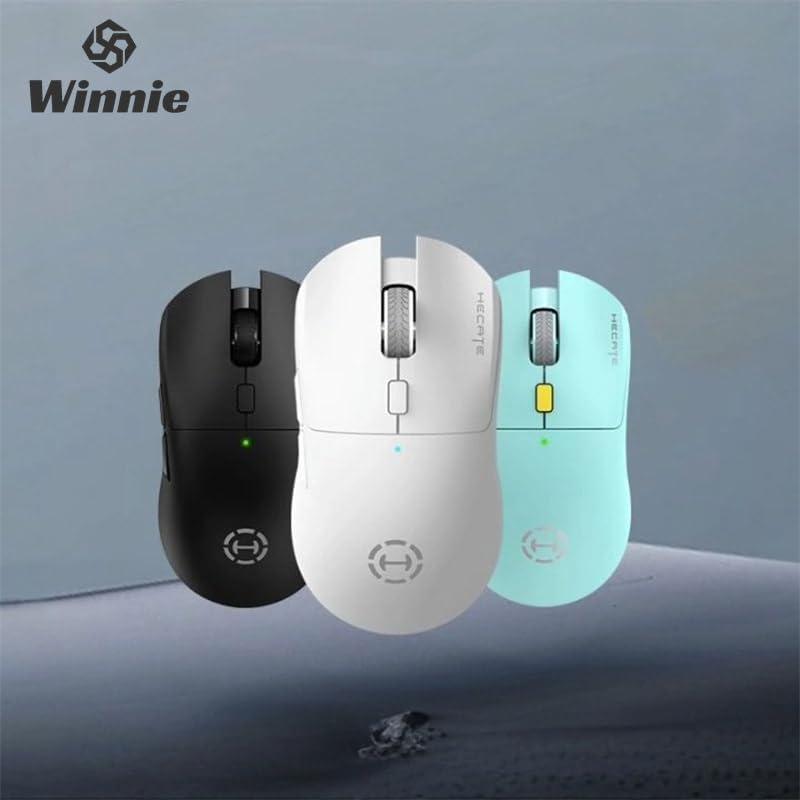
Figure 1: Hecate G3m Pro Wireless Gaming Mouse (Black)
- Lijeva/desna tipka za klik: Standardne funkcije miša.
- Kotačić za pomicanje: For scrolling and middle-click functionality.
- Gumb za promjenu DPI-ja: Adjusts the mouse sensitivity (DPI) on the fly.
- Bočni gumbi: Programmable for various in-game actions or navigation.
- Connectivity Mode Switch: Located on the underside, allows switching between 2.4GHz, Bluetooth, and Wired modes.
- USB-C priključak: Za žično povezivanje i punjenje.
Postavljanje
Follow these steps to set up your Hecate G3m Pro mouse.
1. Punjenje miša
Before first use, ensure the mouse is fully charged. Connect the provided USB-C cable to the mouse's USB-C port and the other end to a USB power source (e.g., computer, wall adapter). The LED indicator will show charging status.
2. Povezivanje putem 2.4 GHz bežične veze (USB adapter)
- Locate the USB 2.4GHz receiver (dongle) usually stored in a compartment on the underside of the mouse.
- Priključite USB prijamnik u slobodni USB priključak na računalu.
- Switch the connectivity mode selector on the mouse to the '2.4G' position.
- The mouse should automatically connect to your computer. The LED indicator may flash briefly and then become solid to indicate a successful connection.
3. Povezivanje putem Bluetooth-a
- Switch the connectivity mode selector on the mouse to the 'BT' (Bluetooth) position.
- Na računalu ili uređaju idite na postavke Bluetootha i omogućite Bluetooth.
- The mouse LED indicator will start flashing, indicating it is in pairing mode.
- Select 'Hecate G3m Pro' from the list of available Bluetooth devices on your computer/device to pair.
- Once paired, the LED indicator will become solid.
4. Povezivanje putem žičanog načina rada
- Spojite priloženi USB-C kabel na USB-C priključak miša.
- Drugi kraj USB-C kabela priključite na slobodni USB priključak na računalu.
- Switch the connectivity mode selector on the mouse to the 'Wired' position.
- Miš će funkcionirati kao žični miš i punit će svoju unutarnju bateriju.
Upute za rad
Understand the functions of your mouse for optimal use.
Podešavanje DPI
Press the DPI cycle button (usually located behind the scroll wheel) to cycle through different DPI settings. Each press will change the sensitivity, often indicated by a change in the LED color or a specific number of flashes. The mouse supports up to 26000 DPI.
Promjena načina rada
Use the switch on the underside of the mouse to select your preferred connection mode: 2.4GHz, Bluetooth, or Wired. Switch modes according to your device and usage scenario.
Prilagodba gumba
For advanced customization of buttons and macros, it is recommended to download the official Hecate software (if available) from the manufacturer's website. This software allows you to reassign button functions, create profiles, and fine-tune performance settings.
Održavanje
Pravilno održavanje osigurava dugotrajnost i performanse vašeg miša.
Čišćenje
- Za brisanje površine miša koristite meku, suhu krpu.
- Za tvrdokornu prljavštinu, lagano dampkrpu obrišite vodom ili blagom otopinom za čišćenje. Izbjegavajte jake kemikalije.
- Ne dopustite da tekućine uđu u unutarnje komponente miša.
- Clean the optical sensor on the underside periodically with a cotton swab to ensure accurate tracking.
Briga o bateriji
- Izbjegavajte često potpuno pražnjenje baterije.
- Charge the mouse when the battery indicator suggests low power.
- Ako miš skladištite dulje vrijeme, napunite ga na oko 50% i pohranite na hladnom i suhom mjestu.
Skladištenje
Store the mouse in a clean, dry environment away from extreme temperatures and direct sunlight. Keep it away from dust and moisture.
Rješavanje problema
If you encounter issues with your Hecate G3m Pro mouse, refer to the following common solutions.
Miš ne reagira
- Provjerite bateriju: Provjerite je li miš napunjen. Spojite ga putem USB-C kabela za punjenje.
- Provjerite način povezivanja: Verify that the mode switch on the underside of the mouse is set to the correct mode (2.4G, BT, or Wired) for your connection type.
- 2.4 GHz veza: Provjerite je li USB prijemnik sigurno priključen u ispravan USB priključak. Pokušajte s drugim USB priključkom.
- Bluetooth veza: Re-pair the mouse with your device. Go to Bluetooth settings, remove the mouse, and then add it again. Ensure your device's Bluetooth is enabled.
- Žičana veza: Provjerite je li USB-C kabel sigurno spojen i na miš i na računalo. Pokušajte s drugim USB priključkom ili kabelom.
Inconsistent Tracking or Cursor Movement
- Čisti senzor: Očistite optički senzor na donjoj strani miša.
- Podloga za miša: Use the mouse on a clean, uniform surface or a high-quality mouse pad. Avoid reflective or glass surfaces.
- DPI postavka: Adjust the DPI setting using the DPI cycle button to find a comfortable sensitivity.
Gumbi ne rade
- Softverske smetnje: Ako koristite prilagođeni softver, pokušajte resetirati dodjele tipki na zadane vrijednosti.
- Testirajte na drugom uređaju: Connect the mouse to another computer to determine if the issue is with the mouse or the original device's settings.
Tehnički podaci
Detailed technical specifications for the Hecate G3m Pro Wireless Bluetooth Gaming Mouse.
| Značajka | Opis |
|---|---|
| Model | G3m Pro |
| Marka | Hecate |
| Tehnologija povezivanja | 2.4GHz Wireless, Bluetooth, Wired (USB-C) |
| Otkrivanje pokreta | Optical (Paw3395 Sensor) |
| DPI (točaka po inču) | Do 26000 DPI |
| Ubrzanje | 50G |
| IPS (inči u sekundi) | 600 |
| Broj gumba | 6 |
| Broj valjaka | 1 (Scroll Wheel) |
| Orijentacija ruke | Dvoličan |
| Posebna značajka | Lightweight (Approx. 63g) |
| Vrsta napajanja | Punjiva baterija |
| Preporučena uporaba | Igre |
| Kompatibilni uređaji | Personal Computer, Laptop, Game Console |
| Operacijski sustavi | Linux, Windows XP (i novije verzije) |
Jamstvo i podrška
Your Hecate G3m Pro Wireless Bluetooth Gaming Mouse comes with a warranty and dedicated support.
Informacije o jamstvu
All products are covered by a Jamstvo 12 mjeseci od datuma kupnje. Ovo jamstvo pokriva nedostatke u proizvodnji i probleme nastale normalnom upotrebom.
Korisnička podrška
If you encounter any problems with your product, such as defective or incorrect items, please do not hesitate to contact us. We are committed to providing prompt assistance and will respond to your inquiries within 24 hours. Please refer to your purchase documentation for specific contact details or visit the official Hecate support webmjesto.