
1. Uvod
The Lepro WL1 AI Smart RGB Wall Lights offer a dynamic and personalized lighting experience for your home. Featuring LightBeats Music Sync, an AI Lighting Designer, and versatile control options via app and voice, these LED light bars allow you to transform any space with billions of potential lighting effects.
Ključne karakteristike:
- Lepro LightGPM 4 - Personalized AI Lighting Designer: Adapts lighting to your preferences and prompts.
- Upgraded Voice Control: Control lights easily with voice commands via the Lepro+ app, Alexa, or Google Assistant.
- Photo-to-Light: Generate lighting designs by taking a photo of your room or uploading an image.
- Sinkronizacija glazbe s LightBeatsima: Synchronizes lighting with music rhythms for an immersive experience.
- Milijarde scena generiranih umjetnom inteligencijom: Offers a vast array of lighting effects for various moods and activities.
- Besprijekorna kontrola aplikacija: Manage multiple devices, adjust brightness, colors, and set timers via the "Lepro+" App (Wi-Fi & Bluetooth).
- Customizable Wall Layout: Includes 8 wall light segments and 4 corners for flexible design configurations.
2. Što je u kutiji
The Lepro WL1 AI Smart RGB Wall Lights package includes the following components:
- 8 x Wall Light Segments
- 4 x Corner Connectors
- 1 x kontroler
- 1 x strujni adapter
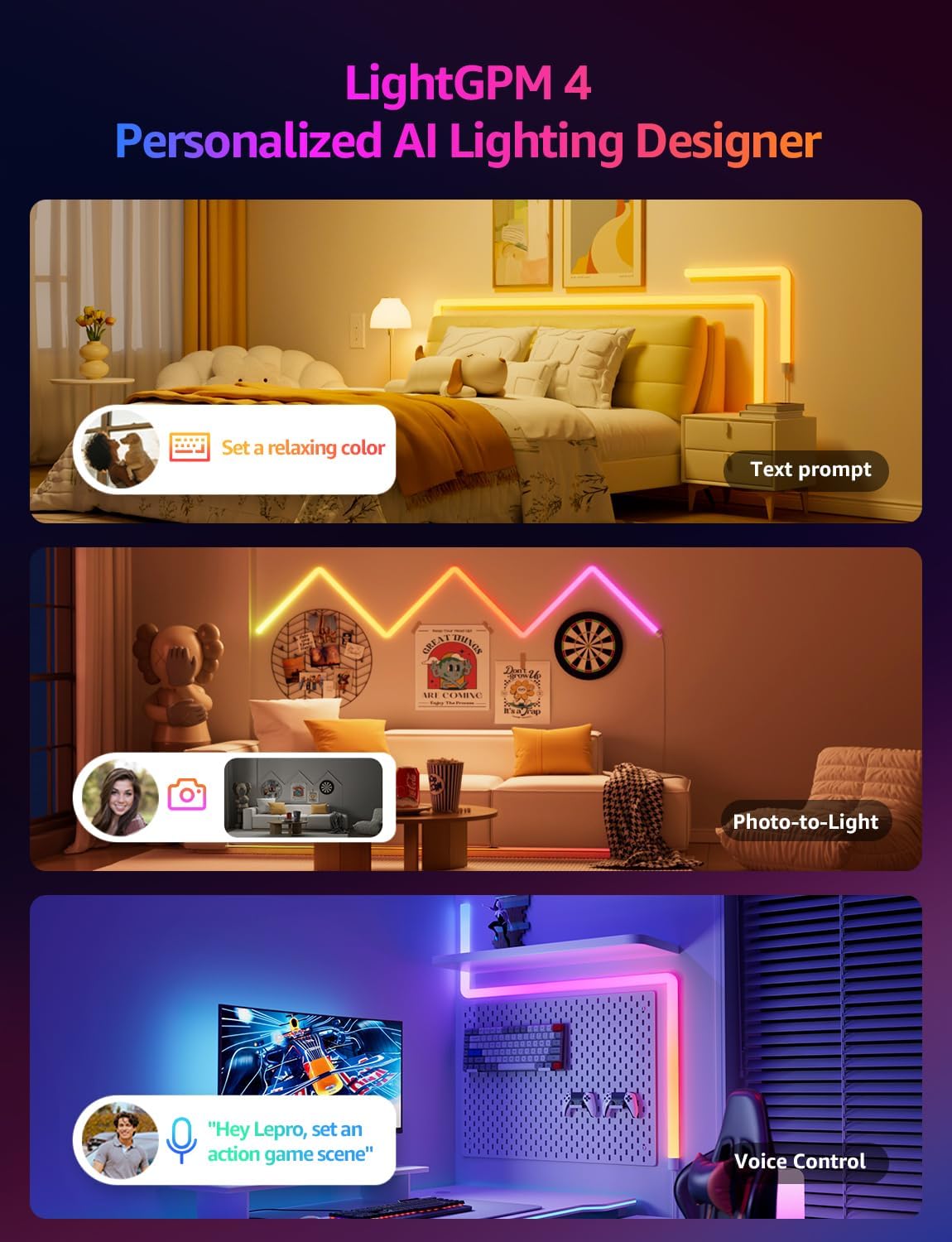
Image: The Lepro WL1 AI Smart RGB Wall Lights in a typical room setup, showcasinproizvod i njegove komponente.
3. Postavljanje
3.1. Sastavljanje i montaža
Follow these steps to assemble and mount your Lepro WL1 Wall Lights:
- Clean the Wall: Ensure the wall surface is clean and dry for optimal adhesive performance.
- Connect Segments: Insert the connectors into the light segments, paying attention to the direction. Ensure a secure fit.
- Pričvrstite montažne ploče: Secure the mounting plates to the back of the light segments.
- Izgled plana: Before sticking, plan your desired light arrangement on the wall.
- Montažna svjetla: Peel off the adhesive backing from the mounting plates and firmly press the light segments onto the wall. Begin with the power supply section and gradually install the full light.
- Priključite napajanje: Plug the power adapter into the controller, then into a power outlet.
Video: Detailed instructions on how to install the Lepro Glide Wall Light WL1, covering assembly and mounting steps.

Image: Visual guide showing the five key steps for installing the Lepro WL1 Wall Lights, from cleaning the wall to linking with the app.
3.2. App Connection (Lepro+ App)
To unlock the full smart features of your Lepro WL1 Wall Lights, connect them to the Lepro+ App:
- Preuzmite aplikaciju: Tražiti "Lepro+" on the App Store (iOS) or Google Play (Android) and install it.
- Registrirajte račun: Open the app and sign up for a new Lepro+ account or log in if you already have one.
- Omogućite Bluetooth i Wi-Fi: Ensure your phone's Bluetooth is enabled and it is connected to a 2.4GHz Wi-Fi network (5GHz networks are not supported).
- Dodaj uređaj: In the Lepro+ App, tap the "+" icon or "Add Device" and follow the on-screen instructions to detect and connect your WL1 Wall Lights.
Video: A step-by-step guide on connecting your Lepro WL1 RGBIC Wall Lights to the Lepro+ App.

Image: Screenshot of the Lepro+ App interface, showing options for Bluetooth and Wi-Fi connection and various lighting controls.
3.3. Voice Assistant Integration (Alexa & Google Assistant)
Once connected to the Lepro+ App, you can link your lights with Amazon Alexa or Google Assistant for hands-free control:
- Open Lepro+ App: Navigate to the "Smart Integration" section in the app settings.
- Select Assistant: Odaberite Amazon Alexa ili Google Assistant.
- Poveži račun: Follow the prompts to link your Lepro+ account with your chosen voice assistant. This typically involves enabling the Lepro skill/action in the Alexa or Google Home app.
- Otkrijte uređaje: Once linked, ask your voice assistant to "discover devices" or manually add them through the assistant's app.
Exampglasovne naredbe:
- "Alexa, turn on the wall lights."
- "Hey Google, change the wall lights to blue."
- "Alexa, dim the wall lights to 50%."

Image: Demonstrates hands-free voice control with Alexa and Google Assistant, alongside in-line box control and smart app control for the Lepro WL1 lights.
4. Upute za rad
4.1. AI Lighting Designer (LightGPM)
The Lepro LightGPM 4 is an AI-powered lighting designer that learns your preferences and creates personalized lighting effects. Interact with it through:
- Text Prompts: Describe your desired mood or activity (e.g., "Set a relaxing color," "Ignite holiday vibes"). The AI will generate suitable lighting.
- Photo-to-Light: Upload a photo of your room, a movie poster, or a game character, and the AI will create a themed lighting design.
- Glasovno upravljanje: Use the integrated voice assistant in the Lepro+ app to adjust brightness, change colors, or activate specific scenes.

Image: Illustrates the LightGPM 4 AI Lighting Designer, showing how text prompts, photo analysis, and voice control can generate personalized lighting scenes.

Image: Shows the simplicity of using AI voice control within the Lepro App to adjust lighting based on emotions, scenes, or direct instructions.
4.2. LightBeats sinkronizacija glazbe
Immerse yourself in dynamic lighting that responds to your music. The LightBeats feature analyzes audio rhythms and transforms your space into an energetic environment.
Video: Demonstrates the LightBeats Music Sync feature of the Lepro WL1 AI Generated Lighting RGBIC Wall Light, showing lights reacting to music.

Image: Shows the LightBeats Music Sync in action, with wall lights changing colors in rhythm with music, enhancing a social gathering.
4.3. Customization and Group Control
The Lepro+ App provides extensive control over your wall lights:
- Prilagodba boja: Choose from 16 million colors and tunable white light. Adjust brightness from 0-100%.
- Odabir scene: Select from a variety of pre-set scenes or create your own custom scenes for different occasions.
- Funkcije mjerača vremena: Set schedules for your lights to turn on/off or change modes automatically.
- Grupna kontrola: Manage multiple Lepro devices simultaneously for a unified lighting experience across different areas.

Image: The Lepro+ App interface displaying options for custom color selection, including a color wheel and brightness adjustment.

Image: An illustration of the group control feature within the Lepro+ App, showing how various Lepro lighting products can be managed together.
5. Specifikacije
| Značajka | Detalj |
|---|---|
| Marka | Guba |
| Broj modela | WL1 |
| Boja | Višebojno |
| Oblik | Pravokutna prizma |
| Materijal | Plastic, Polycarbonate (PC) |
| Vrsta završetka | Mat crna |
| Vrsta izvora svjetlosti | LED |
| Izvor napajanja | Električni na kabel |
| Voltage | 120 volti |
| Svjetlina | 3000 lumena |
| Wattage | 30 vata |
| Vrsta montaže | Zidni nosač |
| Značajke žarulje | AI Music Sync, RGB, Voice Control, Wi-Fi & Bluetooth, LightBeats Music Sync |
| Broj izvora svjetlosti | 8 |
| Dimenzije proizvoda | 11.81"L x 1.38"W (per segment) |
| Težina artikla | 3.25 funti |
| Kompatibilnost s pametnim domom | Amazon Alexa, Google pomoćnik |
6. Održavanje
To ensure the longevity and optimal performance of your Lepro WL1 Wall Lights, follow these maintenance guidelines:
- Čišćenje: Gently wipe the light segments with a soft, dry cloth. Avoid using abrasive cleaners or solvents that could damage the surface.
- Isključite napajanje prije čišćenja: Always unplug the power adapter before cleaning the lights.
- Izbjegavajte izlaganje vodi: These lights are designed for indoor use. Do not expose them to water or high humidity.
- Provjerite veze: Periodically check all physical connections between segments and to the power adapter to ensure they are secure.
7. Rješavanje problema
If you encounter issues with your Lepro WL1 Wall Lights, refer to the following common solutions:
| Problem | Otopina |
|---|---|
| Svjetla se ne pale. |
|
| Lights are not connecting to the Lepro+ App. |
|
| Glasovno upravljanje (Alexa/Google Assistant) ne radi. |
|
| Lights are flickering or displaying incorrect colors. |
|
7.1. How to Reset the Device
If you experience persistent issues, you may need to reset your Lepro WL1 Wall Lights:
- Locate the button on the in-line controller.
- Press and hold this button for approximately 5 seconds until the lights flash or change color, indicating a successful reset.
- After resetting, you will need to reconnect the device to the Lepro+ App.

Image: A visual representation of the reset process for the Lepro WL1 Wall Lights, showing the controller button being pressed.
8. Jamstvo i podrška
Lepro products are designed and manufactured to the highest quality standards. For information regarding warranty coverage, technical support, or customer service, please refer to the official Lepro webweb-mjesto ili izravno kontaktirajte njihovu korisničku podršku.
Mrežna podrška: Posjetiti www.lepro.com za često postavljana pitanja, vodiče za rješavanje problema i kontaktne podatke.
Podrška e-poštom: support@lepro.com
Telefonska podrška: +1 (800) 555-0199