Uvod
This user manual provides essential information for setting up, operating, maintaining, and troubleshooting your VIBOX I-45 Gaming PC. Please read this manual thoroughly before using your new computer to ensure optimal performance and longevity.
1. Postavljanje
1.1 Raspakiranje i sadržaj paketa
Carefully remove all components from the packaging. Ensure all items listed below are present. Retain the packaging for future transport or service needs.
- VIBOX I-45 Gaming PC (VTX-4 Black Tower)
- Kabel za napajanje
- Wi-Fi Network Adapter (300 Mbps)
- Dokumentacija (ovaj priručnik)
1.2 Spajanje perifernih uređaja
Before powering on your PC, connect all necessary peripherals.
- Monitor: Connect your monitor to the graphics output port (HDMI or DisplayPort) on the rear of the PC. Ensure the monitor is also connected to a power source.
- Tipkovnica i miš: Spojite tipkovnicu i miš na dostupne USB priključke.
- Mreža: For wired internet, connect an Ethernet cable to the LAN port. For wireless internet, ensure the included Wi-Fi adapter is installed or connected.
- Audio: Connect speakers or a headset to the audio output jacks.
- Vlast: Connect the power cable to the PC's power input and then to a wall outlet.

Figure 1.2.1: Rear I/O Ports for connecting peripherals.
1.3 Početno pokretanje i postavljanje sustava Windows 11
After connecting all peripherals, press the power button on the front of the PC. The system will boot into Windows 11 Home. Follow the on-screen instructions to complete the initial setup, including language selection, network connection, and user account creation.

Figure 1.3.1: Windows 11 Home Operating System.
2. Upute za rad
2.1 Uključivanje/isključivanje i ponovno pokretanje
- Uključivanje: Pritisnite gumb za napajanje koji se nalazi na prednjoj ploči.
- Zatvoriti: Kliknite gumb Start u sustavu Windows, a zatim odaberite Napajanje > Isključi.
- Ponovno pokretanje: Kliknite gumb Start u sustavu Windows, a zatim odaberite Napajanje > Ponovo pokreni.
2.2 Windows 11 Home Features
Your VIBOX I-45 comes pre-installed with Windows 11 Home, offering several features designed to enhance your computing experience:
- DirectStorage: Enables faster game loading times.
- AutoHDR: Automatically enhances visuals for improved graphics.
- Xbox Game Pass Integration: Seamless access to a library of games.
- Optimized CPU Performance: Enhanced performance for various tasks.
2.3 Upravljanje RGB rasvjetom
The VTX-4 case features Hex RGB Infinity 120mm fans. You can customize the lighting effects and colors using the dedicated RGB change button on the top panel or through compatible software if available.

Figure 2.3.1: Customizable RGB Fans.
3. Održavanje
3.1 Cleaning Your PC
Regular cleaning helps maintain performance and extends the lifespan of your computer.
- Vanjski: Koristite meku, damp krpom za brisanje vanjskih površina. Izbjegavajte jake kemikalije.
- Uklanjanje prašine: Periodically use compressed air to clear dust from fan vents and internal components. Ensure the PC is powered off and unplugged before cleaning.
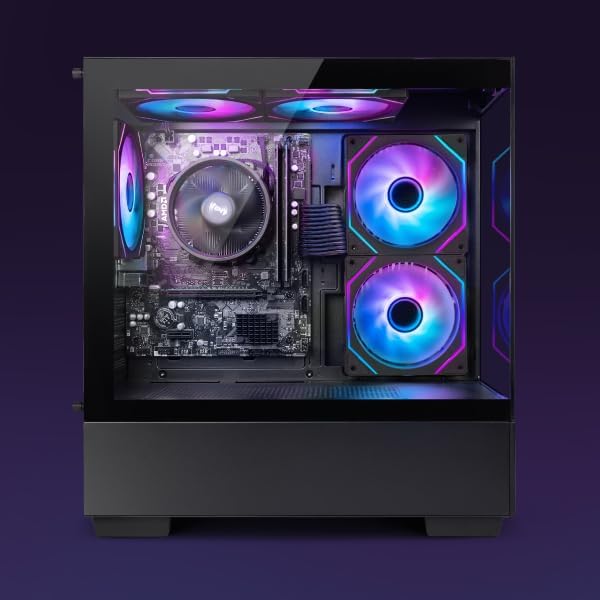
Figure 3.1.1: Internal components of the VIBOX I-45 PC.
3.2 Ažuriranja softvera
Redovito ažurirajte operativni sustav i upravljačke programe kako biste osigurali sigurnost, stabilnost i optimalne performanse.
- Ažuriranja za Windows: Windows 11 automatically checks for updates. You can manually check by going to Settings > Windows Update.
- Ažuriranja upravljačkih programa: Regularly check the VIBOX support webproizvođači lokacija ili komponenti websites (AMD for CPU/GPU) for the latest drivers.
3.3 Sigurnosna kopija sustava
Redovito izrađujte sigurnosne kopije važnih podataka na vanjski disk ili pohranu u oblaku kako biste spriječili gubitak podataka.
4. Rješavanje problema
This section addresses common issues you might encounter. For more complex problems, please contact VIBOX support.
4.1 Bez napajanja
- Provjerite je li kabel za napajanje sigurno spojen i na računalo i na zidnu utičnicu.
- Provjerite je li zidna utičnica funkcionalna tako da u nju priključite drugi uređaj.
- Check the power supply switch on the rear of the PC (if present) is in the 'On' position.
4.2 Nema prikaza na monitoru
- Confirm the monitor is powered on and correctly connected to the PC's graphics output port.
- Provjerite je li na monitoru odabran ispravan ulazni izvor.
- Try a different display cable if available.
4.3 Spore performanse
- Zatvorite nepotrebne aplikacije koje rade u pozadini.
- Provjerite i instalirajte sva ažuriranja sustava Windows ili upravljačkih programa na čekanju.
- Pokrenite čišćenje i defragmentaciju diska (za tvrdi disk, obično nije potrebno za SSD).
- Skenirajte za zlonamjerni softver ili viruse.
4.4 Problemi s mrežnom povezivošću
- Wi-Fi: Ensure the Wi-Fi adapter is properly installed and drivers are up to date. Check your router and internet connection.
- Ethernet: Verify the Ethernet cable is securely connected to both the PC and the router/modem. Check router status.
- Restart your router/modem and PC.
5. Specifikacije
| Značajka | Specifikacija |
|---|---|
| Marka | VIBOX |
| Broj modela | I-45 |
| Boja | VTX-4 Black |
| Operativni sustav | Windows 11 Home |
| Procesor | AMD Ryzen 3 3200G (4 Cores, 3.6 GHz Base, up to 4.0 GHz Max) |
| Grafika | Integrated Radeon Vega 8 Graphics (2GB Shared Memory) |
| OVAN | 16 GB DDR4 (3200 MHz Dual Channel) |
| Skladištenje | SSD od 480 GB |
| Max Memory Support | 128 GB |
| Wi-Fi | 802.11n (300 Mbps adapter included) |
| HDMI priključci | 1 |
| USB 2.0 priključci | 3 |
| USB 3.0 priključci | 3 |
| Dimenzije (D x Š x V) | 36 x 20 x 41 cm |
| Kompatibilni uređaji | Headset, Keyboard, Printer, Monitor, Mouse |
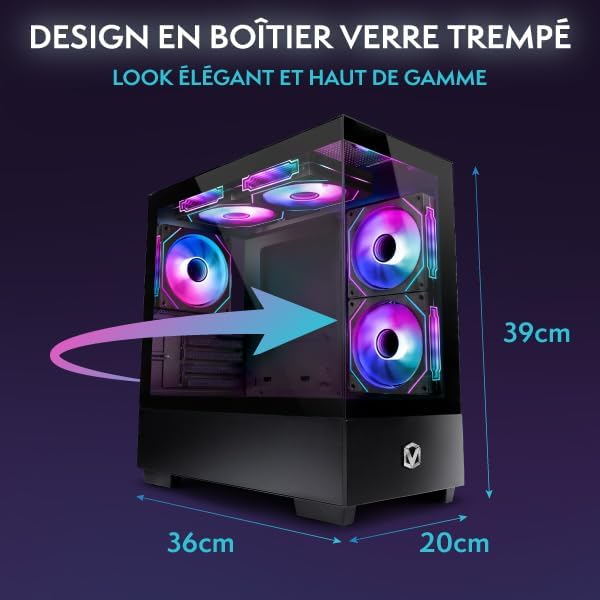
Figure 5.1.1: VIBOX I-45 PC Dimensions.
6. Informacije o jamstvu
Your VIBOX I-45 Gaming PC comes with a manufacturer's warranty covering:
- dijelovi: 2 godina
- Rad: Životni vijek
Please retain your proof of purchase for warranty claims. For detailed terms and conditions, refer to the warranty card included with your product or visit the official VIBOX webmjesto.
7. Podrška
For technical assistance, troubleshooting beyond this manual, or warranty inquiries, please contact VIBOX customer support. You can find contact information on the official VIBOX Gaming webweb-mjestu ili putem vašeg prodavača.
Mrežni resursi:
- Posjetite VIBOX Gaming Store on Amazon za informacije o proizvodu i ažuriranja.