
1. Uvod
The HIKMICRO ECO-V Handheld Thermography Camera is a versatile thermal imaging device designed for various professional applications. It offers thermal, bi-spectrum image fusion, and visible light modes to meet diverse business needs. This manual provides essential information for the safe and effective operation of your ECO-V camera.
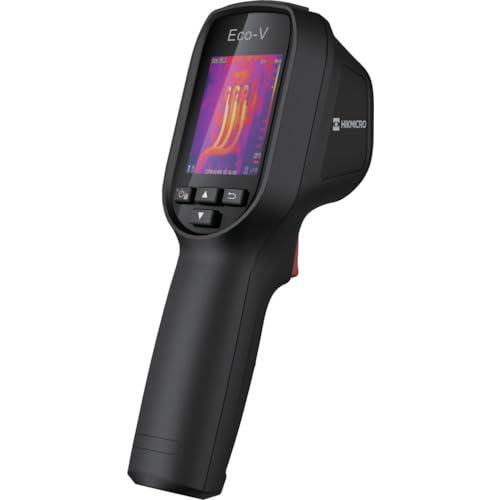
Figure 1: HIKMICRO ECO-V Handheld Thermography Camera
2. Sigurnosne informacije
Molimo pročitajte i razumite sva sigurnosna upozorenja i upute prije upotrebe ovog proizvoda. Nepoštivanje ovih uputa može uzrokovati strujni udar, požar ili ozbiljne ozljede.
Opće sigurnosne mjere
- Ne koristite uređaj u eksplozivnim atmosferama, kao što je prisutnost zapaljivih tekućina, plinova ili prašine.
- Držite uređaj dalje od vode i drugih tekućina.
- Ne pokušavajte otvarati ili modificirati uređaj. Za sve servisne radove obratite se kvalificiranom osoblju.
- Use only HIKMICRO-approved accessories.
- Avoid direct exposure of the thermal lens to strong light sources (e.g., sun, laser) as this may damage the detector.
Sigurnost baterije
- The device contains a built-in Lithium-ion battery. Do not expose the battery to excessive heat, direct sunlight, or fire.
- Do not puncture, open, or disassemble the battery.
- Charge the battery only with the provided USB cable and a compatible power adapter.
- Baterije odložite u skladu s lokalnim propisima.
3. Sadržaj paketa
The HIKMICRO ECO-V package includes the following items:
- HIKMICRO Handheld Thermography Camera ECO-V
- USB kabel vrste C
- Quick Start Guide (not explicitly mentioned but standard)
- Calibration Certificate (not explicitly mentioned but standard)
Video 3.1: Unboxing the HIKMICRO M-Series (similar to ECO-V, showing typical package contents and device appearance).
4. Uređaj prekoview
Familiarize yourself with the physical components and interface of your HIKMICRO ECO-V camera.
Izgled i sučelje
The ECO-V features a compact, ergonomic design for comfortable handheld use. Key components include the thermal lens, optical lens, laser indicator, white light, trigger button, navigation buttons, and a 2.4-inch display.
Video 4.1: This video demonstrates the physical appearance and interface of a HIKMICRO M-Series camera, which shares similar design elements and interface components with the ECO-V.
5. Postavljanje
5.1 Punjenje uređaja
Before initial use, fully charge the device's built-in Lithium-ion battery.
- Connect the provided USB Type-C cable to the device's USB port.
- Connect the other end of the USB cable to a compatible power adapter (5V2A recommended) and plug it into a power outlet.
- The charging indicator will show red during charging and turn green when fully charged.
Video 5.1: This HIKMICRO ECO operation video demonstrates the charging process for the device.
5.2 Uključivanje/isključivanje
To power on the device, press and hold the power button for more than 6 seconds. To power off, press and hold the power button again until the device shuts down.
Video 5.2: This HIKMICRO ECO operation video demonstrates how to power on the device.
6. Upute za rad
This section covers the basic and advanced operational features of your ECO-V camera.
6.1 Image Capture and Display
To capture a thermal image, aim the camera at the target and press the trigger button. The captured image will be saved to the internal EMMC storage. To view saved images, navigate to the 'Albums' section in the menu.
Video 6.1: This HIKMICRO ECO operation video demonstrates image capture and viewing saved snapshots.
6.2 Alati za mjerenje
The ECO-V provides various measurement tools to analyze thermal images:
- Vruća točka: Automatically identifies and displays the highest temperature point.
- Hladna točka: Automatically identifies and displays the lowest temperature point.
- Središnja točka: Prikazuje temperaturu u sredini ekrana.
Video 6.2: This HIKMICRO ECO operation video demonstrates the use of measurement tools like hot, cold, and center spots.
6.3 SuperIR Image Enhancement
SuperIR technology enhances the thermal image resolution, providing more detail for analysis. You can enable or disable this feature in the settings menu.
Video 6.3: This HIKMICRO ECO operation video demonstrates how to enable and use the SuperIR image enhancement feature.
6.4 načina rada slike
The ECO-V supports multiple image modes for different inspection needs:
- Toplinski: Prikazuje samo termalnu sliku.
- Fuzija: Blends the thermal and visible light images for enhanced detail.
- PIP (slika u slici): Overlays a smaller thermal image on a visible light image.
- Optički: Prikazuje samo sliku vidljivog svjetla.
Video 6.4: This HIKMICRO B10S product video demonstrates switching between different image modes, including Thermal, Fusion, PIP, and Optical.
6.5 Parallax Correction
When using fusion modes, adjust the parallax correction based on the distance to the target to ensure accurate alignment between thermal and visible images.
Video 6.5: This HIKMICRO B10S product video demonstrates how to adjust parallax correction for accurate image fusion.
6.6 Palette Adjustment
Select from various color palettes (e.g., White Hot, Black Hot, Rainbow, Ironbow) to visualize temperature differences more effectively. This can be adjusted in the settings menu.
Video 6.6: This HIKMICRO B10S product video demonstrates how to adjust color palettes.
6.7 Emissivity and Distance Settings
For accurate temperature measurements, it is crucial to set the correct emissivity value for the target material and the distance to the target. Refer to the general emissivity reference table in the specifications section.
Video 6.7: This HIKMICRO ECO operation video demonstrates setting emissivity and distance for accurate temperature readings.
6.8 Laserski pokazivač
The built-in laser pointer helps to precisely identify the measurement target. It can be enabled or disabled in the settings menu.
Video 6.8: This HIKMICRO ECO operation video demonstrates how to enable and use the laser pointer.
6.9 Alarm visoke temperature
Set a high temperature alarm threshold to be notified when temperatures exceed a predefined limit. This feature is useful for identifying potential overheating issues.
Video 6.9: This HIKMICRO B10S product video demonstrates how to set a high temperature alarm.
6.10 Hotspot Connection
The ECO-V can connect to a mobile device via Wi-Fi hotspot for live viewing and data transfer. Enable the Wi-Fi hotspot function in the device settings and connect your mobile device.
Video 6.10: This HIKMICRO M-Series video demonstrates how to establish a hotspot connection with a mobile device.
6.11 HIKMICRO Viewer App Connection
Preuzmite HIKMICRO Viewer app on your mobile device to access live view, manage images and videos, and generate reports. Connect the device to your phone via Wi-Fi.
Video 6.11: This HIKMICRO Pocket series video demonstrates connecting the device to the HIKMICRO Viewer app for various functions.
7. Održavanje
7.1 Čišćenje
- Obrišite tijelo uređaja mekom,amp tkanina. Nemojte koristiti abrazivna sredstva za čišćenje ili otapala.
- Gently clean the lenses with a lens cleaning cloth. Avoid touching the lens surface with bare hands.
7.2 Skladištenje
- Uređaj čuvajte na hladnom i suhom mjestu, dalje od izravne sunčeve svjetlosti i ekstremnih temperatura.
- Ako skladištite bateriju dulje vrijeme, provjerite je li djelomično napunjena (oko 50%) i punite je svakih nekoliko mjeseci kako biste održali njezino zdravlje.
8. Rješavanje problema
If you encounter issues with your HIKMICRO ECO-V, refer to the following common problems and solutions:
| Problem | Mogući uzrok | Otopina |
|---|---|---|
| Uređaj se ne uključuje | Slaba baterija; Kvar uređaja | Charge the battery; Contact support |
| Netočna očitanja temperature | Incorrect emissivity/distance settings; Dirty lens | Adjust emissivity/distance; Clean the lens |
| Cannot connect to Wi-Fi hotspot | Incorrect password; Hotspot not enabled | Verify password; Enable hotspot in settings |
9. Specifikacije
Detailed technical specifications for the HIKMICRO ECO-V camera:
| Značajka | Specifikacija |
|---|---|
| Model | ECO-V |
| Measurement Temperature Range | -20°C do 550°C |
| Minimum Temperature Display | 0.1°C |
| Polje od View (FOV) | 50° × 50° |
| Prostorna rezolucija (IFOV) | 8.89 mrad |
| Raspon radne temperature | -10°C do 50°C |
| Raspon temperature skladištenja | -40°C do 70°C |
| Veličina zaslona | 2.4 inča |
| Izvor napajanja | Ugrađena litij-ionska baterija |
| Vrijeme rada baterije | 8 sata |
| Wi-Fi | Nije dostupno |
| Razina zaštite | IP54 |
| Sučelje | USB Type-C |
| Visina piksela | 12μm |
| Measuring Wavelength | 7.5-14μm |
| NETD | < 40 mK (@ 25°C, F#=1.0) |
| Žarišna duljina | 1.35 mm |
| Otvor | F1.0 |
| Minimalna udaljenost fokusa | 0.1 m (0.33 stopa) |
| Frame Rate | 25 Hz |
| Fokus sustav | Bez fokusa |
| Mediji za snimanje | EMMC (4GB) |
| Kapacitet pohrane slika | 30,000 slika |
| Slika File Format | BMP (includes measurement data) |
| Rezolucija toplinske slike | 96×96 (9,216 pixels) |
| Visible Image Resolution | 640×480 |
| Točnost | ±2°C or ±2% (whichever is greater), when ambient temperature is 15°C to 35°C and target temperature is 0°C or above. |
| Materijali | Polikarbonat, ABS smola |
| Težina | 360g |
General Emissivity Reference
| Materijal | emisivnost |
|---|---|
| Ljudska koža | 0.98 |
| PCB | 0.91 |
| Cementni beton | 0.95 |
| Keramika | 0.92 |
| Guma | 0.95 |
| Boja | 0.93 |
| Drvo | 0.85 |
| Cigla | 0.96 |
| Pijesak | 0.90 |
| Tlo | 0.92 |
| Pamuk | 0.98 |
| Karton | 0.90 |
| Bijela knjiga | 0.96 |
| Voda | 0.96 |
10. Jamstvo i podrška
HIKMICRO products are covered by a limited warranty. For detailed warranty terms and conditions, please refer to the official HIKMICRO webstranicu ili se obratite lokalnom distributeru.
Korisnička podrška
If you require technical assistance, troubleshooting, or have questions about your ECO-V camera, please contact HIKMICRO customer support through their official webweb-mjesto ili kontaktne podatke navedene u pakiranju proizvoda.