
DONGKER ZK-3002
DONGKER ZK-3002 Digital AmpKorisnički priručnik za ploču za podizanje
Model: ZK-3002
Uvod
The DONGKER ZK-3002 is a high-performance digital amplifier board designed for audio enthusiasts and DIY projects. Featuring the TPA3255 amplifier chip, it delivers powerful and clear audio output, capable of operating in both stereo (300W+300W) and mono (600W) configurations. This manual provides detailed instructions for setup, operation, and maintenance to ensure optimal performance and longevity of your ampploča za podizanje.

Slika 1: Od vrha prema dolje view of the DONGKER ZK-3002 Digital Amplifier Board.
Ključne značajke
- Velika izlazna snaga: Supports 300W+300W dual-channel stereo or 600W mono bridge connection.
- Inteligentni sustav hlađenja: Features an intelligent temperature control fan that can also be manually controlled.
- Podesivo pojačanje: Potentiometer adjustable gain range from 26dB to 36dB with 10 adjustable gears.
- Line-in Audio Input: Accepts audio signals via an XH2.54-3P audio socket.
- Zaštitne značajke: Includes over-temperature, over-current, short-circuit, and under-voltage zaštita.
- Svestrana primjena: Suitable for home theaters, KTVs, outdoor parties, and DIY speaker projects.
Tehnički podaci
| Parametar | Vrijednost |
|---|---|
| Rad svtage | DC 18V-50V |
| Radna struja | >10A |
| Kontroler IC | TPA3255 |
| Kanal | 2.0 Channel Stereo Output |
| Vrsta audio ulaza | Line-in (XH2.54-3P Socket) |
| Vrsta audio izlaza | Lijevo/Desno |
| BTL Stereo Output Power | 50W-300W (3ohm-8ohm) |
| PBTL Mono Output Power | 100W-600W (2ohm-8ohm) |
| Maksimalna izlazna snaga | 300W*2 at 50V 4ohm / 600W*1 at 50V 2ohm |
| Vrsta upravljanja ventilatorom | Automatsko/ručno upravljanje |
| dobitak | 26-36dB Adjustable |
| Module Size (Installed) | 125 mm * 65 mm * 38 mm |

Figure 2: Dimensions of the ZK-3002 Amplifier Board.
Postavljanje i veze
Prije spajanja amplifier board, ensure all power sources are disconnected. Proper wiring is crucial for safe and optimal performance.
Identifikacija komponente
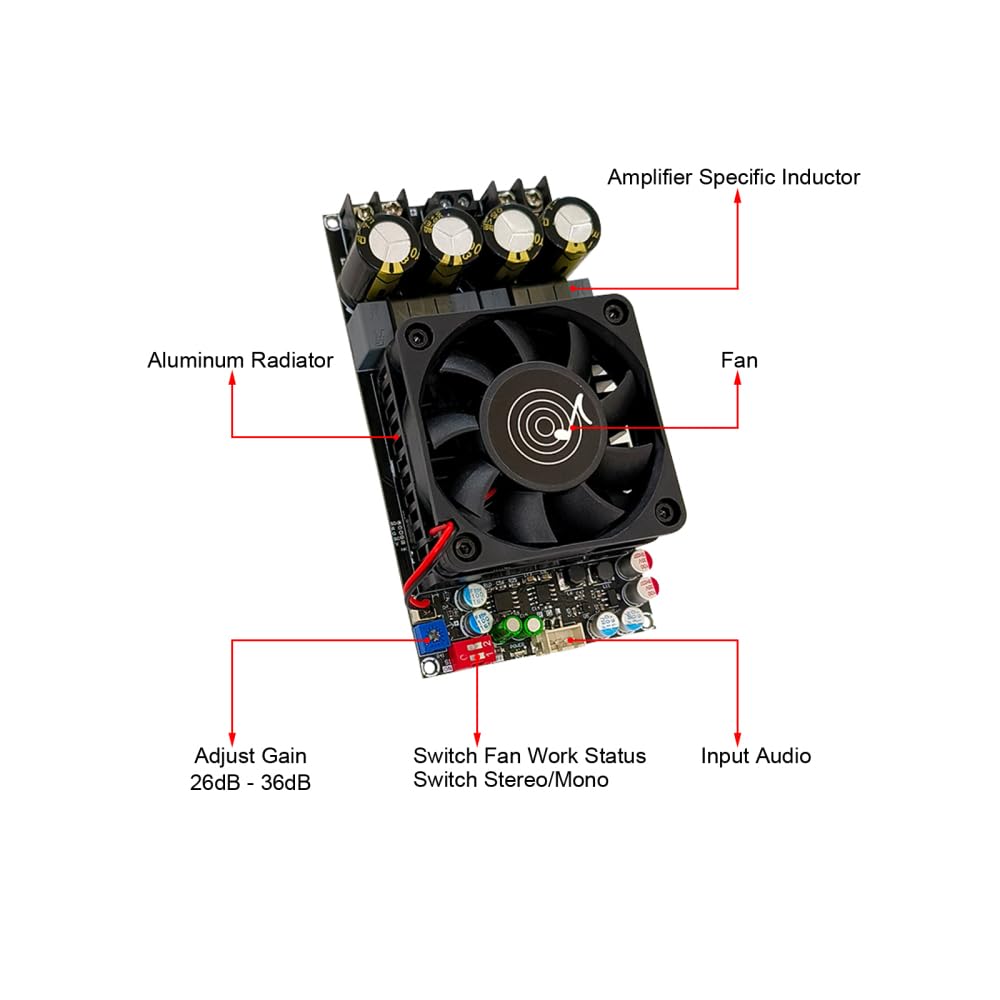
Figure 3: Key components of the ZK-3002 Amplifier Board, including the fan, aluminum radiator, amplifier specific inductor, gain adjustment, fan work status switch, stereo/mono switch, and audio input.
Priključak za napajanje
- Connect a DC power supply (18V-50V, >10A) to the VCC and GND terminals. Ensure correct polarity.
Priključak audio ulaza
- Connect your audio source (e.g., decoder) to the XH2.54-3P audio socket (Line-in).
Priključci zvučnika
The ZK-3002 supports both Stereo Dual Channel BTL Mode and Mono Single Channel PBTL Mode. Select the desired mode using Switch 1 on the board.

Figure 4: Detailed wiring diagrams for Stereo (BTL) and Mono (PBTL) configurations, showing speaker and power connections.
Stereo Dual Channel BTL Mode:
- Set Switch 1 to OFF (Stereo BTL Mode).
- Connect the left speaker to the L+ and L- terminals.
- Connect the right speaker to the R+ and R- terminals.
- Ensure speaker impedance is between 3ohm and 8ohm.
Mono Single Channel PBTL Mode:
- Set Switch 1 to ON (Mono PBTL Mode).
- Connect the mono speaker to the R+ and L- terminals (bridged output).
- Ensure speaker impedance is between 2ohm and 8ohm.
Upute za rad
Uključivanje/isključivanje
- After all connections are secure, connect the power supply to an AC outlet. The board will power on automatically.
- To power off, disconnect the power supply from the AC outlet.
Kontrola glasnoće
- Adjust the volume using the potentiometer labeled "Adjust Gain" on the board. Rotate clockwise to increase volume, counter-clockwise to decrease.
Kontrola ventilatora
- The ZK-3002 features an intelligent temperature-controlled fan.
- Use Switch 2 to control the fan's operation:
- NA: Fan Automatic Control (fan activates based on temperature).
- OFF: Fan Manual Control (fan runs continuously).
Mode Switching (Stereo/Mono)
- Use Switch 1 to select the desired output mode:
- NA: Mono PBTL Mode (for single, high-power speaker).
- OFF: Stereo BTL Mode (for two-channel stereo sound).
- Note: Always power off the board before changing the mode switch to prevent potential damage.
Održavanje
- Čišćenje: Regularly clean the board with a soft, dry cloth. Ensure no dust accumulates on the fan or heatsink to maintain efficient cooling. Do not use liquid cleaners.
- Ventilacija: Osigurajte amplifier board is placed in a well-ventilated area to prevent overheating. Do not obstruct the fan or heatsink.
- Skladištenje: When not in use for extended periods, store the board in a dry, dust-free environment.
Rješavanje problema
| Problem | Mogući uzrok | Otopina |
|---|---|---|
| Nema zvuka | Netočno napajanje voltage/current; Loose speaker connections; Incorrect audio input connection; AmpLifier u načinu zaštite. | Verify power supply meets 18V-50V and >10A requirements. Check all speaker and audio input wiring for secure connections and correct polarity. Power cycle the board to reset protection mode. |
| Izobličen zvuk | Input signal too strong; Speaker impedance mismatch; Faulty speaker. | Reduce the input audio signal level. Ensure speaker impedance matches the recommended range (3-8ohm for stereo, 2-8ohm for mono). Test with a different speaker. |
| Amppregrijavanje lifiera | Poor ventilation; Fan not operating; Excessive load. | Ensure adequate airflow around the board. Check if the fan is spinning (set Switch 2 to OFF for manual control to test). Reduce output volume or speaker load. |
| Ventilator se ne vrti | Fan control switch set to automatic (ON) and temperature is low; Fan malfunction. | Set Switch 2 to OFF (Manual Control) to force the fan on. If it still doesn't spin, the fan may be faulty. |
Jamstvo i podrška
For any questions or issues not covered in this manual, please contact DONGKER customer support. Refer to your purchase documentation for specific warranty terms and contact information.
You can visit the official DONGKER store on Amazon for more information and support: DONGKER Store
Ask a question about this manual
Ask about setup, troubleshooting, compatibility, parts, safety, or missing instructions. Manuals+ will review the question and use this page’s manual context to help answer it.