
VTech Genius XL Interactive Video Binoculars (Model 618605)
VTech Genius XL interaktivni video dalekozor Upute za uporabu
Model: 618605
Uvod
Welcome to the VTech Genius XL Interactive Video Binoculars. This device is designed for children aged 5 and above to explore the world around them through observation, interactive videos, images, and educational games. This manual provides essential information for setup, operation, and maintenance to ensure optimal use and longevity of your product.

Image: The VTech Genius XL Interactive Video Binoculars, showing the main unit with its flip-up color screen and binocular lenses.
Važne sigurnosne informacije
UPOZORENJE: Nije prikladno za djecu mlađu od 36 mjeseci zbog malih dijelova.
- Tijekom uporabe uvijek nadzirite djecu.
- Do not look directly at the sun through the binoculars, as this can cause serious eye damage.
- Provjerite jesu li baterije ispravno umetnute.
- Ne miješajte stare i nove baterije ili različite vrste baterija.
- Odmah izvadite istrošene baterije.
- Baterije bacajte odgovorno.
Što je u kutiji
- 1 Pair of VTech Genius XL Interactive Video Binoculars
- Batteries (4 x LR6-AA)
- Traka za vrat
Postavljanje
1. Ugradnja baterije
- Pronađite odjeljak za baterije na uređaju.
- Pomoću odvijača otvorite poklopac odjeljka za baterije.
- Umetnite 4 nove LR6-AA baterije, pazeći na ispravan polaritet (+/-).
- Vratite poklopac i zategnite vijak.
2. Pričvršćivanje remena za vrat
Thread the provided neck strap through the designated loops on the binoculars. Adjust the strap length for comfortable and secure wearing.

Image: A child wearing the VTech Genius XL Interactive Video Binoculars with the neck strap, demonstrating how it can be worn for outdoor exploration.
Upute za rad
1. Uključivanje/isključivanje
Press and hold the power button to turn the device on or off. The device features an automatic shut-off function to preserve battery life.
2. ViewNačini rada
The binoculars offer two primary viewmetode:
- Through the Binoculars: Look directly through the eyepieces (binocular lenses) for traditional observation. The interpupillary distance is adjustable for optimal comfort.
- On the LCD Screen: Flip up the 2.4-inch color LCD screen to view observations digitally.

Image: A child looking through the VTech Genius XL Interactive Video Binoculars, demonstrating the traditional viewing metoda.
3. Magnification and Focus
- The binoculars provide up to 10x povećanje.
- Use the focus wheel to adjust the image clarity for both binocular and screen viewing.
4. Noćni način rada
Activate the integrated infrared system for night vision. This mode is exclusively available on the LCD screen, allowing observation in low-light or dark conditions.

Image: The VTech Genius XL Interactive Video Binoculars displaying a night vision image of a hedgehog on its screen, highlighting the night vision feature.
5. Snimanje fotografija i videa
The integrated camera allows you to capture images of flora and fauna. The internal memory can store up to 50 photos. A micro-SD card slot (card not included) is available to expand storage capacity and save photos for printing.

Image: The VTech Genius XL Interactive Video Binoculars with multiple captured images of animals and nature displayed around it, illustrating the photo capture function.
6. Interactive Content (BBC Videos & Images)
Explore over 340 official videos and images from the BBC, providing more than 700 educational facts categorized into 9 groups:
- Amphibijanci
- Člankonošci
- Terrestrial Birds
- Flying Birds
- Terrestrial Mammals
- Marine Mammals
- Gmazovi
- Cvjetnice
- Other Plants and Fungi

Image: The VTech Genius XL Interactive Video Binoculars displaying an image of a mushroom on its screen, with a speech bubble indicating educational information, showcasing the BBC content.
7. Games and Quizzes
- Adventure Game: Navigate through 5 natural environments, encountering over 100 animals and exploring 25 levels.
- Educational Quiz: Test scientific knowledge through a 3-stage quiz (Training, Time Challenge, Clue Game).
- Use the joystick and 12 buttons to navigate through games and features.
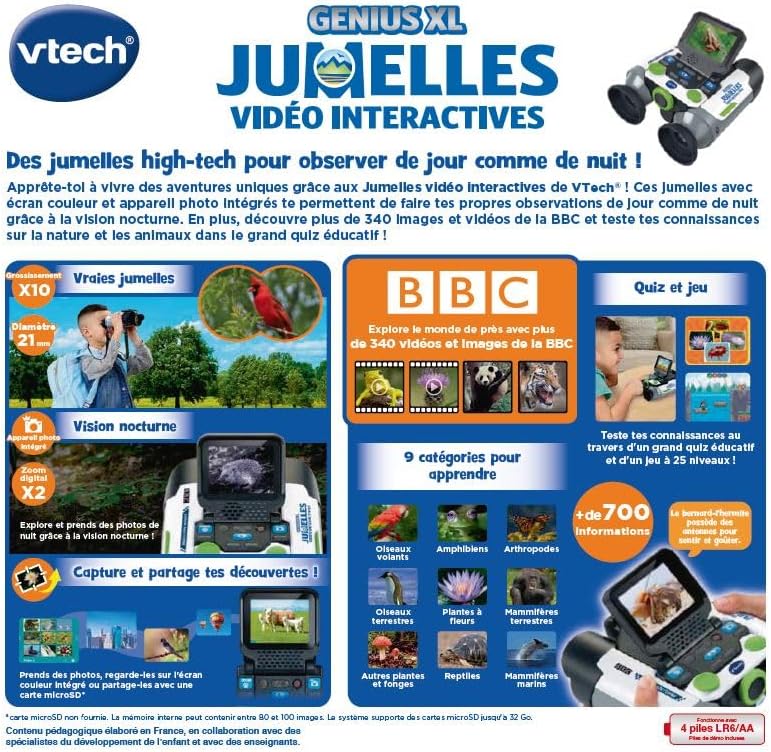
Image: A child holding the VTech Genius XL Interactive Video Binoculars, playing an adventure game on its screen, demonstrating the interactive game feature.
8. Kontrola glasnoće
Adjust the sound volume using the dedicated controls on the device.
Integracija medija
Službeni videozapisi proizvoda
The following video demonstrates the key features and interactive capabilities of the VTech Genius XL Interactive Video Binoculars.
Video: Kratki uvodview video prezentacijaasing children using the VTech Genius XL Interactive Video Binoculars to observe nature, take photos, play games, and utilize the night vision mode. It highlights the educational BBC content and interactive features.
This video provides a broader overview of the Genius XL range, including the Interactive Video Binoculars and the Interactive Video Globe.
Video: Prijeview video demonstrating both the VTech Genius XL Interactive Video Binoculars and the Interactive Video Globe. It shows children engaging with both products, highlighting their educational and interactive aspects, including exploring animals and geography.
Održavanje
Čišćenje
Obrišite uređaj lagano damp krpom. Ne koristite jake kemikalije ili abrazivna sredstva za čišćenje. Prije skladištenja provjerite je li uređaj suh.
Skladištenje
Store the binoculars in a cool, dry place away from direct sunlight. Remove batteries if the device will not be used for an extended period.
Rješavanje problema
- Uređaj se ne uključuje: Check battery installation and ensure batteries are not depleted. Replace with new batteries if necessary.
- Zaslon je prazan ili zamrznut: Try turning the device off and on again. If the issue persists, remove and reinsert the batteries.
- Zvuk ne radi: Check the volume settings. If the issue persists after checking volume and restarting, contact customer support.
- Photos lost or unable to access gallery: Ensure a micro-SD card is properly inserted if you are relying on external storage. If using internal storage and experiencing issues, a factory reset might be necessary, but this will erase all stored photos. It is recommended to regularly transfer important photos to an external micro-SD card.
- Mutna slika: Adjust the focus wheel until the image is clear.
Tehnički podaci
| Značajka | Detalj |
|---|---|
| Dimenzije proizvoda | 12.1 x 6.9 x 16.2 cm |
| Težina | 170 grama |
| Preporučena dob | 5 godine i više |
| Obrazovna vrijednost | Learning, Creativity, Animal Discoveries, Interaction |
| Jezik | French (Note: Product content is in French as per specifications) |
| Referenca proizvođača | 618605 |
| Broj komada | 1 |
| Potrebne baterije | Da (4 x LR6-AA) |
| Baterije uključene | Da |
| Glavni materijal | Plastični |
| Boja | Sivo |
| Posebna značajka | Noćni vid |
| Promjer leće objektiva | 21 milimetara |
| Maksimalno povećanje | 10x |
| Vrsta montaže | Collar (Neck Strap) |
| Naziv modela | X 21 |
| Binocular Prism Description | Porro prizma |
Jamstvo i podrška
Za informacije o jamstvu i korisničku podršku, molimo pogledajte dokumentaciju priloženu uz kupnju ili posjetite službenu VTech stranicu. webstranicu. Sačuvajte dokaz o kupnji za bilo kakve reklamacije u jamstvenom roku.
Product support and spare parts availability may vary by region. The manufacturer states that spare parts are unavailable for this product.