
1. Uvod
Thank you for choosing the Mecer 23.8 Inch Full HD LED Monitor. This manual provides essential information for setting up, operating, and maintaining your monitor. Please read it thoroughly before use to ensure proper functionality and longevity of your device.
This monitor features a 23.8-inch Full HD (1920 x 1080) display, offering crisp and clear visuals. It incorporates TFT LED panel technology for energy efficiency and vibrant colors, with a 16:9 aspect ratio suitable for widescreen viewing. Connectivity options include VGA and HDMI, making it compatible with various devices. Built-in speakers provide basic audio, and wide 178° viewing angles ensure comfortable use. With a 2ms response time, it is suitable for general computing and multimedia consumption.
2. Sigurnosne informacije
- Izvor napajanja: Koristite samo adapter za napajanje koji dolazi s monitorom. Provjerite je li utičnica ispravno uzemljena.
- Ventilacija: Ne blokirajte ventilacijske otvore. Osigurajte dovoljno prostora oko monitora za pravilan protok zraka kako biste spriječili pregrijavanje.
- Plasman: Place the monitor on a stable, flat surface. Avoid placing it in direct sunlight, near heat sources, or in environments with excessive dust or humidity.
- Čišćenje: Disconnect the power cord before cleaning. Use a soft, dry cloth for the screen and a slightly damp cloth for the casing. Izbjegavajte korištenje abrazivnih sredstava za čišćenje ili otapala.
- Izloženost tekućini: Keep liquids away from the monitor. If liquid enters the monitor, disconnect power immediately and contact qualified service personnel.
- rastavljanje: Ne pokušavajte sami rastavljati ili popravljati monitor. Za sve servisne radove obratite se kvalificiranom servisnom osoblju.
3. Sadržaj paketa
Molimo provjerite sadržaj paketa kako biste bili sigurni da su svi artikli prisutni:
- Mecer 23.8 Inch LED Monitor
- Stalak za monitor (baza i vrat)
- Strujni adapter i kabel
- HDMI kabel
- VGA kabel
- Korisnički priručnik (ovaj dokument)
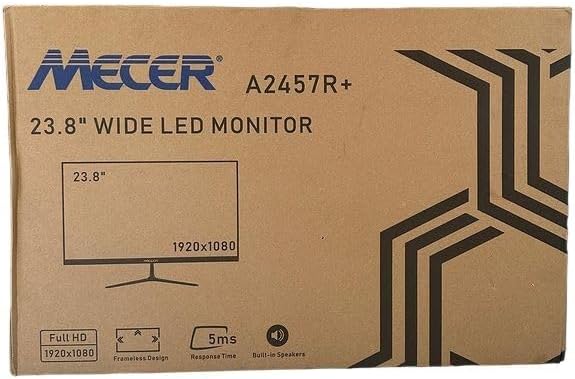
Slika 3.1: The monitor packaging box, indicating the model A2457R+ and key features like 23.8" display, Full HD 1920x1080 resolution, frameless design, 5ms response time, and built-in speakers.
4. Postavljanje
4.1. Sastavljanje postolja monitora
- Pažljivo izvadite komponente monitora i postolja iz pakiranja.
- Pričvrstite vrat postolja na ploču monitora tako da poravnate jezičke i čvrsto gurnete dok ne klikne na mjesto.
- Attach the stand base to the stand neck, securing it with the provided screw (usually hand-tightened).
- Sastavljeni monitor postavite na stabilnu, ravnu površinu.

Slika 4.1: Ispred view of the Mecer 23.8 Inch LED Monitor with its stand assembled, ready for connection.
4.2. Povezivanje s računalom
The monitor supports both HDMI and VGA connections. Choose the appropriate cable for your computer.
- HDMI veza: Connect one end of the HDMI cable to the HDMI port on your computer's graphics card and the other end to the HDMI port on the monitor. HDMI transmits both video and audio signals.
- VGA veza: Connect one end of the VGA cable to the VGA port on your computer's graphics card and the other end to the VGA port on the monitor. VGA transmits only video signals.

Slika 4.2: Stražnji view of the Mecer 23.8 Inch LED Monitor, showing the input ports including HDMI and VGA, as well as the power input.
4.3. Priključak za napajanje
- Connect the power adapter cable to the DC IN port on the back of the monitor.
- Uključite strujni adapter u zidnu utičnicu.
5. Upute za rad
5.1. Uključivanje/isključivanje
Press the power button, typically located on the bottom right side or rear of the monitor, to turn the monitor on or off. The power indicator light will illuminate when the monitor is on.
5.2. Odabir izvora unosa
If you have multiple devices connected, you may need to manually select the input source. Use the monitor's control buttons (usually located near the power button) to navigate to the input selection menu and choose between HDMI or VGA.
5.3. Izbornik s prikazom na zaslonu (OSD).
The OSD menu allows you to adjust various display settings. Use the monitor's control buttons to:
- Pristupite OSD izborniku.
- Navigate through menu options (e.g., Brightness, Contrast, Color Settings, Input Source).
- Adjust values or select options.
- Izađite iz OSD izbornika.
Uobičajene podesive postavke uključuju:
- Svjetlina/kontrast: Prilagodite ukupnu svjetlinu i razliku između svijetlih i tamnih područja.
- Postavke boja: Adjust color temperature, RGB values, or select preset color modes.
- Omjer slike: Change between 16:9, 4:3, or other available options.
- Audio: Adjust volume for the built-in speakers.
5.4. Ugrađeni zvučnici
The monitor includes built-in speakers for basic audio output. If using an HDMI connection, audio will be transmitted automatically. For VGA connections, ensure your computer's audio output is configured correctly. Adjust the volume through the OSD menu or your computer's operating system.
6. Održavanje
6.1. Čišćenje monitora
- Uvijek isključite monitor iz električne utičnice prije čišćenja.
- Zaslon: Nježno obrišite zaslon mekom krpom koja ne ostavlja dlačice. Za tvrdokorne mrlje laganoampen the cloth with water or a specialized screen cleaner (ensure it's alcohol-free and ammonia-free) and wipe carefully. Do not spray liquid directly onto the screen.
- Casing: Za brisanje monitora koristite meku, suhu krpu.asing. Ako je potrebno, malo damp Može se koristiti krpa, a zatim suha krpa.
6.2. Skladištenje
Ako monitor skladištite dulje vrijeme, odspojite sve kabele, zapakirajte ga u originalnu ambalažu (ako je dostupna) i pohranite ga na hladnom i suhom mjestu, dalje od izravne sunčeve svjetlosti i ekstremnih temperatura.
7. Rješavanje problema
Ako naiđete na probleme s monitorom, pogledajte sljedeće uobičajene probleme i rješenja:
- Bez napajanja:
- Provjerite je li kabel za napajanje sigurno spojen na monitor i zidnu utičnicu.
- Provjerite ispravnost utičnice tako da u nju priključite drugi uređaj.
- Provjerite radi li ispravno adapter za napajanje.
- Nema signala:
- Provjerite je li video kabel (HDMI ili VGA) sigurno spojen i na monitor i na računalo.
- Provjerite je li na monitoru odabran ispravan ulazni izvor (putem OSD izbornika).
- Check if your computer is powered on and outputting a video signal.
- Pokušajte s drugim video kabelom ako je dostupan.
- Slika je mutna ili iskrivljena:
- Ensure the monitor's resolution is set to its native resolution (1920 x 1080) in your computer's display settings.
- Adjust the monitor's OSD settings for brightness, contrast, and sharpness.
- For VGA connections, use the 'Auto Adjust' function in the OSD menu if available.
- Nema zvuka iz ugrađenih zvučnika:
- Provjerite je li glasnoća monitora utišana ili preniska u OSD izborniku.
- Provjerite postavke audio izlaza računala kako biste bili sigurni da je monitor odabran kao uređaj za reprodukciju.
- If using VGA, ensure your computer's audio is routed to an external speaker system, as VGA does not carry audio.
8. Specifikacije
| Značajka | Specifikacija |
|---|---|
| Marka | Mecer |
| Broj modela | A2457R+ |
| Veličina zaslona | 23.8 inča |
| Rezolucija | 1920 x 1080 piksela (Full HD) |
| Vrsta zaslona | LED (TFT LED Panel) |
| Omjer slike | 16:9 |
| Vrijeme odziva | 2 milisekundi |
| Brzina osvježavanja | 75 Hz |
| Viewing kutova | 178° horizontalno / 178° vertikalno |
| Povezivost | 1x HDMI, 1x VGA |
| Ugrađeni zvučnici | Da |
| Boja | Crna |
| Dimenzije proizvoda (D x Š x V) | 560D x 42W x 410H millimetres |
| Posebne značajke | High performance intelligent multi-frequency scanning, Micro Computer digital technology control, no radiation, no glare, Comply with VESA DPMS international power saving regulation, Support DDC 1/2B and Windows PNP Plug and Play |
9. Jamstvo i podrška
This Mecer monitor comes with a 1 godina ograničenog jamstva od datuma kupnje. Molimo sačuvajte dokaz o kupnji za potrebe jamstvenog zahtjeva.
For technical support, service, or warranty inquiries, please contact your retailer or the authorized Mecer service center in your region. Do not attempt to repair the product yourself, as this may void your warranty.