
Uvod
Thank you for choosing the Thunderobot K87 Wired Mechanical Keyboard. This manual provides essential information for the proper setup, operation, maintenance, and troubleshooting of your new keyboard. Please read this manual thoroughly before using the product to ensure optimal performance and longevity.

Slika 1: Kutno view of the Thunderobot K87 Mechanical Keyboard.
Postavljanje
Sadržaj paketa
Before proceeding, please verify that your package contains the following items:
- Thunderobot K87 Wired Mechanical Keyboard
- USB kabel
- Korisnički priručnik (ovaj dokument)
Spajanje tipkovnice
- Unpack the Thunderobot K87 keyboard and the included USB cable.
- Connect the USB-C end of the cable to the port located on the keyboard.
- Spojite USB-A kraj kabela na dostupni USB priključak na računalu.
- Vaš operativni sustav će automatski prepoznati tipkovnicu. Za osnovne funkcije obično nisu potrebni dodatni upravljački programi.

Slika 2: Donji dio view of the keyboard, illustrating adjustable feet and cable management options.
Upute za rad
Osnovne funkcije
The Thunderobot K87 is a standard 87-key (TKL) layout mechanical keyboard. Simply plug it into your computer, and it is ready for typing. The keyboard features Red mechanical switches, known for their linear feel and quiet operation, making them suitable for both typing and gaming.
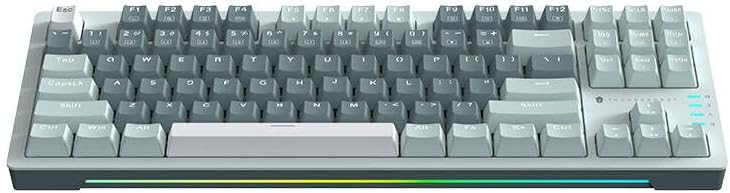
Slika 3: Od vrha prema dolje view of the Thunderobot K87 keyboard layout.
Multimedijske i funkcijske tipke
The keyboard includes a Function (Fn) key, typically located near the right Alt key. This key, when pressed in combination with the F1-F12 keys, activates various multimedia and system functions. Refer to the keycap legends for specific functions.
- Fn + F1-F12: Typically control media playback, volume, and other system shortcuts.
- Fn + tipka Windows: Zaključava/otključava tipku Windows kako bi se spriječilo slučajno pritiskanje tijekom igranja.
Kontrola pozadinskog osvjetljenja
The Thunderobot K87 keyboard features customizable RGB backlighting. Specific key combinations allow you to change lighting modes, brightness, and speed. Consult the keyboard's keycap legends or the manufacturer's website for detailed instructions on lighting customization.

Slika 4: Prednja strana view showing the RGB lighting strip.

Slika 5: Bočni profesionalacfile view demonstrating keycap height and keyboard angle.
Održavanje
Čišćenje tipkovnice
Redovito čišćenje pomaže u održavanju izgleda i funkcionalnosti tipkovnice.
- Prekini vezu: Prije čišćenja uvijek isključite tipkovnicu iz računala.
- Uklanjanje prašine: Upotrijebite limenku komprimiranog zraka za uklanjanje prašine i ostataka između tipki.
- Čišćenje površine: Lagano obrišite tipke i površinu tipkovnice mekom krpom koja ne ostavlja dlačiceampOperite vodom ili blagom, neabrazivnom otopinom za čišćenje. Izbjegavajte prekomjernu vlagu.
- Izbjegavati: Do not use harsh chemicals, solvents, or abrasive materials, as these can damage the keyboard's finish or keycap legends.
Skladištenje
When not in use for extended periods, store the keyboard in a dry, cool place away from direct sunlight and extreme temperatures. Consider covering it to prevent dust accumulation.
Rješavanje problema
If you encounter issues with your Thunderobot K87 keyboard, please refer to the following common solutions:
| Problem | Mogući uzrok | Otopina |
|---|---|---|
| Tipkovnica ne reagira | Labava USB veza, neispravan USB priključak, problem s upravljačkim programom. | Ensure USB cable is securely connected. Try a different USB port on your computer. Restart your computer. |
| Određene tipke ne rade | Otpad ispod tipke, kvar prekidača. | Use compressed air to clear debris. If the issue persists, contact customer support. |
| Pozadinsko osvjetljenje ne radi ili je neispravno | Lighting mode disabled, software conflict. | Check keyboard's lighting control key combinations (Fn + specific keys). Ensure no conflicting software is running. |
| Keyboard input lag | USB port issues, system performance. | Try a different USB port. Close unnecessary background applications. |
If the problem persists after trying these solutions, please contact Thunderobot customer support for further assistance.
Tehnički podaci
| Značajka | Detalj |
|---|---|
| Broj modela | JM03NQ002 |
| Marka | Thunderobot |
| Povezivost | Žično (USB) |
| Tip prekidača | Crveni mehanički prekidači |
| Izgled | 87 tipki (bez deset tipki) |
| Pozadinsko osvjetljenje | RGB |
| Proizvođač | Thunderobot |
| ASIN | B0CWS77B83 |
| Jamstvo | 2 years manufacturer |
Informacije o jamstvu
The Thunderobot K87 Wired Mechanical Keyboard (Model JM03NQ002) comes with a 2-godišnje jamstvo proizvođača from the date of purchase. This warranty covers defects in materials and workmanship under normal use. It does not cover damage caused by accident, misuse, abuse, neglect, unauthorized modification, or improper installation.
To claim warranty service, please retain your proof of purchase. For detailed warranty terms and conditions, or to initiate a warranty claim, please contact Thunderobot customer support.
podrška
For technical assistance, product inquiries, or warranty claims, please visit the official Thunderobot website or contact their customer support team. Please have your product model number (JM03NQ002) and proof of purchase ready when seeking support.
Official Thunderobot Webstranica: www.thunderobot.com (Napomena: Ovo je rezervirano mjesto URL jer nema posebne podrške URL was provided in the product data. Refer to your product packaging or official Thunderobot documentation for the correct support contact information.)


